Can I Charge My Laptop Without A Charger Right Now
Can I Charge My Laptop Without A Charger? Absolutely! You can use USB-C ports, power banks, car chargers, solar panels, and universal adapters to keep your laptop running. This guide covers every practical method, safety tip, and common mistake so you stay powered no matter where you are.
Have you ever found yourself in a situation where your laptop battery is dying and your charger is nowhere to be found? It is a frustrating moment, but the good news is that you have options. Can I Charge My Laptop Without A Charger? The short answer is yes. Whether you are traveling, working remotely, or dealing with a lost charger, there are several practical ways to keep your device powered up.
In this guide, we will walk you through every method you can use to charge your laptop without the original power adapter. From USB-C charging to solar power solutions, we cover it all. You will learn what works, what does not, and how to stay safe while doing it. Let us dive right in.
Key Takeaways
- USB-C Charging: Most modern laptops support USB-C charging, making it the easiest alternative to a traditional charger.
- Power Banks: High-wattage portable battery packs can charge your laptop on the go, but check compatibility first.
- Car Chargers: A car charger or inverter lets you charge your laptop during road trips or commutes.
- Solar Power: Solar chargers offer a sustainable backup option for outdoor adventures.
- Safety Matters: Always match voltage and wattage requirements to avoid damaging your laptop battery.
- Check Your Port: Knowing your charging port type is the first step to finding the right alternative.
📑 Table of Contents
Why You Might Need to Charge Your Laptop Without a Charger
There are many situations where your regular AC adapter might not be available. Understanding these scenarios helps you prepare ahead of time.
Traveling is one of the biggest reasons people need alternative charging methods. You might forget your charger at home, or the luggage gets lost by the airline. In those cases, knowing how to charge laptop devices using other power sources becomes a lifesaver.
Work emergencies also play a big role. Maybe your charger broke last night, and you have a deadline today. Or perhaps you are at a coffee shop and forgot your charging cable. Whatever the reason, having backup knowledge gives you peace of mind.
Outdoor activities and remote work are growing trends too. Many people now work from parks, beaches, or cabins where traditional power outlets are scarce. In these cases, alternative charging methods like solar panels or car chargers become essential tools.
Emergency situations round out the list. Power outages, natural disasters, or camping trips can all leave you without access to a standard power outlet. Knowing how to keep your laptop running in these moments can make a huge difference.
Methods to Charge Your Laptop Without a Charger
Using a Universal Power Adapter
A universal charger is one of the most reliable alternatives. These adapters come with interchangeable tips that fit most laptop brands. You can find them at electronics stores or online for a reasonable price.
Here is how to use one:
- Check your laptop’s voltage requirements and wattage on the bottom label or in the manual.
- Buy a universal adapter that matches those specifications.
- Select the correct tip size for your charging port.
- Plug it in and confirm the laptop power indicator lights up.
Quick tip: Always choose a universal adapter that offers adjustable voltage settings. This gives you more flexibility and protects your laptop battery from damage.
USB-C Charging
USB-C has revolutionized how we charge devices. Many modern laptops now use USB-C as their primary charging port. This means you can use a USB-C cable connected to a power bank, a wall adapter, or even another device to charge laptop batteries.
Here is what you need to know about USB-C charging:
- Check if your laptop supports USB-C charging (not all USB-C ports carry power).
- Look for a USB-C cable that supports power delivery (PD) protocols.
- Make sure the power source provides enough wattage to charge your laptop.
- USB-C charging is generally safe and fast for compatible devices.
Not all USB-C ports are equal. Some are data-only ports, while others support USB-C charging with high wattage. Check your laptop specifications to confirm which type you have.
Car Chargers and Inverters
If you spend time in your car, a car charger can be a great backup. You can plug a DC jack adapter into your vehicle’s cigarette lighter socket to charge your laptop.
There are two main options:
- Direct car chargers: These plug directly into your car and have a charging cable that connects to your laptop’s port.
- Power inverters: These convert DC power from your car battery into AC power, letting you use a standard power adapter.
Car charging works well for road trips and long commutes. Just make sure your car engine is running to avoid draining the car battery.
Solar Power Options
Solar chargers are an eco-friendly way to keep your laptop powered. They are especially useful for camping trips, hiking adventures, or areas with unreliable electricity.
Here is what to look for in a solar charger:
- High wattage output (at least 60W for most laptops).
- Multiple charging ports including USB-C and USB-A.
- Durable, weather-resistant design.
- A built-in battery pack to store energy for later use.
Solar charging takes longer than traditional methods, but it works well in direct sunlight. Pair it with a portable charger that stores energy so you can charge your laptop even when the sun goes down.
Power Banks for Laptops
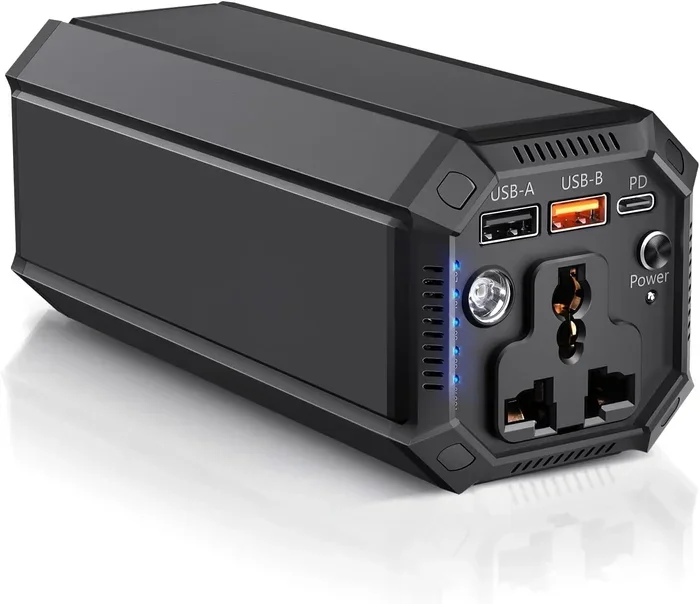
A power bank is a portable battery pack that stores energy and delivers it through cables. Not all power banks can charge laptops, though. You need one with high enough wattage and the right charging port.
Here is how to choose the right power bank:
- Look for a capacity of at least 20,000 mAh for smaller laptops.
- Ensure it has a USB-C power delivery output of 60W or more.
- Check that the voltage requirements match your laptop’s needs.
- Choose a reputable brand for safety and reliability.
Power banks are perfect for travel and daily commutes. They are lightweight, rechargeable, and can serve as backup power whenever you need it.
How to Check if Your Laptop Supports Alternative Charging
Checking Your Charging Port Type
The first step is to identify what kind of charging port your laptop has. Most modern laptops use one of three types: USB-C, barrel jack, or proprietary connectors.
Here is a quick guide:
- USB-C ports: Look for a small, oval-shaped port. This is the most versatile option for alternative charging methods.
- Barrel jacks: These are round ports commonly found on older laptops. You will need a specific DC jack adapter for alternatives.
- Proprietary connectors: Some brands use unique shapes. Check with the manufacturer for compatible alternatives.
Once you know your port type, you can narrow down which alternative charging methods will work for you.
Understanding Voltage and Wattage Requirements
Matching voltage and wattage is critical when using any alternative charger. Using the wrong power adapter can damage your laptop battery or even harm the device.
Follow these guidelines:
- Find your laptop’s voltage and wattage on the bottom label or in the user manual.
- Never use a charger with a higher voltage than required.
- Using a charger with slightly higher wattage is usually safe, as the laptop draws only what it needs.
- Always ensure the charging cable can handle the required power delivery.
When in doubt, consult the laptop manufacturer’s website or contact their support team. They can confirm which alternative chargers are safe for your specific model.
Safety Tips for Charging Without the Original Charger
Avoiding Overheating
One of the biggest risks of using non-original chargers is overheating. If your laptop gets too hot while charging, stop immediately and check the power adapter specifications.
Signs of overheating include:
- The laptop body becomes uncomfortably hot to touch.
- The fan runs constantly at high speed.
- You notice swelling or warping of the laptop casing.
- The charging cable or charging port feels unusually warm.
Overheating can reduce the lifespan of your laptop battery and even pose a fire risk. Always monitor your device when using alternative charging methods.
Using the Right Voltage and Current
Voltage mismatch is one of the most dangerous mistakes you can make. Too much voltage can fry your internal components, while too little voltage may not charge the battery at all.
Here is a simple rule of thumb:
- The voltage must match exactly.
- The amperage or wattage should be equal to or higher than the original charger.
- The charging port connection must be secure and clean.
- Use certified charging cables from reputable brands.
Investing in quality chargers might cost a little more, but it protects your laptop power system and extends the life of your device.
Common Mistakes to Avoid
Using the wrong tip size is one of the most common errors. A universal charger with an incorrect tip can fail to deliver power or cause intermittent charging issues.
Ignoring voltage requirements is another big mistake. Some people assume all chargers are interchangeable, but this is not true. Always verify the specifications before plugging in.
Overcharging your laptop can also be a problem. Once your battery reaches 100%, unplug the charger to preserve battery health. Modern laptops have built-in protections, but it is still good practice.
Using damaged cables or adapters is a safety hazard. Frayed wires or cracked connectors can cause short circuits or inconsistent power delivery. Replace any damaged equipment immediately.
Finally, do not rely solely on alternative methods for long-term use. The original power adapter is designed specifically for your laptop. Alternative methods are best for emergencies and temporary situations.
Expert Tips and Final Thoughts
Keeping a backup charger in your bag or at your desk is one of the best habits you can build. A second AC adapter or a high-quality USB-C cable can save you from many stressful situations.
Here are some expert-backed tips for emergency charging:
- Always carry a portable charger when traveling for work or school.
- Invest in a power bank with at least 60W USB-C power delivery.
- Keep a universal adapter in your car for road trips.
- Consider a small solar charger if you spend time outdoors.
- Label your charging cable and power adapter so you always know which one is yours.
So, can you charge your laptop without a charger? Absolutely. With the right knowledge and tools, you have multiple reliable options at your fingertips. The key is to understand your laptop’s charging port, match the correct voltage requirements, and always prioritize safety.
Being prepared is the best defense against a dead laptop battery. Whether you use a power bank, a car charger, or USB-C charging, knowing your options gives you confidence and independence. Keep this guide handy for your next charging emergency.
Stay powered, stay productive, and never let a missing charger slow you down again.
Frequently Asked Questions
Can I charge my laptop with a phone charger?
Generally, phone chargers do not provide enough wattage to charge a laptop effectively. However, if your laptop has a USB-C port that supports power delivery, a high-powered phone charger (20W or above) might provide a slow charge in emergencies. It will not fully charge a laptop quickly, but it can extend battery life temporarily.
Is it safe to charge a laptop with a power bank?
Yes, it is safe as long as the power bank matches your laptop’s voltage requirements and wattage. Look for a power bank with at least 60W USB-C power delivery and a capacity of 20,000 mAh or more. Always use a certified charging cable to ensure safe power delivery.
Can I use a solar charger to power my laptop?
Yes, solar chargers can charge laptops, but they need sufficient sunlight and adequate wattage output (at least 60W). Solar charging is slower than traditional methods and works best when paired with a battery pack that stores energy for later use. It is an excellent option for outdoor adventures and emergency backup power.
What happens if I use the wrong voltage charger?
Using a charger with the wrong voltage can seriously damage your laptop battery and internal components. Too much voltage can cause overheating, while too little voltage may not charge at all. Always verify the voltage requirements and wattage before using any alternative power adapter.
Can all laptops be charged via USB-C?
No, not all laptops support USB-C charging. Some laptops use USB-C only for data transfer and do not support power delivery through that port. Check your laptop’s specifications or manual to confirm whether your charging port supports USB-C charging before relying on it as an alternative method.
How long does it take to charge a laptop with a power bank?
Charging time depends on the power bank’s capacity, the laptop’s battery size, and the wattage output. A 60W power bank typically takes 3 to 5 hours to charge a standard laptop battery from empty to full. Larger laptops with bigger batteries may take longer, especially if the power bank’s wattage is lower than the laptop’s requirements.
=== CONCLUSION ===
Can I Charge My Laptop Without A Charger? The answer is a clear yes. You have multiple reliable options including USB-C charging, power banks, car chargers, solar panels, and universal power adapters. Each method has its strengths, and the best choice depends on your situation, your laptop model, and the equipment you have available.
The most important takeaway is to always check your voltage requirements and wattage before using any alternative charger. Safety should come first to protect your laptop battery and device. With the right preparation and knowledge, you can keep your laptop running no matter where life takes you. Stay prepared, stay powered, and never let a missing charger hold you back.