Do I Need A Modem With Orbi For Better Wi Fi Coverage
Do I Need A Modem With Orbi? The short answer is yes, you need a modem to connect your Orbi system to the internet, but it depends on your setup. A modem brings the internet signal into your home, and the Orbi router and satellites spread that signal everywhere. Whether you use a separate modem or a modem-router combo, understanding how these devices work together helps you get the best mesh Wi-Fi coverage in your home.
Have you ever stood in your living room staring at a weak Wi-Fi signal? Maybe your bedroom upstairs gets zero bars, or your backyard is completely off the grid. If you have been looking into ways to fix this, you have probably come across the Netgear Orbi system. It promises whole-home mesh Wi-Fi coverage, but here is the big question: do you actually need a modem with Orbi?
The answer is not as simple as a yes or no. Your Orbi system needs a way to connect to the internet, and that is where a modem comes in. But what kind of modem? Do you need one if you already have a gateway from your internet provider? Let us break this all down so you can set up your home network the right way the first time.
Do I Need A Modem With Orbi depends on a few things, including your internet setup, your Orbi model, and how your devices connect. This guide will walk you through everything you need to know. We will cover how the Orbi system works, why a modem matters, and what mistakes to avoid during setup. By the end, you will feel confident about your next move.
Key Takeaways
- You need a modem: Your Orbi system requires a modem to receive an internet signal from your ISP.
- Orbi can work with a modem-router combo: If your ISP provides a gateway device, you can put it in bridge mode and use Orbi as your main router.
- Orbi satellites extend coverage: The satellite units bounce the Wi-Fi signal to eliminate dead zones in larger homes.
- Setup matters: Connecting your Orbi to the modem correctly ensures you get the full speed and range you pay for.
- Not all modems are equal: Your modem must support the internet speeds you have and be compatible with your Orbi model.
- You can buy or rent: Buying your own modem can save money in the long run and gives you more control over your network.
📑 Table of Contents
- What Is the Orbi System and How Does It Work?
- Do You Actually Need a Modem With Orbi?
- How the Orbi System Connects to Your Internet
- Orbi With a Modem vs. Orbi Without a Modem
- Common Setup Mistakes to Avoid
- Expert Tips for Getting the Best Out of Your Orbi System
- Frequently Asked Questions
- Final Thoughts
What Is the Orbi System and How Does It Work?
Before we dive into the modem question, let us talk about what the Orbi system actually is. Netgear Orbi is a mesh Wi-Fi system designed to cover large homes with strong, reliable wireless coverage. Unlike a traditional router that sits in one spot, Orbi uses a main router unit and one or more satellite units to blanket your entire home with Wi-Fi.
How the Main Router and Satellites Work Together
The main Orbi router connects directly to your modem. It then talks to the satellite units, which you place around your home. These satellites create a single, unified network name (SSID). So when you walk from the kitchen to the upstairs bedroom, your phone switches seamlessly between the router and the satellite without dropping the connection.
This is the magic of a mesh network. You do not need to manually switch networks or deal with annoying disconnects. The Orbi system handles everything behind the scenes. The satellites communicate with the router using a dedicated backhaul channel, which means your Wi-Fi speed stays fast even when multiple devices are connected.
Why People Choose Orbi Over Traditional Routers
Most standard routers struggle in homes larger than 2,000 square feet. Walls, floors, and furniture all weaken the Wi-Fi signal. A Wi-Fi extender can help, but it often cuts your speed in half. Orbi solves this problem by using multiple units that work as one cohesive system.
People choose Orbi because it eliminates Wi-Fi dead zones. If you have a three-story house or a large backyard, Orbi satellites can reach every corner. The system is especially popular among gamers, remote workers, and families with many smart home devices.
Do You Actually Need a Modem With Orbi?
Here is the core question: Do I Need A Modem With Orbi to get online? Yes. Every mesh Wi-Fi system, including Orbi, needs a modem to receive an internet signal. Without a modem, your Orbi router and satellites can talk to each other, but they cannot reach the wider internet.
Think of it this way. The modem is the bridge between your home and your internet service provider (ISP). It takes the signal from the ISP line, whether that is cable, fiber, or DSL, and turns it into data your devices can use. The Orbi router then takes that data and distributes it as Wi-Fi signals throughout your home.
When You Definitely Need a Separate Modem
You need a separate modem if your ISP only provides a fiber optic line or a cable connection without a gateway device. In this case, you plug the modem into the wall outlet or phone jack, then connect an Ethernet cable from the modem to the Orbi router. That is it. The Orbi system takes care of the rest.
Some people buy their own modem instead of renting one from the ISP. This can save money over time, especially if you pay more than $10 per month in rental fees. Just make sure your modem is compatible with your ISP and supports the internet speeds you are paying for.
When You Can Use a Modem-Router Combo (Gateway)
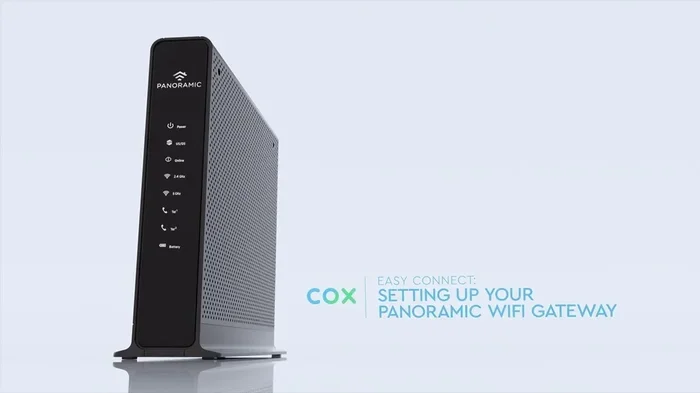
If your ISP gave you a gateway device, that is a modem and router in one box. You can still use Orbi with a gateway. However, you need to put the gateway into bridge mode. Bridge mode turns off the gateway’s Wi-Fi and routing functions so it only acts as a modem. This prevents conflicts between the gateway and your Orbi router.
Not putting your gateway in bridge mode is one of the most common mistakes people make. When both devices try to route traffic, you get double NAT issues, slow speeds, and devices that cannot connect properly.
How the Orbi System Connects to Your Internet
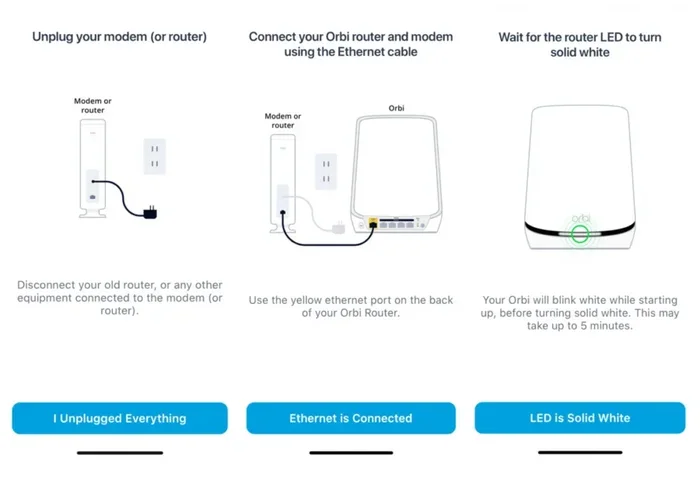
Setting up your Orbi system with a modem is straightforward, but getting it right matters. Let us walk through the connection process step by step.
Step-by-Step Connection Process
- Connect the modem to your ISP line. Plug the coaxial cable or phone line into the modem and power it on.
- Wait for the modem to sync. This can take a few minutes. Watch for the online or activity light to turn solid.
- Connect the Orbi router to the modem. Use an Ethernet cable. Plug one end into the modem and the other into the Orbi router’s WAN port.
- Power on the Orbi router. Wait for it to boot up. The ring light on the front will guide you through the setup.
- Place your Orbi satellites. Put them in rooms where the Wi-Fi signal is weak. Keep them within good range of the router for the best backhaul connection.
- Run the Orbi app or web setup. Follow the on-screen instructions to name your network and set a password.
Once everything is connected, your Orbi system creates a single wireless network that covers your entire home. You can check coverage using the Orbi app, which shows signal strength in different rooms.
What Happens Without a Modem?
Without a modem, your Orbi system will still create a local network. Your devices can connect to the Wi-Fi and talk to each other. You can stream files from a hard drive or print from another room. But you will not have access to the internet. No browsing, no streaming, no video calls. The modem is the essential piece that brings the outside world into your home.
Orbi With a Modem vs. Orbi Without a Modem
To make this crystal clear, let us compare what happens when you use Orbi with and without a modem. The differences are significant, and understanding them helps you make the right choice.
| Feature | Orbi With Modem | Orbi Without Modem |
|---|---|---|
| Internet Access | Full access to the web | No internet access |
| Wi-Fi Coverage | Full mesh coverage across the home | Local network only |
| Device Connectivity | All devices can reach the internet | Devices can only talk to each other |
| Streaming and Browsing | Works perfectly | Does not work |
| Smart Home Integration | Full functionality | Limited to local control |
| Speed Performance | Depends on modem and ISP speeds | Local speeds only |
As you can see, using Orbi without a modem limits you to a local network. For most households, that is not useful. You need the modem to unlock the full potential of your Orbi mesh system.
Do I Need A Modem With Orbi if I already have Wi-Fi from another source? If you have a separate router already providing internet, you can replace it with Orbi. But that existing router still connects to a modem somewhere in the chain. The modem is always the starting point for any internet-connected setup.
Common Setup Mistakes to Avoid
Setting up an Orbi system is not complicated, but small mistakes can cause big problems. Here are the errors most people make when connecting their Orbi to a modem.
Skipping Bridge Mode on a Gateway
This is the number one mistake. If your ISP gave you a gateway and you do not put it in bridge mode, your Orbi router and the gateway will fight each other. Double NAT happens, and some devices will not connect to the internet at all. Always check with your ISP or log into the gateway settings to enable bridge mode before connecting Orbi.
Using an Outdated Modem
Not all modems can handle modern internet speeds. If your modem only supports DOCSIS 2.0 or older, it will bottleneck your connection. For the best performance with Orbi, use a modem that supports at least DOCSIS 3.0 or higher. This ensures your modem can deliver the speeds your internet plan offers without holding anything back.
Placing the Router Too Far From the Modem
The Orbi router should be in the same room as the modem or very close by. Use a short Ethernet cable to connect them. If you run a long cable through walls and floors, you add unnecessary distance and potential signal loss at the start of your network.
Not Updating Firmware
After setup, check for firmware updates. Netgear regularly releases updates that fix bugs and improve performance. An outdated Orbi system may have connectivity issues that a simple update can resolve.
Ignoring Satellite Placement
Your Orbi satellites need to be placed strategically. If you put a satellite too far from the router, the backhaul connection weakens, and your speed drops. A good rule of thumb is to place satellites in rooms where the Wi-Fi signal starts to fade, not in rooms with no signal at all.
Expert Tips for Getting the Best Out of Your Orbi System
You have your Orbi system connected to your modem. Now what? Here are some expert tips to squeeze every bit of performance out of your setup.
Choose the Right Orbi Model for Your Home Size
Netgear offers different Orbi models for different home sizes. The Orbi RBK60 series works well for homes up to 5,000 square feet. The Orbi RBK80 series is designed for larger homes up to 7,000 square feet. If you have a smaller apartment, a standard Orbi router might be enough without any satellites.
Use Ethernet Backhaul When Possible
Orbi satellites can connect to the router wirelessly or via Ethernet cable. If you can run an Ethernet cable to your satellite locations, do it. Wired backhaul is faster and more stable than wireless. This is especially important for gaming consoles, smart TVs, and home office setups that need consistent speeds.
Optimize Your Wi-Fi Channels
Your Orbi system automatically selects the best Wi-Fi channels, but you can tweak them manually if needed. If your neighbors have crowded Wi-Fi networks, changing channels can reduce interference and improve your speeds. The Orbi app makes this easy to do from your phone.
Keep Your Modem and Orbi System Cool
Both modems and routers generate heat. If they overheat, performance drops and connections become unstable. Place your modem and Orbi router in a well-ventilated area. Avoid stacking them on top of other electronics or enclosing them in cabinets.
Restart Your System Regularly
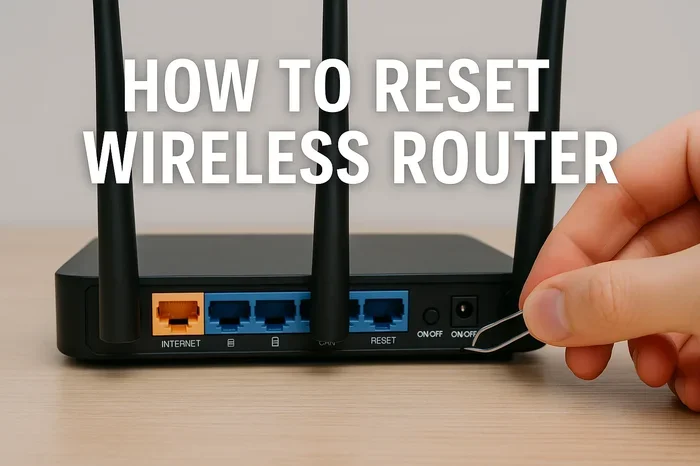
Like any technology, your Orbi system benefits from occasional restarts. If you notice slow speeds or connection drops, try power cycling your modem and Orbi router. Unplug both, wait 30 seconds, and plug them back in. This clears the cache and refreshes the connection.
Secure Your Network
Use a strong Wi-Fi password and enable WPA3 encryption if your Orbi model supports it. This keeps strangers from using your network and protects your personal data. Also, change your default admin password to prevent unauthorized access to your router settings.
Frequently Asked Questions
Can I Use Orbi Without Any Modem at All?
No, you cannot access the internet without a modem. The Orbi system creates a local network without one, but that means no browsing, streaming, or online gaming. The modem is what brings the internet signal into your home for the Orbi router to distribute.
What Kind of Modem Works Best With Orbi?
A modem that supports your ISP’s connection type and your internet speed tier works best. For cable internet, look for DOCSIS 3.0 or 3.1 modems. For fiber, your ISP usually provides the necessary equipment. Always check the Orbi system requirements on Netgear’s website for compatible modem lists.
Do I Need to Buy a Modem or Can I Rent One?
You can do either. Renting from your ISP is convenient but costs $10 to $15 per month. Buying your own modem costs $50 to $200 upfront but saves money within a year or two. Buying also gives you more control over your network and better compatibility with mesh systems like Orbi.
Can I Use Orbi With a Used or Refurbished Modem?
Yes, but make sure the modem is compatible with your ISP and supports the speeds you need. Refurbished modems can work fine if they are in good condition and not too old. Check for DOCSIS 3.0 or newer support and confirm the modem is on your ISP’s approved device list.
How Many Satellites Do I Need for My Home?
This depends on your home size and layout. For homes up to 2,500 square feet, one Orbi router and one satellite usually suffice. For larger homes, add more satellites. Each Orbi satellite extends coverage by about 2,500 square feet. Place them in areas where the signal starts to weaken for the best results.
Will Using Orbi With My Existing Modem Slow Down My Internet Speed?
No, Orbi should not slow down your speeds. In fact, it often improves them by providing stronger, more consistent coverage throughout your home. If you notice speed drops, check that your modem supports your internet plan’s speeds and that your Orbi firmware is up to date.
Final Thoughts
So, do I need a modem with Orbi? Absolutely. The modem is the essential first link in your internet connection chain. It brings the signal from your ISP into your home, and the Orbi system takes it from there, spreading fast, reliable Wi-Fi to every room.
Whether you use a separate modem or a gateway device, the key is to set things up correctly. Put your gateway in bridge mode if you have one. Choose a modem that supports your internet speeds. Place your Orbi router and satellites thoughtfully. And keep your system updated for the best performance.
A well-configured Orbi system paired with the right modem transforms your home network. No more dead zones. No more buffering. No more frustration. You get seamless, whole-home Wi-Fi coverage that keeps everyone connected. Take the time to get your setup right, and you will enjoy a faster, more reliable internet experience every single day.