Can You Have Free Wifi At Home Without Spending Money
Yes, you can have free wifi at home without spending money. There are several legitimate ways to get free wifi at home, from using mobile hotspot data and free internet plans to leveraging community networks and wifi sharing apps. This guide walks you through every practical method so you can stay connected without paying for a traditional broadband plan. Whether you are a student, a renter on a tight budget, or just someone who wants to cut costs, these strategies will help you get online for free.
Imagine never paying a monthly bill for home internet again. Sounds too good to be true, right? But the truth is, you can have free wifi at home without spending a single penny. People do it every day, and you can too.
The internet is not a luxury anymore. It is a necessity. Whether you need it for work, school, or staying in touch with loved ones, going without it is not an option most of us can afford. But paying for a broadband plan every month can really add up. That is why so many people are looking for ways to get free wifi at home.
This guide covers every real, honest method to get online without opening your wallet. No gimmicks. No scams. Just practical, tested strategies that actually work. By the end, you will know exactly how to set up free wifi at home and keep it running smoothly.
Key Takeaways
- Mobile hotspot tethering: Use your phone’s data plan to create a free wifi network at home.
- Free internet plans: Some ISPs and government programs offer low-cost or free internet access.
- Community wifi networks: Public and neighborhood networks can provide free connectivity.
- Wifi sharing apps: Apps like WiFi Map help you find and share free connections.
- Negotiate with providers: Loyalty and promotional offers can land you free or discounted service.
- DIY mesh networks: Set up a local network with friends or neighbors to split costs.
- Avoid common mistakes: Don’t fall for scams or violate terms of service while seeking free wifi.
📑 Table of Contents
- What Does It Mean to Have Free Wifi At Home?
- Method 1: Use Your Phone as a Mobile Hotspot
- Method 2: Look for Free Internet Plans and Government Programs
- Method 3: Share Wifi From a Neighbor or Friend
- Method 4: Find Free Public Wifi Networks
- Method 5: Set Up a Community Mesh Network
- Method 6: Negotiate With Your Internet Provider
- Common Mistakes People Make When Seeking Free Wifi
- How to Make Free Wifi At Home Work for You
- Comparison: Free Wifi Methods at a Glance
- Final Thoughts on Getting Free Wifi At Home
What Does It Mean to Have Free Wifi At Home?
When we talk about free wifi at home, we mean getting internet access in your living space without a traditional paid subscription. There is no monthly bill to a cable company or phone carrier. You use the connection you already have or find free sources nearby.
Free wifi at home does not mean slow or unreliable internet. With the right setup, you can stream videos, browse the web, and even work from home. The key is knowing which methods work best for your situation.
Why Do People Want Free Home Internet?
There are many reasons people search for free wifi at home. Some cannot afford a monthly internet bill. Others are between jobs or living in temporary housing. Students often look for ways to save money. And some people simply want to cut expenses and live more frugally.
No matter your reason, the desire to save money on internet is completely valid. The cost of broadband has risen steadily over the years. Many families now spend more on internet than on their phone bills. Finding a way to get free wifi at home can free up hundreds of dollars each year.
Method 1: Use Your Phone as a Mobile Hotspot
The easiest way to get free wifi at home is by using your smartphone as a mobile hotspot. You probably already pay for a data plan. Why not share that connection with your laptop, tablet, or other devices?
Both Android and iPhone devices have built-in hotspot features. You just turn it on, set a password, and connect your other devices. It is like having a personal wifi router in your pocket.
How to Set Up a Mobile Hotspot
Setting up a mobile hotspot is simple. Here is what to do on both platforms:
- On Android: Go to Settings, then Network and Internet, then Hotspot and Tethering. Turn on the Wifi Hotspot and set a name and password.
- On iPhone: Go to Settings, then Personal Hotspot, and toggle it on. Set a password and your iPhone will broadcast a wifi network.
Once your hotspot is active, your other devices can connect just like they would to a regular router. You can browse, stream, and video call using your phone’s data connection.
Things to Watch Out For
There are a few things to keep in mind. First, using your phone as a hotspot drains your battery fast. Keep your phone plugged in while using it. Second, hotspotting uses a lot of data. If your plan has a limited data cap, you might run out quickly.
Some carriers throttle hotspot speeds after a certain amount of data. Check your plan details before relying on this method full time. Also, make sure your hotspot password is strong. You do not want strangers leeching off your connection.
Quick Tip
Use your hotspot mainly for light tasks like email and browsing. For heavy streaming, it will eat through your data fast. If you have an unlimited data plan, hotspotting is one of the best ways to get free wifi at home.
Method 2: Look for Free Internet Plans and Government Programs
Did you know that several programs offer free or very cheap internet to eligible households? The government and some internet service providers run programs specifically designed to help people get connected without breaking the bank.
The Affordable Connectivity Program (ACP) is one of the most well-known options. It provides a monthly discount on internet service. In some cases, it can make your internet essentially free. Other programs exist at the state and local level too.
Government Assistance Programs
Here are some programs you should look into if you need free wifi at home:
- Affordable Connectivity Program (ACP): Offers up to $30 per month off your internet bill. Some households qualify for up to $75.
- Lifeline Program: Provides discounted phone and internet service to low-income households.
- Emergency Broadband Benefit (EBB): A temporary program that provided free internet during crisis periods.
- Local Library Programs: Many libraries offer free wifi access and even loanable hotspots.
Eligibility usually depends on your income level, participation in other assistance programs, or your location. Check with your preferred internet provider to see what options are available in your area.
Free Internet from Major Providers
Some major internet companies offer free or discounted plans. Xfinity, for example, has a program called Internet Essentials that provides low-cost internet to qualifying families. AT and Verizon also have similar initiatives.
These programs are not always advertised loudly. You often need to search for them or ask directly. Do not assume you do not qualify. Apply and find out. You might be surprised.
Method 3: Share Wifi From a Neighbor or Friend
One of the oldest tricks for getting free wifi at home is simply asking a neighbor or friend if you can share their connection. This works especially well if you live in an apartment building or a close-knit neighborhood.
Of course, you should not just take someone else’s wifi without permission. That is not only rude, it can also be illegal. But a friendly conversation can lead to a win-win arrangement.
How to Make Wifi Sharing Work
Here is how to approach wifi sharing the right way:
- Be upfront and honest. Tell your neighbor or friend that you are looking for a way to save on internet costs.
- Offer something in return. Maybe you can share the cost of a faster plan, or help them with something they need.
- Set clear boundaries. Agree on usage limits, times, and expectations so no one feels taken advantage of.
- Use a guest network. If your neighbor shares their wifi, have them set up a separate guest network for your devices. This keeps their main network secure.
Wifi sharing is a great way to get free wifi at home while building community. Many people are happy to share a portion of their connection, especially if you contribute in some way.
Method 4: Find Free Public Wifi Networks
Public wifi networks are everywhere. Coffee shops, libraries, shopping malls, and fast food restaurants all offer free internet. While these are not technically “at home,” you can use them strategically to reduce your home data usage.
Some people work from coffee shops or libraries for part of the day and then use their home setup for the rest. This hybrid approach can significantly cut your internet costs.
Apps That Help You Find Free Wifi
There are several apps designed to help you find free wifi networks near you. These are incredibly useful if you want free wifi at home or on the go:
- WiFi Map: Shows millions of free wifi hotspots worldwide. Users share passwords for public networks.
- Avast Wi-Fi Finder: Scans for available networks and shows which ones are open and free.
- Instabridge: Crowdsources free wifi passwords from users in your area.
- Wigle Wifi: Maps wifi networks in your neighborhood and shows which ones are open.
These apps are free to download and use. They can help you find free wifi at home or anywhere else you need it. Some apps even let you contribute by sharing passwords you already know.
Method 5: Set Up a Community Mesh Network
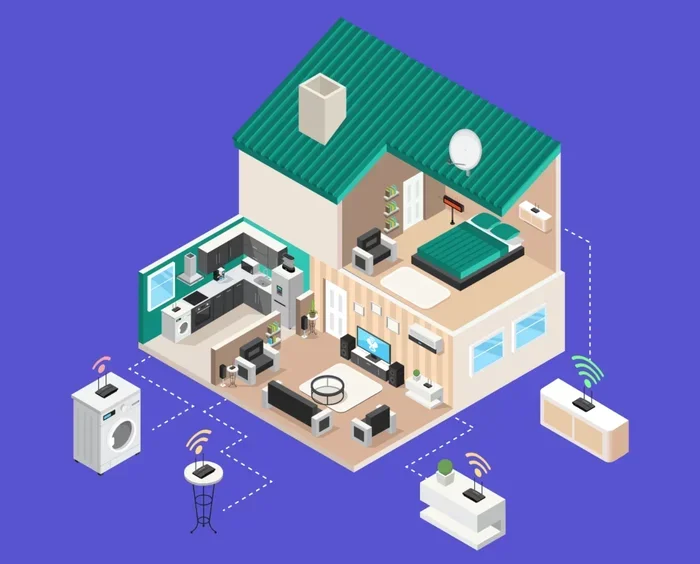
A mesh network is a group of wifi routers that work together to cover a larger area. You can set up a community mesh network with friends or neighbors to split the cost of one internet connection.
This is one of the more creative ways to get free wifi at home. Instead of each household paying for its own plan, a group of people shares one connection and the cost. The more people in the group, the less each person pays.
How to Build a Simple Mesh Network
Here is a basic overview of how to set up a mesh network:
- Choose a leader: One person signs up for the internet plan and hosts the main connection.
- Add routers: Each household adds a mesh node or router to extend the signal.
- Use mesh-compatible hardware: Systems like Google Nest Wifi, Eero, or TP-Link Deco work great for this.
- Set up separate networks: Each household gets its own network name and password for security.
- Split costs fairly: Divide the bill equally or based on usage.
Mesh networks work best when the homes are close together. If you live in a neighborhood where houses are spread far apart, the signal might not reach everyone. But in apartment complexes or tight-knit communities, this method is a game changer.
Expert Insight
Networking experts recommend using wired backhaul between mesh nodes when possible. This means connecting routers with ethernet cables for the strongest and fastest signal. It costs a little more upfront but delivers much better performance than wireless-only setups.
Method 6: Negotiate With Your Internet Provider
If you already pay for internet, you might be able to get it cheaper or even free through negotiation. Many people do not realize that internet providers have promotional offers, loyalty discounts, and hardship programs.
A simple phone call can sometimes result in a free or heavily discounted plan. Providers would rather keep you as a customer than lose you to a competitor.
Tips for Negotiating With Your ISP
Here is how to approach your internet provider for the best deal:
- Call during off-peak hours. Weekday mornings are usually less busy for customer service.
- Prepare your case. Know your current plan, how long you have been a customer, and competing offers in your area.
- Be polite but firm. Ask to speak with a retention specialist. They have more power to offer discounts.
- Mention cancellation. Let them know you are considering switching providers. This often triggers special offers.
- Ask about free trials. Some providers offer free internet for a limited period to new or returning customers.
You might be surprised how willing providers are to help. Many have unadvertised promos that can save you significant money. Some customers have even reported getting free wifi at home for several months through these negotiations.
Common Mistakes People Make When Seeking Free Wifi
While finding free wifi at home is entirely possible, many people make mistakes that waste their time or even put them at risk. Here are the most common pitfalls to avoid.
1. Falling for Wifi Scam Apps
There are apps that promise free wifi but actually steal your data. They ask for unnecessary permissions or show excessive ads. Stick to well-known, reputable apps from trusted developers. If an app seems sketchy, delete it immediately.
2. Using Unsecured Networks Carelessly
Open wifi networks without passwords are convenient, but they are also risky. Hackers can intercept your data on unsecured networks. Never enter passwords, banking information, or personal details when connected to a public or open network.
3. Ignoring Data Limits
When using a mobile hotspot or shared connection, data limits still apply. Going over your limit can result in extra charges or throttled speeds. Always monitor your data usage and set alerts if needed.
4. Violating Terms of Service
Some people try to crack wifi passwords or use connections they are not authorized for. This is both unethical and illegal. Stick to legal methods of getting free wifi at home, and you will never have to worry about consequences.
Common Mistakes Summary
- Downloading scam apps that promise free wifi but compromise your security.
- Accessing personal accounts on unsecured public networks.
- Exceeding data caps on hotspot or shared plans without monitoring usage.
- Attempting to access someone else’s wifi without permission.
- Ignoring speed limitations that come with free or promotional plans.
How to Make Free Wifi At Home Work for You
Once you have found a way to get free wifi at home, you want to make sure it actually works well. A bad setup can lead to slow speeds, dropped connections, and frustration. Here is how to optimize your free connection.
Invest in a Good Router
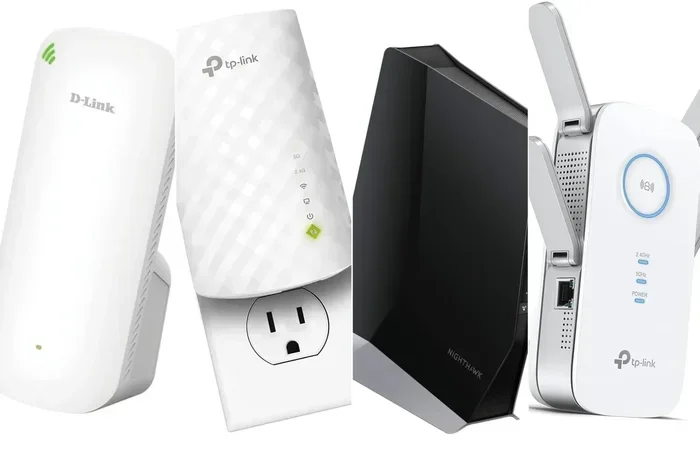
Even if your internet is free, the quality of your router matters. A good router can make a slow connection feel faster and cover more of your home. Look for routers with dual-band or tri-band support for the best performance.
You do not need to spend a fortune. Many affordable routers under $50 offer excellent performance for basic browsing and streaming. If you are sharing a connection with multiple people, invest in a mesh system for better coverage.
Optimize Your Wifi Signal
Small changes can make a big difference in your wifi speed. Try these tips:
- Place your router in a central location. Walls and furniture block wifi signals.
- Keep the router elevated. Put it on a shelf or table, not on the floor.
- Avoid interference. Microwaves, baby monitors, and other electronics can disrupt wifi signals.
- Update your router firmware. Manufacturers release updates that improve performance and security.
- Use the 5GHz band when possible. It is faster than the 2.4GHz band, though it has a shorter range.
Run Regular Speed Tests
Use a free speed test tool to check your internet performance. If speeds are slower than expected, try restarting your router or moving it to a different location. Speed tests also help you identify whether the problem is with your connection or a specific device.
Comparison: Free Wifi Methods at a Glance
Not all methods for getting free wifi at home are created equal. Here is a quick comparison to help you choose the best option for your situation.
| Method | Cost | Speed | Reliability | Best For |
|---|---|---|---|---|
| Mobile Hotspot | Free (uses existing data) | Moderate to Fast | High | Light users and occasional needs |
| Government Programs | Free or Very Low Cost | Moderate | High | Low-income households |
| Wifi Sharing | Free | Varies | Moderate | Neighborhoods with friendly neighbors |
| Public Wifi | Free | Moderate | Low to Moderate | Supplementing home internet |
| Community Mesh | Shared Cost | Good | High | Groups of friends or neighbors |
| ISP Negotiation | Free or Discounted | Full Speed | High | Current internet customers |
As you can see, each method has its strengths. The best approach often combines two or more of these strategies. For example, you might use a mobile hotspot for daily needs and visit the library for heavy downloading.
Final Thoughts on Getting Free Wifi At Home
Having free wifi at home is not just a dream. It is a reality for millions of people who use the methods described in this guide. Whether you tether to your phone, apply for a government program, share with a neighbor, or set up a community network, there is a solution that fits your situation.
The most important step is to start. Try one method today and see how it works for you. If it does not fully meet your needs, combine it with another method. Most people find that a mix of strategies gives them the best results.
Remember, free wifi at home is not about being cheap. It is about being smart with your money and finding creative solutions. In a world where internet costs keep rising, knowing how to stay connected for free is a valuable skill.
So go ahead. Try these tips. Share this article with someone who might need it. And enjoy the freedom of getting online without spending a dime. You deserve to be connected, and now you know exactly how to make it happen.
Frequently Asked Questions
Is it legal to get free wifi at home?
Yes, absolutely. All the methods described in this guide are completely legal. Using your phone as a hotspot, applying for government programs, sharing wifi with permission, and negotiating with your ISP are all legitimate ways to get free wifi at home. Just avoid accessing networks you do not have permission to use.
Can I use my phone hotspot as my only internet at home?
You can, but it depends on your data plan. If you have an unlimited data plan and do not stream a lot of video, a mobile hotspot can work well as your primary connection. Just keep an eye on your data usage and be aware that speeds may slow during peak hours.
How fast is free wifi compared to paid broadband?
It varies. Mobile hotspots can be quite fast, especially on 5G networks. Government programs like the ACP typically offer standard broadband speeds. Community mesh networks depend on the quality of the shared connection. In many cases, free wifi at home is fast enough for browsing, streaming, and video calls.
Do wifi sharing apps really work?
Yes, wifi sharing apps like WiFi Map and Instabridge are widely used and generally reliable. They crowdsource free wifi passwords from users around the world. However, always use them responsibly and never connect to networks without the owner’s permission.
What is the best way to get free wifi at home for students?
Students should look into the Affordable Connectivity Program, school-provided wifi, and library hotspots. Many colleges also offer free internet to enrolled students. Combining these with a mobile hotspot can give students reliable free wifi at home throughout the school year.
Can I get free wifi at home if I live in a rural area?
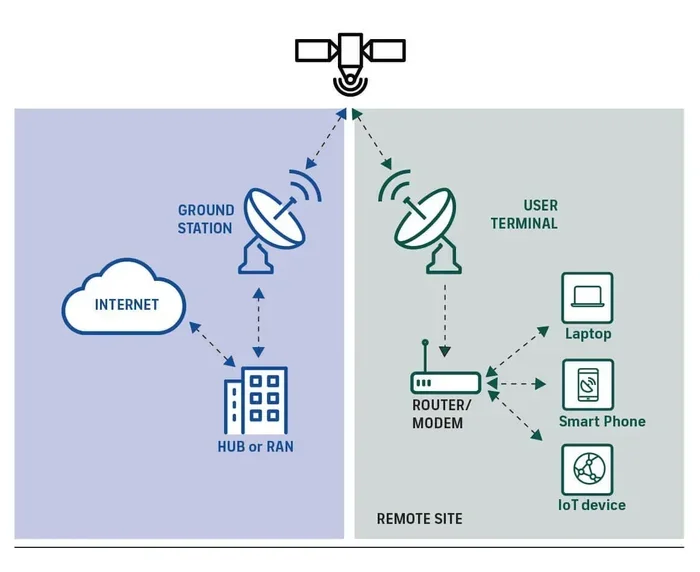
Rural residents have options too. Government programs like the ACP and Lifeline often cover rural areas. Satellite internet providers sometimes offer free trials or low-cost plans. Mobile hotspots can also work well in rural areas if you have cell service. Check with local providers to see what is available in your region.
=== CONCLUSION ===
Getting free wifi at home is entirely possible if you know where to look and what methods to try. From mobile hotspots and government programs to community networks and ISP negotiations, there are plenty of paths to stay connected without paying a traditional broadband bill. The key is to find the combination of strategies that works best for your lifestyle and needs.
Start with the methods that feel most practical for you. Test them out. Adjust as needed. And remember, free wifi at home is not a fantasy, it is a smart, achievable goal. Share what you learn with friends and family, and help more people get connected for free.