Can You Get Wifi Through Satellite And Stay Connected
Can you get wifi through satellite? Yes, you absolutely can. Satellite wifi lets you connect to the internet from almost anywhere on Earth using signals sent between your dish and a satellite in space. This technology is a game changer for rural areas, travelers, and anyone who needs reliable internet where traditional options fall short. In this guide, we break down how satellite wifi works, what providers to consider, and how to get the best performance from your setup.
Have you ever found yourself in a remote cabin, a camping trailer, or a rural home and wondered whether you could still get online? The answer is yes. Can you get wifi through satellite? Absolutely. Satellite wifi has transformed the way people stay connected, especially in areas where traditional internet infrastructure simply does not reach.
Whether you live miles from the nearest town or you travel frequently for work, satellite-based internet offers a practical solution. It uses signals sent between a dish on your property and a satellite orbiting thousands of miles above Earth. Those signals carry your data back and forth, giving you a wifi connection that works almost everywhere.
In this article, we will walk you through everything you need to know about getting wifi through a satellite. We will cover how the technology works, which providers to look at, what speeds you can expect, and the common challenges you might face. By the end, you will have a clear picture of whether satellite internet is the right choice for your situation.
Key Takeaways
- Satellite wifi is real and accessible: You can get a wifi connection through a satellite dish and modem, bringing internet to virtually any location with a clear view of the sky.
- Two main satellite types exist: Geostationary satellites orbit far from Earth and offer wide coverage, while low earth orbit satellites like Starlink deliver faster speeds and lower latency.
- Speed varies by provider and plan: Download speeds range from 12 Mbps to over 200 Mbps depending on the service and satellite technology used.
- Rural and remote users benefit the most: Satellite wifi fills the gap where cable, fiber, or DSL internet is simply not available.
- Weather and obstructions matter: Rain, snow, trees, and buildings can weaken your satellite signal and affect performance.
- Data caps are common: Most satellite plans come with monthly data limits, so managing usage is essential for consistent speeds.
- Setup is straightforward but requires planning: You need a satellite dish, modem, and a clear line of sight to the sky for optimal signal strength.
📑 Table of Contents
How Satellite WiFi Works
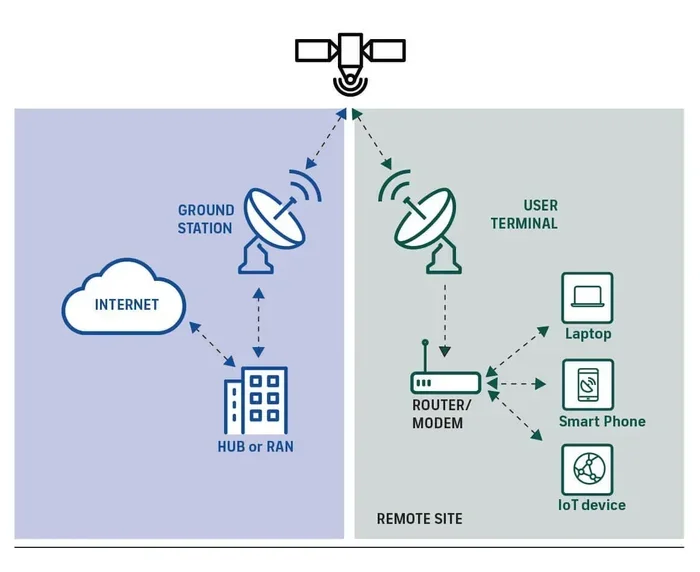
The concept behind satellite internet is simpler than most people think. A satellite sits in space and acts as a relay point between your home and the broader internet. Here is how the process flows step by step.
The Role of the Satellite Dish
Your satellite dish is the physical piece of equipment mounted outside your home. It points toward the sky and sends signals up to the satellite. When you request a webpage or stream a video, your dish transmits that request upward. The satellite receives it, processes it, and sends the data back down to your dish.
The dish must have a clear view of the southern sky (in the Northern Hemisphere) to maintain a strong signal strength. Trees, buildings, and even steep hills can block the signal and cause interruptions. This is why proper placement matters so much.
How Data Travels from Space to Your Home
Once the satellite receives your request, it bounces the signal back to a ground station on Earth. That ground station is connected to the broader internet. The data then travels back up to the satellite and down to your dish. From there, a satellite modem converts the signal into a usable internet connection.
Your modem connects to a router, which broadcasts the wifi connection throughout your home. This entire process happens in milliseconds, though the distance the signal travels does introduce some delay, which we will discuss later.
Types of Satellite Internet Services
Not all satellite internet is the same. Over the years, technology has evolved significantly, and today there are two main categories of satellites used for internet service. Understanding the difference helps you choose the right provider and plan.
Geostationary Satellites
Traditional satellite internet relies on geostationary satellites. These satellites orbit about 22,000 miles above Earth. Because they stay in a fixed position relative to the ground, your dish can point at a consistent location in the sky.
Providers like HughesNet and Viasat use geostationary satellites. The advantage is broad coverage area. Even remote regions can access service. The downside is distance. That 22,000-mile round trip creates noticeable latency, which affects real-time activities like video calls and online gaming.
Low Earth Orbit Satellites
A newer approach uses low earth orbit satellites that orbit just a few hundred miles above Earth. Because the distance is much shorter, signals travel faster, reducing latency significantly. Starlink, operated by SpaceX, is the most well-known provider in this category.
LEO satellite constellations involve hundreds or even thousands of small satellites working together. This network provides strong broadband speed and lower ping times compared to traditional geostationary options. However, the service area is still expanding, and availability depends on your location.
Major Providers Compared
Here is a quick look at the leading satellite internet providers and what they offer.
- HughesNet: Uses geostationary satellites. Plans start around 12 Mbps download speed. Comes with a standard data cap and built-in wifi capability through compatible routers.
- Viasat: Also uses geostationary technology. Offers higher-tier plans with speeds up to 100 Mbps. Data allowances vary by plan, and availability depends on your region.
- Starlink: Uses low earth orbit satellites. Delivers speeds between 50 and 250 Mbps in most areas. Lower latency makes it suitable for video conferencing and light gaming. Requires a clear view of the northern sky.
Can You Get WiFi Through Satellite for Home Use?
The short answer is yes. Many households, especially in rural areas, rely on satellite wifi as their primary internet connection. But setting it up properly makes all the difference between a frustrating experience and a smooth one.
Setting Up Your Satellite WiFi System
Getting a wifi connection through satellite involves a few key steps. First, you need to choose a provider and a data plan that fits your usage habits. Then you order the equipment, which typically includes a dish, a modem, and a router.
Installation usually requires mounting the dish on your roof or a pole in your yard. The dish must align precisely with the satellite in the sky. Some providers offer professional installation, while others let you set it up yourself with step-by-step guidance.
Once the dish is in place, you connect it to the modem using a coaxial cable. The modem then connects to your router, which spreads the wifi connection throughout your home. The entire setup can take anywhere from one hour to a full day, depending on whether you hire a professional.
Equipment You Need
Here is a list of the essential equipment for a home satellite wifi setup.
- Satellite dish: The outdoor unit that sends and receives signals to and from the satellite.
- Satellite modem: Converts the satellite signal into an internet connection your devices can use.
- Router: Broadcasts the wifi signal throughout your home. Many modern satellite plans include a combo modem-router unit.
- Coaxial cables: Connect the dish to the modem and the modem to the router.
- Tripod or mounting bracket: Secures the dish in the correct position with a clear view of the sky.
Some providers also offer optional accessories like signal amplifiers or weatherproof enclosures for the dish. These add-ons can improve performance in challenging environments.
Satellite WiFi Speed and Performance
One of the most common questions people ask is about broadband speed. How fast is satellite internet really? The answer depends on the provider, the satellite type, and your specific plan.
Download vs Upload Speeds
Most satellite plans advertise download speed, which is the rate at which data comes to your device. For example, a basic HughesNet plan might offer 12 Mbps download. A Starlink plan might deliver 100 to 200 Mbps download.
Upload speed is usually lower. With geostationary satellites, upload speeds often range from 1 to 3 Mbps. LEO satellites like Starlink tend to offer more balanced upload and download speeds, sometimes reaching 10 to 20 Mbps upload.
For everyday tasks like browsing, email, and streaming video, download speed matters most. But if you video conference for work or upload large files, you will want to pay attention to upload speed as well.
Latency Issues and What They Mean
Latency is the delay between sending a request and receiving a response. It is measured in milliseconds. Traditional geostationary satellite internet often has latency between 500 and 700 milliseconds because of the long distance the signal travels.
Low earth orbit satellites dramatically reduce this. Starlink typically delivers latency between 20 and 50 milliseconds. This is close to what you get with cable or fiber internet and makes real-time applications much more usable.
High latency can cause problems with video calls, online gaming, and any activity that requires instant feedback. If you are someone who game streams or participates in video meetings, choosing a low-latency option is important.
Satellite WiFi for Rural and Remote Areas
For many people living in rural areas, rural internet options are limited. Cable companies and phone companies often do not extend their infrastructure to remote locations. This is where satellite internet shines.
Why Satellite WiFi Matters for Rural Users
If you live on a farm, a large property, or a remote homestead, getting a reliable wifi connection can feel impossible. Ground-based options like DSL or fixed wireless may not reach your location. Cable internet requires physical lines that simply do not exist in many rural areas.
Satellite wifi solves this problem. As long as you have a clear view of the sky, you can get online. This opens up opportunities for remote work, online education, telehealth appointments, and entertainment that would otherwise be unavailable.
Comparing Satellite to Other Rural Options
Here is how satellite internet stacks up against other rural internet options.
- DSL: Uses phone lines. Speeds are slow and distance from the provider’s hub limits performance. Not widely available in very remote areas.
- Fixed Wireless: Uses a tower-based signal. Faster than DSL but requires line of sight to a nearby tower. Coverage is limited.
- Satellite Internet: Available almost anywhere with a clear sky view. Speeds are improving rapidly with new LEO technology. The main trade-off is data caps and weather sensitivity.
- Mobile Hotspot: Uses cellular networks. Convenient but dependent on cell coverage and often has strict data limits.
For true off-grid connectivity, satellite wifi remains the most reliable and widely available option. It gives you a wifi connection where no other technology can reach.
Common Challenges and How to Overcome Them
Satellite internet is not perfect. Understanding the challenges helps you set realistic expectations and take steps to minimize problems.
Weather Interference
One of the most common concerns about satellite internet is weather interference. Heavy rain, snow, ice, and thick cloud cover can weaken the signal between your dish and the satellite. This is sometimes called “rain fade.”
Most of the time, the effect is temporary. Once the weather clears, your connection returns to normal. To reduce weather-related issues, make sure your dish is installed in a location with the least exposure to prevailing storms. Some users add weather shields or heaters to their dishes to prevent ice buildup.
Data Caps and Throttling
Many satellite plans come with a monthly data cap. This is a limit on how much data you can use before your speeds are reduced. HughesNet, for example, typically offers 10 to 50 GB of data per month depending on the plan.
Once you hit the cap, your provider may slow your speeds significantly or charge overage fees. To manage this, try to download large files during off-peak hours, use data-saving settings on streaming services, and monitor your usage regularly through your provider’s app or portal.
Obstructions and Signal Blockage
Your dish needs a clear view of the satellite in the sky. Trees, tall buildings, mountains, and even power lines can block or weaken the signal. Before installation, have your provider or a professional assess the site for potential obstructions.
If obstructions are unavoidable, consider using a smaller dish designed for tighter spaces or a mesh wifi connection system indoors to extend coverage to areas where the signal is weaker.
Cost Considerations
Satellite internet can be more expensive than cable or fiber. Equipment costs, monthly fees, and installation charges all add up. Starlink, for instance, requires an upfront payment for the dish and router, plus a monthly subscription fee. Traditional providers like HughesNet and Viasat often include equipment leasing fees in their monthly plans.
That said, the cost is often justified by the convenience and availability. For many rural users, satellite internet is the only viable high-speed option. When compared to the alternative of having no internet at all, the investment makes sense.
Tips for Getting the Best Satellite WiFi Experience
Want to maximize your satellite internet performance? Here are some practical tips that make a real difference.
- Place your dish with a clear sky view. The fewer obstructions, the stronger your signal strength will be.
- Use a quality router. A good router spreads the wifi connection evenly throughout your home and reduces dead zones.
- Monitor your data usage. Keep an eye on your monthly allowance to avoid speed throttling.
- Update your equipment. Newer modems and routers handle satellite signals more efficiently and can improve broadband speed.
- Consider a mesh network. If your home is large, a mesh system helps maintain a strong wifi connection in every room.
- Schedule heavy downloads wisely. Many providers offer off-peak hours when data usage does not count against your cap.
- Keep your dish clean and clear of snow. Regular maintenance prevents signal loss during bad weather.
Following these steps will help you get the most out of your satellite wifi setup and enjoy a smoother, more reliable internet experience.
Conclusion
Can you get wifi through satellite and stay connected? The answer is a resounding yes. Satellite internet has come a long way, and today it offers a viable path to connectivity for millions of people who would otherwise be left offline. Whether you live in a remote rural area, travel frequently, or simply need a backup connection, satellite wifi delivers real value.
The technology continues to improve. Low earth orbit satellites are bringing faster speeds and lower latency to more users every year. Providers are expanding their networks and offering more flexible data plans. As the industry grows, the gaps in coverage and performance will continue to narrow.
If you have been wondering whether satellite internet is right for you, the answer is likely yes. Evaluate your needs, compare providers, and invest in the right setup. With the right equipment and a clear view of the sky, you can stay connected no matter where life takes you.
Frequently Asked Questions
Is satellite WiFi the same as satellite internet?
Yes, the terms are used interchangeably. Satellite wifi refers to the wifi connection you get in your home after a satellite internet setup. The satellite delivers the internet to your dish, and your router broadcasts it as a wifi signal throughout your home.
Can I use satellite WiFi anywhere?
You can use satellite internet in most places that have a clear view of the sky. However, availability and performance vary by location. Urban areas usually have more options, while rural and remote areas benefit the most from satellite internet since other options are limited.
How fast is satellite WiFi?
Speed depends on your provider and the type of satellite. Traditional geostationary plans offer 12 to 100 Mbps download. New low earth orbit services like Starlink can deliver 50 to 250 Mbps. Your actual broadband speed also depends on your data plan, network congestion, and signal strength.
Does weather affect satellite WiFi?
Yes, heavy rain, snow, and thick clouds can temporarily weaken your signal. This is known as rain fade. The effect is usually brief and resolves once the weather clears. Proper dish placement and weatherproofing can reduce the impact of weather interference on your connection.
Is satellite WiFi expensive?
Satellite internet tends to cost more per month than cable or fiber. Equipment and installation fees add to the upfront cost. However, for many rural users, it is the most affordable high-speed option available. Plans start at around $50 to $150 per month depending on the provider and speed tier.
Can I stream videos with satellite WiFi?
Yes, you can stream videos with satellite internet. Most providers offer plans with enough data for regular streaming. Just be mindful of your data cap and plan. Lowering the streaming quality on platforms like Netflix or YouTube can help you stay within your monthly data allowance.