Can I Charge A Laptop Battery With A Car Battery Charger
Yes, you can charge a laptop battery with a car battery charger, but it requires the right adapter and careful attention to voltage and compatibility. Using a 12V car battery charger with a step-up converter or a compatible DC adapter lets you power your laptop anywhere. Always match the voltage and wattage to avoid damaging your device or battery.
Have you ever been stuck in a car, on a road trip, or at a remote campsite with a dying laptop? It is a frustrating situation. Your laptop battery is draining fast, and your normal charger is nowhere to be found. That raises a very common question: can I charge a laptop battery with a car battery charger?
The short answer is yes. But the full answer comes with some important details. Charging your laptop from a car battery charger is absolutely possible. However, you need to understand voltage requirements, compatibility, and safety precautions. Using the wrong setup can damage your laptop or even your car battery. This guide walks you through everything you need to know. We cover how it works, what you need, step-by-step instructions, and the best products to use.
Key Takeaways
- It is possible: You can charge a laptop battery using a car battery charger with the right adapter and voltage converter.
- Voltage matching is critical: Most laptops need 19V, while car batteries provide 12V, so a step-up converter is often required.
- Safety first: Overcharging, short circuits, and incompatible connectors can damage your laptop or battery.
- USB-C and DC adapters offer flexibility: Modern options make car-to-laptop charging easier than ever.
- Not all car chargers work: You need to check wattage, amperage, and connector type before attempting.
- Emergency power is a real benefit: Road trips, camping trips, and power outages are perfect use cases.
- Battery health matters: Frequent car charging can affect laptop battery lifespan if done improperly.
📑 Table of Contents
- Understanding How Laptop Batteries Charge
- Can You Actually Use A Car Battery Charger For Your Laptop
- What You Need To Know About Voltage And Compatibility
- Step-By-Step Guide To Charging Your Laptop From A Car Battery
- Common Mistakes And Safety Tips
- Best Car Battery Chargers For Laptops
- Frequently Asked Questions
- Conclusion
Understanding How Laptop Batteries Charge
Before you plug anything in, it helps to understand the basics. Laptop batteries need specific voltage and current to charge safely. Every laptop model has its own power requirements. These are measured in volts and watts.
How Laptop Charging Works
Your laptop charger converts wall outlet power into the right form for your battery. A standard wall outlet provides alternating current, or AC. Your laptop needs direct current, or DC, to charge. The charger inside your laptop box does this conversion.
Most laptops require between 19V and 20V to charge. Some smaller models work with 12V or even 5V through USB-C. The key is matching the output of your power source to what your laptop expects. Car batteries provide 12V DC, which is close but not always enough on its own.
Why Voltage Matters So Much
Voltage is the pressure that pushes electricity into your laptop. Too little voltage means your laptop will not charge at all. Too much voltage can fry your internal components. Think of it like water pressure — too low and nothing flows, too high and pipes burst.
This is why you cannot simply connect a car battery directly to your laptop. The voltage difference and power delivery need to be managed properly. A voltage converter or step-up adapter bridges this gap safely.
Can You Actually Use A Car Battery Charger For Your Laptop
This is where things get interesting. Many people assume that because a car battery charger outputs 12V, it can charge a laptop. The truth is more nuanced. It depends on the type of charger and your laptop model.
Types Of Car Battery Chargers
Not all car battery chargers are the same. Here are the main types you will encounter:
- Basic trickle chargers: These slowly charge a car battery. They are not designed for laptops and will not work directly.
- Jump starters: Portable jump starters often include USB ports. These can charge laptops if they provide enough wattage.
- Multi-function chargers: These come with various output options, including DC and USB. Some models are laptop-compatible.
- Power inverters: These convert 12V DC to 120V AC, letting you use a standard wall charger in your car.
Each type has different use cases. A power inverter is the most versatile option. It lets you use your regular laptop charger in the car. A multi-function charger with USB-C is the most convenient for direct charging.
When A Car Battery Charger Works For Laptops
A car battery charger works for your laptop when it meets these conditions:
- The output voltage matches or is compatible with your laptop requirements.
- The charger provides enough wattage to power your laptop and charge the battery simultaneously.
- The connector type fits your laptop or you have the right adapter.
- The charger has built-in safety features like overcurrent and overvoltage protection.
If your car battery charger checks all four boxes, you are good to go. Always double-check the specifications before connecting anything.
What You Need To Know About Voltage And Compatibility
Compatibility is the biggest factor in whether this setup works. Not every car charger will safely charge every laptop. Here is what you need to check before trying.
Matching Voltage Requirements
Most laptops need 19V to 20V input. A standard car battery provides 12V. This means you need a step-up voltage converter that boosts 12V to 19V or higher. Some modern laptops accept lower voltages through USB-C, which makes things easier.
Check your laptop label or original charger for the exact voltage. It is usually printed on the bottom of the laptop or on the charger itself. Look for a number followed by “V” — that is your voltage requirement.
Wattage And Amperage Explained
Wattage tells you how much power your laptop draws. A typical laptop uses 45W to 90W while charging. Your car charger must deliver at least that much power for charging to work properly.
Amperage works alongside wattage. Higher amperage means more current flow. If your charger cannot supply enough amperage, your laptop may charge very slowly or not at all. Some laptops even drain the car battery if the charger cannot keep up.
USB-C Charging From A Car Battery
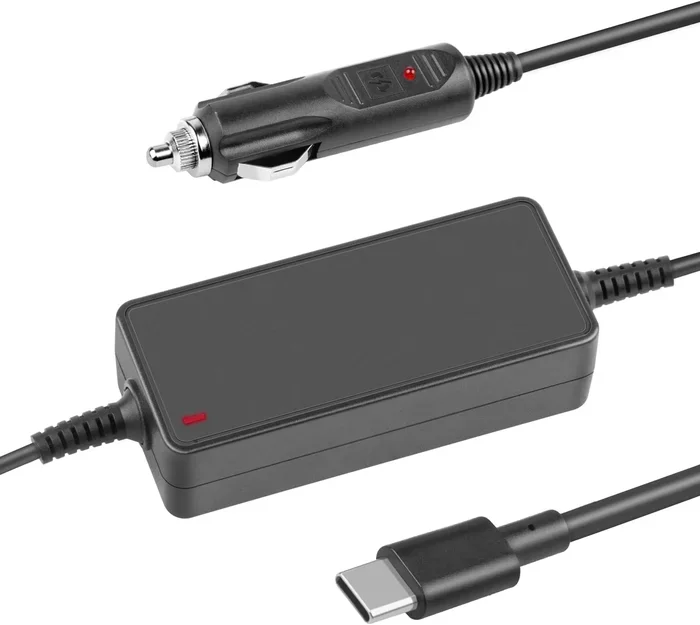
Many modern laptops support USB-C charging. This opens up new possibilities. A car USB-C charger with sufficient wattage can charge your laptop directly from a car battery or 12V outlet.
Look for car chargers rated at 65W or higher for USB-C laptops. Some models offer up to 100W, which is more than enough for most laptops. Make sure the charger supports Power Delivery or PD protocol for safe and fast charging.
DC Adapter Compatibility
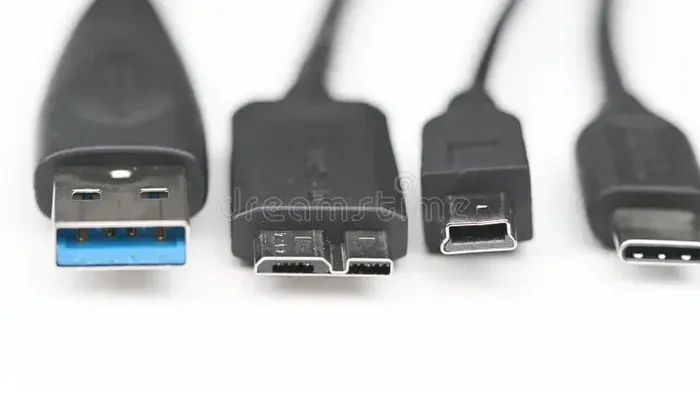
If your laptop uses a traditional barrel-style DC connector, you need a compatible adapter. Car battery chargers with interchangeable tips make this easier. You can swap the tip to match your laptop’s power jack.
Popular tip sizes include 5.5mm x 2.1mm and 5.5mm x 2.5mm. Always verify the correct size and polarity before connecting. Reversed polarity can damage your laptop motherboard.
Step-By-Step Guide To Charging Your Laptop From A Car Battery
Now that you understand the basics, let us walk through the actual process. Follow these steps carefully to charge your laptop safely from a car battery charger.
Step 1: Check Your Laptop Power Requirements
Find the label on your laptop or the original charger. Note the voltage (V) and wattage (W) requirements. Write these down. This information is essential for choosing the right car charger.
Step 2: Choose The Right Car Battery Charger
Based on your laptop requirements, select a compatible charger. Options include:
- A car power inverter if you want to use your original charger.
- A direct DC adapter with matching voltage and connector.
- A high-wattage USB-C car charger for USB-C compatible laptops.
Always buy from reputable brands. Cheap, unverified chargers can pose serious safety risks.
Step 3: Connect The Charger To The Car Battery
Attach the charger to your car battery using the included clamps or cigarette lighter adapter. Make sure the car engine is running if you are using a direct battery connection. This prevents draining your car battery completely.
Double-check all connections. Loose connections can cause sparks or inconsistent power delivery.
Step 4: Connect The Laptop And Start Charging
Plug the appropriate cable or adapter into your laptop. The charging indicator should light up. If it does not, check the voltage settings and connections.
Let the battery charge to at least 50% before disconnecting if possible. This gives you enough power to work on without immediately needing to recharge.
Step 5: Monitor The Charging Process
Keep an eye on your laptop while it charges from the car. Watch for any unusual heat, slow charging, or error messages. Disconnect immediately if anything seems wrong.
Once your laptop is charged, disconnect everything in reverse order. Unplug the laptop first, then the car charger.
Common Mistakes And Safety Tips
Charging a laptop from a car battery charger can go wrong if you are not careful. Avoid these common mistakes to keep your devices safe.
Mistakes To Avoid
- Using the wrong voltage: This is the number one mistake. Too much voltage can destroy your laptop.
- Ignoring wattage requirements: A low-wattage charger will charge your laptop very slowly or not at all.
- Forgetting about polarity: Reversed polarity can cause short circuits and permanent damage.
- Charging with the car off: This drains your car battery quickly and may leave you stranded.
- Using damaged cables or adapters: Frayed wires create fire hazards and inconsistent power delivery.
- Leaving the charger connected unattended: Overcharging can reduce battery health over time.
Safety Tips For Car Laptop Charging
- Always use a surge protector or a charger with built-in surge protection.
- Keep the laptop ventilated while charging. Heat builds up faster in cars.
- Do not use the laptop heavily while charging from a car. The power supply may not be stable enough for intensive tasks.
- Store your car charger properly when not in use. Heat inside a car can damage electronics.
- Check your car battery health regularly. A weak car battery will not deliver consistent power.
Expert Insight: Battery Health And Car Charging
Frequent charging from a car battery charger can affect your laptop battery’s long-term health. Car power sources are not as stable as wall outlets. Small voltage fluctuations happen regularly. Over time, this can degrade your laptop battery faster than normal charging.
To minimize this effect, try to charge your laptop from a wall outlet whenever possible. Use car charging as a backup or emergency option. If you rely on car charging frequently, consider investing in a high-quality power inverter with stable output.
Best Car Battery Chargers For Laptops
Not all car battery chargers are created equal. Some are designed specifically with laptop charging in mind. Here are some of the best options available.
Top Picks For 2024
- BESTEK Power Inverter: Converts 12V to 110V AC. Lets you use any standard laptop charger. Reliable and widely available.
- Anker PowerDrive III: A high-wattage USB-C car charger. Delivers up to 100W. Perfect for modern USB-C laptops.
- Nekteck DC Car Charger: Offers multiple DC output options with interchangeable tips. Great for older laptop models.
- Tacklife T8 Jump Starter: Doubles as a portable jump starter and a power bank. Includes USB-C and USB-A ports.
- G3i00 12V to 19V Step-Up Converter: A dedicated voltage converter. Ideal for direct DC laptop charging from a car battery.
How To Choose The Right One
When selecting a car battery charger for your laptop, consider these factors:
- Output compatibility: Does the charger match your laptop voltage and connector type?
- Wattage rating: Is it high enough to charge your laptop model?
- Safety certifications: Look for UL, CE, or FCC certification.
- Portability: If you travel often, a compact and lightweight charger is a big plus.
- Brand reputation: Stick with trusted brands known for quality and safety.
Comparison Table: Car Charger Options For Laptops
| Charger Type | Best For | Wattage Range | Pros | Cons |
|---|---|---|---|---|
| Power Inverter | Any laptop with original charger | 100W – 300W | Versatile, uses any charger | Bulky, draws more power |
| USB-C Car Charger | USB-C laptops | 45W – 100W | Compact, fast charging | Only works with USB-C laptops |
| DC Adapter | Older laptops with barrel jack | 45W – 90W | Direct connection, stable | Limited to one connector type |
| Jump Starter with USB | Emergency charging on the go | 30W – 60W | Portable, dual-purpose | Lower wattage, not for heavy use |
| Step-Up Converter | Direct DC charging | 65W – 120W | Precise voltage control | Extra equipment needed |
Frequently Asked Questions
Can I charge my laptop directly from a car battery without any adapter?
No, you should not connect a laptop directly to a car battery. Car batteries provide 12V DC, but most laptops require 19V to 20V. Without a proper adapter or converter, the voltage mismatch can damage your laptop or fail to charge it at all. Always use a compatible charger or voltage converter designed for this purpose.
Is it safe to charge a laptop from a car battery charger while driving?
Yes, it is generally safe as long as you use a quality charger with proper safety features. Make sure the charger has overcurrent protection, overvoltage protection, and short-circuit protection. Avoid using your laptop for intensive tasks while charging, as this can strain both the car battery and the charger.
How long does it take to charge a laptop battery from a car battery charger?
Charging time varies based on your charger wattage and laptop battery size. A 65W car charger typically takes 2 to 4 hours to charge a laptop from zero to full. A lower-wattage charger may take 6 hours or more. Driving with the engine running ensures a steady power supply for consistent charging speeds.
Will charging my laptop from a car drain the car battery?
It can, especially if the car engine is off. A laptop charger draws between 45W and 90W of power, which puts a noticeable load on a car battery. If you keep the engine running, the alternator replenishes the battery. However, extended charging with the engine off can leave you with a dead car battery.
Can I use a car jump starter to charge my laptop?
Yes, many portable jump starters include USB ports that can charge laptops. However, check the wattage output first. Most jump starters deliver 30W to 60W through USB ports, which is enough for smaller laptops but may charge larger gaming laptops slowly. They work best as emergency backup options.
What is the difference between a car battery charger and a power inverter for laptops?
A car battery charger delivers DC power directly and is designed for specific voltage outputs. A power inverter converts 12V DC from the car to 120V AC, allowing you to use any standard wall charger. Power inverters are more versatile but bulkier. Car battery chargers are more compact and efficient for direct laptop charging.
Conclusion
Can I charge a laptop battery with a car battery charger? Absolutely yes. With the right equipment and proper precautions, you can keep your laptop powered anywhere you go. Whether you are on a long road trip, camping in the wilderness, or dealing with a power outage, a car battery charger can be a lifesaver.
The key is understanding your laptop’s power requirements and choosing a compatible car charger. Match the voltage, check the wattage, and always use safety-certified products. Avoid common mistakes like skipping the voltage converter or using damaged cables.
Car battery chargers come in many forms — power inverters, USB-C car chargers, DC adapters, and jump starters. Each has its strengths. Pick the one that fits your laptop model and your lifestyle. Invest in quality products from trusted brands to protect both your laptop and your car battery.
Next time your laptop battery is running low and a wall outlet is out of reach, you will know exactly what to do. Charge with confidence, stay safe, and keep working wherever life takes you.