Can Hdmi Go In Wall And Find Out If It Will Work For You
Yes, HDMI can go in a wall, and it is one of the best ways to keep your home theater or TV setup looking clean and organized. Running HDMI through a wall hides cables from sight and protects them from damage. You will need the right cable type, proper tools, and a few simple steps to make it work safely and effectively.
If you have ever looked at a wall-mounted TV and wondered how the cables stay hidden, you are not alone. HDMI cables inside walls are the secret behind those clean, clutter-free entertainment setups. But can HDMI go in a wall safely? Will the signal still work? These are the questions most homeowners ask before they start cutting into drywall.
The good news is that running HDMI in a wall is a common practice. Thousands of people do it every year. It keeps your living room looking neat and protects your cables from pets, kids, and everyday wear. But there are a few important things you need to know first. Using the wrong cable or skipping safety steps can lead to signal problems or even fire risks. This guide covers everything you need to know about HDMI cable routing through walls in simple, easy-to-follow steps.
Key Takeaways
- In-wall HDMI installation is safe and effective when you use the right cable type and follow building codes.
- Flat HDMI cables and in-wall rated cables are the best choices for routing through walls.
- You can run HDMI up to 50 feet or more inside a wall using extenders or high-quality cables.
- Common mistakes like using non-rated cables or skipping fire stops can cause safety hazards.
- HDMI wall plates and cable management tools make the installation process much easier and cleaner.
- Signal loss is minimal when you use proper cables and avoid sharp bends inside the wall cavity.
- In-wall HDMI setups greatly improve the look of your living space and home theater.
📑 Table of Contents
- Can HDMI Go In Wall And Still Work Properly?
- Types Of HDMI Cables For Wall Installation
- Step-By-Step Guide To Running HDMI In A Wall
- Common Problems And How To Avoid Them
- Quick Tips For A Successful In-Wall HDMI Setup
- Is In-Wall HDMI Worth The Effort?
- HDMI Wall Installation Vs. Surface Cable Management
- Expert Insights On In-Wall HDMI
- Conclusion
Can HDMI Go In Wall And Still Work Properly?
The short answer is yes. HDMI can go in a wall and work just as well as a surface-run cable. But the key is using the right type of cable and following proper installation steps. Not all HDMI cables are built for inside-wall use, and that is where most people make mistakes.
When you place an HDMI cable inside a wall, it sits in a closed space with limited airflow. This means the cable needs to handle heat buildup. It also needs to maintain a strong HDMI signal over distance without losing quality. Standard HDMI cables that are not rated for in-wall use may overheat or cause signal dropouts over time.
In-wall rated HDMI cables are specifically designed for this purpose. They have thicker insulation and better heat resistance. They also meet safety standards set by building codes in most areas. If you want your wall-mounted TV setup to look great and work flawlessly, choosing the right cable is step one.
Why People Choose In-Wall HDMI Installations
There are many reasons homeowners choose to route HDMI cables inside their walls. The most obvious reason is aesthetics. A room with no visible cables looks much cleaner and more modern. But beyond looks, there are practical benefits too.
- Protection from damage: Cables hidden inside walls are safe from pets, furniture bumps, and accidental pulls.
- More space: You free up floor space and keep your entertainment area tidy.
- Better home value: Built-in wiring is a nice feature for future buyers.
- Reduced tripping hazards: No cables crossing walkways or lying on the floor.
- Longer cable life: Protected cables last longer than exposed ones.
All of these benefits make HDMI wall installation a smart choice for any home theater or media room. It is one of the best upgrades you can make to your cable management setup.
Types Of HDMI Cables For Wall Installation
Not all HDMI cables are the same. When you are running a cable inside a wall, the type of cable matters a lot. Using the wrong kind can lead to signal problems or safety issues. Let us look at the best options available.
Flat HDMI Cables
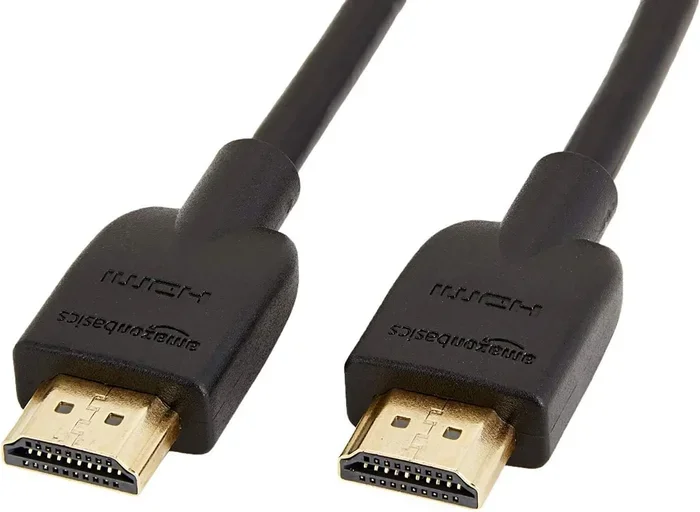
Flat HDMI cables are the most popular choice for in-wall installations. They are thin and flexible, which makes them easy to slide through wall cavities and tight spaces. Their flat shape also means they take up less room behind drywall. This is a big plus when you are working with narrow wall spaces.
Flat cables are great for HDMI cable routing behind a TV or along a wall stud. They bend easily around corners without kinking. Most flat HDMI cables come in lengths from 3 feet to 50 feet, giving you plenty of options for different room sizes.
In-Wall Rated HDMI Cables
In-wall rated HDMI cables carry a special certification. This rating means the cable has been tested to safely operate inside wall cavities. The insulation on these cables is thicker and more heat-resistant. It also meets fire safety standards required by most building codes.
You should always look for the CL2 or CL3 rating when buying an in-wall HDMI cable. CL2 and CL3 cables are designed for use in vertical shafts and hidden spaces where heat can build up. These are the safest choices for any concealed cable installation.
High-Speed HDMI Cables With Ethernet
If you want the best performance, go with a high-speed HDMI cable with Ethernet. These cables support 4K and even 8K resolutions. They also carry internet data through the HDMI connection. This is great if you have multiple devices connected to your TV or projector.
For home theater setup enthusiasts, high-speed cables ensure you get the best picture and sound quality. They future-proof your installation so you can upgrade devices without rewiring.
HDMI Over Ethernet Solutions
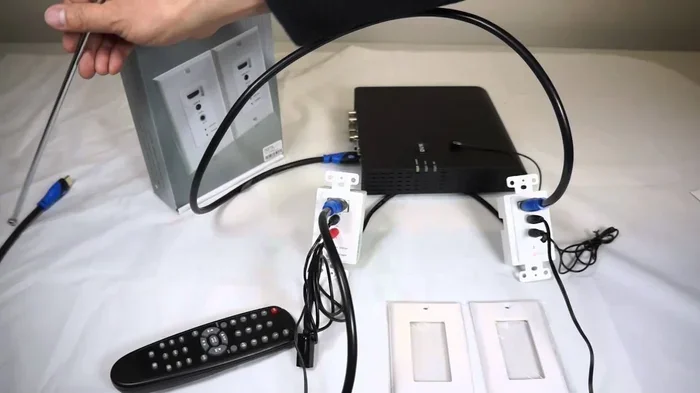
Another option is HDMI over Ethernet. This uses an HDMI extender that sends the signal through an Ethernet cable. You run a thin Ethernet cable inside the wall instead of a bulky HDMI cable. Then an extender box converts the signal back at the other end.
This method is perfect for long runs. Standard HDMI cables start to lose signal quality beyond 30 to 50 feet. But with an HDMI extender, you can run the signal 100 feet or more without any loss in quality.
Step-By-Step Guide To Running HDMI In A Wall
Running HDMI inside a wall is easier than most people think. With the right tools and a clear plan, you can complete the job in a few hours. Here is a simple guide to help you through the process.
Step 1: Plan Your Cable Route
Before you cut anything, plan where the cable will go. Decide where your TV will be mounted and where your AV equipment will sit. Use a stud finder to locate the wall studs and avoid cutting into them. You want to route the cable between studs through the wall cavity.
Mark your entry and exit points with a pencil. Make sure the route avoids electrical wires and plumbing. Use a stud finder with wire detection to be safe. Planning ahead saves time and prevents costly mistakes.
Step 2: Gather Your Tools And Materials
You will need a few basic tools for this job:
- In-wall rated HDMI cable or flat HDMI cable
- Drywall saw or jab saw
- Fish tape or fiberglass pull rod
- HDMI wall plate
- Screwdriver and drill
- Wire connectors or butt splices
- Drywall mud and sandpaper
- Paint to match the wall
Having everything ready before you start makes the process smooth and fast. You do not want to stop halfway through to find a missing tool.
Step 3: Cut The Access Holes
Use your drywall saw to cut small holes at your entry and exit points. The holes should be just big enough to fit your cable and fish tape through. Typical hole sizes are about 1 to 2 inches in diameter.
Cut one hole near your TV and another near your equipment area. If you are using a HDMI wall plate, cut the hole to match the plate size. Most wall plates require a 2-inch to 3-inch hole.
Step 4: Fish The Cable Through The Wall
This is the most important step. Feed the fish tape through one hole and pull it out the other end. Attach your HDMI cable to the fish tape using electrical tape or a pull grip. Then gently pull the cable through the wall cavity.
Go slow and steady. Do not yank the cable or force it through tight spots. Sharp bends can damage the cable and weaken the HDMI signal. If the wall cavity has insulation, use a lubricant like cable pulling gel to help the cable slide through smoothly.
Step 5: Connect And Test
Once the cable is through, connect it to your TV and your source device. Power on both devices and check for a clear picture and sound. Test all HDMI ports if you have a switch or splitter.
If the signal is not working, check for kinks or damaged connectors. A cable tester can help you identify any issues quickly. Fix any problems before you close up the wall.
Step 6: Close Up And Finish
After testing, secure the cable inside the wall using cable clips or straps. This prevents the cable from moving or shifting over time. Then use drywall mud to fill the holes and sand them smooth once dry.
Finally, paint the patched areas to match your wall. Install the HDMI wall plate over each access point. Your concealed cable installation is now complete and looks professional.
Common Problems And How To Avoid Them
Even with careful planning, in-wall HDMI installations can run into problems. Knowing what to watch for helps you avoid headaches down the road.
Signal Loss Over Distance
The most common issue with HDMI cable routing through walls is signal loss over long distances. Standard HDMI cables start to lose quality beyond 30 to 50 feet. If you need to run a cable longer than that, consider using an HDMI extender or switching to HDMI over Ethernet.
You can also use a powered HDMI booster or repeater. These devices amplify the signal and keep it strong over long runs. They are small and easy to hide behind your equipment.
Heat Buildup Inside The Wall
Cables inside walls have limited airflow. This can cause heat to build up around the cable over time. Using a non-in-wall-rated cable in this environment is risky. The insulation can melt or degrade, which creates a fire hazard.
Always use fire-rated HDMI cable or cables with CL2 or CL3 ratings. These cables are built to handle the heat inside wall cavities. They are the safest choice for any built-in TV wiring project.
Sharp Bends And Cable Damage
When you pull an HDMI cable through a wall, avoid sharp bends. Sharp bends can damage the internal wiring and cause signal problems. Keep your bends gentle and gradual. If the wall cavity has tight corners, use a flexible fish tape to guide the cable around them.
A good rule of thumb is to never bend an HDMI cable tighter than a radius of 1 inch. This keeps the internal structure intact and preserves the HDMI signal quality.
Interference From Other Wires
Running HDMI cables too close to electrical wires can cause interference. The electrical current can create electromagnetic interference that degrades your HDMI picture. Keep your HDMI cables at least 6 inches away from any electrical wiring.
If you must cross electrical wires, do so at a 90-degree angle. This minimizes the chance of interference and keeps your HDMI wall connection clean and clear.
Quick Tips For A Successful In-Wall HDMI Setup
Here are some quick tips that make the whole process easier and more reliable:
- Always buy extra cable length. It is better to have too much than too little. You can always trim the excess.
- Label both ends of the cable. This saves time when you are connecting devices behind the wall.
- Use a cable pull kit. It makes fishing cables through walls much faster and smoother.
- Test before you close up. Never seal the wall until you have confirmed the signal works perfectly.
- Check local building codes. Some areas require specific cable ratings or permits for in-wall wiring.
- Keep a diagram of your wiring. This helps if you ever need to troubleshoot or make changes later.
- Use HDMI wall plates for a clean finish. They cover the entry and exit points and look professional.
Is In-Wall HDMI Worth The Effort?
After reading through all the steps and tips, you might be wondering if HDMI go in wall setups are really worth it. The answer is a strong yes.
The visual improvement alone is reason enough. A room with hidden cables looks dramatically better than one with cables dangling behind the TV. Guests notice the difference, and it makes your space feel more polished and intentional.
Beyond looks, in-wall installation protects your investment. Your cables are safe from damage, and you do not have to worry about tripping over cords or dealing with tangled wires. The HDMI signal quality remains strong when you use the right cable and follow proper installation steps.
The cost is also reasonable. You mainly need an in-wall rated cable, a few basic tools, and some time. Compared to the cost of a professional installer, a DIY HDMI wall installation can save you hundreds of dollars.
If you are planning a new home theater or upgrading your current setup, in-wall HDMI is one of the best decisions you can make. It is clean, safe, and long-lasting. Your future self will thank you every time you see that neat, cable-free wall.
HDMI Wall Installation Vs. Surface Cable Management
You might be wondering how in-wall installation compares to surface cable management. Both methods have their pros and cons. Here is a quick comparison to help you decide.
| Feature | In-Wall HDMI | Surface Cable Management |
|---|---|---|
| Aesthetics | Completely hidden | Visible cables on wall or floor |
| Installation Difficulty | Moderate to advanced | Easy and quick |
| Cost | Low to moderate | Low |
| Cable Protection | Excellent | Moderate |
| Signal Quality | Excellent with proper cable | Excellent |
| Flexibility For Changes | Difficult to modify | Easy to adjust |
As you can see, in-wall HDMI wins on looks and protection. Surface management wins on ease and flexibility. Choose the method that fits your needs and budget best.
Expert Insights On In-Wall HDMI
Professional installers agree that running HDMI inside a wall is one of the best upgrades for any home entertainment setup. The key is preparation and using the right materials.
“Always use in-wall rated cables,” says a certified home theater installer. “Non-rated cables can overheat inside wall cavities and create a real safety risk. The extra cost of a CL2 or CL3 rated cable is worth every penny.”
Another expert tip is to pre-wire your walls before closing them up during construction or renovation. This gives you the most flexibility and the cleanest possible result. If you are doing a retrofit, plan your access points carefully and use quality HDMI wall plates to keep the finish looking sharp.
Conclusion
Can HDMI go in a wall? Absolutely yes. With the right cable, proper tools, and careful planning, you can create a clean and safe in-wall HDMI installation that looks amazing and works perfectly. The process is straightforward and the results are well worth the effort.
Remember to always use in-wall rated HDMI cables and follow building safety guidelines. Avoid common mistakes like sharp bends, non-rated cables, and skipping signal tests. Take your time, plan your route, and enjoy the satisfaction of a professional-looking setup.
Whether you are building a new home theater or upgrading your current one, HDMI cable routing through walls is a game-changer. Your room will look cleaner, your cables will last longer, and your entertainment experience will be better than ever. Start your project today and enjoy the benefits of a concealed cable installation for years to come.
Frequently Asked Questions
Can Any HDMI Cable Go Inside A Wall?
No, not every HDMI cable is safe for inside-wall use. You should always use cables that are rated for in-wall installation, such as CL2 or CL3 rated cables. These cables have special insulation that handles heat buildup and meets fire safety standards. Using a non-rated cable inside a wall can be a fire hazard and may void your insurance.
Do I Need A Special HDMI Cable For Wall Installation?
Yes, you need an in-wall rated HDMI cable for safe installation. Flat HDMI cables are the most popular choice because they are thin and flexible. High-speed HDMI cables with Ethernet are also a great option if you want the best picture and sound quality. Always check the cable rating before you buy.
What Is The Maximum Distance For In-Wall HDMI?
A standard HDMI cable can run up to about 50 feet inside a wall before signal quality starts to drop. If you need to go longer than that, use an HDMI extender or HDMI over Ethernet solution. These devices boost the signal and allow you to run cables 100 feet or more without any loss in quality.
Can I Use An HDMI Extender For Wall Routing?
Yes, an HDMI extender is a great option for wall routing. It sends the HDMI signal through an Ethernet cable inside the wall, then converts it back at the other end. This method works well for long runs and keeps the cable run thin and easy to manage. It is one of the most popular solutions for concealed cable installations.
Will My HDMI Signal Get Weaker Inside A Wall?
Your HDMI signal should stay strong inside a wall if you use the right cable and avoid sharp bends. In-wall rated cables are designed to maintain signal quality over their rated distance. If you experience signal loss, check for kinks, damaged connectors, or cable runs that are too long for the cable type you are using.
How Do I Hide HDMI Cables Behind A TV?
The best way to hide HDMI cables behind a TV is to route them inside the wall using an in-wall HDMI kit. You cut small access holes, fish the cable through the wall cavity, and connect it at both ends. Then you close up the holes and install HDMI wall plates for a clean, finished look. This method completely hides the cables from view.
=== CONCLUSION ===
HDMI go in wall setups are safe, effective, and one of the best ways to improve the look and function of your entertainment area. By choosing the right in-wall HDMI cable, following proper installation steps, and avoiding common mistakes, you can create a professional-looking setup that lasts for years. Take your time, plan carefully, and enjoy the clean, cable-free result.