Can Wi Fi Name Be Hidden Everything You Need To Know
Yes, you can hide your WiFi name, also known as your SSID, from public view. This simple setting in your router can make your wireless network less visible to casual snoopers. However, hiding your SSID is not a silver bullet for network security and should be paired with strong WiFi encryption and other protective measures for real peace of mind.
Have you ever wondered if your wireless network name is visible to everyone within range? Maybe you live in a busy apartment building where dozens of WiFi networks pop up on your device. Or perhaps you are concerned about strangers seeing your home network and trying to access it. Either way, the question of whether you can hide your WiFi name comes up a lot.
The short answer is yes. You can absolutely hide your WiFi network name, also called the SSID (Service Set Identifier). Most modern routers give you the option to turn off SSID broadcast. When you do this, your network disappears from the list of available WiFi networks that people see on their phones and laptops. But there is much more to this topic than just flipping a switch. Let us walk through everything you need to know about hiding your WiFi name, why people do it, and whether it is worth the effort.
In this guide, we will cover exactly how hiding your SSID works, the pros and cons, step-by-step instructions for different router brands, and whether this practice actually keeps your wireless network safe. By the end, you will have a clear picture of what hiding your WiFi name can and cannot do for you.
Key Takeaways
- Hiding your WiFi name is possible: You can disable SSID broadcast through your router settings to make your network invisible to most users.
- It is not a strong security measure: Skilled attackers can still find a hidden SSID using freely available tools.
- It may cause connection hassles: Devices must manually enter the network name to connect, which can be annoying.
- Strong encryption matters more: Using WPA3 or WPA2 with a complex password is far more effective than hiding your SSID.
- Router settings vary: The steps to hide your SSID differ depending on your router brand and model.
- Guest networks are a better alternative: For most home users, a separate guest network with a simple password is more practical than hiding your main SSID.
📑 Table of Contents
- What Does It Mean to Hide Your WiFi Name?
- Why Do People Hide Their WiFi Name?
- How to Hide Your WiFi Name
- Does Hiding Your WiFi Name Actually Improve Security?
- Pros and Cons of Hiding Your WiFi Name
- When Should You Hide Your WiFi Name?
- Common Mistakes People Make When Hiding Their WiFi Name
- Quick Tips for Managing Your WiFi Network
- Frequently Asked Questions
- Final Thoughts
What Does It Mean to Hide Your WiFi Name?
Every wireless network has a name. This name is called the SSID or Service Set Identifier. When you set up a router, it usually broadcasts this name so that devices nearby can find it easily. Think of it like a store sign. The sign helps people find the store. Your SSID is like that sign for your wireless network.
When you hide your WiFi name, you are turning off that sign. The router stops sending out the SSID in its beacon frames. These are the small signals your router sends out regularly to announce its presence. Without the broadcast, your network simply does not show up in the list of available WiFi networks on other devices.
However, here is the important part. Hiding the SSID does not make your network invisible to everyone. It just makes it invisible to casual users. Anyone with the right tools and a little bit of technical knowledge can still detect a hidden network. We will get into that later in this article.
How SSID Broadcasting Works
Your wireless router sends out beacon frames about ten times per second. Each beacon frame contains the SSID, supported data rates, and other technical details. This is how your phone or laptop discovers available networks. When you disable SSID broadcast, your router still sends beacon frames. But it leaves the SSID field blank or sets it to null. Most devices ignore networks with no visible name in their scan results.
Some people confuse hiding the SSID with turning off the router entirely. Your router is still running. It is still broadcasting a signal. It is still providing internet access to any device that knows the network name and password. You are simply removing the network from the list of visible options.
Why Do People Hide Their WiFi Name?
There are several reasons why someone might want to hide their WiFi network name. Let us look at the most common motivations behind this practice.
Privacy Concerns
Many people feel uncomfortable with their network name being visible to neighbors and passersby. Your SSID can reveal personal information. For example, if your network is named “SmithFamilyWiFi,” anyone nearby knows there is a Smith family at that address. Hiding the name removes this easy identifier from public view.
Security Through Obscurity
Some users believe that hiding the SSID adds a layer of network security. The idea is simple. If nobody can see your network, they cannot target it. This concept is known as security through obscurity. While it is not foolproof, it does reduce the number of casual attacks. Most hackers scan for visible networks first. A hidden network requires extra effort to find, which may deter less determined intruders.
Reducing Network Clutter
In dense living areas like apartment complexes or office buildings, the list of visible WiFi networks can be overwhelming. Hiding your network name keeps it off that list. This is especially helpful if you have multiple routers or access points in your home and do not want every device automatically connecting to the wrong one.
Preventing Unwanted Connections
When your network is visible, strangers might try to connect to it. They could use your bandwidth, access shared files, or in worst-case scenarios, engage in illegal activity through your IP address. Hiding the SSID makes it harder for opportunistic users to find and connect to your network without permission.
How to Hide Your WiFi Name
Hiding your SSID is straightforward, but the exact steps depend on your router brand. Below, we will walk you through the general process and provide specific instructions for popular router manufacturers.
Step-by-Step General Guide
Follow these steps to hide your WiFi network name on most routers:
- Open a web browser on a device connected to your router.
- Type your router’s IP address into the address bar. Common addresses are 192.168.0.1 or 192.168.1.1.
- Log in with your admin username and password. Check the sticker on the back of your router if you have not changed these.
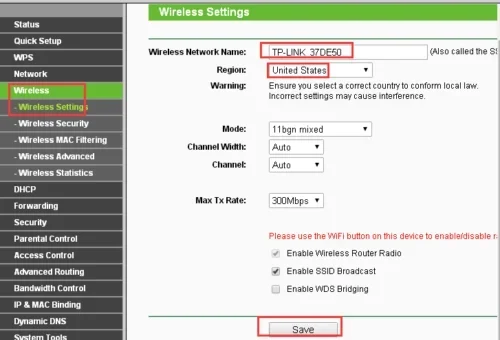
- Navigate to the wireless settings or WiFi settings section.
- Look for an option called “SSID Broadcast,” “Visibility Status,” or “Hide Network.”
- Toggle the setting to disable or enable hiding.
- Save your changes and restart your router if prompted.
Instructions for Popular Router Brands
Netgear Routers: Log into the admin panel at routerlogin.net. Go to Wireless Settings under the Advanced tab. Check the box that says “Disable SSID Broadcast.” Click Apply to save.
TP-Link Routers: Access the router at 192.168.0.1 or tplinkwifi.net. Go to Wireless Settings. Find the “Hide SSID” option and set it to Enable. Save and reboot.
ASUS Routers: Open the ASUS router app or go to router.asus.com. Go to Wireless Settings. Under the General tab, toggle “Hide SSID” to on. Apply the settings.
Linksys Routers: Log in at linksyssmartwifi.com. Go to Wireless Settings. Under the Basic Wireless Settings tab, check “Disable SSID Broadcast.” Save your settings.
Google Nest WiFi: Open the Google Home app. Tap on your router. Go to Settings and then Wi-Fi settings. Toggle “Visible network” off. This hides your SSID from nearby devices.
What Happens After You Hide the SSID?
Once you hide your WiFi name, your network will no longer appear in the list of available networks on any device. To connect, you must manually add the network. On most devices, you go to WiFi settings, select “Add Network” or “Join Hidden Network,” and then enter the SSID, security type, and password. After that, the device remembers the network and connects automatically in the future.
Does Hiding Your WiFi Name Actually Improve Security?
This is the million-dollar question. The short answer is no, not really. Hiding your SSID gives you a false sense of security. Let us explain why.
The Truth About Hidden SSIDs
When you hide your SSID, your router still sends out beacon frames. These frames contain useful information for anyone who knows how to look. Even though the SSID field is blank, the wireless network still exists. Tools like Wireshark, Aircrack-ng, and Kismet can detect hidden networks by analyzing these beacon frames and capturing probe requests from devices that are already connected.
Here is how it works. When your phone connects to a hidden network, it sends out probe requests asking, “Is anyone there?” These probe requests contain the SSID in plain text. Any attacker running a packet sniffer can capture these requests and learn your network name. Once they know the SSID, they can attempt to crack your password just like they would with a visible network.
What Experts Say About SSID Hiding
Most cybersecurity experts agree that hiding your SSID is not a meaningful security measure. The Wireless Security Alliance and many IT professionals recommend focusing on strong encryption and complex passwords instead. Hiding the SSID might stop a neighbor from casually connecting to your network, but it will not stop a determined attacker.
In fact, some security researchers argue that hiding your SSID can actually make your network less secure. When devices search for hidden networks, they send out probe requests that include the SSID. These requests are unencrypted and can be intercepted. This behavior can actually make it easier for attackers to identify your network and target it.
What Actually Keeps Your Network Secure
If hiding the SSID is not enough, what should you do? Here are the practices that truly protect your wireless network:
- Use WPA3 encryption: This is the latest and most secure WiFi encryption standard. If your router does not support WPA3, use WPA2 at minimum.
- Create a strong password: Use a long, complex password with a mix of uppercase letters, lowercase letters, numbers, and symbols.
- Keep your router firmware updated: Manufacturers release updates that patch security vulnerabilities. Check for updates regularly.
- Disable WPS: Wi-Fi Protected Setup has known vulnerabilities that attackers can exploit. Turn it off in your router settings.
- Use a guest network: For visitors and IoT devices, set up a separate guest network with its own password.
- Enable the firewall: Most routers have a built-in firewall. Make sure it is turned on.
Pros and Cons of Hiding Your WiFi Name
Every networking decision has trade-offs. Let us look at the advantages and disadvantages of hiding your SSID so you can make an informed choice.
Pros
- Reduces visibility to casual users and neighbors
- Decreases the number of unauthorized connection attempts
- Can help in environments with many overlapping networks
- Adds a small layer of obscurity to your network security
- Prevents your network name from appearing in public WiFi lists
Cons
- Does not provide real protection against skilled attackers
- Makes connecting new devices more tedious
- Can cause connection issues with some smart home devices
- May interfere with WiFi mesh systems and range extenders
- Creates a false sense of security that leads to neglecting stronger measures
- Probe requests from hidden networks can actually expose your SSID
When Should You Hide Your WiFi Name?
Despite its limitations, there are situations where hiding your SSID makes sense. Let us explore when this practice is most useful.
In Apartment Buildings
If you live in an apartment building with dozens of visible networks, hiding yours can reduce confusion. It also adds a small barrier against neighbors who might try to piggyback on your connection. In this scenario, hiding the SSID is more about convenience and mild security than robust protection.
For Home Offices
People who work from home often handle sensitive data. Hiding the SSID, combined with strong encryption and a VPN, can be part of a layered security approach. It is not the strongest measure on its own, but it contributes to an overall security posture.
In Business Environments
Some small businesses hide their SSIDs to prevent customers and visitors from connecting to the main network. In these cases, hiding the name is often paired with a separate guest network and strict access controls.
Common Mistakes People Make When Hiding Their WiFi Name
Even well-intentioned users make mistakes when trying to hide their WiFi network name. Here are the most common pitfalls to avoid.
Forgetting to Save Settings
After you change the SSID broadcast setting, always click Save or Apply. Many users change the setting but forget to save, so the network remains visible. Always reboot your router after making changes to ensure they take effect.
Not Documenting the SSID
Once you hide your network name, you need to remember it to connect new devices. Write it down in a secure place or use a password manager. If you forget the SSID, you will have to log back into the router to find it.
Relying Solely on SSID Hiding
This is the biggest mistake of all. Hiding your SSID should be just one small part of your security strategy. Relying on it alone leaves your network vulnerable. Always pair it with strong encryption, complex passwords, and regular firmware updates.
Ignoring Smart Device Compatibility
Many smart home devices, including smart speakers, cameras, and thermostats, struggle to connect to hidden networks. Some simply cannot detect them at all. Before hiding your SSID, check that all your connected devices can handle a hidden network.
Using the Same SSID on Multiple Routers
If you have a mesh WiFi system or multiple routers, using the same hidden SSID can cause confusion. Devices may not know which access point to connect to. Use unique SSIDs for each access point or rely on your mesh system’s seamless roaming features.
Quick Tips for Managing Your WiFi Network
Whether you decide to hide your SSID or not, here are some quick tips to keep your wireless network running smoothly and securely.
- Change your default admin password: Most routers ship with generic admin credentials. Change them immediately to prevent unauthorized access to your settings.
- Regularly review connected devices: Check your router’s admin panel to see which devices are connected. If you spot something unfamiliar, change your password right away.
- Use MAC address filtering: This feature allows only specific devices to connect to your network. It adds another layer of control, though it is not foolproof.
- Schedule WiFi downtime: Some routers let you turn off the wireless signal during hours you do not need it. This reduces your exposure window.
- Place your router centrally: This reduces signal leakage outside your home, making it harder for outsiders to even detect your signal.
- Use a VPN on all devices: A VPN encrypts all traffic leaving your devices, adding protection even if someone does access your network.
Frequently Asked Questions
Can hiding my WiFi name prevent hackers from accessing my network?
No, hiding your SSID alone cannot stop a skilled hacker. Tools like packet sniffers can detect hidden networks by capturing probe requests and analyzing beacon frames. You should always use strong encryption like WPA3, a complex password, and other security measures to truly protect your wireless network.
Will hiding my WiFi name affect my internet speed?
No, hiding your SSID does not affect your internet speed in any way. The router still broadcasts the same signal strength and bandwidth. The only difference is that your network name will not appear in the list of available WiFi networks on nearby devices.
Can smart home devices connect to a hidden WiFi network?
Some can, but many cannot. Smart devices like smart plugs, cameras, and light bulbs often need to scan for available networks during setup. A hidden SSID may not appear in their scan results. You may need to manually enter the network name and password, and some devices simply do not support hidden networks at all.
Is it better to hide my WiFi name or use a guest network?
For most home users, a guest network is more practical than hiding the main SSID. A guest network gives visitors internet access without exposing your primary network and shared files. It also keeps your smart home devices separate from guest connections. Use both features together for the best results.
How do I find my hidden WiFi name if I forget it?
Log into your router’s admin panel using its IP address in a web browser. Navigate to the wireless settings section. The SSID will be listed there, even though it is hidden from broadcasts. You can also check the original router documentation or the sticker on the router itself, as the default SSID is often printed there.
Does hiding the SSID help with WiFi interference in apartment buildings?
Not directly. WiFi interference is caused by overlapping channels and signal congestion, not by visible network names. However, hiding your SSID does reduce the number of networks your device scans for, which can slightly improve device performance in crowded WiFi environments.
Final Thoughts
So, can WiFi name be hidden? Absolutely. It is a simple setting available on virtually every router on the market today. You can turn off SSID broadcast and make your network invisible to casual users. It takes just a few minutes and requires no special equipment.
But here is the real takeaway. Hiding your SSID is not a substitute for proper network security. It is a small convenience feature that offers minimal protection on its own. If you truly want to secure your wireless network, focus on what matters most. Use WPA3 or WPA2 encryption. Set a long, complex password. Keep your router firmware up to date. Disable WPS. And consider using a guest network for visitors and smart devices.
Think of hiding your SSID as locking your front door but leaving the windows open. It is a step in the right direction, but it is not enough on its own. Combine it with stronger security practices, and you will have a much safer WiFi network for your home or office.
Ultimately, the decision to hide your WiFi name comes down to your personal comfort level and your specific situation. If you live in a densely populated area and want a little extra peace of mind, go ahead and hide it. Just do not rely on it as your only line of defense. Take the full steps to protect your network, and you will be in great shape.