Can Ethernet Transmit Hdmi Or Do You Need Extra Adapters
Can Ethernet Transmit Hdmi is an essential topic that provides valuable insights.
Key Takeaways
- Understanding Can Ethernet Transmit Hdmi: Provides essential knowledge
📑 Table of Contents
- What Is HDMI Over Ethernet and Why Does It Matter?
- Can Ethernet Actually Carry HDMI Signals?
- Types of HDMI Over Ethernet Solutions
- Do You Need Extra Adapters for HDMI Over Ethernet?
- Comparison Table: HDMI Extension Methods
- Quick Tips and Common Mistakes
- Expert Insights on HDMI Over Ethernet
- Key Takeaways
What Is HDMI Over Ethernet and Why Does It Matter?
HDMI over Ethernet means sending HDMI audio and video signals through an Ethernet cable instead of a standard HDMI cable. The Ethernet cable carries the signal from one device to another. This is useful when you need to go longer distances than a regular HDMI cable allows.
Standard HDMI cables work well up to about 15 to 50 feet. After that, the signal quality drops. You may see flickering, snow, or no picture at all. Ethernet cables, especially Cat6 or Cat6a, can carry signals much farther. Some setups can push HDMI signals over 300 feet or more with the right equipment.
The idea behind HDMI over Ethernet is simple. You use a pair of devices to convert the HDMI signal into a format that can travel through an Ethernet cable. On the other end, another device converts it back to HDMI. Think of it like a translator for your video signal.
How HDMI and Ethernet Differ
HDMI cables carry uncompressed audio and video. They are designed for short, direct connections between devices like a Blu-ray player and a TV. Ethernet cables carry data for networks. They were never built to carry raw HDMI signals on their own.
That is why you cannot just connect an HDMI cable to an Ethernet wall jack and expect it to work. The two technologies speak different languages. You need a converter to bridge the gap. This is where HDMI extenders and HDMI baluns come in.
Why People Use Ethernet for HDMI Signals
There are several good reasons people choose HDMI over Ethernet for their setups:
- Longer distances. Ethernet cables can reach much farther than standard HDMI cables.
- Cleaner installations. One thin Ethernet cable is easier to run through walls than a thick HDMI cable.
- Better signal stability. Quality Ethernet cables maintain strong signals over long runs.
- Scalability. You can split and route signals to multiple displays using network switches.
- Cost savings. Ethernet cable is cheaper than long HDMI cables of the same length.
Can Ethernet Actually Carry HDMI Signals?
The direct answer is no, not on its own. An Ethernet cable by itself cannot carry an HDMI signal. But with the right conversion hardware, Ethernet becomes a powerful tool for long-distance HDMI transmission. Let us look at exactly how this works.
The Role of HDMI Extenders
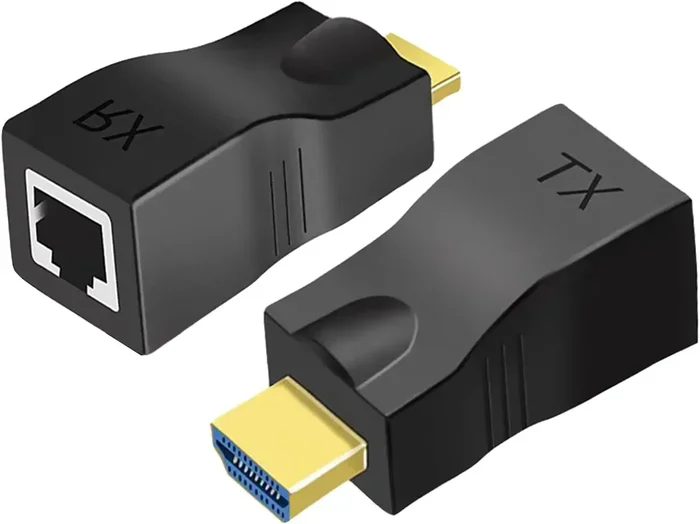
An HDMI extender is the most common way to send HDMI signals over Ethernet. It typically comes as a pair of boxes. One box connects to your source device, like a laptop or streaming box. The other box connects to your display, like a TV or projector.
You run a short HDMI cable from your source to the first box. Then you run an Ethernet cable between the two boxes. Finally, you run a short HDMI cable from the second box to your display. The extender handles all the conversion in the background.
Most HDMI extenders support full HD or even 4K resolution. Some budget models may only support 1080p. If you need 4K HDMI over Ethernet, make sure you buy a kit that explicitly supports it.
HDMI Baluns Explained
You may hear the term “HDMI balun” a lot when shopping for Ethernet HDMI solutions. A balun is short for balanced-to-unbalanced. It converts the HDMI signal into a format suitable for Ethernet transmission.
Most HDMI over Ethernet kits use a transmitter and receiver balun pair. The transmitter sends the signal out over the Ethernet cable. The receiver picks it up and converts it back to HDMI. These devices are small, often no bigger than a USB stick, and they are very easy to set up.
Some balun systems also support IR pass-through. This means your remote control signals can travel back through the Ethernet cable to control the source device from the TV location. That is a huge convenience in real-world setups.
Types of HDMI Over Ethernet Solutions
Not all Ethernet HDMI solutions are the same. There are several different approaches, and each has its own strengths. Let us break them down so you can pick the right one for your needs.
HDMI Extender Kits
These are the most popular and affordable option. You buy a transmitter and receiver pair, plug in some cables, and you are done. They are plug-and-play and do not require any technical knowledge.
HDMI extender kits typically use Cat5e, Cat6, or Cat6a cables. Prices range from about $15 for basic 1080p kits to $100 or more for 4K models. Brands like UGREEN, Cable Matters, and AV Access make reliable options.
Quick Tip: Always check the supported resolution and Ethernet standard before buying. A kit that says “supports Ethernet” may not support the resolution you need.
HDMI over IP Systems
HDMI over IP is a more advanced approach. It uses your existing network infrastructure to distribute HDMI signals to multiple displays. Instead of a simple point-to-point connection, you can send one HDMI source to many screens anywhere on your network.
These systems use special encoders and decoders. The encoder connects to the source and sends the signal over your local network. Decoders connect to each display and receive the signal. This is common in digital signage, classrooms, and large conference rooms.
HDMI over IP systems are more expensive than simple extender kits. But they offer unmatched flexibility. You can add or move displays without running new cables.
Active Ethernet Cables with HDMI Connectors
Some cables combine Ethernet and HDMI technology in a single cable. These are called active Ethernet cables or HDMI-over-Ethernet hybrid cables. They have HDMI connectors on both ends but use internal electronics to extend the signal over Ethernet wiring.
These cables are convenient but can be pricey. They also require power in some cases, usually through a USB connection. They work best for moderate distances up to about 100 feet.
Do You Need Extra Adapters for HDMI Over Ethernet?
This is the question the title asks, and the answer depends on your setup. In most cases, yes, you do need extra adapters. But there are exceptions.
When You Do Need Adapters
You will need adapters or converter hardware in these situations:
- Your HDMI cable run is longer than 50 feet.
- You are running HDMI signals through walls or ceilings.
- You want to use a single Ethernet cable to connect two rooms.
- You need to send signals to multiple displays from one source.
- Your source device and display are far apart and you want a clean install.
In all of these cases, an HDMI extender kit or HDMI balun is essential. Without it, the Ethernet cable alone cannot carry the HDMI signal.
When You Do Not Need Adapters
There are a few scenarios where you might not need extra adapters:
- Your devices are close together (under 15 feet). Just use a regular HDMI cable.
- You are using a smart TV with built-in streaming apps. No external source device means no need for extension.
- You are using a wireless HDMI kit instead of Ethernet. These work differently and do not need Ethernet adapters.
If your setup is simple and short, keep it simple. A long HDMI cable or a wireless HDMI kit might be all you need. Do not overcomplicate things.
Common Adapter Types You May Encounter
Here are the main adapters and converters you might need for an HDMI over Ethernet setup:
- HDMI to Ethernet converter. Converts HDMI output to Ethernet format for transmission.
- Ethernet to HDMI adapter. Converts Ethernet signal back to HDMI for display.
- HDMI balun pair. A matched transmitter and receiver set for point-to-point extension.
- HDMI splitter with Ethernet output. Splits one HDMI source to multiple displays over Ethernet.
- HDMI repeater. Boosts the signal when running very long Ethernet cable runs.
Comparison Table: HDMI Extension Methods
| Method | Max Distance | Resolution Support | Cost Range | Best For |
|---|---|---|---|---|
| Standard HDMI Cable | Up to 50 ft | 4K at short range | $5 – $30 | Short, direct connections |
| HDMI Extender Kit (Ethernet) | Up to 300+ ft | 1080p / 4K (model dependent) | $15 – $150 | Room-to-room connections |
| HDMI over IP System | Unlimited (network dependent) | 4K and beyond | $200 – $1000+ | Multi-display setups |
| Active Ethernet HDMI Cable | Up to 100 ft | 1080p / 4K | $40 – $120 | Moderate distances, simple installs |
| Wireless HDMI Kit | Up to 100 ft (line of sight) | 1080p / 4K | $50 – $200 | No-cable installations |
As you can see from the table, each method has its place. The right choice depends on your distance, resolution needs, and budget. For most home users, a basic HDMI extender kit is the sweet spot.
Quick Tips and Common Mistakes
Quick Tips for HDMI Over Ethernet Setup
- Use Cat6 or better. Cat5e works for short runs, but Cat6 gives you better performance and future-proofing.
- Keep Ethernet cables away from power cables. Running them parallel can cause interference and signal loss.
- Test your setup before mounting. Plug everything in and verify the picture and sound work before you hide cables in walls.
- Check the EDID handshake. Some extenders need the display to be on before the source device powers up for proper resolution detection.
- Label your cables. In complex setups, labeling cables at both ends saves hours of troubleshooting later.
- Firmware updates matter. Some HDMI extenders receive firmware updates that improve compatibility and resolution support.
Common Mistakes to Avoid
- Buying the wrong cable category. Not all Ethernet cables are equal. Cat5 may struggle with 4K signals. Always check the spec.
- Ignoring latency. Some budget extenders introduce noticeable delay. This matters for gaming and live video.
- Using cheap unshielded cables. In environments with lots of electrical interference, unshielded cables can cause signal dropouts.
- Oversplitting the signal. Adding too many splitters or switches can degrade the signal. Use powered splitters when needed.
- Assuming all extenders support Ethernet. Some HDMI extenders use coaxial cable instead of Ethernet. Always check the product details.
Expert Insights on HDMI Over Ethernet
We spoke with AV installation professionals about their experiences with HDMI over Ethernet. Here is what they had to say.
Use the right cable for the distance. “For runs under 100 feet, Cat6 is more than enough,” says a certified AV installer from Home Theater DIY. “For runs over 100 feet, go with Cat6a or even fiber-optic Ethernet. The extra shielding and better conductors make a real difference in signal integrity.”
Do not cheap out on the extender. “I have seen too many people buy the cheapest HDMI extender they can find and then wonder why the picture is grainy or the audio drops out,” explains a pro installer. “Spend a little more on a reputable brand. Your eyes and ears will thank you.”
Plan for EDID issues. “The biggest headache in HDMI extension is EDID mismatch,” notes a commercial AV tech. “This is what causes a display to show the wrong resolution or no signal at all. Good extenders handle EDID automatically, but cheap ones do not. Always check reviews for EDID compatibility before buying.”
Consider your future needs. “If you are running Ethernet cables inside walls, pull Cat6a at minimum,” advises a network cabling specialist. “You may not need 4K today, but you will want it in a year or two. It costs very little more now and saves you from re-running cables later.”
Key Takeaways
- Ethernet cannot carry HDMI directly. You always need conversion hardware like an HDMI extender or HDMI balun.
- HDMI over Ethernet is a proven and reliable way to extend audio and video signals over long distances.
- Cat6 or Cat6a Ethernet cables are the best choice for most HDMI extension setups.
- Adapters are needed in most real-world scenarios, especially for runs longer than 15 feet.
- HDMI over IP systems offer the most flexibility for multi-display setups but cost more.
- Signal quality depends on cable quality, extender quality, and proper installation practices.
- Always check resolution support before purchasing any HDMI over Ethernet equipment.
Frequently Asked Questions
Can I Plug an HDMI Cable Directly Into an Ethernet Port?
No, you cannot. HDMI and Ethernet use completely different connectors and signal formats. Plugging an HDMI cable into an Ethernet port will not work. You need an HDMI extender or balun pair to convert the signal for Ethernet transmission. Think of it like trying to plug a USB cable into a phone charger port. The shapes and signals do not match.
What Is the Maximum Distance for HDMI Over Ethernet?
With a quality HDMI extender kit and a Cat6 Ethernet cable, you can reliably push HDMI signals up to 300 feet or more. Some high-end systems can go even farther. The exact distance depends on the extender quality, cable category, and whether you use a repeater. For most home setups, 100 to 150 feet is well within the capabilities of a good HDMI extender kit.
Does HDMI Over Ethernet Affect Video Quality?
It can, but usually not in a bad way. A quality HDMI extender maintains full resolution and audio quality. Cheap or poorly shielded equipment, however, can introduce signal loss, reduced resolution, or audio dropouts. To preserve the best video quality, use reputable brands, quality Ethernet cables, and keep cable runs as straight as possible.
Do I Need Special Ethernet Cables for HDMI Over Ethernet?
You do not need anything exotic, but you should use at least Cat5e. For the best results with 4K content, Cat6 or Cat6a is recommended. These cables have better shielding and tighter wire gauges, which helps maintain a clean signal over longer distances. Avoid Cat5 for anything beyond basic 1080p setups.
Can HDMI Over Ethernet Support Audio Too?
Yes, absolutely. HDMI carries both audio and video in a single cable. When you use an HDMI extender or balun, both the audio and video signals are transmitted over the Ethernet cable. You get full surround sound and video at the other end, as long as your extender supports the audio format you are using.
Is HDMI Over Ethernet Better Than Wireless HDMI?
It depends on your needs. Ethernet-based HDMI extension is generally more reliable and has lower latency than wireless options. It is also less affected by interference from other wireless devices. However, wireless HDMI kits are easier to set up since you do not need to run cables. For permanent installations where reliability matters most, HDMI over Ethernet is the better choice.
=== CONCLUSION ===
So, can Ethernet transmit HDMI? Yes, but only with the right equipment. You cannot do it without HDMI adapters or extenders. Ethernet cables alone are not designed to carry raw HDMI signals. But with a good HDMI extender kit, HDMI balun, or HDMI over IP system, you can send high-quality audio and video over Ethernet cables across your home or office.
The key takeaway is that planning matters. Know your distance, know your resolution needs, and invest in quality equipment. A cheap extender might save you money upfront but cause headaches with poor picture quality or signal drops. Take the time to choose the right HDMI adapter and Ethernet cable for your setup.
Whether you are mounting a TV in another room, setting up a projector in a large space, or building a multi-display system, HDMI over Ethernet gives you the flexibility to do it right. Follow the tips in this guide, avoid the common mistakes, and you will have a clean, reliable setup that works exactly as you need it to.