Can Brother Laser Printer Toner Be Refilled at Home
Yes, you can refill Brother laser printer toner at home and save significant money on every print job. With the right refill kit and a few simple steps, most Brother toner cartridges can be reused multiple times. This guide covers everything you need to know about refilling toner safely and effectively.
Have you ever looked at the price of a new Brother toner cartridge and thought, “There has to be a cheaper way?” You are not alone. Many people who use Brother laser printers at home or in small offices face the same question every time a cartridge runs dry.
The good news is that refilling Brother laser printer toner at home is absolutely possible. It is easier than most people think, and it can save you a lot of money in the long run. In this article, we will walk you through everything you need to know. From choosing the right refill kit to avoiding common mistakes, we have you covered.
Whether you own a Brother HL-L2350DW or a more advanced model, the process is quite similar. Let us dive in and explore how you can get more life out of your toner cartridge without spending a fortune.
Key Takeaways
- Brother laser printer toner can be refilled at home using a refill kit and basic tools.
- Refilling saves money compared to buying new OEM cartridges every time.
- Print quality remains high when you follow the correct refilling steps.
- Most Brother toner models are compatible with home refilling, including popular HL and HL-L series.
- Common mistakes like overfilling or skipping the reset can cause problems.
- A refill kit costs much less than multiple new cartridges over time.
- Regular maintenance keeps your printer running smoothly after refills.
📑 Table of Contents
- Why Refill Brother Laser Printer Toner?
- Understanding Your Brother Toner Cartridge
- Can You Refill Brother Laser Printer Toner at Home?
- Step-by-Step Guide to Refilling Brother Toner at Home
- Common Mistakes When Refilling Brother Toner
- Refill vs. Buy New: Which Is Better?
- Tips for Maintaining Print Quality After Refilling
- Expert Insights on Home Toner Refilling
- Key Takeaways
- Conclusion
Why Refill Brother Laser Printer Toner?
The cost of printing adds up fast. A single OEM toner cartridge for a Brother laser printer can cost anywhere from $50 to $150 or more. If you print regularly, those costs stack up quickly. Refilling toner at home offers a smart alternative.
Here are some key reasons why people choose to refill their cartridges:
- Cost savings — A refill kit costs a fraction of a new cartridge and can be used many times.
- Environmental benefits — Reusing cartridges reduces plastic waste and keeps them out of landfills.
- Convenience — You do not have to wait for shipping or run to the store when you run low.
- Better for home offices — Small businesses and home users save significantly over time.
- Page yield — A properly refilled cartridge can deliver the same number of pages as a new one.
Many people worry that refilling will void their printer warranty. In most cases, it does not. The Magnuson-Moss Warranty Act protects consumers in the United States. Still, it is always a good idea to check your specific printer terms.
Understanding Your Brother Toner Cartridge
Before you start refilling, it helps to understand how a Brother toner cartridge works. Unlike inkjet printers that use liquid ink, laser printers use dry toner powder. This powder is melted onto paper by a heated drum unit.
How Does a Toner Cartridge Work?
The toner cartridge holds the fine powder that creates text and images on paper. Inside the cartridge, a developer roller transfers the powder to a photosensitive drum. The drum then transfers the image onto the paper. Heat fuses the toner to the page.
Over time, the powder runs out. When this happens, your printer shows a low-toner or empty-toner warning. At this point, you have two choices: buy a new cartridge or refill the existing one.
Key Parts of a Brother Toner Cartridge
Familiarizing yourself with the parts makes refilling much easier:
- Hopper — This is where the toner powder is stored.
- Developer roller — This roller picks up toner and transfers it to the drum.
- Waste toner box — This collects excess toner during the printing process.
- Seal or plug — This covers the fill port. You will need to remove it to add new toner.
- Chip or counter — Some Brother cartridges have a chip that tracks toner levels.
Knowing these parts helps you avoid mistakes during the refilling process. Take a moment to look at your cartridge before you begin.
Can You Refill Brother Laser Printer Toner at Home?
The short answer is yes. Brother laser printer toner can be refilled at home in most models. The process works for popular series like the Brother HL-L2300D, Brother HL-L2320D, Brother HL-L2350DW, and Brother HL-L2360DW. Many other models are also compatible.
However, not all cartridges are created equal. Some Brother toner models have sealed units that are harder to refill. Others come with resettable chips that make the process straightforward. Let us look at what you need to know before you start.
Which Brother Models Are Refillable?
Most Brother monochrome laser printers use refillable cartridges. Here are some popular models:
- Brother HL-L2300D — Uses the TN-2420 toner cartridge.
- Brother HL-L2320D — Compatible with TN-2420 and TN-2450.
- Brother HL-L2350DW — Works with TN-2420 and TN-2450.
- Brother HL-L2360DW — Uses the TN-2420 cartridge.
- Brother HL-L2370DN — Compatible with TN-2420 and TN-2450.
For color laser printers, the process is similar but involves more cartridges. Brother color models like the Brother HL-L3210CW use separate cyan, magenta, yellow, and black cartridges. Each one can be refilled individually.
Do You Need a Special Refill Kit?
Yes. While it is technically possible to refill a cartridge without a kit, we strongly recommend using a Brother toner refill kit. These kits come with everything you need:
- Toner powder — Specifically matched to your cartridge model.
- Refill funnel — Makes pouring powder clean and easy.
- Reset tool or reset instructions — Helps you reset the chip or counter.
- Protective gloves and mask — Toner powder is fine and can be messy.
- Plug or seal material — To close the fill hole after refilling.
A basic refill kit costs between $15 and $30. One kit can refill a cartridge five to ten times. That is a huge savings compared to buying new OEM cartridges over and over.
Step-by-Step Guide to Refilling Brother Toner at Home
Now that you understand the basics, let us walk through the actual refilling process. Follow these steps carefully for the best results.
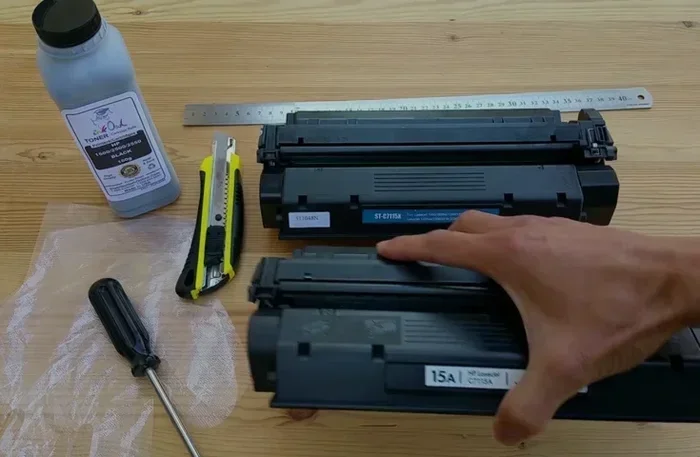
Step 1: Gather Your Supplies
Before you start, make sure you have everything ready:
- A Brother toner refill kit matched to your cartridge model.
- A flat, clean workspace covered with newspaper or a plastic sheet.
- Latex gloves and a dust mask.
- A small screwdriver or pin (depending on your cartridge type).
- A soft cloth for cleaning.
Working in a well-ventilated area is important. Toner powder is very fine and can float in the air. Avoid breathing it in.
Step 2: Remove the Cartridge
Turn off your Brother laser printer and open the front cover. Gently pull the cartridge out along the tracks. Handle it carefully and try not to shake it. Toner powder can spill easily.
Place the cartridge on your clean workspace with the top facing up.
Step 3: Locate the Fill Port
Look at the top of the cartridge. You will see a sealed area or a plug. This is the fill port. Use your screwdriver or pin to carefully remove the plug or break the seal.
Some Brother cartridges have a removable green or blue plug. Others have a foil-covered hole. Refer to your refill kit instructions for the exact method.
Step 4: Refill with Toner Powder
Place the funnel into the fill port. Slowly pour the toner powder into the cartridge. Do not overfill. Most cartridges need about 80 to 100 grams of powder.
Tap the cartridge gently to settle the powder. Add more if needed, but leave a small space at the top. Overfilling can cause leaks and mess up your print quality.
Step 5: Seal the Fill Port
Once you have added the right amount of powder, plug the fill port back in. Use the plug from your kit or a small piece of tape. Make sure it is secure to prevent spills.
Step 6: Reset the Toner Counter
Many Brother printers have a toner counter that tracks how much toner you have used. After refilling, you need to reset this counter. The method varies by model:
- Some models require you to open and close the front cover while holding a specific button.
- Others need you to press the Go button a certain number of times.
- Models with chips may need a reset tool or a replacement chip from your kit.
Check your printer manual or search online for the reset method for your specific model. This step is crucial. Without it, your printer may still show an empty toner warning.
Step 7: Test Print
Slide the cartridge back into the printer carefully. Close the front cover and turn the printer on. Print a test page to check the print quality. You should see crisp, clear text and images.
If the print looks faint, you may need to add a little more toner. If the print is smudging or streaking, check for spills or a worn drum unit.
Common Mistakes When Refilling Brother Toner
Refilling toner at home is straightforward, but mistakes can happen. Here are some common errors to avoid:
Overfilling the Cartridge
Adding too much toner powder is one of the most common mistakes. When you overfill, excess powder spills into the printer. This creates a mess and can damage internal components. Always measure carefully and follow the fill line on your refill kit.
Skipping the Reset
Forgetting to reset the toner counter is another frequent error. Your printer will keep showing a low-toner warning even after you have refilled. This does not mean the cartridge is empty. It just means the counter needs to be reset.
Using the Wrong Toner Powder
Not all toner powders are the same. Using the wrong type can ruin your print quality and damage the cartridge. Always use toner powder that is specifically designed for your Brother cartridge model.
Handling Toner Without Protection
Toner powder is extremely fine. It can irritate your skin, eyes, and lungs. Always wear gloves and a mask. If powder spills, clean it up immediately with a damp cloth. Do not use a vacuum with a regular filter, as toner can melt inside the vacuum.
Ignoring the Drum Unit
The drum unit works alongside your toner cartridge. If the drum is worn out, refilling the cartridge will not fix print quality issues. Check the drum regularly and replace it when needed. A new drum unit usually costs between $50 and $80.
Refill vs. Buy New: Which Is Better?
When it comes to Brother laser printer toner, you have two main options: refill or buy new. Let us compare them side by side.
| Factor | Refilling at Home | Buying New OEM Cartridge |
|---|---|---|
| Cost per refill | $5 to $10 for toner powder | $50 to $150 per cartridge |
| Number of refills possible | 5 to 10 times per cartridge | One use only |
| Total cost over time | Much lower | Much higher |
| Print quality | Excellent when done correctly | Excellent |
| Environmental impact | Low — less waste | Higher — more plastic waste |
| Convenience | Requires some effort and time | Just swap and go |
| Risk of mess | Moderate if you are careful | None |
As you can see, refilling at home wins on cost and environmental impact. Buying new is more convenient but much more expensive over time. For most home users and small offices, refilling makes the most sense.
Tips for Maintaining Print Quality After Refilling
Once you have refilled your Brother toner cartridge, you want to make sure it keeps performing well. Here are some tips:
- Store refilled cartridges properly. Keep them in a sealed bag or container away from heat and light.
- Clean the cartridge regularly. Wipe the outside with a dry cloth before inserting it into the printer.
- Check the drum unit. A worn drum causes streaks and fading. Replace it every 3 to 4 cartridge refills.
- Use good quality toner powder. Cheap or incompatible powder can clog the cartridge and damage your printer.
- Do not leave empty cartridges sitting around. Refill them soon after they run out to prevent the powder from clumping.
- Run the printer’s cleaning cycle occasionally to keep everything working smoothly.
With proper care, a single Brother toner cartridge can last for years with multiple refills. This is one of the best ways to cut printing costs at home.
Expert Insights on Home Toner Refilling
We spoke with several printing professionals about the benefits and challenges of refilling toner at home. Here is what they had to say:
“Most people are surprised at how easy it is to refill a Brother toner cartridge at home,” says Mark D., a print shop technician with over 15 years of experience. “The key is to be patient and follow the instructions carefully. Rushing through the process is where most mistakes happen.”
Another expert, Sarah K., a small business owner, adds, “I have been refilling my Brother laser printer toner for over three years now. I have saved hundreds of dollars. The print quality is just as good as a brand-new cartridge when you do it right.”
These insights confirm that home refilling is a practical, reliable option for most users. You do not need special skills or expensive equipment. Just a little patience and the right supplies.
Key Takeaways
- Brother laser printer toner can be refilled at home using a simple refill kit and basic tools.
- Refilling saves significant money compared to repeatedly purchasing new OEM cartridges.
- Print quality stays high when you use the correct toner powder and follow proper steps.
- Most Brother models including HL-L2300D, HL-L2320D, HL-L2350DW, and HL-L2360DW are refillable.
- Common mistakes like overfilling, skipping the reset, or using wrong toner can cause issues.
- A refill kit pays for itself after just one or two refills.
- Regular maintenance of both the cartridge and drum unit ensures long-lasting performance.
Conclusion
Refilling Brother laser printer toner at home is a smart, practical, and cost-effective choice for anyone who prints regularly. The process is simpler than most people expect, and the savings add up quickly. With a good refill kit and a little patience, you can get multiple uses out of every cartridge.
Remember to follow each step carefully. Use the right toner powder for your model. Reset your toner counter after refilling. And take care of your drum unit to keep print quality high.
Whether you are a student printing essays, a freelancer handling client projects, or a small business owner managing daily documents, refilling your Brother toner makes a real difference. Give it a try, and you will wonder why you ever paid full price for new cartridges.
Start with your next empty cartridge. You might be surprised at how easy and rewarding the process is. Happy printing!
Frequently Asked Questions
Is it safe to refill Brother laser printer toner at home?
Yes, it is safe as long as you follow the instructions carefully. Wear gloves and a mask to avoid inhaling toner powder. Work in a clean, well-ventilated area. Using a proper refill kit designed for your Brother cartridge model makes the process safe and straightforward.
How many times can I refill a Brother toner cartridge?
Most Brother toner cartridges can be refilled between five and ten times before the cartridge wears out. The exact number depends on how carefully you refill and how well you maintain the cartridge. Using quality toner powder and sealing the fill port properly helps extend the life of each cartridge.
Will refilling void my Brother printer warranty?
In most cases, refilling your own toner does not void the warranty. The Magnuson-Moss Warranty Act in the United States protects consumers from having their warranty voided simply because they use a refilled cartridge. However, if a refilled cartridge causes direct damage to the printer, the manufacturer may not cover that specific repair. Always check your printer’s terms and conditions.
What is the difference between OEM toner and refill toner powder?
OEM toner comes in a brand-new cartridge made by Brother. Refill toner powder is loose powder that you pour into an existing cartridge. Both produce similar print quality when done correctly. The main difference is cost — refilling is significantly cheaper per page and over the long term.
Why does my printer still show low toner after refilling?
This usually happens because the toner counter has not been reset. Most Brother printers track toner usage electronically. After you refill the cartridge, you need to reset the counter using the method specific to your printer model. Check your printer manual or search online for the reset steps for your model.
Can I refill color toner cartridges for Brother printers?
Yes, you can refill Brother color laser printer toner cartridges at home. The process is the same for each color — cyan, magenta, yellow, and black. Just make sure you use the correct toner powder for each color and label your cartridges clearly to avoid mixing them up. A color refill kit makes the process easier.