Can Any Usb Cable Be Used For Charging Your Devices
Not all USB cables are created equal. Using the wrong cable can slow down charging, damage your device, or even pose a safety risk. This guide explains why cable type, quality, and standards matter, and shows you how to choose the right one for every device.
Can Any Usb Cable Be Used For Charging Your Devices
You plug in a cable and wait. But what if that cable is the wrong one? The short answer is no, not any USB cable can be used for charging your devices safely and efficiently. The cable you choose affects charging speed, device safety, and even battery health over time.
Many people grab whatever cable is handy. They assume all USB cables work the same. That assumption can lead to frustration. A device might charge slowly, not charge at all, or overheat. Understanding the differences between cable types, standards, and quality levels helps you avoid these problems. This article breaks down everything you need to know. You’ll learn how to pick the right cable for every gadget in your home.
Whether you have a smartphone, tablet, Bluetooth speaker, or camera, the cable matters. We’ll explore connector types, fast charging tech, and common mistakes. By the end, you’ll never grab the wrong cable again.
Key Takeaways
- Cable type matters: USB-A, USB-C, micro USB, and Lightning connectors each serve different devices and charging speeds.
- Quality and certification are crucial: Cheap or counterfeit cables can cause slow charging, overheating, or device damage.
- Fast charging requires the right gear: USB-C with Power Delivery, Qualcomm Quick Charge, or proprietary standards need compatible cables and chargers.
- Amperage and wattage drive speed: A cable’s ability to deliver current directly affects how fast your device charges.
- Length and gauge play a role: Longer or thinner cables increase resistance and can reduce charging efficiency.
- Always check device requirements: Matching the cable to your device’s charging standard ensures optimal performance.
📑 Table of Contents
- Why Not All USB Cables Are the Same
- Understanding USB Cable Types and Connectors
- How Charging Works: Amperage, Voltage, and Wattage
- Can You Use Any USB Cable for Fast Charging?
- Common Mistakes People Make with USB Cables
- How to Choose the Right USB Cable for Charging
- Expert Insights: What Manufacturers Want You to Know
- Key Takeaways
- Conclusion
Why Not All USB Cables Are the Same
USB cables look simple on the outside. Inside, they contain different wires, resistors, and chips. These components determine how much power a cable can carry. A basic charging cable might only support 500mA. A high-quality USB-C cable can handle 100 watts or more. That huge difference changes everything.
Here are the key factors that make cables different:
- Connector type: USB-A, USB-C, micro USB, Lightning, and proprietary shapes each fit specific devices.
- Wire gauge: Thicker wires carry more current with less resistance.
- Chip and resistor configuration: Some cables use e-markers to negotiate higher power with the charger.
- Cable standard: USB 2.0, USB 3.0, and USB 4 support different data and power profiles.
- Certification: Certified cables meet strict safety and performance rules.
Using a mismatched cable can cause slow charging or no charging at all. In rare cases, a poor-quality cable can damage your device’s battery or charging port. Always match the cable to your device’s needs.
The Truth About USB Cable Types
Different devices use different connectors. Let’s look at the most common types you’ll encounter.
- USB-A: The classic rectangular plug. Often found on chargers and older devices. It typically delivers up to 5 watts without special protocols.
- USB-B and micro USB: Common on older Android phones, printers, and external hard drives. micro USB is being phased out in favor of USB-C.
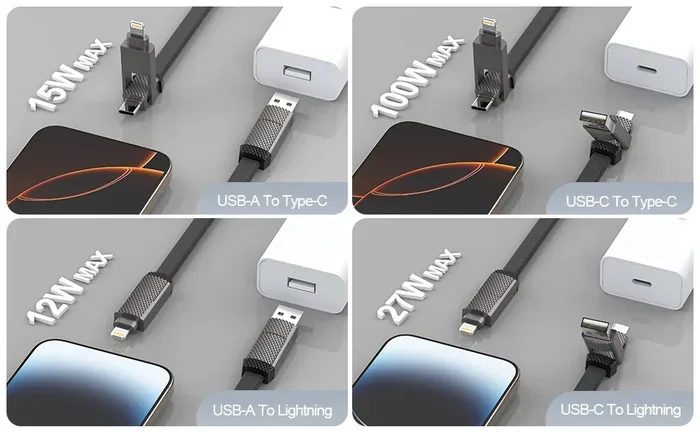
- USB-C: The modern reversible connector. Supports fast charging standards like USB Power Delivery and can carry up to 240 watts with the right equipment.
- Lightning: Apple’s proprietary connector for iPhones and iPads. It supports fast charging with USB-C to Lightning cables and a USB-C power delivery charger.
Each connector type has specific power and data capabilities. Plugging a USB-A cable into a USB-C port will often result in slow charging or no charging, depending on the device.
Understanding USB Cable Types and Connectors
Knowing which cable fits your device is just the start. You also need to understand what each connector can do. This section breaks down the most common cables and their typical use cases.
USB-A, USB-B, USB-C, and Lightning Explained
USB-A is the workhorse of the charging world. You’ll find it on wall chargers, car adapters, and USB hubs. It’s reliable but limited in speed and power. If you’re charging an old Bluetooth speaker or a basic e-reader, a USB-A cable works fine.
USB-B and micro USB cables were standard for years. Many Android phones used micro USB until the shift to USB-C. USB-B is more common in printers and external storage. These cables can still charge devices, but they lack the power delivery features of USB-C.
USB-C is the future. It’s small, reversible, and supports high wattage. A single USB-C cable can charge a laptop, phone, and tablet. It also carries data at speeds up to 40 Gbps with USB4. The key is to use a cable rated for the power you need.
Lightning cables are exclusive to Apple devices. They come standard with iPhones and iPads. For fast charging, you need a USB-C to Lightning cable and a USB-C charger that supports power delivery. Using an old USB-A to Lightning cable will charge your iPhone slowly.
Which Cable for Which Device?
Here’s a simple guide to match cables with devices.
- Modern Android phones: USB-C cable. Look for one that supports 18W or more for fast charging.
- iPhones (iPhone 8 and newer): USB-C to Lightning cable for fast charging. A USB-A to Lightning cable works for standard charging.
- Older Android phones: micro USB cable. Ensure it’s a quality cable to avoid slow charging.
- Tablets and laptops: USB-C cable with power delivery support. Check the wattage rating on your device.
- Accessories like earbuds and smartwatches: Often use USB-A or micro USB. Some use proprietary cables.
Using the right cable ensures your device charges at its designed speed. It also protects your battery from unnecessary stress.
How Charging Works: Amperage, Voltage, and Wattage
Charging speed depends on three simple measurements: voltage, current (amperage), and power (wattage). Voltage pushes the electricity. Amperage measures the flow. Wattage is the product of the two. A higher wattage means faster charging, but only if the cable can handle it.
Most standard USB cables provide 5 volts and 0.5 to 2 amps. That’s 2.5 to 10 watts. Fast charging protocols bump the voltage or amperage to deliver 15, 30, or even 100 watts. The cable must be able to carry that extra power without overheating.
What Determines Charging Speed?
Several factors work together to determine how fast your device charges.
- The charger’s output: A charger rated for 18 watts can push more power than one rated for 5 watts.
- The cable’s current rating: A cable rated for 3 amps can deliver more power than one rated for 2 amps.
- The device’s charging controller: Your phone or tablet negotiates the power it can accept.
- The cable’s internal resistance: Thinner wires have higher resistance, which wastes energy as heat.
- The protocol used: USB Power Delivery, Qualcomm Quick Charge, or proprietary standards set the rules.
If any link in this chain is weak, your charging speed drops. A great charger with a cheap cable will never perform well. That’s why cable quality matters so much.
Quick Tips: Check Your Cable
Before you buy or use a cable, keep these quick tips in mind.
- Look for the amperage rating printed on the cable or its packaging.
- Choose cables with thicker, heavier wires for higher power devices.
- Avoid cables that are extremely long and thin, especially for fast charging.
- Check for USB-IF certification or MFi certification for Apple products.
- If a cable gets hot while charging, stop using it immediately.
Can You Use Any USB Cable for Fast Charging?
Fast charging has become a standard feature on most modern phones and laptops. But fast charging doesn’t work with just any cable. You need a cable that supports the specific fast charging standard your device uses.
For example, a Samsung phone with Super Fast Charging requires a cable that can handle higher amperage and specific voltage levels. Using a basic 1-amp cable will result in normal charging speeds. You won’t get the fast boost you expect. The same applies to USB Power Delivery. A USB-C cable without an e-marker chip might limit the power to 60 watts, even if your charger can deliver 100 watts.
Fast Charging Standards Explained
Here are the most common fast charging standards you’ll encounter.
- USB Power Delivery (USB-PD): An open standard that supports up to 240 watts with USB-C. It negotiates power between the charger and device.
- Qualcomm Quick Charge: Common on Android phones. It increases voltage to charge faster. Works with compatible cables and chargers.
- SuperVOOC and Warp Charge: Proprietary standards from Oppo and OnePlus. They use high amperage at low voltage. Require special cables designed for that purpose.
- Apple Fast Charging: Uses USB-C Power Delivery. Requires a USB-C to Lightning cable and a USB-C charger of 18 watts or higher.
Each standard has specific cable requirements. Using the wrong cable can mean your device charges at standard speeds, even if you have a fast charger.
The Role of the Charger and Device
Fast charging is a three-part system: the charger, the cable, and the device. All three must support the same protocol for fast charging to work. A USB-C cable with power delivery can enable fast charging on a laptop. But if your phone only supports Quick Charge, you’ll need a charger and cable that support that protocol.
Some devices also adjust charging speed based on temperature and battery level. They might start fast and then slow down to protect the battery. This is normal behavior and not a sign of a bad cable.
Common Mistakes People Make with USB Cables
Even careful users make mistakes with USB cables. These small errors can reduce charging speed, shorten battery life, or create safety hazards. Here are the most common ones to avoid.
Using Damaged or Counterfeit Cables
A frayed or broken cable might still work, but it’s a risk. Damaged insulation can expose live wires. Counterfeit cables often use substandard materials and skip safety features. They may not regulate voltage properly, which can lead to overheating or even a fire. Always inspect your cables for wear and tear. Replace any cable that shows signs of damage immediately.
Ignoring Cable Length and Gauge
Longer cables have more resistance. A 10-foot USB-C cable might charge your device slower than a 3-foot one, even if both are rated for the same amperage. The wire gauge (thickness) also matters. A thinner gauge (higher AWG number) means less current capacity. For fast charging, choose a short, thick cable whenever possible.
Assuming All USB-C Cables Are Equal
Not all USB-C cables support the same power levels. Some only handle 3 amps, while others support 5 amps or more. A cable that looks identical to another might have different internal wiring. Always check the specifications. Look for the 56k ohm resistor on full-featured USB-C cables, which signals support for USB Power Delivery up to 100 watts.
Using Non-Certified Cables for Expensive Devices
Cheap unbranded cables are tempting. But they often lack proper safety circuits. For a high-end phone or a laptop, invest in a certified cable. MFi certification for Apple devices and USB-IF certification for USB-C cables are reliable markers of quality.
How to Choose the Right USB Cable for Charging
Picking the right cable doesn’t have to be confusing. Follow these simple steps to find the perfect cable for every device.
Look for Certification and Quality Marks
Certifications are your best friend. They tell you the cable has been tested for safety and performance.
- USB-IF Certification: Ensures the cable meets USB standards for speed and power delivery.
- MFi Certification: Apple’s Made for iPhone/iPad program guarantees compatibility and safety for Lightning cables.
- USB Power Delivery Certification: Confirms the cable supports the USB-PD protocol.
- Thunderbolt Certification: For the highest data and power speeds, look for Thunderbolt 3 or 4 cables.
Cables without any certification are a gamble. They might work fine, but you have no guarantee of safety or performance.
Recommended Brands and Features
Here are some features to prioritize when buying a charging cable.
- Braided nylon exterior: More durable and resistant to fraying than rubber or plastic.
- Reinforced connectors: Look for strain relief and metal housings that prevent bending at the plug.
- Right-angle connectors: Great for charging in tight spaces or while using the device.
- Short length for fast charging: A 1- or 2-foot cable reduces resistance and heat.
- Multiple cables for different devices: Keep a USB-A cable for older accessories and a USB-C cable for modern gear.
Brands like Anker, Belkin, Cable Matters, and Apple offer reliable options. They might cost a little more, but they protect your devices and deliver consistent performance.
Expert Insights: What Manufacturers Want You to Know
We asked charging experts and manufacturers about the most common cable myths. Here’s what they want you to know.
OEM vs. Third-Party Cables
Original manufacturer cables, like Apple’s Lightning cable, are often expensive. But third-party cables can be just as good if they’re certified. The key is to look for trusted third-party brands that invest in quality control and safety testing. A well-made third-party USB-C cable can charge your laptop just as fast as the OEM version.
The Future of USB Charging
The industry is moving toward USB-C as the universal standard. The European Union has mandated USB-C for many electronic devices. This means fewer cables and more compatibility. USB Power Delivery is evolving to support higher wattages. Soon, a single cable could charge everything from earbuds to gaming laptops. Investing in quality USB-C cables now future-proofs your setup.
Key Takeaways
- Not every USB cable works for fast charging: You need a cable that matches your device’s power requirements and supports the right protocol.
- Cable quality directly impacts safety: Cheap, counterfeit, or damaged cables can overheat, damage your device, or fail to charge at all.
- USB-C is the most versatile connector: It supports the widest range of devices and the highest power levels.
- Certifications matter: USB-IF, MFi, and USB-PD certifications are reliable indicators of a safe, high-performance cable.
- Length and thickness affect speed: Shorter, thicker cables charge faster and more efficiently than long, thin ones.
- Fast charging is a system: The charger, cable, and device must all support the same standard for fast charging to work.
Conclusion
The answer to whether can any USB cable be used for charging is a clear no. While any cable might technically connect and deliver some power, the wrong cable can lead to slow charging, frustration, and potential safety risks. The right cable ensures your devices charge quickly, safely, and efficiently. Take a moment to check your cables. Look for the right connector, proper certification, and the correct amperage rating. A small investment in quality cables pays off in better performance and longer device life. Choose wisely, charge confidently, and never let a bad cable slow you down again.
Frequently Asked Questions
Can I use any USB cable to charge my phone?
You can use any USB cable that physically fits your phone’s port, but it may charge slowly. For fast charging, you need a cable that supports your phone’s specific fast charging standard and has the right amperage rating.
Why does my USB cable charge slowly?
Slow charging often happens because the cable has thin wires, high resistance, or doesn’t support the required amperage. Using a damaged cable or a cable that’s too long can also reduce charging speed significantly.
Is it safe to use a third-party USB cable?
Yes, as long as the third-party cable is certified by USB-IF, MFi, or supports USB Power Delivery. Certified cables meet safety standards and deliver reliable performance. Avoid cheap, uncertified cables from unknown brands.
What’s the difference between a USB-A and USB-C cable for charging?
USB-A is an older, rectangular connector that typically provides lower power. USB-C is a newer, reversible connector that supports higher wattage and fast charging protocols like USB Power Delivery. USB-C is the standard for modern devices.
Do I need a special cable for fast charging?
Yes, fast charging requires a cable that can handle higher current or voltage. The cable must also support the specific fast charging protocol your device uses, such as USB Power Delivery or Qualcomm Quick Charge.
Can a USB cable damage my device if it’s low quality?
Yes, a low-quality or counterfeit cable can deliver unstable voltage and current, which may overheat your device, damage the battery, or harm the charging port. Always use certified, well-made cables to protect your devices.