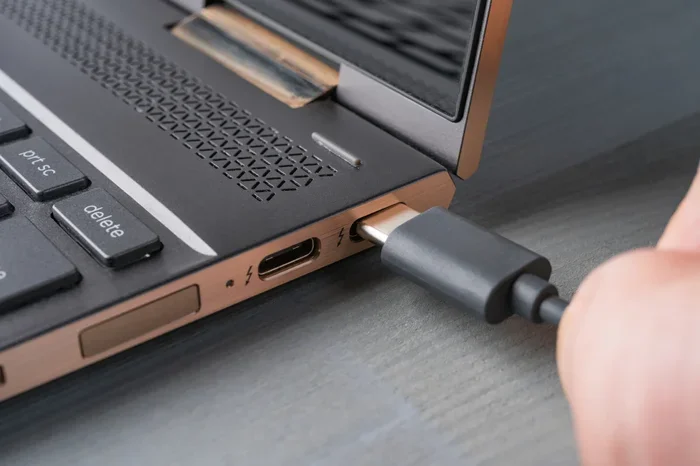
Can Any Usb C Charge A Laptop And Keep It Powered Up
Not every USB C can charge a laptop effectively. The truth is that USB-C charging depends on power delivery standards, wattage output, and cable quality. This guide breaks down everything you need to know about USB-C laptop charging, from power delivery specs to the best USB-C chargers for your device.
You plug a USB-C cable into your laptop and… nothing happens. Or maybe it charges, but painfully slow. If you have ever wondered can any USB C charge a laptop, you are not alone. This is one of the most common questions people ask today, and the answer is not as simple as yes or no.
The USB-C connector has become the go-to standard for many devices. Phones, tablets, and now laptops all use it. But here is the catch. Just because a cable fits does not mean it will charge your laptop properly. There are rules, standards, and specs that decide whether a USB-C charger will actually work.
In this guide, we will walk through everything you need to know. We will cover how USB-C charging works, what wattage you need, which cables to use, and the common mistakes that stop your laptop from charging. By the end, you will know exactly what to look for in a USB-C laptop charger.
Whether you are at home, at a coffee shop, or traveling, understanding USB-C charging can save you time, money, and a lot of frustration. Let us get into it.
Key Takeaways
- USB-C does not mean universal charging: Not every USB-C port or charger can power a laptop. You need the right wattage and Power Delivery protocol.
- USB-C Power Delivery (PD) is essential: This standard determines whether a USB-C charger can safely charge a laptop.
- Wattage matters a lot: Most laptops need 45W to 100W, and some even more. A low-wattage USB-C charger may charge slowly or not at all.
- Cable quality affects charging: A cheap or damaged USB-C cable can ruin your charging speed or fail entirely.
- USB-C power banks exist: You can keep your laptop charged on the go with a high-capacity USB-C power bank.
- Common issues are fixable: Most USB-C charging problems come from cables, adapters, or settings, not the laptop itself.
📑 Table of Contents
What Is USB-C Charging and How Does It Work?
USB-C is a type of connector. It is small, reversible, and fits both sides. That is why people love it. You never have to flip the cable to find the right angle. But the connector itself is not the whole story. What matters most is what happens inside the cable and charger.
USB-C Power Delivery, often called USB-C PD, is the technology that decides how much power flows through the cable. Think of it like a water pipe. The connector is just the shape of the pipe. The power delivery standard is the valve that controls how much water (or power) flows through.
How USB-C Power Delivery Works
USB-C PD is a charging standard built into the USB specification. It allows devices to negotiate the right amount of power. When you plug a USB-C charger into your laptop, the two devices talk to each other. They agree on the voltage and current needed. This is called a handshake.
If your laptop supports USB-C PD and your charger does too, they will work together. If one side does not support PD, you may get slow charging or no charging at all. This is why can any USB C charge a laptop is not a simple yes. Both the charger and the cable need to support the right protocol.
USB-C vs Traditional Laptop Chargers
Old laptop chargers used a barrel connector. It was big, bulky, and only fit one brand. USB-C is different. It is universal, small, and can carry both data and power. One cable can charge your laptop, connect to a monitor, and transfer files at the same time.
But universal does not mean automatic. A standard USB-C port on a phone charger usually outputs 5V to 9V. Most laptops need 20V or more. That is where USB-C power delivery comes in. Without PD, a regular phone charger will struggle to charge a laptop.
Can Any USB-C Charger Charge a Laptop?
The short answer is no. Not every USB-C charger can charge a laptop. The long answer depends on a few key factors that we will break down now.
The Role of USB-C Power Delivery
USB-C Power Delivery is the biggest factor. This standard allows chargers to send up to 100W of power through a USB-C cable. Some advanced setups can even go beyond that. But both the charger and the laptop must support PD for this to work.
Here is what you need to check:
- Does your laptop support USB-C PD? Most modern laptops do, but not all. Check your laptop specs.
- Does your charger support PD? Look for a label that says USB-C PD or Power Delivery.
- Does your cable support PD? Not all USB-C cables handle high wattage. Some are only built for data or low-power charging.
If all three check out, your USB-C charger should work. If any one of them does not, you may run into problems.
Wattage Matters for Laptop Charging
Wattage is the amount of power a charger delivers. Think of it like the engine size of a car. A bigger engine can do more work. A higher wattage charger can charge a laptop faster.
Most laptops need between 45W and 100W to charge properly. Gaming laptops and workstations can need 100W to 240W. If you use a USB-C charger that only puts out 30W, your laptop may charge very slowly. Or it might lose battery while you use it.
Here is a quick reference table:
| Laptop Type | Typical Wattage Needed | USB-C PD Support |
|---|---|---|
| Ultrabook | 45W to 65W | Yes |
| Business Laptop | 65W to 90W | Yes |
| Gaming Laptop | 100W to 240W | Some models |
| Chromebook | 30W to 45W | Yes |
| MacBook | 60W to 140W | Yes |
As you can see, wattage is not one size fits all. Before you buy a USB-C charger, check your laptop’s power requirements. Using the wrong wattage can lead to slow charging or even damage over time.
USB-C Charging Speed and Efficiency
Speed matters. Nobody wants to wait hours for their laptop to charge. USB-C can be very fast, but only when everything lines up correctly.
How Fast Can USB-C Charge a Laptop?
A proper USB-C PD charger can charge a laptop from 0% to 50% in about 30 minutes. That is impressive. But this speed depends on several things working together.
The charger wattage, cable quality, laptop battery size, and even the temperature all play a role. A 65W USB-C charger on a thin laptop will charge fast. The same charger on a gaming laptop with a huge battery will charge much slower.
Factors That Affect Charging Speed
Several things can slow down your USB-C charging. Here are the most common ones:
- Low wattage charger: A 30W charger on a 90W laptop will charge slowly or not keep up with usage.
- Bad cable: Cheap cables have thin wires that cannot carry high power. They also overheat faster.
- Using the laptop while charging: Running heavy apps while charging splits the power. Your laptop may not gain charge at all.
- Old battery: Laptop batteries degrade over time. An old battery will charge slower no matter what charger you use.
- Heat: If your laptop gets hot, it may slow down charging to protect the battery.
To get the fastest USB-C charging speed, use a high-quality charger, a certified cable, and try to close heavy apps while charging. These small steps make a big difference.
USB-C Power Banks for Laptop Charging
Traveling with a laptop means you need power on the go. A USB-C power bank can be a lifesaver. But not just any power bank will work.
Best USB-C Power Banks for Laptop Charging
When choosing a USB-C power bank for your laptop, look for these features:
- High capacity: You need at least 20,000mAh to charge a laptop more than once. Bigger is better for longer trips.
- USB-C PD support: The power bank must output PD at the right wattage for your laptop.
- Multiple ports: A good power bank lets you charge your laptop and phone at the same time.
- Fast recharge: Look for power banks that recharge quickly using their own USB-C PD input.
Some popular options include 65W and 100W USB-C power banks from brands like Anker, Baseus, and UGREEN. These can charge most ultrabooks and business laptops on the go.
How to Choose the Right Power Bank
Here are some quick tips to help you pick the right one:
- Check your laptop’s wattage requirement. Buy a power bank that meets or exceeds it.
- Choose a capacity of at least 20,000mAh for one full laptop charge.
- Make sure it has a USB-C PD port, not just a regular USB-C port.
- Read reviews for real-world charging speed and reliability.
- Consider the weight. A 65W power bank is still heavy enough to notice in your bag.
A good USB-C power bank turns any desk into a workstation. It is perfect for travel, coffee shops, or long days away from an outlet.
Common USB-C Charging Problems and Solutions
Even with the right gear, you might run into issues. Here are the most common problems and how to fix them.
Why Your USB-C Charger Might Not Work
You plug in your USB-C charger and the laptop does not respond. Before you panic, try these steps:
- Check the cable: Swap it with a different USB-C cable. Many cables are data-only and cannot carry power.
- Try a different outlet: A dead outlet can look like a broken charger.
- Inspect the port: Dirt or lint in the USB-C port can block the connection. Use a toothpick gently to clean it.
- Check the charger label: Make sure it supports USB-C PD and the right wattage.
- Restart your laptop: Sometimes a simple restart fixes charging issues.
Troubleshooting USB-C Charging Issues
If the basics do not work, try these advanced steps:
- Update your laptop drivers: Outdated power management drivers can cause charging problems.
- Check battery health: Go to your laptop settings and look at battery health. A degraded battery may need replacement.
- Use the original charger: If a third-party USB-C charger fails, try the one that came with your laptop.
- Disable USB-C charging in BIOS: Some laptops let you turn off USB-C charging in BIOS settings. Make sure it is enabled.
- Try a different USB-C port: Some laptops have multiple USB-C ports. Not all of them may support charging.
Most USB-C charging problems are easy to fix. Start simple and work your way up. Nine times out of ten, it is the cable or the charger.
Expert Tips for USB-C Laptop Charging
We have gathered some practical tips from charging experts to help you get the most out of your USB-C setup.
Choosing the Right USB-C Charger
Not all USB-C chargers are created equal. Here is what to look for when buying one:
- Check the wattage: Match it to your laptop’s needs. When in doubt, go higher.
- Look for USB-C PD certification: This ensures the charger meets safety standards.
- Choose a reputable brand: Brands like Anker, Belkin, and UGREEN offer reliable USB-C chargers.
- Consider a GaN charger: Gallium Nitride (GaN) chargers are smaller and more efficient than traditional ones.
- Read reviews: Real user experiences tell you a lot about long-term reliability.
Keeping Your USB-C Cable in Good Shape
Your cable is the weakest link in the charging chain. Here is how to keep it working well:
- Do not wrap it too tightly: This damages the internal wires over time.
- Avoid bending at sharp angles: The connection point is the most vulnerable part.
- Store it properly: Use a cable organizer or pouch to prevent tangles and damage.
- Replace frayed cables immediately: A damaged cable can cause slow charging or even safety risks.
- Buy certified cables: Look for USB-IF certification to ensure quality and safety.
Taking care of your cables and charger saves money in the long run. It also keeps your USB-C laptop charging safe and efficient.
Quick Tips for Better USB-C Charging
Here are some bonus tips that make a real difference:
- Use a USB-C hub with charging pass-through: This lets you connect multiple devices while keeping your laptop charged.
- Avoid cheap knockoff chargers: They may not support proper USB-C PD and could damage your laptop.
- Charge in cool environments: Heat slows down charging and degrades battery health over time.
- Enable battery saver mode: This reduces power draw and helps your laptop charge faster.
- Unplug once fully charged: Keeping your laptop plugged in at 100% all the time can shorten battery life.
Final Thoughts on USB-C Laptop Charging
So, can any USB C charge a laptop? The honest answer is no. Not every USB-C cable, charger, or port will work. But with the right gear, USB-C charging is fast, convenient, and incredibly versatile.
The key is understanding what your laptop needs. Check the wattage, make sure your charger supports USB-C Power Delivery, and use a quality cable. These three steps will solve most charging issues.
Whether you are at your desk or on the road, a good USB-C charger or USB-C power bank keeps you powered up. Invest in the right equipment, take care of your cables, and you will never worry about a dead laptop battery again.
Share this guide with friends who still ask, can any USB C charge a laptop. It might save them a lot of frustration. And remember, the right charger makes all the difference.
Frequently Asked Questions
Can I use any USB-C cable to charge my laptop?
Not all USB-C cables can charge a laptop. You need a cable that supports USB-C Power Delivery and the right wattage. Many USB-C cables are designed only for data transfer or low-power devices like phones. Check the cable specs before using it with your laptop.
What wattage USB-C charger do I need for my laptop?
Check your laptop’s original charger for the wattage rating. Most ultrabooks need 45W to 65W. Gaming laptops and workstations often need 90W to 140W or more. Using a lower-wattage charger may result in slow charging or no charging at all while the laptop is in use.
Will a USB-C power bank charge my laptop?
Yes, but only if the power bank supports USB-C Power Delivery at the right wattage. Look for a power bank with at least 65W output and a capacity of 20,000mAh or more. This will give you one or more full charges for most laptops.
Why is my USB-C charger not charging my laptop?
This can happen for several reasons. The cable might not support power delivery, the charger wattage might be too low, or the USB-C port might be dirty or damaged. Try a different cable and charger first, then check the port for debris.
Can I charge my laptop with a phone charger that has USB-C?
Most phone chargers output only 5V to 9V, which is not enough for a laptop. They usually lack USB-C Power Delivery support. While your laptop might show a tiny charging icon, it will charge extremely slowly or not at all under normal use.
Is USB-C charging safe for my laptop battery?
Yes, USB-C charging is safe as long as you use a certified charger and cable. USB-C Power Delivery includes built-in safety features that regulate voltage and current. Avoid cheap, uncertified chargers, as they may not follow proper safety standards.