Can The Internet Go Down In An Area And What Happens Next
Yes, the internet can absolutely go down in a specific area, and it happens more often than most people think. Local internet disruptions can stem from ISP outages, natural disasters, cable damage, or even cyber attacks. When the internet goes down, daily life slows down, businesses lose money, and communication breaks apart. Understanding why outages occur and what steps to take next can save you time, stress, and money. This guide walks you through everything you need to know about local internet outages and how to stay prepared.
Key Takeaways
- Internet outages are common: Localized internet disruptions happen regularly due to weather, infrastructure issues, and human error.
- Multiple causes exist: From fiber optic cable cuts to power grid failures, many factors can knock out your connection.
- ISPs play a big role: Your service provider’s network health directly impacts whether you experience broadband outage in your area.
- Preparation helps: Having backup internet options and an outage plan keeps you connected during network failure events.
- Communication tools matter: Knowing how to stay in touch without the internet is essential during extended internet downtime.
- Reporting outages helps: Contacting your ISP and checking outage maps speeds up the internet service restoration process.
- Future risks are real: Climate change and aging infrastructure mean internet disruption events may become more frequent.
📑 Table of Contents
- Can The Internet Go Down In An Area? Yes, And It Happens More Than You Think
- Why Does The Internet Go Down In A Specific Area?
- What Happens When the Internet Goes Down in Your Area?
- How Long Do Internet Outages Typically Last?
- How to Prepare for and Handle Internet Outages
- Expert Insights on Internet Outages and Resilience
- The Future of Internet Reliability and Outage Prevention
- Conclusion
Can The Internet Go Down In An Area? Yes, And It Happens More Than You Think
Have you ever been in the middle of a work call, streaming your favorite show, or trying to send an important email when the screen just goes blank? It is frustrating. And it is more common than you might expect. Can the internet go down in an area? Absolutely. It happens every single day across the world. A local internet disruption can affect one neighborhood, an entire city, or even a whole region.
The internet feels invisible. It is just there. You click a link, and a page loads. You open an app, and it works. But underneath that seamless experience lies a massive, complex web of cables, routers, servers, and data centers. When any part of that system breaks, the internet connectivity issues can ripple outward fast. Understanding how and why these outages happen is the first step toward being prepared.
Whether you are dealing with a brief internet downtime or a multi-day broadband outage, knowing what is happening and what to do next makes a huge difference. Let us break it all down.
Why Does The Internet Go Down In A Specific Area?
When your internet stops working but your neighbor’s still does, it can feel confusing. Why you and not them? The truth is that internet outages are rarely random. They usually have a specific cause. Let us look at the most common reasons a network failure can hit your area.
Physical Infrastructure Damage
The internet relies on physical cables. Fiber optic lines, copper wires, and coaxial cables carry data across cities and countries. When these cables get damaged, the internet goes down. Construction crews accidentally digging up a line is one of the top causes. Storms bring down utility poles. Vehicles crash into ground-mounted equipment. Even squirrels chewing through cables can cause outages.
Here are the most common ways physical infrastructure gets damaged:
- Construction accidents: Excavators and backhoes hitting underground fiber lines during digging projects.
- Weather events: High winds, ice storms, flooding, and lightning strikes damaging above-ground cables and equipment.
- Vehicle collisions: Cars or trucks hitting utility poles or ground-mounted network equipment.
- Animal interference: Rodents and birds causing damage to outdoor cables and equipment housings.
- Aging infrastructure: Old cables and equipment that have not been updated and become more prone to failure.
ISP and Service Provider Issues
Your internet service provider (ISP) controls the network that delivers the internet to your home. When your ISP experiences problems, everyone on that network feels it. ISP outages can happen for many reasons. A software update gone wrong can knock out routers across an entire region. A configuration error can redirect traffic into a black hole. Server overloads during peak usage times can slow or stop service entirely.
Sometimes the problem is not even technical. Billing disputes, regulatory issues, or corporate decisions can lead to service provider outage events. If your ISP goes through maintenance or upgrades, they may take parts of the network offline temporarily.
Power Grid Failures
Here is something many people do not think about. The internet needs electricity. Data centers, cell towers, and network equipment all require power. When the power grid fails, the internet often fails with it. A blackout in your area almost certainly means your internet is down too. Even partial power outages can knock out specific network equipment that serves your neighborhood.
This is why power grid failure and internet outage often go hand in hand. If your area loses power, your router, modem, and any equipment between you and the wider internet go dark. The good news is that many data centers have backup generators. But the equipment closer to your home usually does not.
Natural Disasters
Earthquakes, hurricanes, wildfires, and tornadoes can devastate internet infrastructure. In extreme cases, entire communities lose connectivity for weeks. The 2021 Texas winter storm knocked out internet for millions of people. Hurricane Katrina in 2005 destroyed massive portions of the Gulf Coast’s network infrastructure. Wildfires in California have repeatedly taken down internet service for entire counties.
Natural disasters cause internet disruption on a massive scale. They damage cables, destroy data centers, knock out power, and make repairs extremely difficult when roads are impassable.
Cyber Attacks and Security Threats
Not all outages are caused by nature or accidents. Malicious actors can launch cyber attacks that take down internet infrastructure. Distributed Denial of Service (DDoS) attacks flood servers with so much traffic that they crash. Attacks on DNS servers can make websites unreachable even when the underlying network is working fine. In rare but serious cases, state-sponsored attacks target critical internet infrastructure.
While large-scale cyber attacks on internet infrastructure are less common than physical damage, they are growing in frequency and sophistication. A major cyber attack on infrastructure could affect thousands or even millions of users in a specific area.
What Happens When the Internet Goes Down in Your Area?
So the internet is down. Now what? The effects of a local internet outage go far beyond just not being able to browse websites. The impact touches nearly every part of modern life.
Impact on Daily Communication
Most people rely on the internet for communication. Messaging apps, email, and video calls all need a working connection. When the internet goes down, your phone’s cellular service might still work. But if you are used to texting over Wi-Fi or using apps like WhatsApp or Signal, those go dark too. Landline phones that rely on VoIP technology also stop working during outages.
For many families, losing internet means losing their primary way of staying in touch. This is especially hard for people who live far from family members or who rely on video calls to stay connected.
Business and Economic Effects
Businesses feel the pain of internet downtime almost immediately. Online stores cannot process orders. Companies that rely on cloud-based tools cannot access their files. Customer service teams lose the ability to look up information or respond to inquiries. The cost of internet outages to businesses is staggering. Studies estimate that a single hour of downtime can cost small businesses thousands of dollars.
Even businesses that do not operate primarily online suffer. Point-of-sale systems go offline. Inventory management tools stop syncing. Employees cannot work remotely. The ripple effects of a broadband outage spread through the entire local economy.
Emergency Services and Public Safety
This is one of the most serious consequences of an internet outage. Emergency services like 911 rely on internet-connected systems in many areas. When the internet goes down, calling for help can become harder. Traffic lights may fail. Security systems that depend on internet connectivity stop working. Hospitals and emergency response teams may face communication challenges.
This is why having emergency communication backup plans is so important. A traditional landline phone, a battery-powered radio, or a satellite phone can keep you connected when the internet is not available.
Entertainment and Daily Routines
Let us not forget the everyday frustrations. Streaming services go dark. Online gaming becomes impossible. Smart home devices that rely on internet connectivity stop responding. Even something as simple as checking the weather or reading the news becomes a challenge when you cannot get online.
For parents, a loss of internet can mean kids cannot access online learning tools or entertainment. For remote workers, it means an immediate work stoppage. The internet downtime affects everyone differently, but almost everyone feels it.
How Long Do Internet Outages Typically Last?
The duration of an internet outage varies widely depending on the cause. Some outages last only a few minutes. Others can stretch on for days or even weeks.
Here is a general breakdown of outage durations by cause:
- Brief technical glitches: 5 to 30 minutes. These are often caused by temporary network congestion or minor equipment issues.
- ISP maintenance or upgrades: 1 to 4 hours. Usually scheduled in advance and communicated to customers.
- Physical cable damage: A few hours to a few days. Depends on how accessible the damaged cable is and how quickly repair crews can reach it.
- Power outages: Minutes to hours. Tied directly to how long it takes to restore electricity.
- Natural disasters: Days to weeks. Severe damage to infrastructure can take a long time to repair.
- Cyber attacks: Hours to days. Depends on the severity of the attack and the resources needed to restore systems.
Most internet service restoration happens within a few hours for minor issues. But major events can cause extended internet disruption that tests the patience of entire communities.
How to Prepare for and Handle Internet Outages
The good news is that you can take steps to reduce the impact of an internet outage. Preparation is key. Here is what you can do before, during, and after an outage.
Before an Outage: Build Your Backup Plan
Do not wait until the internet goes down to figure out what you will do. Create a plan now.
- Get a mobile hotspot: A dedicated hotspot device or your phone’s tethering feature can provide internet when your home broadband is down.
- Consider a secondary ISP: Having two different internet providers gives you a backup if one goes offline.
- Invest in a UPS: An uninterruptible power supply keeps your modem and router running during short power outages.
- Download important content: Save documents, maps, and entertainment offline so you can access them without the internet.
- Keep a battery-powered radio: A traditional radio is one of the most reliable ways to get news and emergency updates during outages.
During an Outage: What to Do Right Now
When the internet goes down, stay calm and follow these steps.
- Check your equipment: Restart your modem and router. Unplug them, wait 30 seconds, and plug them back in. This fixes many temporary issues.
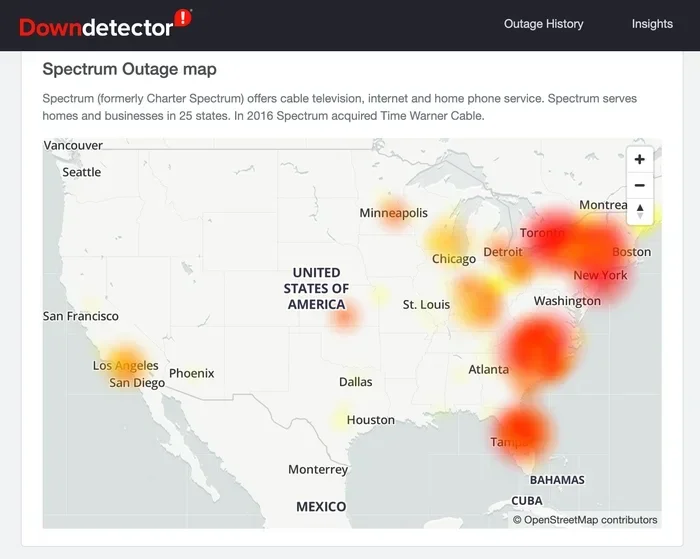
- Check for outages in your area: Most ISPs have outage maps on their websites or apps. Check if the problem is widespread.
- Contact your ISP: Report the outage. This helps your provider track the issue and prioritize repairs.
- Use your phone’s cellular data: If your mobile signal is strong, use it for essential tasks like checking email or getting directions.
- Stay informed: Follow local news and your ISP’s social media accounts for updates on restoration timelines.
Quick Tips for Staying Connected During an Outage
- Turn off Wi-Fi on your devices and use cellular data instead to save battery.
- Charge all devices fully before a storm or predicted outage.
- Keep a portable battery pack charged and ready.
- Use text messages instead of calls when networks are congested.
- Have a printed list of important phone numbers in case you cannot look them up online.
Common Mistakes People Make During Internet Outages
Avoid these common pitfalls that make outages even more stressful:
- Panicking: Most outages are temporary. Take a deep breath and work through the steps calmly.
- Not checking your ISP’s status page: You might be able to find out when service will be restored without even calling customer support.
- Ignoring your phone’s data usage: If you switch to cellular data, keep an eye on your usage to avoid overage charges.
- Forgetting to back up data: Regular backups ensure you do not lose important files if an outage is accompanied by a system crash.
- Assuming it is your fault: Many people blame their own equipment when the real issue is a widespread outage. Check with your ISP first.
Expert Insights on Internet Outages and Resilience
We spoke with networking professionals about the future of internet reliability. Their insights highlight why outages will likely become a bigger concern going forward.
Dr. Sarah Chen, Network Infrastructure Analyst: “The internet was not designed to be completely resilient. It was built to connect academic and research institutions. As we rely on it for everything from banking to healthcare, the strain on that original design grows every year. We need to invest heavily in redundancy and modernization.”
Mark Thompson, ISP Operations Manager: “The number one thing customers can do is stay informed. Know your provider’s outage reporting process. Have a backup plan for critical communication. And understand that we work as fast as we can to restore service, but some damage simply takes time to repair.”
Dr. Lisa Park, Cybersecurity Researcher: “As our internet infrastructure ages and becomes more interconnected, the attack surface for cyber threats grows. Both physical and digital resilience need to be part of every community’s disaster planning.”
These experts agree on one thing: the internet is essential infrastructure, and treating it that way requires investment, planning, and personal preparedness.
The Future of Internet Reliability and Outage Prevention
What does the future hold for internet connectivity and outage prevention? The trends point in both directions.
On the positive side, technology is improving. Mesh networks, satellite internet like Starlink, and 5G wireless connections offer alternatives to traditional broadband. These technologies can provide backup connectivity when ground-based networks fail. Satellite internet is especially promising for areas prone to natural disasters or remote locations where physical infrastructure is vulnerable.
On the challenging side, climate change is increasing the frequency and intensity of extreme weather events. Aging infrastructure across many countries needs billions of dollars in upgrades. The growing demand for data shows no signs of slowing down. All of these factors mean that internet disruption events may become more common in the coming years.
The best thing you can do is stay informed, stay prepared, and stay connected through multiple channels. The internet is a remarkable tool, but it is not infallible. Understanding its vulnerabilities makes you a smarter, more resilient user.
Conclusion
Can the internet go down in an area? Yes, it absolutely can. And it does, more often than most people realize. Whether caused by a construction accident, a storm, an ISP issue, or a cyber attack, local internet outages are a real and growing concern. The effects touch communication, business, safety, and daily life in profound ways.
The good news is that preparation makes all the difference. Having a backup plan, knowing what to do during an outage, and staying informed can turn a frustrating experience into a manageable one. Invest in redundant connectivity options. Keep your devices charged. And remember that the internet, for all its power, is a human-built system that needs maintenance, upgrades, and care.
Take action today. Review your internet setup, check your ISP’s outage policies, and build a simple backup plan. You will be glad you did the next time the internet goes down in your area.
Frequently Asked Questions
Can the internet go down in just one house?
Yes, it is possible for the internet to go down at a single home while the rest of the neighborhood stays online. This usually happens due to issues with your specific equipment, a damaged cable serving just your address, or a problem with your ISP account. Restarting your modem and router is the first step to troubleshoot a single-house outage.
How can I find out if there is an internet outage in my area?
Most ISPs provide an outage map on their website or mobile app. You can also check third-party sites like DownDetector that aggregate user reports. Calling your ISP’s customer support line is another reliable way to confirm whether an outage is affecting your area.
What should I do if the internet goes down during a workday?
First, restart your modem and router. If that does not work, switch to your phone’s cellular data or hotspot. Notify your employer or clients about the outage as soon as possible. If you work remotely regularly, consider setting up a secondary internet source like a mobile hotspot or a backup ISP connection.
Can a cyber attack really take down the internet in an entire area?
Yes, it is possible. Cyber attacks targeting DNS servers, ISP infrastructure, or critical network nodes can cause widespread internet disruption in a specific area. While large-scale attacks are less common than physical outages, they are a growing concern for cybersecurity experts and network operators worldwide.
How can I protect my home network from outages?
Invest in a UPS to keep your modem and router running during short power outages. Consider a secondary internet source like a mobile hotspot or a satellite internet service. Keep your devices charged and download important content for offline access. Having these backups in place makes a big difference when outages happen.
Will satellite internet replace traditional broadband and reduce outages?
Satellite internet services like Starlink are improving rapidly and offer a valuable alternative to traditional broadband, especially in rural or disaster-prone areas. However, satellite internet has its own limitations, including weather sensitivity and latency. It works best as a complement to, not a complete replacement for, other types of internet service.
=== META DESCRIPTION ===
Can the internet go down in an area? Find out why outages happen, what causes them, and how to stay connected when the internet goes offline.