Are All USB Blocks The Same Or Are They Really Different
No, all USB blocks are definitely not the same. From USB-A to USB-C, from basic chargers to advanced power delivery hubs, each USB block serves a unique purpose. Choosing the wrong one can mean slow charging, data loss, or even damaged devices. This guide breaks down everything you need to know.
You plug in a USB block without thinking twice. But have you ever stopped to wonder whether they are all built the same? The short answer is no. USB blocks come in different shapes, sizes, power ratings, and standards. Some charge your phone in minutes while others take hours. Some transfer files at lightning speed while others barely keep up.
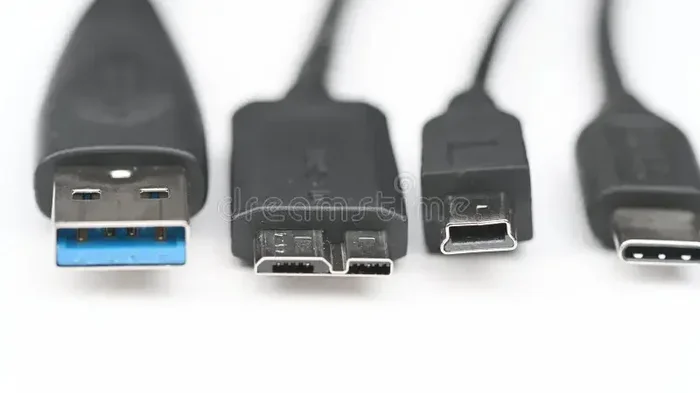
The world of USB adapters and USB charger blocks can feel confusing. There are USB-A, USB-B, USB-C, Mini USB, Micro USB — the list goes on. Each type has its own use case, speed, and power delivery capability. Choosing the right USB block can save you time, protect your devices, and even extend their battery life.
In this article, we will walk through everything you need to know about USB blocks. We will compare types, explain power delivery, and help you avoid common mistakes. Whether you are shopping for a new USB hub or just curious about how your USB power adapter works, this guide has you covered.
Key Takeaways
- USB blocks vary widely: Not every adapter or hub delivers the same power, speed, or compatibility.
- USB standards matter: USB 2.0, USB 3.0, and USB-C offer very different data transfer rates and power output.
- Wattage and amperage count: A higher-rated USB power adapter charges devices faster and safer.
- Device compatibility is key: Your phone, tablet, and laptop may all need different USB adapters.
- Cheap adapters can be risky: Low-quality USB charger blocks may damage your devices or pose safety hazards.
- USB-C is not universal yet: Despite its growing popularity, many devices still use older USB connector types.
- Reading labels helps: Always check the wattage rating, data speed, and compatibility before buying.
📑 Table of Contents
What Is a USB Block, Anyway?
A USB block is the physical adapter or plug that connects your device to a power source or another device. It is the little box or tip you plug into a wall outlet or insert into your laptop. Inside that small housing sits circuitry that manages power delivery and sometimes data transfer.
Most people call them by different names. Some say USB charger, others say USB adapter or USB power block. They all refer to the same general thing — a device that converts alternating current (AC) from your wall outlet into direct current (DC) that your gadgets can use.
Here is something many people do not realize. Not every USB block is designed for the same job. A block made for a keyboard is very different from one made for a gaming laptop. The difference lies in wattage output, data transfer speed, and the USB connector type it uses.
How Does a USB Block Work?
When you plug a USB power adapter into the wall, it takes the high-voltage AC power and converts it to low-voltage DC power. This DC power flows through the USB cable and into your device. The USB block regulates the voltage and current to match what your device needs.
If the USB adapter cannot regulate power properly, your device may charge slowly, overheat, or in worst cases, get damaged. This is why the quality of your USB charger block really matters. A cheap, unregulated block might deliver inconsistent power that harms your gadgets over time.
The Different Types of USB Blocks
USB blocks are not a one-size-fits-all solution. They come in several types, each designed for specific devices and purposes. Let us break them down so you can easily tell them apart.
USB-A Blocks
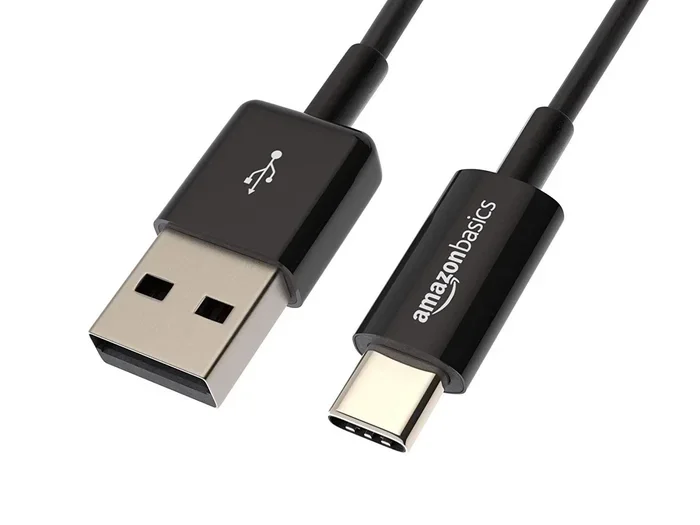
The USB-A connector is the classic rectangular block you have probably used for years. It is the most common USB port type found on computers, wall chargers, and power banks. USB-A blocks typically support USB 2.0 or USB 3.0 standards.
USB 2.0 USB-A blocks transfer data at up to 480 Mbps and deliver up to 2.5 watts of power. USB 3.0 USB-A blocks are much faster, reaching 5 Gbps data transfer and up to 4.5 watts. These blocks work great for keyboards, mice, flash drives, and older phones.
USB-B Blocks
USB-B connectors are the square-shaped blocks you often see on printers and scanners. They are less common in everyday life but still widely used in office setups. USB-B blocks are designed for data-heavy devices that need a stable, reliable connection.
These blocks usually support USB 2.0 speeds. Some newer USB-B blocks support USB 3.0, which offers much faster data transfer rates. If you use a printer or external hard drive, there is a good chance you have used a USB-B adapter before.
USB-C Blocks
USB-C blocks are the modern standard. They are small, reversible, and incredibly versatile. A single USB-C block can handle charging, data transfer, and even video output through Alternate Mode technology.
USB-C blocks support USB Power Delivery, which can deliver up to 100 watts of power. This means a single USB-C charger block can power everything from your phone to your laptop. USB-C is rapidly becoming the go-to connector type for most new devices.
USB-C Hub Blocks
A USB-C hub is a special type of USB block that adds extra ports to your device. It lets you connect multiple peripherals — like a monitor, keyboard, and external drive — through a single USB-C port. USB hub blocks are incredibly popular among laptop users who need more connectivity.
Not all USB-C hubs are the same, though. Some are passive, meaning they do not boost signal strength. Others are active and include their own power delivery chip. Active hubs tend to perform better, especially when connecting multiple devices at once.
Why All USB Blocks Are NOT the Same
Now that you know the different types, let us talk about why USB blocks are so different from each other. This is the part most people overlook when they grab the cheapest USB adapter they can find.
Power Delivery Differences
The biggest difference between USB blocks is power delivery. A basic USB charger block might deliver only 5 watts (5 volts at 1 amp). A fast-charging USB power adapter can deliver 65 watts, 100 watts, or even more. This has a huge impact on how fast your device charges.
Using a low-wattage USB block with a power-hungry device like a laptop will result in slow charging. Worse, your laptop might actually lose battery while you use it if the USB adapter cannot supply enough power. Always check the wattage rating on your USB block before using it with demanding devices.
Data Transfer Speed Differences
Not all USB adapters transfer data at the same speed. A USB 2.0 block might take several minutes to transfer a large file, while a USB 3.0 block can do the same job in seconds. If you regularly move large files between devices, the USB standard of your block matters a lot.
Here is a quick comparison of common USB standards and their speeds:
- USB 2.0: Up to 480 Mbps data transfer, up to 2.5W power
- USB 3.0: Up to 5 Gbps data transfer, up to 4.5W power
- USB 3.1: Up to 10 Gbps data transfer, up to 10W power
- USB 3.2: Up to 20 Gbps data transfer, up to 100W power (USB-C)
- USB4: Up to 40 Gbps data transfer, up to 100W power (USB-C)
As you can see, the USB standard inside your USB block makes a massive difference in performance.
Connector Type and Compatibility
USB blocks use different connector types, and they are not always interchangeable. A USB-A block will not fit into a USB-C port without an adapter. A Micro USB block will not work with a device that only has a USB-C port. Compatibility is a major reason why USB blocks are not all the same.
Before buying any USB adapter, check what connector type your device uses. Using the wrong USB block will not work at all, or it might damage your device’s USB port over time.
How to Pick the Right USB Block for Your Needs
Choosing the right USB block does not have to be complicated. Follow these simple steps to find the perfect USB power adapter for your needs.
Step 1: Check Your Device Requirements
Start by checking what your device needs. Look at the label on your original USB charger or check your device manual. Note the voltage (measured in volts) and amperage (measured in amps). Multiply these two numbers to get the wattage.
For example, if your device needs 5 volts at 2 amps, it requires a 10-watt USB block. Always choose a USB adapter that meets or exceeds your device’s power requirements.
Step 2: Consider the Connector Type
Make sure the USB block you buy has the right connector type for your device. Most modern phones and tablets use USB-C, while older devices may use Micro USB or USB-A. Laptops often need USB-C with Power Delivery support.
Pro tip: If you have multiple devices, consider buying a universal USB block that comes with interchangeable connector tips. These are versatile and save you from buying multiple USB adapters.
Step 3: Look for Safety Certifications
Not all USB charger blocks are created equal when it comes to safety. Look for blocks that carry safety certifications like UL, CE, or FCC. These certifications mean the USB power adapter has been tested and meets safety standards.
A certified USB block will have proper over-current protection, over-voltage protection, and temperature control. This protects both your device and your home from electrical hazards. Never buy a cheap, uncertified USB adapter — the risks are simply not worth it.
Step 4: Think About Portability
If you travel often, a compact USB block is a must. Look for USB charger blocks that are small and lightweight but still deliver high power. Some USB-C blocks are incredibly small yet deliver 65 watts or more. These travel-friendly USB adapters are perfect for people on the go.
On the other hand, if you use your USB block at a desk, size may not matter as much. You can opt for a larger USB hub block with multiple ports for charging several devices at once.
Common USB Block Mistakes to Avoid
Even careful users sometimes make mistakes with their USB blocks. Here are the most common ones and how to avoid them.
Using the Wrong Wattage Block
One of the biggest mistakes is using a USB block with too low a wattage. This causes slow charging and can even strain your device’s battery over time. Always match your USB power adapter to your device’s power needs.
Ignoring Data Transfer Needs
Some people buy a USB block based only on charging speed and forget about data transfer. If you use your USB adapter to transfer files, make sure it supports a fast enough USB standard. A USB 2.0 block will frustrate you when transferring large files.
Buying the Cheapest Option
It is tempting to grab the cheapest USB charger block online, but this can backfire. Low-quality USB blocks often lack proper safety features and may deliver inconsistent power. Investing in a reputable USB adapter from a trusted brand is always a smarter choice.
Forcing Connectors
Never force a USB connector into a port. If it does not fit, you are likely using the wrong USB block or need an adapter. Forcing connectors can damage the USB port on your device and lead to costly repairs.
Expert Insights on USB Blocks
We asked tech experts about the most common misconceptions surrounding USB blocks. Here is what they had to say.
Not All USB-C Blocks Are Equal
Many people assume that any USB-C block will work with any USB-C device. This is not true. Some USB-C blocks only support basic charging at 5 watts, while others support USB Power Delivery up to 100 watts. Always check the specifications of your USB-C block before using it with expensive devices like laptops.
Brand Matters More Than You Think
Tech experts consistently recommend sticking with reputable brands for your USB power adapter needs. Brands like Anker, Belkin, and Apple invest heavily in safety testing and quality control. A USB block from a trusted brand will last longer, charge faster, and keep your devices safer.
Future-Proof with USB-C
Most experts agree that USB-C is the future of connectivity. Investing in a good-quality USB-C block now will save you money and hassle in the long run. As more devices move to USB-C, having a versatile USB-C block means you will not need multiple USB adapters for different devices.
Key Takeaways
- USB blocks vary widely in power, speed, and compatibility.
- USB-A, USB-B, and USB-C blocks each serve different purposes and devices.
- Power delivery is the biggest differentiator between USB blocks. Always match wattage to your device’s needs.
- Data transfer speed depends on the USB standard inside your block, not just the connector type.
- Safety certifications like UL, CE, and FCC are essential for any USB charger block you buy.
- Cheap, uncertified USB blocks can damage your devices and pose safety risks.
- USB-C is the future, but older USB connector types are still widely used and important to understand.
Conclusion
So, are all USB blocks the same? Absolutely not. From power delivery to data transfer speed, from connector types to safety certifications, every USB adapter has its own strengths and limitations. Choosing the right USB block can make a real difference in how your devices perform, how fast they charge, and how long they last.
The next time you need a new USB charger block or USB hub, take a moment to consider what you actually need. Check your device requirements, pick the right connector type, and invest in a quality USB power adapter from a trusted brand. Your gadgets — and your wallet — will thank you.
Understanding USB blocks is one of the simplest ways to get more out of your devices. With the right USB adapter in hand, you will enjoy faster charging, quicker file transfers, and peace of mind knowing your devices are safe.
Are All USB Blocks the Same?
No, USB blocks differ in connector type, power delivery, data transfer speed, and safety features. Always check specifications before purchasing.
Can I Use Any USB Block with My Laptop?
Not necessarily. Laptops often require specific USB-C blocks with Power Delivery support. Using the wrong USB block may result in slow charging or no charging at all.
Why Does My USB Block Get Hot?
Mild warmth is normal, but excessive heat can indicate a low-quality USB charger block or an incompatible power adapter. Always use certified USB power adapters to avoid overheating.
Is USB-C Better Than USB-A?
USB-C offers faster data transfer, higher power delivery, and a reversible connector. However, USB-A is still widely used and perfectly functional for many devices and peripherals.
How Do I Know If My USB Block Supports Fast Charging?
Check the wattage rating on the USB block. Blocks rated at 18 watts or higher typically support fast charging. Also look for USB Power Delivery or Quick Charge labels.
Can a Bad USB Block Damage My Device?
Yes, a low-quality or incompatible USB adapter can deliver inconsistent power that may damage your device’s battery or charging port. Always use certified, reputable USB blocks.
Frequently Asked Questions
What is Are All Usb Blocks The Same?
Are All Usb Blocks The Same is an important topic with many practical applications.