Can You Extend A Bluetooth Signal Without Buying New Gear
Can you extend a Bluetooth signal without spending money on new equipment? The answer is yes, and there are several simple methods you can try right now. Bluetooth signal extension is easier than most people think, and you likely already have everything you need. This guide covers free and low-cost ways to boost your Bluetooth range and improve wireless connectivity at home or in the office.
Have you ever been listening to music in another room and suddenly your Bluetooth connection drops? Or maybe your wireless speaker stops playing the moment you walk too far away? It is frustrating, and it makes you wonder if there is a way to fix this without running out to buy expensive new equipment.
The good news is that you can extend a Bluetooth signal using methods that cost little to nothing at all. Whether you want to improve your Bluetooth range for headphones, speakers, keyboards, or smart home devices, there are practical steps you can take today. This guide walks you through every option, from simple free tricks to smart DIY solutions that actually work.
Bluetooth technology has come a long way, but it still has physical limits. The signal can only travel so far before it weakens. However, understanding how Bluetooth works and what affects its performance gives you the power to get the most out of your current setup. Let us dive into the details and explore how you can make your Bluetooth devices reach farther than ever before.
Key Takeaways
- Free methods work: You can extend your Bluetooth signal using simple repositioning, obstacle removal, and software adjustments without spending a dime.
- Bluetooth version matters: Older Bluetooth versions have shorter ranges, and updating firmware can sometimes improve performance.
- Physical barriers kill signal: Walls, metal objects, and water significantly weaken Bluetooth range, so placement is everything.
- DIY boosters exist: Simple homemade solutions like aluminum foil reflectors can give your signal a helpful nudge.
- Know when to upgrade: Sometimes buying a Bluetooth repeater is the smartest move, even if you wanted to avoid it.
- Interference is a sneaky killer: Wi-Fi routers and other wireless devices can disrupt your Bluetooth connection more than you think.
📑 Table of Contents
Understanding Bluetooth Signal and Its Natural Limits
Before we talk about extending anything, it helps to understand what Bluetooth actually is and why it has limits in the first place. Bluetooth is a short-range wireless technology that lets devices communicate without cables. It uses radio waves to send data between devices like your phone and your wireless earbuds or your laptop and a Bluetooth speaker.
How Far Can Bluetooth Normally Reach?
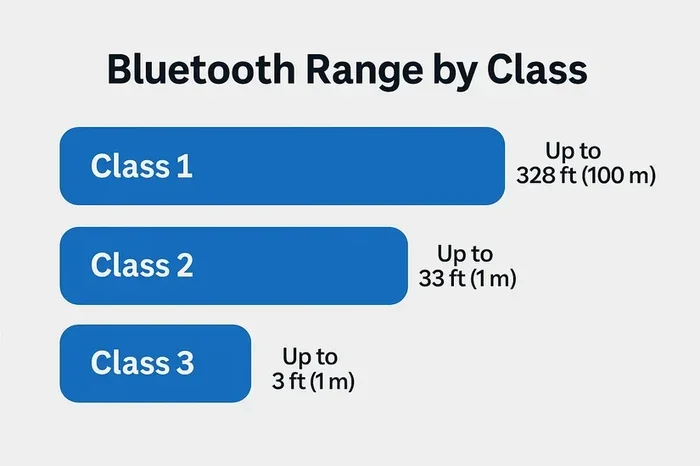
The standard range for most Bluetooth devices is about 30 feet or roughly 10 meters. This is called Class 2 Bluetooth, and it is what you find in most phones, headphones, and portable speakers. Some devices use Class 1 Bluetooth, which can reach up to 300 feet or about 100 meters under ideal conditions. However, those are rare and usually found in industrial equipment.
Several factors determine your actual Bluetooth distance in real life:
- Bluetooth version: Newer versions like Bluetooth 5.0 offer significantly better range than older versions like Bluetooth 4.2.
- Physical obstacles: Walls, furniture, and even people can block or weaken the signal.
- Signal interference: Other wireless devices nearby can disrupt the connection.
- Device power: Smaller devices like earbuds have weaker transmitters than larger ones.
- Environment: Indoor spaces with many walls reduce range more than open outdoor areas.
When you understand these limits, it becomes clear why your Bluetooth sometimes struggles. The signal is fighting against physics every step of the way. But the good news is that you can work with these limits instead of against them.
Can You Extend A Bluetooth Signal Using Free Methods?
The short answer is absolutely yes. You do not need to spend money on a Bluetooth range extender or a fancy new adapter. Many free methods can noticeably improve your Bluetooth connectivity right now. Let us look at the most effective ones.
Reposition Your Devices
The simplest and most effective trick is to move your devices closer together. This sounds obvious, but many people do not realize how much placement affects their signal. If your phone is in one room and your speaker is in another with two walls in between, you are asking for trouble.
Try these repositioning tips:
- Move the receiving device closer to the source device.
- Place both devices in the same room when possible.
- Keep your Bluetooth devices at the same height rather than on different floors.
- Avoid corners and closets where signals get trapped.
- Place devices in open spaces with fewer obstacles between them.
Even moving your speaker a few feet can make a big difference. Bluetooth signal strength drops quickly when it has to pass through solid objects, so open space is your best friend.
Remove Physical Obstacles
Physical barriers are the number one enemy of Bluetooth signals. Water, metal, thick walls, and large furniture all absorb or block radio waves. If you want to extend your Bluetooth range, look at the path between your devices and remove or reduce obstacles where possible.
Common culprits that weaken Bluetooth signals include:
- Thick concrete or brick walls
- Large metal objects like refrigerators or filing cabinets
- Water tanks, fish tanks, and even plants with heavy water content
- Mirrors and glass panels
- Dense bookshelves and wooden furniture
You do not need to rebuild your home, of course. Simply being aware of what is between your devices can help you make smarter placement decisions. Move that fish tank away from the path between your phone and speaker, and you might be surprised at the improvement.
Reduce Wireless Interference
Bluetooth operates on the 2.4 GHz frequency band, which is the same band used by Wi-Fi routers, microwaves, and other wireless devices. When too many devices share this space, signal interference becomes a real problem. Your Bluetooth signal has to compete for airtime, and it often loses.
Here is how you can reduce interference:
- Move your Wi-Fi router away from your Bluetooth devices.
- Turn off wireless devices you are not actively using.
- Keep Bluetooth devices away from microwaves when in use.
- Switch your Wi-Fi to the 5 GHz band if your router supports it.
- Avoid using multiple Bluetooth devices simultaneously when possible.
These small changes can free up space for your Bluetooth signal to travel cleaner and farther. Less competition means a stronger, more stable connection.
DIY Tricks to Boost Bluetooth Range
If the free methods above are not giving you enough, there are some clever do-it-yourself tricks that can push your Bluetooth range a bit further. None of these require buying new gear, and most use items you already have at home.
The Aluminum Foil Reflector
This is one of the oldest and most effective DIY Bluetooth hacks. You can create a simple reflector using aluminum foil that directs your Bluetooth signal in a specific direction instead of letting it scatter in all directions.
Here is how to do it:
- Cut a piece of cardboard into a curved shape, like a half-moon or a U.
- Cover the curved side completely with aluminum foil, shiny side facing inward.
- Place the reflector behind your Bluetooth transmitter, with the open end facing toward the receiving device.
- The foil will bounce the signal forward, concentrating it in one direction.
This trick works best for devices that transmit in all directions, like a Bluetooth adapter plugged into your computer. You focus the signal where you actually need it. It is not magic, but it is surprisingly effective for short to medium distances.
Use a Bluetooth Adapter with Better Antenna
If your computer or laptop has a weak built-in Bluetooth antenna, you can use a USB Bluetooth adapter with a stronger external antenna. These adapters are small, affordable, and plug right into a USB port. They can significantly improve your wireless signal boost compared to built-in Bluetooth.
Look for adapters that support Bluetooth 5.0 or later. These offer the best range and stability. Even if you already have Bluetooth built into your device, using a dedicated adapter can sometimes outperform the internal hardware.
Update Your Device Firmware
This is a tip many people overlook. Device manufacturers regularly release firmware updates that improve Bluetooth performance, fix bugs, and sometimes even extend range. Keeping your devices updated is one of the easiest ways to maintain strong Bluetooth connectivity.
Check for updates on your phone, tablet, laptop, and any other Bluetooth-enabled device. On most phones, you can find this in Settings > Software Update. On computers, check your manufacturer’s website or use the built-in update tool.
Reset and Re-Pair Your Devices
Sometimes the simplest fix is the most overlooked one. If your Bluetooth connection feels weak or unreliable, try resetting both devices and re-pairing them from scratch. This clears out any corrupted connection data and forces the devices to establish a fresh link.
To do this:
- Turn off Bluetooth on both devices.
- Remove the paired device from your Bluetooth settings.
- Restart both devices.
- Turn Bluetooth back on and re-pair the devices.
This simple reset can sometimes restore lost range and improve connection stability. It is like giving your Bluetooth connection a fresh start.
When Should You Consider a Bluetooth Extender?
Free methods and DIY tricks work great for many situations. But there are times when you genuinely need more power. Knowing when to consider a Bluetooth signal extender saves you time and frustration.
Signs You Need a Bluetooth Repeater
Watch for these warning signs that your current setup is not enough:
- Your connection drops every time you move to a different room.
- Audio stutters or cuts out even at moderate distances.
- You have tried repositioning and removing obstacles with no improvement.
- Your Bluetooth device is more than 30 feet away and losing connection.
- You need reliable coverage across multiple rooms or a large area.
If you are experiencing these issues regularly, a Bluetooth extender might be the right solution. These devices receive your existing Bluetooth signal and rebroadcast it at full strength, effectively doubling or tripling your range.
Types of Bluetooth Extenders
There are a few different types of Bluetooth extenders available:
- Bluetooth repeaters: These receive and rebroadcast the signal. They are the most common type and work with most Bluetooth devices.
- Bluetooth adapters with extended range: These plug into your computer or device and offer stronger transmission power than built-in Bluetooth.
- Bluetooth mesh networks: These use multiple nodes to create a wide coverage area. They are more common in smart home setups.
Each type has its strengths, and the right choice depends on your specific needs and setup. A simple repeater works great for most home users, while mesh networks are better for larger spaces.
Common Mistakes That Weaken Your Bluetooth Signal
Sometimes the problem is not your signal strength but habits and mistakes that unknowingly hurt your Bluetooth performance. Avoiding these common errors can make a big difference.
Placing Devices Near Signal Killers
Many people place their Bluetooth devices near things that destroy wireless signals without even realizing it. Your Bluetooth speaker sitting behind a metal TV stand or next to a router is fighting a losing battle from the start.
Keep your Bluetooth devices away from:
- Large metal objects
- Wi-Fi routers and modems
- Microwaves and other appliances that emit 2.4 GHz waves
- Thick walls and structural beams
- Other Bluetooth devices that are actively transmitting
Using Outdated Bluetooth Versions
Older Bluetooth versions simply cannot match the range and performance of newer ones. If your device only supports Bluetooth 4.0 or earlier, you are working with a shorter range and weaker signal than Bluetooth 5.0 or 5.3 can offer.
While you cannot always upgrade the Bluetooth hardware in older devices, you can check if firmware updates are available. Some manufacturers release updates that improve Bluetooth performance even on older hardware.
Ignoring Battery Levels
Low battery levels can significantly weaken your Bluetooth signal. When a device’s battery is running low, it often reduces its transmission power to conserve energy. This means your signal drops faster and your range shrinks.
Keep your Bluetooth devices charged. A fully charged device will always outperform a low-battery one in terms of signal strength and range. This is one of the simplest and most overlooked tips for maintaining strong Bluetooth connectivity.
Expert Tips for Better Bluetooth Connectivity
Beyond the basics, there are some expert-level tips that can take your Bluetooth experience to the next level. These insights come from understanding how wireless technology works at a deeper level.
Use Bluetooth 5.0 Devices When Possible
Bluetooth 5.0 brought major improvements in range, speed, and stability. Devices using Bluetooth 5.0 can reach up to four times farther than older versions in ideal conditions. If you are buying new Bluetooth accessories, look for Bluetooth 5.0 or later support.
The range improvement alone makes it worth the upgrade. Bluetooth 5.0 also handles interference better, which means fewer dropped connections in crowded wireless environments.
Keep Your Devices Cool
Heat is a silent killer of Bluetooth performance. When devices overheat, they reduce transmission power to protect themselves. This leads to weaker signals and shorter range. Keep your Bluetooth devices in well-ventilated areas and avoid stacking them on top of each other.
Consider a Bluetooth Mesh for Smart Homes
If you have a smart home setup with many Bluetooth devices, consider using a mesh network. Bluetooth mesh allows devices to relay signals to each other, creating a wider coverage area. This is especially useful for smart lights, sensors, and locks spread throughout your home.
Mesh networks are more complex to set up, but they offer the best solution for whole-home Bluetooth coverage without running cables or buying individual extenders for every room.
Test Your Signal Strength
Many smartphones and laptops let you check Bluetooth signal strength in their settings. Some third-party apps can give you even more detailed information about your signal quality. Use these tools to identify weak spots in your home and adjust your device placement accordingly.
Testing helps you understand exactly where your signal struggles, so you can make targeted improvements instead of guessing. It is a small step that pays off big.
Conclusion
Can you extend a Bluetooth signal without buying new gear? Absolutely. The methods in this guide show that you have more control over your Bluetooth performance than you might think. From simple repositioning tricks to DIY reflectors and interference reduction, there are many ways to boost your Bluetooth range for free.
Understanding what weakens your signal is just as important as knowing how to strengthen it. Physical obstacles, wireless interference, outdated firmware, and low batteries all work against your Bluetooth connection. Address these issues, and you will see immediate improvements.
For those times when free methods are not enough, Bluetooth extenders and repeaters offer a reliable solution. But before you spend money, try the tips in this guide first. You might be surprised at how much better your Bluetooth works with just a few simple changes. Start with the easiest tips today, and enjoy stronger, more reliable Bluetooth connectivity in every room of your home.
Frequently Asked Questions
Can I extend Bluetooth signal range without any extra equipment?
Yes, you can extend your Bluetooth range using free methods like repositioning devices, removing obstacles, reducing wireless interference, and updating firmware. These simple steps often make a noticeable difference without spending any money at all.
How far can Bluetooth reach with an extender?
A Bluetooth extender can typically double or triple your normal range. Standard Bluetooth reaches about 30 feet, so with an extender you may achieve 60 to 90 feet or more depending on your environment and the extender quality.
Does Bluetooth 5.0 have a longer range than older versions?
Yes, Bluetooth 5.0 offers significantly better range than older versions. It can reach up to four times farther than Bluetooth 4.2 under ideal conditions, and it handles interference much better too.
Can walls really block Bluetooth signals?
Yes, walls especially thick concrete or brick ones can significantly weaken Bluetooth signals. Even drywall and wooden partitions reduce range to some degree. The more walls between devices, the weaker the connection becomes.
Is aluminum foil really effective for boosting Bluetooth?
Aluminum foil can help direct and concentrate your Bluetooth signal in a specific direction. It is not a magic solution for long distances, but it is a surprisingly effective and free way to improve signal focus for short to medium ranges.
Why does my Bluetooth keep disconnecting even when devices are close?
This is usually caused by wireless interference from Wi-Fi routers, microwaves, or other Bluetooth devices. Low battery levels and outdated firmware can also cause disconnections. Try reducing interference, charging your devices fully, and updating firmware to fix this issue.