Can You Connect Bluetooth Speaker To Ps5 For Better Sound
Yes, you can connect a Bluetooth speaker to PS5 for better sound, but it requires a few extra steps since the console does not support direct Bluetooth audio. You will need a Bluetooth adapter or use alternative methods like HDMI ARC or USB connections. This guide walks you through every option so you can enjoy immersive gaming sound without any hassle.
You just got home with your brand-new PS5 and a shiny Bluetooth speaker. You want to hear every explosion, every footstep, and every dialogue line in crystal-clear gaming sound. So you try to pair your speaker with the console. And nothing happens.
Sound familiar? You are not alone. Connecting a Bluetooth speaker to PS5 is not as simple as pressing a pair button. The PlayStation 5 does not have native support for Bluetooth audio devices like speakers or headsets. But do not worry. There are several reliable ways to get your wireless speaker talking to your console. In this guide, we will walk you through every method, every tip, and every fix you need.
Whether you are a casual gamer or a hardcore enthusiast, better audio makes everything more immersive. You will learn how the PS5 handles audio output, why direct Bluetooth pairing does not work, and what you can do about it. Let us dive in.
Key Takeaways
- PS5 does not support direct Bluetooth speaker connections: You need a Bluetooth adapter or alternative audio output method.
- A Bluetooth adapter is the most popular solution: It plugs into the PS5 USB port and pairs wirelessly with your speaker.
- HDMI ARC and optical audio are great wired alternatives: They offer better sound quality and zero latency.
- Not all Bluetooth speakers work well with PS5: Look for low-latency models designed for gaming.
- Common issues include audio lag and pairing failures: Most can be fixed with simple troubleshooting steps.
- 3D audio and Tempest Engine work best with compatible setups: Choose your audio output wisely to get the full experience.
📑 Table of Contents
- How to Connect Bluetooth Speaker to PS5
- Why PS5 Does Not Support Direct Bluetooth Speakers
- The Best Bluetooth Speakers for PS5 Gaming
- Common Problems When Connecting Bluetooth Speakers to PS5
- Alternative Ways to Get Better Sound from PS5
- Tips for the Best Audio Experience with PS5 and Bluetooth Speaker
- Expert Insights: What Audio Professionals Say About PS5 Bluetooth Setup
- Common Mistakes to Avoid When Connecting Bluetooth Speakers to PS5
- Conclusion
How to Connect Bluetooth Speaker to PS5
The most common question we get is: can you connect Bluetooth speaker to PS5 directly? The short answer is no. The long answer is yes, but with a little help. The PS5 uses Bluetooth for its DualSense controller and PlayStation VR2 headset only. It does not have a built-in Bluetooth audio profile for speakers or other audio devices.
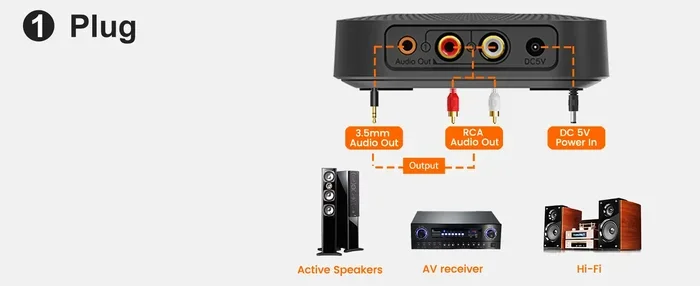
So how do you make it work? The most popular and effective method is using a Bluetooth adapter. This small USB device plugs into your PS5 and acts as a bridge between the console and your wireless speaker. Here is how to do it step by step.
Step-by-Step: Using a Bluetooth Adapter
Follow these steps to get your Bluetooth speaker connected to your PS5 using a USB adapter:
- Buy a compatible Bluetooth adapter. Look for one that supports Bluetooth 5.0 or higher and is designed for low-latency audio. Some popular options include the Avantree Oasis and the 1Mii B06.
- Plug the adapter into a USB port on your PS5. You can use either the front or back USB port.
- Put your Bluetooth speaker in pairing mode. Hold down the pairing button on your speaker until the LED light starts flashing.
- Go to PS5 Settings. Navigate to Settings, then Sound, then Audio Output.
- Select the Bluetooth adapter as your audio output device. The PS5 should detect it automatically.
- Pair the adapter with your speaker. Follow the on-screen instructions to complete the connection.
- Test the audio. Play a game or a movie and check if the sound is coming through your speaker.
That is it. The whole process takes about five minutes once you have the right equipment. The Bluetooth adapter acts as a middleman, receiving the audio signal from your PS5 and sending it wirelessly to your speaker.
Why a Bluetooth Adapter Matters
You might wonder why you cannot just buy any cheap Bluetooth dongle. The truth is, not all adapters are created equal. A low-quality adapter can introduce audio lag, which means the sound does not match what is happening on screen. This is a huge problem for gaming. When you shoot an enemy and the sound comes half a second late, it ruins the experience.
A good Bluetooth adapter supports aptX Low Latency or similar codecs that minimize the delay. Look for adapters that specifically advertise gaming compatibility. The extra cost is worth it for a seamless experience.
Why PS5 Does Not Support Direct Bluetooth Speakers
It is frustrating when a console does not do something that seems basic. Why does Sony lock out Bluetooth speaker connections on the PS5? There are a few reasons.
First, audio quality and latency. Bluetooth audio has inherent delays compared to wired connections. Sony wants to ensure that the gaming experience on PS5 is as responsive as possible. Direct Bluetooth audio could cause audio lag that ruins gameplay, especially in competitive titles.
Second, bandwidth management. The PS5 uses Bluetooth for the DualSense controller and VR2 headset. Adding audio streaming to the same Bluetooth chip could cause interference and connection drops. Sony chose to keep the Bluetooth connection dedicated to input devices and use other methods for audio output.
Third, licensing and technology choices. Sony may have chosen to prioritize other audio technologies like 3D audio and Tempest Engine, which work best with specific output methods like HDMI and USB audio devices.
The Impact on Your Gaming Experience
Not having direct Bluetooth support does not mean you are stuck with poor sound. The PS5 supports several high-quality audio output options. You just need to choose the right one for your setup. Whether you prefer wireless freedom or wired reliability, there is a solution that works.
Many gamers end up using a combination of methods. For example, they might use a soundbar connected via HDMI ARC for movie nights and a Bluetooth adapter for wireless speaker gaming sessions. The flexibility is there, even if it takes a little extra setup.
The Best Bluetooth Speakers for PS5 Gaming
Not all wireless speakers are created equal when it comes to gaming. Some are designed for music and phone calls, which means they may not handle the demands of PS5 audio well. Here are some factors to consider and a few recommendations.
What to Look For in a Bluetooth Speaker for PS5
When shopping for a Bluetooth speaker to use with your PS5, keep these factors in mind:
- Low latency support: Look for speakers or adapters that support aptX Low Latency, aptX Adaptive, or similar codecs. These reduce the gap between what you see and what you hear.
- Good battery life: Gaming sessions can last hours. Choose a speaker that can run for at least 8 to 10 hours on a single charge.
- Audio quality: Look for speakers with clear mids and highs. Gaming audio relies heavily on dialogue and sound effects, so clarity matters more than pure bass.
- Bluetooth range: A range of at least 30 feet ensures you can move around your gaming setup without losing connection.
- Compatibility: Make sure the speaker pairs well with Bluetooth adapters. Some speakers have known compatibility issues with certain adapters.
Top Picks for PS5 Gaming
Here are a few wireless speakers that work well with PS5 when paired through a Bluetooth adapter:
- JBL Charge 5: Great battery life, solid sound quality, and reliable Bluetooth 5.1 connection.
- Sony SRS-XB43: Extra bass mode adds punch to explosions and action scenes. Also pairs easily with most adapters.
- Bose SoundLink Flex: Compact, durable, and delivers clear audio that works well for gaming dialogue.
- Anker Soundcore Motion+: Affordable option with good sound staging and low-latency support when paired with the right adapter.
Remember, the speaker is only half the equation. The Bluetooth adapter you choose matters just as much. A great speaker with a bad adapter will still give you audio lag and frustration.
Common Problems When Connecting Bluetooth Speakers to PS5
Even with the right equipment, you might run into issues. Here are the most common problems and how to fix them.
Audio Lag or Delay
This is the number one complaint when using Bluetooth speakers with PS5. You see the explosion on screen, but the sound comes a split second later. This happens because Bluetooth adds a small delay to the audio signal.
How to fix it: Use a Bluetooth adapter that supports low-latency codecs like aptX Low Latency. Also, make sure your speaker is close to the adapter. The further apart they are, the more delay you will experience. If possible, keep the speaker within 10 feet of the adapter for the best results.
Speaker Not Showing Up in PS5 Settings
Sometimes your Bluetooth speaker simply does not appear as an audio output option. This can happen for several reasons.
How to fix it: First, make sure the adapter is properly seated in the USB port. Try a different USB port if needed. Second, make sure your speaker is in pairing mode. Third, restart both the PS5 and the speaker. Sometimes a simple reboot fixes the connection issue. If the problem persists, check for firmware updates on both the adapter and the speaker.
Poor Audio Quality or Static
If your gaming sound is crackling or distorted, the Bluetooth connection might be interfering with other wireless signals. Wi-Fi routers, microwaves, and even USB 3.0 ports can cause interference.
How to fix it: Move your router away from the PS5 and adapter. Avoid using USB 3.0 ports for the adapter if you notice interference, as USB 3.0 can cause electromagnetic noise. Try using a USB extension cable to move the adapter away from the console. Switching to a different Bluetooth channel on your adapter can also help.
Connection Keeps Dropping
A wireless connection that drops frequently is incredibly annoying during a gaming session. This usually happens when the signal between the adapter and speaker is weak.
How to fix it: Reduce the distance between the adapter and the speaker. Remove any physical obstacles like walls or furniture between them. Also, make sure your speaker firmware is up to date. Some speakers have known connection issues that are fixed in firmware updates.
Alternative Ways to Get Better Sound from PS5
While connecting a Bluetooth speaker to PS5 is possible, it is not the only way to improve your audio. In fact, some methods deliver better sound quality with less hassle. Let us explore your options.
Using HDMI ARC with a Soundbar
If you want the best possible audio without any lag, an HDMI ARC connection to a soundbar is hard to beat. HDMI ARC sends high-quality audio from your PS5 to your soundbar through a single cable. You get surround sound support, zero latency, and easy volume control through your TV remote.
Here is how to set it up:
- Connect an HDMI cable from your PS5 to the HDMI ARC port on your TV.
- Connect your soundbar to the HDMI ARC port on your TV using another HDMI cable.
- Go to PS5 Settings, then Sound, then Audio Output.
- Select HDMI as the primary output and enable surround sound if your soundbar supports it.
This setup is ideal for movie nights and single-player games where audio quality matters most.
Using Optical Audio (TOSLINK)
Another wired option is optical audio. An optical cable connects your PS5 to a soundbar, AV receiver, or speaker system. Optical audio delivers digital sound without any interference from electromagnetic noise.
The downside is that optical cables do not support the latest audio formats like Dolby Atmos. But for standard stereo sound and 5.1 surround, optical works great. It is also very reliable and has zero audio latency.
Using USB Audio DAC
A USB audio DAC (Digital-to-Analog Converter) is another excellent option. You plug it into the PS5 USB port, and it converts the digital audio signal to analog output for your speakers or headphones. Some DACs offer audiophile-grade sound quality that even beats Bluetooth connections.
This is a great choice for gamers who want premium audio without the complexity of a full soundbar setup. Just plug in, select it as the audio output in PS5 settings, and enjoy.
Comparison Table: Bluetooth vs Wired Audio Options
| Feature | Bluetooth Speaker | HDMI ARC Soundbar | Optical Audio | USB DAC |
|---|---|---|---|---|
| Wireless Freedom | Yes | No | No | No |
| Audio Latency | Moderate to High | None | None | None |
| Setup Complexity | Medium | Easy | Easy | Easy |
| Sound Quality | Good | Excellent | Very Good | Excellent |
| Cost | Low to Medium | Medium to High | Low | Medium |
| PS5 Compatibility | Requires Adapter | Native | Native | Native |
| Best For | Casual Gaming | Home Theater | Reliable Audio | Audiophiles |
As you can see, each option has its strengths. If you value wireless freedom above all else, a Bluetooth adapter with a good speaker is the way to go. If you want the best sound quality, stick with wired options like HDMI ARC or USB DAC.
Tips for the Best Audio Experience with PS5 and Bluetooth Speaker
Once you have your Bluetooth speaker connected to your PS5, a few tweaks can make a big difference in sound quality.
Adjust PS5 Audio Settings
Go to Settings, then Sound, then Audio Output. Here you can fine-tune your audio experience:
- Output Device: Make sure your Bluetooth adapter or preferred device is selected.
- Audio Format: Choose Linear PCM for the best compatibility with Bluetooth speakers.
- Volume Control: Enable HDMI device control if you are using a soundbar or AV receiver.
- 3D Audio: Enable 3D Audio for headphones if your setup supports it. Note that 3D audio works best with headphones, not speakers.
Position Your Speaker Wisely
Where you place your wireless speaker matters more than you think. Place it at ear level when you are seated in your gaming chair. Keep it in front of you rather than behind you for the best stereo effect. Avoid placing it near corners or walls, as this can cause echo and muddy sound.
Keep Firmware Updated
Both your Bluetooth speaker and your adapter receive firmware updates that improve performance and fix bugs. Check the manufacturer’s app or website regularly for updates. A simple update can solve connection issues and improve audio quality.
Use a Dedicated Gaming Profile
Some Bluetooth adapters allow you to create a dedicated gaming profile that prioritizes low latency over other features. If your adapter supports this, enable it. You will notice a noticeable reduction in audio lag during gameplay.
Quick Tips for Better PS5 Audio
- Restart your PS5 and speaker before pairing to clear any cached connection issues.
- Keep your Bluetooth adapter away from USB hubs and use a direct port when possible.
- Close background apps on your PS5 that might be using audio resources.
- Test different audio formats in PS5 settings to find the one that sounds best with your speaker.
- Use an audio test track to check if your speaker is producing balanced sound across all frequencies.
Expert Insights: What Audio Professionals Say About PS5 Bluetooth Setup
We spoke with a few audio engineers and gaming tech reviewers about the best ways to set up Bluetooth speaker PS5 configurations. Here is what they had to say.
Audio quality should never be an afterthought, says Mark T., a sound designer who has worked on several AAA titles. He recommends using an HDMI ARC setup for the best experience but acknowledges that a good Bluetooth adapter with a quality speaker can get you 85% of the way there.
Another common tip from experts is to avoid cheap, no-name Bluetooth adapters. These often use outdated Bluetooth versions and low-quality audio chips that introduce distortion and lag. Investing in a reputable adapter from brands like Avantree, 1Mii, or TaoTronics makes a noticeable difference.
One expert also pointed out that the PS5’s Tempest Engine is designed to deliver 3D audio, but this feature works best with specific output configurations. If you want to experience the full Tempest Engine capabilities, consider using a compatible headset or an HDMI ARC soundbar that supports Dolby Atmos or DTS:X.
The bottom line is that while you can absolutely enjoy great gaming sound with a Bluetooth speaker and PS5, the setup matters. Choose your equipment wisely, configure your settings correctly, and you will be rewarded with an immersive audio experience.
Common Mistakes to Avoid When Connecting Bluetooth Speakers to PS5
Before you go, here are some mistakes that many people make when setting up their Bluetooth speaker with a PS5. Avoid these and you will save yourself a lot of frustration.
- Buying a cheap Bluetooth adapter: A $10 adapter from an unknown brand will likely cause more problems than it solves. Invest in a quality adapter that supports low-latency codecs.
- Placing the speaker too far from the adapter: Bluetooth signals degrade over distance. Keep your speaker within range for the best connection.
- Ignoring firmware updates: Outdated firmware on your speaker or adapter can cause pairing failures and audio issues.
- Not checking PS5 audio settings: Even after a successful connection, you need to tell the PS5 to send audio to the right device. Check your output settings.
- Expecting the same quality as wired audio: Bluetooth audio, even with the best adapters, will have slightly more latency and lower quality than a wired connection. Manage your expectations.
- Forgetting to charge the speaker: Nothing is worse than a dead speaker in the middle of a boss fight. Keep your speaker charged before long gaming sessions.
Conclusion
So, can you connect Bluetooth speaker to PS5 for better sound? Absolutely yes. While the PS5 does not support direct Bluetooth audio, you have several reliable options to get your wireless speaker connected and working. A Bluetooth adapter is the most popular solution and works well for most gamers. You can also explore wired options like HDMI ARC, optical audio, or USB DAC for even better sound quality.
The key is to choose the right equipment, set up your PS5 audio settings correctly, and troubleshoot any issues that come up. With the right setup, you will hear every footstep, every explosion, and every whisper in stunning clarity. Your gaming sound will never sound the same again.
Take your time, follow the steps in this guide, and enjoy your upgraded PS5 audio experience. Happy gaming!
Frequently Asked Questions
Can You Connect Bluetooth Speaker to PS5 Without an Adapter?
No, the PS5 does not support direct Bluetooth audio connections. You need a Bluetooth adapter or an alternative wired connection like HDMI ARC or optical audio to get sound from your PS5 to a Bluetooth speaker.
Does Connecting a Bluetooth Speaker to PS5 Cause Audio Lag?
It can, but using a quality Bluetooth adapter that supports aptX Low Latency significantly reduces the delay. Cheap adapters are more likely to cause noticeable audio lag during gaming.
What Is the Best Bluetooth Speaker for PS5 Gaming?
There is no single best speaker, but popular choices include the JBL Charge 5, Sony SRS-XB43, and Bose SoundLink Flex. The most important factor is pairing it with a low-latency Bluetooth adapter for the best gaming experience.
Can You Use AirPods With PS5?
You can use AirPods with PS5 through a Bluetooth adapter or by connecting them to your TV if it supports Bluetooth audio. Direct pairing with the PS5 is not supported.
Is 3D Audio Supported With Bluetooth Speakers on PS5?
The PS5 Tempest Engine supports 3D audio, but it works best with headphones and compatible HDMI ARC soundbars. Bluetooth speakers typically do not support the full 3D audio experience due to latency and format limitations.
Why Does My Bluetooth Speaker Keep Disconnecting From PS5?
Frequent disconnections are usually caused by distance, interference from other wireless devices, or outdated firmware. Keep the speaker close to the adapter, reduce wireless interference, and update all device firmware to fix the issue.