Can Phones Have A Projector Here Is All You Need To Know
Can phones have a projector? Yes, they can, and the technology is more accessible than ever. Whether you want a phone with a built-in projector or a portable projector accessory for your device, there are plenty of ways to turn your phone into a big-screen entertainment hub. In this guide, we cover everything from pico projector options to phone screen projection methods, so you can make an informed choice.
Have you ever wondered if your phone could double as a projector? The idea of pulling up a movie on a wall bigger than your TV sounds amazing, right? Can phones have a projector? The short answer is yes. The longer answer is that there are several ways to make it happen, and the options keep getting better every year.
Whether you are camping with friends, presenting at work, or just want a bigger screen for movie night, a phone projector setup can change the way you use your device. In this article, we will walk you through everything you need to know. We will cover how the technology works, what products are available, and how to pick the best option for your needs.
The world of mobile projection has grown a lot in recent years. What once felt like science fiction is now something you can buy at most electronics stores. From tiny pico projectors that fit in your pocket to phones that come with a projector already inside, the choices are expanding fast. Let us dive in and explore them all.
Key Takeaways
- Phone projectors exist in multiple forms: built-in options, clip-on accessories, and standalone pico projectors that connect to your phone.
- Built-in projector phones are rare: only a few manufacturers have released models with this feature, but the market is growing.
- Phone projector accessories are affordable: you can find portable projectors that pair with any smartphone for under $100.
- Wireless projection is now standard: most modern phones support screen mirroring and casting without extra hardware.
- Consider brightness and battery life: these are the two most important factors when choosing a projector for phone use.
- Phone projector technology is evolving fast: expect better image quality and smaller devices in the near future.
📑 Table of Contents
What Is a Phone Projector and How Does It Work
A phone projector is any device or feature that takes the image from your phone and displays it on a larger surface. This can be a wall, a screen, or a white sheet. The technology behind it is simpler than most people think. At its core, a projector takes light and pushes it through a lens to create a bigger image.
How Built-In Phone Projectors Work
Some phones come with a built-in projector right inside the body. These devices use tiny LED or laser light sources combined with a micro-lens system. The image from your phone screen gets fed through the projector module, and you see a larger version on any flat surface.
These built-in systems are compact. They do not add bulk to the phone in a noticeable way. However, they do take up internal space, which is one reason why not every phone manufacturer uses them. The projector phone technology is still maturing, and the image quality can vary a lot from one model to another.
How External Phone Projectors Work
External projectors are separate devices that connect to your phone. You can use a cable, Bluetooth, or Wi-Fi to send your phone screen to the projector. These devices range from tiny pocket projectors to larger units that produce very bright images.
The most common type is the pico projector. These are small, portable, and designed for personal use. You can set one up on a desk or a shelf, point it at a wall, and enjoy a screen that is 50 to 100 inches wide. Many pico projectors also have built-in batteries, so you do not need a power outlet to use them.
Wireless vs Wired Projection
Wireless phone projection uses technologies like Chromecast, AirPlay, or Miracast. You simply connect your phone to the projector over Wi-Fi, and your screen appears on the big surface. This is super convenient and works well for most everyday uses.
Wired projection uses an HDMI cable or a USB-C adapter. The connection is more stable, and there is no lag. If you need a reliable setup for presentations or gaming, a wired connection is the way to go. Both methods work great, and the best choice depends on your situation.
Do Phones Actually Come With Built-In Projectors
This is one of the most common questions people ask. Can phones have a projector inside them without any extra accessories? Yes, but the options are limited right now. Only a handful of manufacturers have released phones with this feature, and they tend to be niche products.
Current Models With Built-In Projectors
A few brands have experimented with projector phone designs. Some Chinese manufacturers have released models that include a tiny projector in the top edge of the phone. These projectors can display an image on a wall or ceiling, which is fun for watching videos in bed or sharing photos with a small group.
The Samsung Galaxy Beam was one of the earliest examples of a projector phone. It came out several years ago and featured a built-in pico projector. While it was not a massive hit, it proved the concept could work. Since then, other brands have followed suit, though the market remains small.
Why Built-In Projectors Are Still Rare
There are a few reasons why most phones do not have built-in projectors. First, the technology adds cost. A mini projector module is not cheap to manufacture, and most consumers do not want to pay extra for a feature they might rarely use.
Second, battery life takes a hit. Running a projector drains your phone battery quickly. Most people prefer their phone to last a full day, and adding a projector module makes that harder. Finally, image quality on built-in phone projectors is still limited. The small size of the module means the image is not as bright or sharp as a dedicated projector.
What to Expect in the Future
The future looks promising. As LED and laser projector technology improves, we can expect built-in projectors to become brighter and more efficient. Some tech experts believe that within the next few years, projector phones will be more common. The demand for mobile entertainment is growing, and a built-in projector would be a killer feature for many consumers.
How to Project Your Phone Screen (Methods and Accessories)
If your phone does not have a built-in projector, you are not out of luck. There are many ways to project your phone screen, and most of them are affordable and easy to set up. Let us look at the most popular methods.
Using a Portable Pico Projector
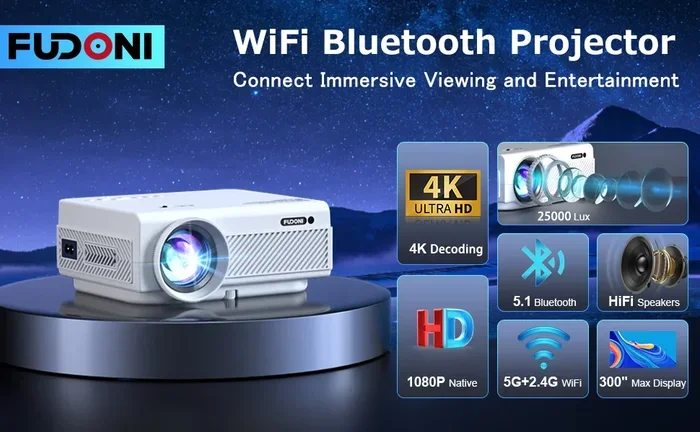
A pico projector is the most popular option for people who want a phone projector setup. These tiny devices fit in your hand and can project an image from 30 to 100 inches. You connect your phone via Wi-Fi, Bluetooth, or a cable, and you are ready to go.
Some pico projectors even have built-in batteries, which makes them perfect for outdoor use. You can set one up at a campsite, on a patio, or in a dorm room. The image quality has improved a lot in recent years, and even budget models now offer decent brightness and color accuracy.
Using a Phone Projector Accessory
If you do not want to buy a separate projector, you can use a phone projector accessory. These include clip-on lenses and magnification screens that work with your phone’s display. You place the accessory over your phone screen, and it magnifies the image onto a wall.
These accessories are very affordable. You can find them for under $20 online. They do not need any power or batteries, which makes them super simple to use. The downside is that the image quality is not as good as a real projector. The colors can be washed out, and the brightness depends on your phone’s screen.
Using Smart TV Casting or Streaming Devices
Another great option is to use a smart TV casting device like Chromecast, Roku, or Apple TV. These devices connect to your TV, and you can cast your phone screen directly to the big screen. This is not technically a projector, but it achieves the same goal of a larger display.
Phone to TV projection is now very easy. Most modern phones support screen mirroring out of the box. You just open the casting feature on your phone, select your device, and your screen appears on the TV. This method works great for streaming movies, showing photos, or giving presentations.
Quick Tips for Better Projection
- Use a dark room: projectors work best in low-light conditions. The darker the room, the sharper and more vibrant the image will look.
- Use a smooth white surface: a blank white wall works great. Avoid textured walls, as they can make the image look blurry.
- Keep the projector stable: use a tripod or a flat surface to avoid a shaky image.
- Adjust the focus: most projectors have a focus ring or digital focus option. Take a moment to sharpen the image before you start watching.
- Turn up your phone brightness: this helps the projector display brighter and more vivid colors.
Benefits of Having a Projector on Your Phone
Why would you want a projector on your phone in the first place? There are more benefits than you might think. Let us look at the biggest advantages.
Bigger Screen for Entertainment
The most obvious benefit is a bigger screen. Instead of squinting at a small phone display, you can watch movies, shows, and videos on a wall that is 50 inches or more. This makes mobile entertainment a lot more enjoyable, especially for group viewing.
Portability and Convenience
A portable projector that connects to your phone is incredibly convenient. You can throw it in your bag and take it anywhere. Whether you are traveling, camping, or just hanging out at a friend’s house, you can turn any room into a mini theater.
Great for Presentations and Sharing
If you ever need to present something, a phone projector is a game-changer. You can share slides, photos, or documents with a group without needing a laptop or a bulky projector. This is especially useful for students, freelancers, and small business owners.
Cost Savings
Instead of buying a separate TV or monitor, you can use your phone and a projector. A good pico projector costs much less than a new TV, and it is far more portable. For people who want a big-screen experience without the big price tag, a phone projector setup is hard to beat.
Fun Factor
Let us be honest. Projecting a movie on your bedroom wall is just plain fun. It feels futuristic and exciting. Kids love it, and adults enjoy it too. A phone projector setup adds a sense of novelty and fun to your everyday entertainment.
Best Phone Projector Options and Accessories
The market for phone projectors has grown a lot. There are now many options at different price points. Here are some of the best choices available right now.
Top Standalone Pico Projectors
- Anker Nebula Capsule III: This is one of the best portable projectors on the market. It runs Android TV, has built-in speakers, and connects to your phone via Wi-Fi or HDMI. The image quality is excellent for its size.
- XGIMI MoGo 2: A sleek and compact projector with auto-focus and auto keystone correction. It produces bright, clear images and is great for both movies and presentations.
- AAXA P300: A budget-friendly option that still delivers solid performance. It is small, lightweight, and easy to carry around.
Top Phone Projector Accessories
- Clip-on projector lenses: These are affordable magnifying lenses that attach to your phone. They work without any power source and are great for casual use.
- HDMI adapters: A simple USB-C to HDMI adapter lets you connect your phone to any projector or TV. This is the most reliable wired option.
- Wireless casting dongles: Devices like Chromecast or Fire TV Stick let you cast your phone screen wirelessly to any TV or projector with an HDMI input.
Comparison Table: Built-In Projector Phones vs External Projectors
- Feature: Built-in projector phones have the projector integrated into the device. External projectors are separate devices that connect to your phone.
- Portability: Built-in options are more convenient since you do not carry extra gear. External projectors add bulk but offer better image quality.
- Cost: Built-in projector phones tend to be more expensive. External projectors and accessories are available at many price points.
- Image Quality: External projectors generally produce brighter and sharper images. Built-in projectors are limited by the small size of the module.
- Battery Impact: Built-in projectors drain your phone battery. External projectors have their own battery, so your phone stays charged.
The Future of Projector Phone Technology
The projector phone market is at an exciting crossroads. Technology is improving fast, and consumer demand is growing. Here is what we can expect in the coming years.
Brighter and More Efficient Light Sources
Laser and advanced LED technology is making projectors brighter and more energy-efficient. This means future projector phones will be able to display clearer images even in well-lit rooms. The days of needing a dark room for a good projection are slowly coming to an end.
Smaller and More Powerful Modules
Engineers are finding ways to shrink projector components even further. This means more phones will be able to fit a projector inside without adding bulk or weight. As the modules get smaller, the image quality will continue to improve.
Integration with Augmented Reality
Some experts believe that phone projector technology will eventually merge with augmented reality (AR). Imagine projecting a touchscreen interface onto any surface and interacting with it using your phone’s cameras. This is still a few years away, but the foundations are being laid right now.
More Manufacturers Entering the Market
As consumer interest grows, more phone manufacturers are likely to explore built-in projectors. The success of early models will encourage others to invest in this technology. We may see major brands like Apple, Samsung, and Google release projector phones in the near future.
Key Takeaways
- Phone projectors are real and available now: you can buy them as built-in phones or as external accessories.
- External pico projectors offer the best image quality: they are portable, affordable, and easy to use.
- Built-in projector phones are rare but growing: the technology is improving, and more models are expected soon.
- Wireless projection is the most convenient option: most modern phones support casting without extra cables.
- Brightness and battery life are key factors: always check these before buying a projector for phone use.
- The future is bright for projector phone technology: expect better image quality, smaller devices, and more options in the years ahead.
Conclusion
Can phones have a projector? Absolutely. The technology is here, it is accessible, and it is getting better every year. Whether you choose a phone with a built-in projector or pick up a portable pico projector as an accessory, you can enjoy a bigger screen wherever you go.
The options are varied and cater to different budgets and needs. If you want simplicity, a built-in projector phone is a great choice. If you want flexibility and better image quality, an external pico projector is the way to go. And if you just want a quick and cheap solution, a clip-on projector accessory can do the job.
Phone projector technology is no longer a novelty. It is a practical tool for entertainment, education, and work. As the technology continues to evolve, we can expect even more impressive options to hit the market. The best time to explore this space is right now, so pick the option that fits your needs and start projecting.
Grab your phone, find a blank wall, and enjoy the show. The future of mobile projection is bright, and you are going to want to be part of it.
Frequently Asked Questions
Do any smartphones come with a built-in projector?
Yes, a few smartphones do come with a built-in projector. These are niche products, and the options are limited compared to regular phones. The technology is still developing, but more brands are expected to release projector phones in the near future.
How much does a phone projector cost?
The price varies widely. Basic clip-on accessories can cost under $20, while quality pico projectors range from $100 to $500. Built-in projector phones tend to be more expensive than regular smartphones. Your budget will determine which option works best for you.
Can I project my phone screen wirelessly?
Yes, most modern phones support wireless projection through Wi-Fi. Technologies like Chromecast, AirPlay, and Miracast make it easy to cast your phone screen to a projector or smart TV without any cables.
What is the best projector for phone use?
The best projector depends on your needs and budget. For portability, the Anker Nebula Capsule III and XGIMI MoGo 2 are top choices. For a budget option, a clip-on lens accessory or a basic pico projector works well for casual use.
Does projecting from a phone drain the battery?
Yes, projecting your phone screen does drain the battery faster. If you are using an external projector, your phone battery will deplete more quickly than normal. Using a projector with its own battery can help reduce the strain on your phone.
Is phone projector image quality good enough for movies?
It depends on the projector. Pico projectors in the $200 and above range offer decent image quality for movies. Cheaper options may produce a dimmer or less sharp image. For the best experience, use the projector in a dark room and choose a smooth white surface to project onto.
=== SEO TITLE ===
Can Phones Have A Projector Here Is All You Need To Know
=== META TITLE ===
Can Phones Have A Projector Here Is What You Need To Know
=== URL SLUG ===
can-phones-have-a-projector