Can My Parents See Incognito History on Shared Devices
Can my parents see incognito history? The short answer is: it depends on the device and setup. Incognito mode keeps your browsing local, but shared devices, network monitoring, and parental controls can still expose your activity. This guide explains exactly how private browsing works and what steps parents can take to monitor internet use on shared devices.
Key Takeaways
- Incognito mode does not hide your history from everyone: It only prevents saving data on your local device.
- Parents can see incognito history through routers: Network-level logging tracks all sites visited on a shared WiFi connection.
- Monitoring software can bypass private browsing entirely: Apps installed on shared devices capture everything, including incognito sessions.
- Browser sync and Google accounts link your activity: If you sign into a shared account, your search and browsing history may be visible.
- DNS cache and system logs store records: Even after closing an incognito window, traces can remain on shared computers.
- Using your own device and data plan is the safest option: A personal phone with mobile data offers the most privacy.
- Honest communication is better than hiding: If you are a minor, talking openly with your parents about internet use builds trust.
📑 Table of Contents
Can My Parents See Incognito History on Shared Devices?
You opened a new incognito window and thought you were safe. Maybe you were searching for something personal. Maybe you were just browsing without wanting a record of it. Either way, the big question is real. Can my parents see incognito history? The answer is not a simple yes or no. It depends on several factors, including the type of device, the network setup, and the tools your parents use.
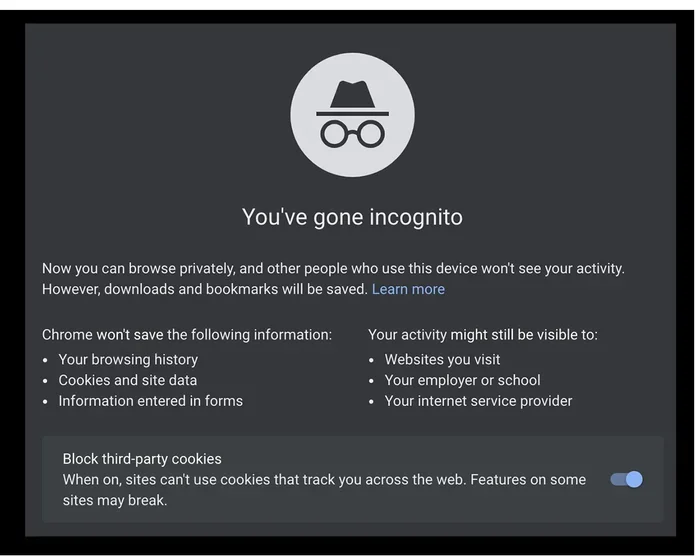
Incognito mode is often misunderstood. Many people think it makes them completely invisible online. That is not true. Private browsing only stops your browser from saving local data like cookies, cache, and browsing history. It does not hide your activity from your internet provider, your network admin, or monitoring tools. On shared devices, the risks are even higher.
This article breaks down exactly how incognito mode works, what parents can and cannot see, and what you can do to protect your internet privacy. Whether you use a shared laptop, a family computer, or a tablet at home, this guide covers it all.
What Is Incognito Mode and How Does It Work?
Before diving into whether parents can track your activity, it helps to understand what incognito mode actually does. Every major browser offers a private browsing option. Chrome calls it incognito. Firefox calls it private browsing. Safari and Edge have similar features too.
How Browsers Handle Private Browsing
When you open an incognito window, your browser does a few specific things:
- It stops saving your browsing history. The list of websites you visit will not appear in your history after you close the window.
- It deletes cookies when you close the window. Cookies are small files that websites use to remember you. In incognito mode, they vanish once you close the tab.
- It clears the cache. Temporary files like images and scripts are not stored on your device.
- It disables saved form data. Anything you type into forms will not be saved for future use.
That sounds pretty private, right? But here is the catch. Incognito mode only affects your local device. It does not hide your search history from your internet service provider, your employer, or the websites you visit. And on a shared device, it certainly does not hide you from anyone who has access to the device or the network.
Think of it this way. Incognito mode is like wearing a mask inside your own house. It keeps your identity hidden from anyone in the room with you, but it does not stop anyone from looking through the windows or checking the security cameras outside.
Can Parents Actually See Incognito History?
Now for the big question. Can parents see incognito history? The answer depends on where and how you are browsing. Let us look at the different scenarios.
On Shared Computers
If you are using a family computer or a shared laptop, your parents may be able to see some of your activity, even in incognito mode. Here is why.
First, incognito mode does not delete your activity from the device in real time. It simply prevents the browser from saving it automatically. But other tools can still capture what you do. For example, keyloggers record every keystroke you type. Screen capture software takes screenshots at intervals. Some monitoring software runs in the background and logs all browser activity, including incognito sessions.
Second, your parents might check the DNS cache on the computer. The DNS cache stores records of every website you visit. Even in incognito mode, these records can remain until they are cleared. A tech-savvy parent can access this information fairly easily.
Third, if your parents have admin access to the computer, they can install tracking tools. Once installed, these tools run silently and record everything. You would not even know they are there.
On Shared Phones and Tablets
Shared phones and tablets are common in many households. If your parents give you their old phone or if you share a family iPad, the same risks apply.
On Android devices, Google account sync can link your browsing history across devices. If you sign into Chrome on a shared tablet and then open an incognito window, your regular browsing data might still sync to the account. This means your parents could see your history through their own Google account on a different device.
On iPhones and iPads, iCloud syncing works similarly. If your Safari browsing data is backed up to iCloud, your parents who share the Apple ID might have access to that data. Incognito mode in Safari stops saving history locally, but it does not prevent cloud backups from capturing other data.
Additionally, many parents install parental control apps on shared devices. Apps like Qustodio, Bark, and Norton Family can monitor all activity, including incognito browsing. These apps run quietly in the background and send reports to the parent’s device.
Ways Parents Can Track Your Online Activity
Even if your parents do not actively check your browsing, there are multiple ways they can access your online activity. Understanding these methods helps you know what to watch out for.
Router and Network-Level Tracking
Every device connected to your home WiFi passes through the router. The router keeps logs of all network activity. This includes every website you visit, every search you make, and how long you spend on each site.
Can my parents see incognito history through the router? Yes, they can. The router does not care whether you are in incognito mode or not. It sees all traffic that passes through it. Most home routers have a log section accessible through the admin panel. Parents who know how to log in can review this data.
Some modern routers come with built-in parental controls. These tools let parents see a list of all websites accessed on the network. They can set time limits, block certain sites, and receive alerts for specific activity. Even if you use private browsing, the router still sees everything.
Monitoring Software and Apps
Monitoring software is one of the most powerful tools parents can use. These programs run on the device and capture detailed records of online activity.
Common features of monitoring apps include:
- Real-time screen recording that captures everything on the screen.
- Keystroke logging that records every search and message typed.
- Browser history tracking that logs all visited URLs, including incognito sessions.
- App usage reports that show how long you spend on each app.
- Location tracking that monitors where the device has been.
Some monitoring tools are designed specifically for parents. Others are marketed as employee surveillance tools. Either way, they can capture your internet activity regardless of whether you use incognito mode. If such software is installed on a shared device, your private browsing is not private at all.
Browser Sync and Cloud Accounts
Many browsers sync data across devices using a cloud account. Google Chrome, Safari, and Microsoft Edge all offer this feature. If your parents share a Google account or an Apple ID with you, your browsing history might sync to their devices.
Here is how this works. You browse normally on a shared computer. Your Chrome browser saves the history and syncs it to your Google account. Your parents log into the same Google account on their phone. They can see your full browsing history there. Incognito mode prevents syncing of incognito sessions, but your regular browsing data is still visible.
This is a subtle but important point. Incognito mode stops the syncing of private sessions. But it does not erase or hide your regular browsing data that is already synced.
Search Engine Records
Every search you make on Google, Bing, or DuckDuckGo is recorded by the search engine itself. Even if you delete your local search history, the search company may still have a record of your queries.
If your parents have access to your Google account, they can view your search and activity history through their Google Dashboard. This includes searches made on any device linked to that account. Incognito mode does not prevent Google from recording your searches if you are signed into your account while browsing.
The same applies to other search engines and online services. Your digital footprint extends far beyond what is saved on your device.
How to Protect Your Privacy on Shared Devices
If you are concerned about your internet privacy, there are steps you can take. Some are simple. Others require a bit more effort. Here are practical tips to help you browse more safely on shared devices.
Use Your Own Device and Data
The most effective way to protect your privacy is to use your own device with your own data plan. When you browse on your phone using mobile data (not WiFi), your parents cannot see your activity through the home router.
Your mobile carrier can see your data usage, but they do not typically share detailed browsing logs with your parents. This gives you a much higher level of online privacy compared to using a shared WiFi network.
Use a VPN Service
A VPN, or Virtual Private Network, encrypts your internet traffic. This makes it much harder for anyone on the same network to see what you are doing.
When you connect to a VPN, your data passes through a secure server. Your internet service provider, your parents, and anyone else on the network cannot see your browsing activity. They only see that you are connected to a VPN server.
Keep in mind that a VPN does not make you completely anonymous. The VPN provider itself may keep logs. And a VPN does not stop monitoring software installed directly on your device. But it is a strong layer of protection for your network-level privacy.
Clear Your DNS Cache Regularly
If you must use a shared computer, clear your DNS cache after each session. The DNS cache stores the addresses of websites you visit. Clearing it removes those records.
On Windows, you can clear the DNS cache by opening Command Prompt and typing ipconfig /flushdns. On Mac, you can use the Terminal app with the command sudo dscacheutil -flushcache. This is a simple step that removes one way your activity can be tracked.
Avoid Signing Into Personal Accounts
On shared devices, avoid signing into your personal Google account, Apple ID, or social media accounts. When you stay signed in, your browsing data can sync and become visible to others.
If you need to search something, use a browser in incognito mode and do not sign into any accounts. This reduces the amount of data that can be linked back to you.
Be Aware of Installed Software
If your parents have installed any monitoring software on a shared device, assume that they can see everything. No amount of private browsing will hide your activity from these tools.
If you are unsure whether monitoring software is installed, check your list of installed programs. On Windows, go to Settings > Apps. On Mac, check the Applications folder. Look for any apps you do not recognize. Common monitoring app names include Bark, Qustodio, Norton Family, and mSpy.
Should You Be Worried? Finding the Right Balance
It is natural to want some privacy, especially as you grow older. But it is also important to understand why parents monitor online activity. In most cases, parents are not trying to spy on you. They are trying to keep you safe.
Online safety is a real concern. Cyberbullying, inappropriate content, online predators, and screen addiction are all genuine risks. Parents use monitoring tools to protect their children from these dangers.
If you are a minor, consider having an open conversation with your parents about internet use. Explain what you do online and why privacy matters to you. Building trust often leads to more freedom and less need for secretive browsing.
If you are an adult living at home, the situation is different. You have a right to privacy. In that case, using your own device, a VPN, and your own data connection are the best ways to maintain your internet privacy.
Quick Tips for Safer Browsing
- Use mobile data instead of shared WiFi when you want private browsing.
- Always use incognito mode on shared devices, even though it is not foolproof.
- Install a reputable VPN to encrypt your network traffic.
- Clear your DNS cache after using a shared computer.
- Do not save passwords on shared devices.
- Log out of all accounts when you are done browsing.
- Check for monitoring apps if you suspect your activity is being tracked.
Conclusion
Can my parents see incognito history? The truth is, incognito mode is not a magic shield. It prevents your browser from saving local data, but it does not hide your activity from networks, routers, monitoring tools, or cloud accounts. On shared devices, the risks are even greater.
Parents can see your online activity through several methods. Router logs, monitoring software, browser sync, and search engine records all provide ways to track your internet use. Private browsing helps, but it is not enough on its own.
The best way to protect your online privacy is to use your own device with your own data connection. If that is not an option, combine incognito mode with a VPN, regular cache clearing, and smart account habits.
Ultimately, internet safety is about balance. Whether you are a teen or an adult, understanding how your online activity is tracked empowers you to make better choices. Stay informed, stay cautious, and take control of your digital footprint today.
Frequently Asked Questions
Can my parents see my incognito history on the WiFi router?
Yes, they can. The WiFi router logs all network activity, regardless of whether you use incognito mode. Parents who access the router admin panel can see every website you visit on their network. Incognito mode only prevents local browser storage, not network-level tracking.
Does incognito mode hide my activity from monitoring software?
No, it does not. Monitoring software installed on a device captures all activity, including incognito sessions. These tools record keystrokes, screen activity, and browser history in real time. Incognito mode does not affect software running at the system level.
Can my parents see my Google search history if I use incognito mode?
If you are signed into your Google account while browsing, Google still records your searches. Incognito mode prevents the browser from saving history locally, but it does not stop Google from logging your activity on its servers. Signing out of your account helps reduce this tracking.
What is the safest way to browse privately at home?
The safest method is to use your own device with mobile data instead of shared WiFi. If you must use a shared network, combine incognito mode with a VPN. A VPN encrypts your traffic and makes it very difficult for anyone on the network to see your activity.
How can I check if my parents have monitoring software installed?
Check your device’s list of installed apps or programs. Look for names like Bark, Qustodio, Norton Family, or mSpy. On Windows, go to Settings and review installed programs. On Mac, check the Applications folder. If you find unfamiliar software, ask your parents about it directly.
Is it wrong to want privacy online?
Not at all. Everyone deserves privacy, regardless of age. However, if you are a minor, your parents have a responsibility to keep you safe online. Open communication about your internet habits can help build trust and lead to a healthier balance between privacy and safety.