Can I Convert A Cd Player To Bluetooth And Stream Wirelessly
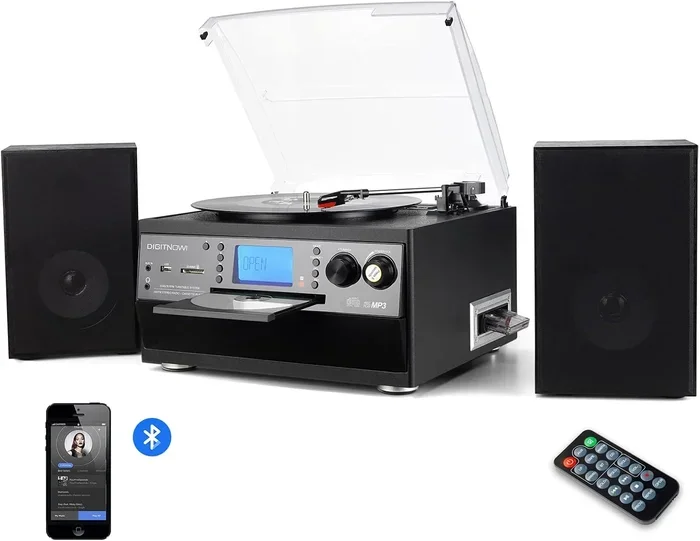
Yes, you can convert a CD player to Bluetooth and start streaming music wirelessly. Whether it is a home stereo or a car CD player, adding Bluetooth connectivity is easier than you think. In this guide, you will learn the different methods, step-by-step instructions, and expert tips to make your old audio system work with modern wireless streaming technology.
Key Takeaways
- Bluetooth adapters are the easiest way to add wireless streaming to any CD player.
- Converting a CD player to Bluetooth can save you from buying a whole new stereo system.
- There are multiple methods including Bluetooth receivers, transmitter modules, and Bluetooth-enabled cables.
- Car CD players can also be upgraded with Bluetooth kits for hands-free driving.
- Proper pairing and placement of your Bluetooth receiver makes a big difference in audio quality.
- Wireless audio conversion works best when you choose the right adapter for your specific stereo type.
- Retro audio upgrades keep your favorite collection alive while enjoying modern convenience.
📑 Table of Contents
- Can I Convert A Cd Player To Bluetooth And Stream Wirelessly?
- Why You Might Want to Convert A Cd Player To Bluetooth
- How to Convert A Cd Player To Bluetooth: Step-by-Step Guide
- Different Methods to Add Bluetooth to Your Cd Player
- Converting A Cd Player To Bluetooth in Your Car
- Common Mistakes When Upgrading Your Cd Player
- Expert Tips for Getting the Best Wireless Audio Experience
- Conclusion
Can I Convert A Cd Player To Bluetooth And Stream Wirelessly?
If you love your old CD player but wish you could stream music wirelessly, you are not alone. Many people ask, “Can I convert a CD player to Bluetooth?” The answer is a clear yes. You do not need to throw away your favorite stereo system. With the right tools, you can add Bluetooth connectivity to almost any CD player.
Whether it sits in your living room or your car, a Bluetooth adapter can breathe new life into older audio equipment. Wireless music streaming has never been easier. In this guide, we will walk you through every method, share practical tips, and help you avoid common mistakes. By the end, you will know exactly how to make your CD player work with modern audio streaming technology.
Let us get started and bring your old stereo into the wireless age.
Why You Might Want to Convert A Cd Player To Bluetooth
Old CD players still hold a special place for many music lovers. You may have a large collection of CDs you love. But the world has moved toward wireless streaming. Here is why upgrading makes sense.
Convenience and Modern Listening Habits
Streaming services like Spotify, Apple Music, and YouTube Music dominate how we listen today. Carrying CDs around feels outdated. When you convert a CD player to Bluetooth, you get the best of both worlds. Your old stereo stays, and you gain wireless access to millions of songs.
Saving Money on Audio Equipment
Buying a brand-new Bluetooth speaker or receiver system costs a lot. A simple Bluetooth receiver costs much less. You get wireless audio conversion without spending big money. This is a smart audio upgrade for any budget.
Keeping Your Favorite Stereo System
Some stereo systems sound amazing. They were built to last. Instead of replacing them, a Bluetooth module lets you keep the sound quality you love. This is a great retro audio upgrade that respects your investment.
Easier Sharing and Multi-Room Audio
Bluetooth lets multiple devices connect. You can share music across rooms. Adding Bluetooth connectivity to your CD player makes it a hub for the whole house.
How to Convert A Cd Player To Bluetooth: Step-by-Step Guide
Ready to make the switch? Here is how to convert a CD player to Bluetooth in simple steps.
Step 1: Check Your CD Player’s Outputs
Look at the back of your CD player. You need to find audio outputs. Common types include:
- 3.5mm headphone jack — the most common and easiest to use.
- RCA outputs — red and white plugs found on older stereos.
- Optical or coaxial digital outputs — found on higher-end CD players.
- Speaker-level outputs — direct connections for powered speakers.
Knowing your outputs helps you choose the right Bluetooth adapter.
Step 2: Choose the Right Bluetooth Adapter
Not all adapters are the same. Here is a quick comparison of the most popular types:
| Adapter Type | Best For | Ease of Use | Audio Quality |
|---|---|---|---|
| Bluetooth Receiver (3.5mm) | Home stereos with headphone jack | Very Easy | Good |
| Bluetooth Transmitter | Sending audio to Bluetooth speakers | Easy | Good |
| Bluetooth Module with Wiring | Custom car stereo installations | Moderate | Excellent |
| Bluetooth Cable (AUX) | Quick plug-and-play setup | Very Easy | Average |
| Bluetooth Adapter with RCA | Older stereos with RCA outputs | Easy | Very Good |
Pick the one that matches your CD player’s outputs. Most people start with a Bluetooth receiver for simplicity.
Step 3: Connect the Adapter
Plug the adapter into your CD player’s output. If you use a Bluetooth receiver, connect it to the headphone jack or RCA out. Then power on both your CD player and the adapter.
Step 4: Pair Your Device
Put the adapter in pairing mode. Open Bluetooth on your phone or tablet. Find the adapter in your device list. Tap to pair. Once connected, you can stream wirelessly through your CD player’s speakers.
Step 5: Test and Adjust
Play some music and check the sound quality. Move the adapter closer if you get interference. Adjust the volume on both the adapter and the stereo. Enjoy your new wireless audio setup.
Different Methods to Add Bluetooth to Your Cd Player
There is more than one way to convert a CD player to Bluetooth. Let us explore each method so you can pick what works best.
Method 1: Bluetooth Receiver with AUX Input
This is the most popular option. You buy a small Bluetooth receiver that plugs into a 3.5mm AUX port. These devices are tiny, affordable, and work with most stereos. Just plug in, pair your phone, and start streaming. This is ideal for home stereo Bluetooth setups.
Method 2: Bluetooth Transmitter Module
A Bluetooth transmitter takes audio from your CD player and sends it out wirelessly. This works great if you want to connect Bluetooth speakers or headphones. You place the transmitter between the CD player and the speakers. It picks up the audio and retransmits it wirelessly. This method suits people who want flexible wireless music streaming.
Method 3: DIY Bluetooth Module Installation
If you enjoy hands-on projects, a DIY Bluetooth module might be for you. These small circuit boards connect directly to your stereo’s internal wiring. You solder or wire them into the system. This gives the cleanest look and often the best audio quality. However, it requires some technical skill. Search online for Bluetooth module kits designed for audio projects.
Method 4: Bluetooth-Enabled Audio Cables
These are simple cables with built-in Bluetooth. One end plugs into your CD player. The other end connects to a Bluetooth speaker or receiver. They are convenient but may slightly reduce audio quality. Still, they offer a quick and easy path to wireless audio conversion.
Method 5: Replacing the CD Changer with a Bluetooth Unit
Some people choose to replace their CD changer entirely with a modern Bluetooth unit. This is common in cars. You swap the old player for a new one that supports wireless streaming. It is a bigger change but gives you full Bluetooth connectivity with modern features built in.
Converting A Cd Player To Bluetooth in Your Car
Car CD players are among the most common devices people want to upgrade. You might love the factory sound system but wish for wireless streaming on road trips. Here is how to add Bluetooth to your car CD player.
Option A: Bluetooth FM Transmitter
A Bluetooth FM transmitter plugs into your car’s cigarette lighter. It broadcasts audio on an FM frequency. Your car radio picks it up. This is one of the easiest and cheapest options. However, FM transmitters can sometimes experience interference or static. Still, they work well for most drivers who want quick Bluetooth connectivity.
Option B: Bluetooth AUX Adapter
If your car stereo has an AUX input, a Bluetooth AUX adapter works perfectly. You plug it in, pair your phone, and stream directly. No FM frequencies. No static. Just clean wireless audio. This is a popular choice for newer car stereos.
Option C: Bluetooth Car Kit with Wiring
For a more permanent solution, consider a Bluetooth car kit that connects directly to your car’s wiring. These kits often include a microphone for hands-free calling. They integrate seamlessly with your existing system. This is the best option if you want a professional-grade audio upgrade in your vehicle.
Quick Tips for Car Bluetooth Conversions
- Place the Bluetooth adapter near the dashboard for a strong signal.
- Keep your phone within 30 feet for stable wireless streaming.
- Pair your device before driving to avoid distractions.
- Test the audio at different volumes to find the best sound quality.
- Consider a kit with noise cancellation for clearer calls.
Common Mistakes When Upgrading Your Cd Player
Adding Bluetooth connectivity to a CD player is usually straightforward. But people do make mistakes. Here are some common ones to avoid.
Buying the Wrong Adapter
Not every Bluetooth adapter fits every stereo. Always check your CD player’s output ports before buying. A receiver designed for AUX will not work if your player only has RCA outputs. Match the adapter to your system for the best results in wireless audio conversion.
Ignoring Audio Quality Settings
Some adapters support high-quality audio codecs like aptX or AAC. If you care about audio quality, choose an adapter that supports these. Skipping this step can lead to compressed or muffled sound. Your retro audio upgrade should sound great, not worse.
Poor Placement of the Bluetooth Receiver
Where you place your Bluetooth receiver matters. Keep it away from metal objects and electronic interference. Place it near the stereo’s input for the cleanest connection. Bad placement leads to dropouts and weak signals.
Not Updating Firmware
Many modern Bluetooth modules receive firmware updates. These improve performance and fix bugs. Check the manufacturer’s website periodically. Keeping your adapter updated ensures reliable wireless music streaming.
Forgetting to Disable Other Bluetooth Devices
When pairing, other nearby devices might try to connect. This causes confusion and delays. Before you start, turn off Bluetooth on other gadgets. Then focus on pairing your phone with the Bluetooth receiver for a smooth experience.
Expert Tips for Getting the Best Wireless Audio Experience
Want top-notch sound after you convert a CD player to Bluetooth? Here are some pro tips.
Choose Quality Over Price
Cheap adapters often cut corners on audio quality. Spending a little more gets you better chips, stronger signals, and support for hi-res audio. Look for brands with solid reviews for wireless streaming.
Use High-Quality Cables
If your setup uses cables between the CD player and adapter, do not skimp. Shielded, high-quality cables reduce interference. This keeps your wireless audio conversion sounding crisp and clear.
Consider a DAC Upgrade
An external DAC (Digital-to-Analog Converter) can dramatically improve sound. Some Bluetooth receivers have built-in DACs, but a dedicated unit offers more power. This is worth exploring if you want audiophile-level music streaming devices performance.
Keep Your Software Current
Update your phone’s Bluetooth drivers and your adapter’s firmware regularly. These updates improve compatibility and performance. A well-maintained system delivers the best Bluetooth connectivity.
Experiment with Streaming Apps
Different apps offer different audio settings. Try Tidal, Spotify, or Amazon Music for high-quality streams. Adjust bitrate settings within the app. Pairing quality content with quality hardware gives you the ultimate wireless audio experience.
Conclusion
Converting a CD player to Bluetooth is one of the smartest audio upgrades you can make. You save money, keep your beloved stereo, and gain access to endless wireless streaming options. Whether it sits in your living room or your car, a simple Bluetooth adapter transforms how you enjoy music.
The process is straightforward. Check your outputs, choose the right adapter, connect, pair, and enjoy. Avoid common mistakes like poor placement or choosing the wrong device. Follow expert tips for the best sound quality.
Now you know the answer to “Can I convert a CD player to Bluetooth?” It is yes, and you have everything you need to do it. Grab a Bluetooth receiver, dust off that old CD player, and start streaming wirelessly today. Your favorite music deserves a new way to play.
Frequently Asked Questions
Can I convert a CD player to Bluetooth without any wiring?
Yes, you can. A Bluetooth AUX cable or a Bluetooth transmitter that connects wirelessly to your existing speakers requires no permanent wiring. These plug-and-play options are perfect if you want a quick setup. Just plug the adapter into your CD player’s headphone jack, pair your device, and start streaming.
What is the best Bluetooth adapter for a home CD stereo system?
The best adapter depends on your stereo’s outputs. If your system has a 3.5mm headphone jack, a small Bluetooth receiver like the ones from Avantree or Mpow works great. For systems with RCA outputs, choose a Bluetooth adapter with RCA connectors. These models deliver strong wireless streaming and solid audio quality for home stereos.
Will converting a CD player to Bluetooth reduce sound quality?
It depends on the adapter you choose. Budget adapters may compress audio slightly. However, higher-end Bluetooth receivers support codecs like aptX or AAC, which maintain excellent sound quality. Using quality cables and a good DAC also helps. In most cases, the sound difference is minimal and well worth the wireless convenience.
Can I use a converted CD player wirelessly with Bluetooth speakers?
Absolutely. You can use a Bluetooth transmitter connected to your CD player’s output. The transmitter sends the audio signal to any compatible Bluetooth speaker. This setup works well for multi-room audio. You get wireless music streaming from your favorite stereo through modern speakers placed anywhere in your home.
Is it expensive to add Bluetooth to an old CD player?
No, it is quite affordable. A basic Bluetooth receiver costs between $15 and $40. Mid-range models with better audio quality range from $40 to $80. Professional-grade Bluetooth modules or car kits may cost more. Overall, this is a budget-friendly audio upgrade compared to buying a brand-new stereo system.
How long does the Bluetooth conversion process take?
For most people, it takes about 10 to 20 minutes. You need to check your CD player’s outputs, plug in the adapter, and pair your device. If you install a Bluetooth module with wiring inside a stereo unit, it may take longer. But a simple receiver setup is fast and can be done in minutes.