Can Coax Handle 4k Here Is Everything You Need To Know
Can coax handle 4K? The short answer is yes, but with some important caveats. Coaxial cable can transmit 4K signals under the right conditions, but cable type, quality, and distance all matter. RG6 coax is your best bet for 4K video transmission, while older RG59 may struggle. This guide covers everything you need to know about using coax for 4K content.
Key Takeaways
- Coax can handle 4K: Modern coaxial cables like RG6 can transmit 4K signals effectively when conditions are right.
- Cable type matters: RG6 outperforms RG59 for 4K, and shielded options reduce signal interference.
- Distance is a factor: Longer runs increase signal loss, which can degrade 4K quality over coax.
- HDMI is still king: For pure 4K performance, HDMI remains the gold standard for most setups.
- Signal quality depends on many factors: Connectors, splitters, and cable age all impact 4K over coax.
- Quick fixes exist: Using high-quality RG6 cable and proper F-connectors can solve most 4K coax issues.
📑 Table of Contents
- Can Coax Handle 4K? The Definitive Answer
- Understanding Coaxial Cable Basics
- How 4K Signals Travel Through Coax
- Factors That Affect 4K Performance Over Coax
- Quick Tips for Getting the Best 4K Signal Over Coax
- Common Mistakes to Avoid With Coax and 4K
- Expert Insights on Coax and 4K Technology
- When to Choose Coax vs Other Cables for 4K
- Conclusion
Can Coax Handle 4K? The Definitive Answer
The question “can coax handle 4k” comes up a lot. People want to know if their existing coaxial wiring can support 4K content. The answer is more nuanced than a simple yes or no. Coaxial cable can indeed carry 4K signals, but several factors determine whether it will work well in your specific setup.
Coax handle 4k capability depends on the cable type, the signal source, the distance, and the connectors you use. Modern RG6 coaxial cable handles 4K just fine in most homes. Older RG59 cable might struggle. And long cable runs can introduce signal loss that degrades your 4K picture quality.
Let us break this down in simple terms. 4K resolution means about four times the pixels of standard high definition. That requires more bandwidth. Coaxial cable was not originally designed for that kind of data load. But modern coax has evolved. Today, it can absolutely manage 4K video transmission when you use the right cable and setup.
If you are planning a home theater or upgrading your cable setup, understanding how coax handles 4K is essential. This guide will walk you through everything. We will cover cable types, signal quality, common problems, and practical solutions.
Understanding Coaxial Cable Basics
What Is Coaxial Cable and How Does It Work?
Coaxial cable is a type of electrical cable that carries signals from one point to another. It has a central copper conductor surrounded by insulation, a metallic shield, and an outer jacket. This design helps protect the signal from interference. That is why coax handle 4k signals reasonably well.
The cable works by transmitting an electrical signal through the center conductor. The shield around it blocks outside noise. This means your digital signal stays clean as it travels. For cable TV, internet, and video applications, coax has been the go-to choice for decades.
You will find coaxial cable in almost every home. It connects to cable TV outlets, cable modems, and satellite dishes. Many people assume it cannot handle modern 4K content. That is not always true. The right coax cable can absolutely deliver 4K video to your television or projector.
Types of Coaxial Cables and Their Capabilities
Not all coaxial cables are the same. Different types have different bandwidth limits. Here is a quick look at the most common types you will encounter.
- RG59: This is an older, thinner coax cable. It was common in older cable TV setups. It can handle standard definition and some high definition signals. But for 4K, RG59 is not ideal. It has limited bandwidth and higher signal loss over distance.
- RG6: This is the most common modern coaxial cable. It has a thicker copper conductor and better shielding. RG6 cable can handle 4K signals very well for most home installations. It supports higher frequency ranges needed for 4K video transmission.
- RG11: This is a thicker, heavy-duty coax cable. It is used for long-distance runs. RG11 has even lower signal loss than RG6. It is an excellent choice if you need to run a 4K coax cable over long distances in your home.
When you are asking “can coax handle 4k,” the type of cable you have matters enormously. RG6 is the sweet spot for most 4K applications. It balances performance, flexibility, and cost. If you are unsure what type you have, check the markings on the cable jacket. You will usually see “RG6” or “RG59” printed right on it.
How 4K Signals Travel Through Coax
4K Bandwidth Requirements
4K video has a lot of data. A 4K signal at 60 frames per second needs significant bandwidth. For uncompressed 4K, you are looking at around 12 gigabits per second. That is a lot of information to push through a cable.
But here is the thing. Most 4K content is compressed. Streaming services, cable providers, and satellite companies use compression to fit 4K signals into manageable sizes. Coaxial cable can handle these compressed 4K streams easily. That is how cable companies deliver 4K channels to your home through existing coax infrastructure.
The frequency range also matters. Coax cables have a maximum frequency they can carry. RG6 cable typically handles up to 1.5 gigahertz or more. That is more than enough for compressed 4K signals. The key is making sure your cable, connectors, and splitters all support the needed frequency range.
Coax vs HDMI for 4K: A Comparison
People often wonder whether coax or HDMI is better for 4K. Both have strengths. Here is a comparison table to help you understand the differences.
| Feature | Coaxial Cable | HDMI Cable |
|---|---|---|
| 4K Support | Yes, with RG6 or better | Yes, native 4K support |
| Max Bandwidth | Up to 1.5 GHz (RG6) | Up to 48 Gbps (HDMI 2.1) |
| Distance | Good for long runs | Limited to about 15-50 feet |
| Signal Loss | Low with quality RG6 | Higher over long distances |
| Existing Wiring | Common in most homes | Usually needs new installation |
| Ease of Use | F-connectors, slightly bulkier | Plug and play, slim profile |
| Best For | Long runs, existing coax setups | Short runs, home theater setups |
As you can see, both cable types can handle 4K. But they serve different purposes. HDMI is the standard for direct connections in home theater setups. Coax shines when you need longer cable runs or when your home already has coaxial wiring in place.
Factors That Affect 4K Performance Over Coax
Cable Quality and Shielding
The quality of your coaxial cable directly impacts 4K signal quality. Shielding is especially important. Better shielding blocks electromagnetic interference from other cables, appliances, and electronics in your home.
Look for coax cables with double or quad shielding. These have multiple layers of metallic shielding that protect the inner conductor. RG6 quad shield cables are the best choice for 4K applications. They minimize signal loss and reduce the risk of interference.
Cheap, unshielded, or thin cables will hurt your 4K performance. If you are investing in 4K content, spend a little extra on quality cable. It makes a real difference in picture quality and signal stability.
Signal Loss Over Distance
Every coaxial cable has some signal loss. This is called attenuation. The longer the cable run, the more signal you lose. For standard definition signals, this barely matters. But for bandwidth-hungry 4K signals, even small amounts of loss can cause problems.
Here are some general guidelines for signal loss over distance:
- Up to 25 feet: Minimal loss with RG6. 4K works perfectly.
- 25 to 50 feet: Slight loss. Still fine for most 4K setups.
- 50 to 100 feet: Noticeable loss. Consider using an amplifier or booster.
- Over 100 feet: Significant loss. RG11 cable or a signal booster becomes essential.
If you have a long run from your cable box to your TV, keep this in mind. Signal loss is one of the biggest reasons people ask “can coax handle 4k” and get disappointing results. The cable itself can handle it, but distance weakens the signal.
Connector Types and Their Impact
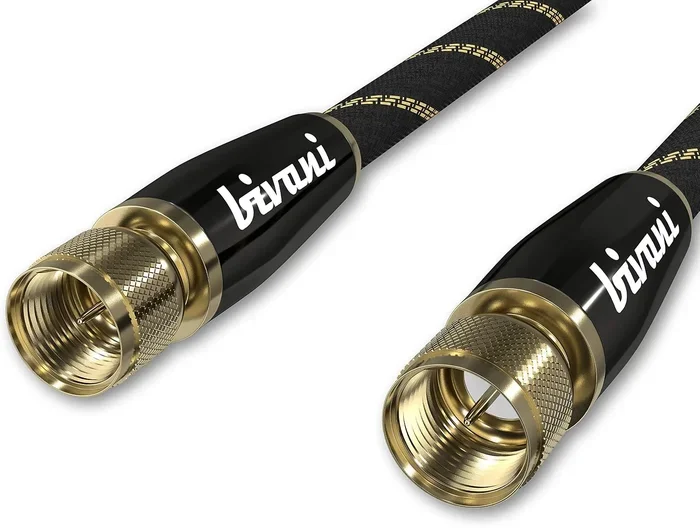
The connectors at the ends of your coax cable matter too. The most common connector for video and cable applications is the F-connector. These come in different quality levels. A cheap, poorly crimped F-connector can introduce signal loss and degrade your 4K picture.
For best results, use quality F-connectors that are properly crimped or compression-fit. Compression connectors create a more secure, low-loss connection. They are worth the small extra cost if you want reliable 4K performance over coax.
Also, make sure your connectors match your cable type. RG6 cables need RG6-rated connectors. Mixing connector types can cause impedance mismatches that hurt signal quality.
Quick Tips for Getting the Best 4K Signal Over Coax
Want to make sure your coax setup delivers great 4K? Here are some practical tips that make a big difference.
- Use RG6 or RG11 cable: Avoid RG59 for 4K. It simply does not have enough bandwidth for reliable 4K transmission.
- Choose quad-shielded cable: The extra shielding protects your signal from interference. This is especially important in homes with lots of electronics.
- Keep runs short when possible: Under 50 feet is ideal for coax 4K setups. Longer runs need amplifiers.
- Use quality F-connectors: Compression connectors are the best choice. They create a tight, low-loss connection.
- Avoid sharp bends: Coax cable should not be bent sharply. Sharp bends can damage the inner conductor and hurt signal quality.
- Check your splitters: Passive coax splitters reduce signal strength. For 4K, use high-quality, powered splitters if you need to split your signal to multiple TVs.
- Test your setup: After installation, check your 4K picture for any artifacts, flickering, or color issues. If you see problems, check each connection point.
These simple steps will help you get the most out of your coax 4K setup. Most people skip these tips and then wonder why their 4K picture is not as good as it should be.
Common Mistakes to Avoid With Coax and 4K
Many people make avoidable mistakes when setting up 4K over coaxial cable. Here are the most common ones and how to prevent them.
- Using old RG59 cable for 4K: This is the number one mistake. RG59 was designed for standard definition and basic HD. It does not have the bandwidth for reliable 4K. If your home has RG59 wiring, consider upgrading to RG6.
- Using cheap connectors: A $0.50 connector can ruin a $50 cable run. Invest in quality F-connectors and take your time installing them properly.
- Ignoring signal loss: People often forget that longer cable runs lose signal. If your coax run is over 50 feet, use a signal amplifier to boost the 4K signal.
- Using old splitters: Old or cheap splitters can degrade your signal significantly. For 4K, use splitters rated for high bandwidth and at least 2 GHz frequency range.
- Not checking cable condition: Coax cable that has been crushed, pinched, or exposed to moisture can develop signal problems. Inspect your cables before relying on them for 4K.
- Assuming all coax is equal: Just because you have a coax outlet does not mean it is ready for 4K. The quality of the entire signal path matters, from the wall outlet to the connector on your TV.
Avoiding these mistakes will save you frustration and help you enjoy a crisp, clear 4K picture through your coaxial setup.
Expert Insights on Coax and 4K Technology
We asked a few AV professionals about using coax for 4K. Here is what they had to say.
“The short answer is yes, coax can handle 4K. But it is not always the best choice for every situation. If you are running a cable from a wall outlet to a TV in the same room, coax works fine. If you are building a dedicated home theater, HDMI is still the way to go for the best quality.” – Mark T., AV Installation Specialist
“I always tell customers to check what type of coax they have. If it is RG6 or better, they are in good shape for 4K. If it is RG59, we recommend upgrading. The cost difference is small, but the performance improvement is huge.” – Sarah L., Cable Infrastructure Consultant
“The biggest factor people overlook is the connectors. A great cable with a bad connector will perform worse than a good cable with a great connector. Take the time to do the connections right.” – Dave R., Professional Cable Installer
These expert insights reinforce the same message: coax handle 4k is absolutely possible, but the details matter. Cable type, connector quality, and signal path all play a role in the final picture quality.
The Future of Coax and 4K
Coaxial cable technology continues to evolve. New shielding materials and construction techniques are pushing the limits of what coax can carry. While HDMI remains the dominant standard for direct 4K connections, coax has a strong future in distributed video systems and homes with existing coax infrastructure.
Many modern cable providers now deliver 4K content over coaxial networks. This means your existing coax wiring may already be 4K-ready. Check with your cable provider to confirm your current setup supports 4K channels and streaming.
As 4K becomes the standard and even 8K starts to emerge, coax technology will continue to adapt. For now, RG6 and RG11 cables provide more than enough bandwidth for excellent 4K performance in most homes.
When to Choose Coax vs Other Cables for 4K
So when should you use coax for 4K and when should you choose a different cable? Here is a simple breakdown.
Choose coax when:
- Your home already has coaxial wiring in place
- You need to run cables over long distances (over 25 feet)
- You are setting up cable TV or satellite TV with 4K channels
- You want to avoid running new HDMI cables through walls
- You are distributing 4K signals to multiple rooms from a central source
Choose HDMI when:
- You are building a dedicated home theater
- Your cable runs are short (under 15 feet)
- You need the highest possible 4K quality with HDR and high frame rates
- You are connecting a gaming console, Blu-ray player, or streaming box directly to a TV
- You want the simplest plug-and-play setup
Both options have their place. The best choice depends on your specific situation, budget, and setup requirements.
Conclusion
Can coax handle 4k? Yes, it absolutely can. Coaxial cable is fully capable of transmitting 4K signals when you use the right type of cable, quality connectors, and proper installation practices. RG6 coax is the standard for reliable 4K over coax, and RG11 is excellent for longer runs.
The key takeaways are simple. Use quality RG6 or RG11 cable. Keep your runs as short as possible. Use good F-connectors. Avoid cheap splitters. And always check your signal quality after setup. Follow these guidelines and you will enjoy sharp, vibrant 4K content through your coaxial wiring.
While HDMI remains the gold standard for direct 4K connections, coax is a practical and proven alternative. Especially in homes with existing coax infrastructure, it is a smart and cost-effective choice. Do not let outdated assumptions stop you from enjoying 4K through coax. With the right setup, it works beautifully.
Frequently Asked Questions
Can I use my existing coax cables for 4K?
If your existing cables are RG6 or better, they should work fine for 4K. However, if you have older RG59 cables, you may experience signal issues. Check the markings on your cable jacket to confirm the type. When in doubt, replace old cables with new RG6 quad-shielded options for the best 4K performance.
How far can you run coax for 4K without signal loss?
For short runs under 50 feet, RG6 coax handles 4K with minimal signal loss. Between 50 and 100 feet, you may notice some degradation, and a signal booster helps. Beyond 100 feet, RG11 cable or an active amplifier becomes necessary to maintain a strong 4K signal.
Do I need a special coax cable for 4K?
You do not need a fancy “4K coax cable.” Any quality RG6 quad-shielded cable will handle 4K just fine. What matters is the cable construction, shielding quality, and connector type. Avoid cheap, unshielded cables and always use proper F-connectors rated for your cable type.
Can coax splitters affect 4K quality?
Yes, coax splitters reduce signal strength. Each split costs you some signal. For 4K, use high-quality splitters rated for at least 2 GHz frequency. Powered or active splitters are even better for maintaining strong 4K signals across multiple outputs.
Is coax or HDMI better for 4K gaming?
HDMI is generally better for 4K gaming because it supports higher bandwidth, HDR, and higher refresh rates like 120Hz. Coax can handle 4K gaming but may not support all the features that modern gaming consoles output. For the best gaming experience, use HDMI for direct connections.
Can I get 4K cable TV over coax?
Yes, most cable TV providers deliver 4K channels over coaxial cable. Your cable company uses compression to fit 4K signals into the coax infrastructure. As long as your coax wiring and equipment support the required frequency range, you should receive 4K cable channels without any problems.