Can Bluetooth Be Added to a Stereo Receiver Easily
Can Bluetooth be added to a stereo receiver? Absolutely yes. You can use a Bluetooth adapter, a dedicated receiver, or a transmitter to bring wireless streaming to any stereo system. This guide covers every method, from budget options to premium solutions, so you can choose the best fit for your setup.
There is nothing quite like the warm, rich sound of a good stereo receiver. Whether you have a classic home audio setup or a modern entertainment center, your stereo receiver is the heart of the system. But here is the problem. Many older receivers do not have Bluetooth built in. That means you are stuck using cables or CDs when you could be streaming music wirelessly from your phone or tablet.
The good news is that you can absolutely add Bluetooth to a stereo receiver with relative ease. Whether your receiver is brand new or has been sitting in your living room for years, there is a solution that fits. In this article, we will walk you through every option, every step, and every tip you need to know.
By the time you finish reading, you will know exactly which method works best for your setup. You will also learn how to keep your sound quality high while enjoying the convenience of wireless streaming. Let us dive right in.
Key Takeaways
- Multiple methods exist: You can add Bluetooth using an adapter, a dedicated receiver, or a built-in module depending on your receiver’s features.
- Wireless streaming is easy: The setup process is simple and does not require advanced technical skills.
- Sound quality matters: Choosing the right Bluetooth codec and adapter makes a big difference in audio performance.
- Older receivers can be upgraded: Even vintage stereo systems can gain Bluetooth capability with the right accessory.
- Budget-friendly options work well: You do not need to spend a lot to enjoy wireless music from your stereo.
- Common mistakes slow you down: Avoid pairing errors and signal drops with a few simple tips.
- Bluetooth vs. wired has trade-offs: Each connection type has pros and worth considering for your listening habits.
📑 Table of Contents
- What Is a Stereo Receiver and Why Add Bluetooth?
- Ways to Add Bluetooth to a Stereo Receiver
- How to Choose the Right Bluetooth Solution
- Step-by-Step Setup Guide
- Tips for Better Bluetooth Sound Quality
- Common Mistakes to Avoid
- Can Bluetooth Be Added to Older Stereo Receivers?
- Bluetooth vs. Wired Connections: Which Is Better?
- Final Thoughts on Adding Bluetooth to Your Stereo Receiver
What Is a Stereo Receiver and Why Add Bluetooth?
A stereo receiver is an audio device that combines a tuner, preamplifier, and power amplifier in one unit. It takes audio signals from various sources and amplifies them to drive your speakers. Think of it as the control center of your home audio system. Traditional receivers connect to devices using RCA cables, optical inputs, or auxiliary ports.
But times have changed. Today, most people listen to music through their phones, tablets, or laptops. Streaming services like Spotify, Apple Music, and YouTube dominate how we consume audio. Without Bluetooth wireless connectivity, your receiver becomes a bottleneck. You end up dealing with cables, adapters, and limited device compatibility.
Adding Bluetooth solves this problem completely. It lets you stream music from any Bluetooth-enabled device without wires. You can control playback from your phone, switch between playlists effortlessly, and enjoy your favorite tracks with just a tap. It is one of the simplest upgrades you can make to improve your listening experience.
Who Benefits Most From Adding Bluetooth?
Several groups of people benefit greatly from this upgrade. If you own an older stereo system, adding Bluetooth breathes new life into it. Audiophiles who care about sound quality can still enjoy high-fidelity wireless streaming. And casual listeners who just want convenience will love the simplicity of going wireless.
Home theater enthusiasts also benefit. Many receivers serve double duty as audio hubs for both music and movie sound. Adding Bluetooth means you can easily stream soundtracks or podcasts alongside your regular listening. It is a versatile upgrade that serves everyone in the household.
Ways to Add Bluetooth to a Stereo Receiver
Now that you understand why Bluetooth matters, let us look at the actual methods. There are several ways to connect Bluetooth to a stereo receiver. Each has its own advantages and drawbacks. Let us break them down.
Method 1: Bluetooth Adapter or Dongle
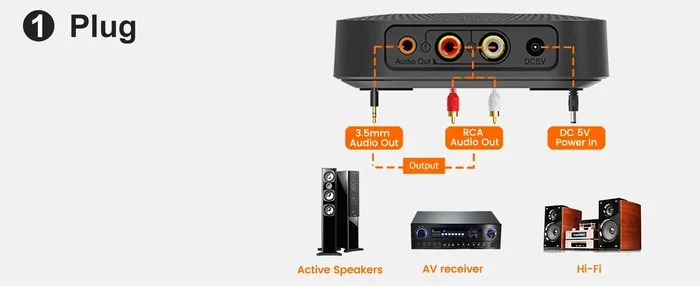
A Bluetooth adapter is a small plug-in device that connects to your receiver’s input. You simply plug it into an available audio input, pair it with your phone, and you are streaming. These adapters are compact, affordable, and incredibly easy to use.
Most Bluetooth adapters plug into a standard 3.5mm aux input or RCA jacks. They draw power from the receiver itself or a nearby USB port. Popular options include brands like Mpow, TaoTronics, and Avantree. Prices range from about $15 to $60 depending on features and codec support.
The main advantage of an adapter is simplicity. There is almost no setup involved. The downside is that some adapters may introduce slight latency or compress audio slightly. For casual listening, this is barely noticeable. For critical audiophile listening, you may want a higher-end option.
Method 2: Dedicated Bluetooth Receiver
A dedicated Bluetooth receiver is a more advanced option. These devices are designed specifically for audio use and often support premium codecs like aptX, aptX HD, and LDAC. They connect to your receiver using RCA cables or a 3.5mm auxiliary cable.
Receivers like the Audioengine B1 or the 1Mii B06-DL offer excellent sound quality and reliable range. They typically have a range of 30 to 100 feet, depending on the model and environment. These devices also handle the pairing process smoothly and maintain a stable connection.
The trade-off is cost. A good Bluetooth receiver will run you $50 to $150. However, if sound quality is your priority, this is the best way to go. The difference in audio fidelity compared to a cheap adapter is significant and worth it for serious listeners.
Method 3: Bluetooth Transmitter
A Bluetooth transmitter works in the opposite direction. Instead of receiving a signal, it sends audio from your phone to the receiver. You connect the transmitter to your receiver’s output or aux input, and it streams audio from your device. This is a great option if your receiver lacks a direct Bluetooth input.
Transmitters like the TaoTronics TT-BA07 or the Avantree Leaf work well with most stereo systems. They are particularly useful for receivers that only have RCA inputs or optical outputs. Some transmitters also support sending audio to multiple devices simultaneously.
Method 4: Built-In Bluetooth Module
Some modern stereo receivers come with Bluetooth built right in. If you are shopping for a new receiver, look for models that advertise wireless connectivity. Brands like Yamaha, Denon, Marantz, and Pioneer often include Bluetooth as a standard feature on mid-range and above models.
Having built-in Bluetooth is the most seamless option. There is no extra device to buy, no cables to manage, and no additional power source. The sound quality is also optimized for the specific receiver. If you are in the market for a new unit, this should be at the top of your feature list.
How to Choose the Right Bluetooth Solution
Not all Bluetooth solutions are created equal. Choosing the right one depends on your receiver, your budget, and your listening habits. Here are the key factors to consider.
Check Your Receiver’s Inputs
Start by looking at the back of your stereo receiver. What inputs do you have available? If you see a 3.5mm aux input, a Bluetooth adapter will work perfectly. If you only have RCA inputs, look for a receiver with RCA compatibility. Some receivers have optical or coaxial digital outputs, which opens up even more options.
Knowing your inputs helps you narrow down your choices quickly. It also prevents you from buying an adapter that does not work with your system. Take a photo of the back panel if you need to remember what you have.
Consider Audio Codec Support
Bluetooth codecs determine the quality of wireless audio transmission. The standard codec, SBC, works with almost all devices but does not deliver the best sound. aptX offers much better quality and is widely supported. aptX HD and LDAC deliver near-lossless audio for audiophiles.
If you care about sound quality, look for a Bluetooth adapter or receiver that supports at least aptX. The difference is noticeable, especially with complex music like orchestral pieces or detailed jazz recordings. For casual pop or podcast listening, SBC is perfectly fine.
Think About Range and Stability
Bluetooth range typically spans 10 to 100 feet depending on the device and class. Class 2 devices, which are the most common, offer about 30 feet of range. If you plan to move around your home while listening, look for a device with a longer range.
Stability also matters. Cheap adapters may drop connections or introduce audio stuttering. Higher-quality receivers and adapters maintain a consistent, uninterrupted stream. Reading reviews before purchasing helps you avoid frustrating connectivity issues.
Budget Considerations
You can add Bluetooth to a stereo receiver for as little as $15. Budget adapters work well for basic streaming. If you want premium sound quality, expect to spend $50 to $150 on a dedicated receiver. Built-in Bluetooth on a new receiver adds cost to the unit but eliminates the need for a separate device.
The best approach is to decide what matters most to you. If convenience is king, a cheap adapter does the job. If sound quality is non-negotiable, invest in a better receiver or adapter. Either way, the upgrade is affordable and worthwhile.
Step-by-Step Setup Guide
Setting up Bluetooth on your stereo receiver is straightforward. Here is a simple walkthrough for the most common method using a Bluetooth adapter.
Step 1: Gather Your Equipment
You will need a Bluetooth adapter or receiver, the appropriate cables, and your stereo receiver. If your adapter came with a USB cable, make sure you have a USB power source available. Most adapters also include a 3.5mm cable and RCA cables in the box.
Step 2: Connect the Adapter to Your Receiver
Plug the adapter into an available input on your receiver. If it uses RCA cables, connect the red and white plugs to the corresponding input jacks. If it uses a 3.5mm cable, plug it into the aux input. Make sure the connection is secure and the cable is not pinched or strained.
Step 3: Power On and Select the Input
Turn on your stereo receiver and select the input you just connected. Use the receiver’s input selector or remote control to choose the correct source. You should hear a faint hum or static, which is normal when no device is paired yet.
Step 4: Pair Your Device
Turn on Bluetooth on your phone or tablet. Put the adapter into pairing mode, usually by holding down a button until a light flashes. Look for the adapter’s name on your device and tap to connect. You should hear a confirmation tone from the receiver once paired.
Step 5: Test and Adjust
Play some music and check the sound quality. Adjust the volume on both your phone and your receiver for the best balance. If you experience any issues, try moving closer to the receiver or restarting the pairing process.
Tips for Better Bluetooth Sound Quality
Bluetooth audio has improved dramatically over the years, but you can still take steps to get the best possible sound from your wireless setup.
Keep Your Devices Close
Bluetooth signals weaken with distance and obstacles. Keep your phone within 30 feet of the receiver for the best connection. Walls, furniture, and other electronics can interfere with the signal. Placing the adapter near the receiver helps maintain a strong, clear connection.
Update Firmware and Drivers
Many Bluetooth adapters and receivers receive firmware updates that improve performance and fix bugs. Check the manufacturer’s website or app for updates. Keeping your devices current ensures you get the best sound quality and stability.
Use High-Quality Audio Files
Streaming at lower bitrates compresses audio and reduces quality. When possible, stream at higher bitrates or use lossless formats. Services like Tidal and Apple Music offer lossless streaming options that take full advantage of a good Bluetooth connection.
Minimize Interference
Wi-Fi routers, microwaves, and other Bluetooth devices can cause interference. Keep your receiver away from these sources for a cleaner signal. If you live in a crowded apartment building with many wireless networks, this becomes especially important.
Use the Right Cable
The cable between your adapter and receiver matters more than you might think. Cheap cables can introduce noise and signal loss. Use well-shielded cables from reputable brands. A good quality RCA or aux cable costs just a few dollars but makes a noticeable difference.
Common Mistakes to Avoid
Adding Bluetooth to a stereo receiver is simple, but there are a few common mistakes that can cause frustration. Here is what to watch out for.
- Buying the wrong type of device: A Bluetooth transmitter and receiver are not the same thing. Make sure you buy the right one for your setup. A receiver gets audio from your phone to the stereo. A transmitter sends audio from the stereo to wireless headphones.
- Ignoring codec compatibility: Not all devices support all codecs. If your phone supports aptX but your adapter only supports SBC, you will get lower quality audio. Check compatibility before purchasing.
- Placing the adapter too far away: Bluetooth range is limited. Placing the adapter in a different room or behind a wall weakens the signal. Keep it close to your listening area.
- Forgetting to update firmware: Outdated firmware can cause pairing issues and poor performance. Always check for updates after purchase.
- Overlooking power requirements: Some adapters need external power. Make sure you have a USB port or power outlet nearby before buying.
- Pairing too many devices: Some adapters struggle when multiple devices are connected. Keep your paired devices list manageable for the smoothest experience.
Can Bluetooth Be Added to Older Stereo Receivers?
Yes, absolutely. Older stereo receivers often benefit the most from a Bluetooth upgrade. Many vintage receivers have excellent amplifiers and speaker outputs but lack modern connectivity. Adding Bluetooth brings them into the current century without replacing the entire unit.
The process is the same regardless of the receiver’s age. You simply connect a Bluetooth adapter to an available input. If your older receiver only has a turntable input or a single aux jack, you can still add Bluetooth. Some adapters come with RCA to 3.5mm cables that work with virtually any input configuration.
One thing to keep in mind with older receivers is the overall audio quality of the unit. A Bluetooth adapter will not improve a receiver that already has poor sound. But it will let you enjoy wireless streaming at the quality level your receiver is capable of producing. For many vintage systems, the sound quality is actually quite good and fully capable of handling Bluetooth audio.
Best Bluetooth Solutions for Vintage Receivers
For vintage receivers, we recommend a dedicated Bluetooth receiver with RCA outputs. These devices connect directly to the receiver’s input jacks and provide the best sound quality. The Audioengine B1 and the 1Mii B06-DL are excellent choices. They offer aptX support, stable connections, and compact designs that fit well on a vintage stereo setup.
Bluetooth vs. Wired Connections: Which Is Better?
This is a common debate among audio enthusiasts. Both Bluetooth and wired connections have their strengths. Understanding the differences helps you make the right choice for your listening habits.
| Feature | Bluetooth | Wired (Aux/RCA) |
|---|---|---|
| Convenience | Very high, no cables needed | Lower, requires physical cables |
| Sound Quality | Good with aptX/LDAC, slight compression | Excellent, lossless signal |
| Setup Ease | Simple, quick pairing | Plug and play, no pairing needed |
| Device Compatibility | Works with all Bluetooth devices | Requires compatible cable and input |
| Range | 10 to 100 feet | Limited by cable length |
| Cost | $15 to $150 for adapter | Usually free, uses existing cables |
| Latency | Slight delay possible | No delay |
For most people, Bluetooth is the better choice. The convenience factor alone makes it worth it. The slight difference in sound quality is barely noticeable for everyday listening. If you are an audiophile who listens to high-resolution audio exclusively, wired connections still have an edge. But for the vast majority of listeners, Bluetooth is more than sufficient.
Final Thoughts on Adding Bluetooth to Your Stereo Receiver
Adding Bluetooth to a stereo receiver is one of the best upgrades you can make to your home audio setup. It is affordable, easy to install, and instantly makes your system more versatile. Whether you choose a simple adapter, a premium receiver, or a built-in module, the result is the same: wireless music streaming at your fingertips.
The process is simple enough for anyone to handle. You do not need to be an audio engineer or a tech expert. Just pick the right method for your receiver, follow the setup steps, and enjoy your music wirelessly. The days of fumbling with cables are over.
Take some time to evaluate your receiver, choose the right Bluetooth solution, and enjoy the upgrade. Your stereo system has been waiting for this. Once you experience the freedom of wireless streaming, you will wonder how you ever listened without it.
Frequently Asked Questions
Can I add Bluetooth to any stereo receiver?
Yes, you can add Bluetooth to virtually any stereo receiver. If your receiver has an aux input, RCA jacks, or an optical output, there is a Bluetooth solution that will work. Even the oldest receivers can be upgraded with the right adapter or receiver device.
Does adding Bluetooth reduce sound quality?
It can, but the difference is minimal with modern Bluetooth codecs. Using an adapter that supports aptX or aptX HD keeps sound quality very close to wired connections. For most listeners, the difference is barely noticeable and well worth the convenience.
How much does it cost to add Bluetooth to a stereo receiver?
Budget Bluetooth adapters start at around $15 and work well for basic streaming. Dedicated Bluetooth receivers range from $50 to $150 and offer better sound quality and range. The cost depends on your budget and how important audio fidelity is to you.
Is Bluetooth safe for my stereo receiver?
Yes, Bluetooth is completely safe for your stereo receiver. It does not damage the electronics or affect the internal components. The adapter simply receives a wireless signal and converts it to audio, which passes through your receiver normally.
Can I connect multiple devices to a Bluetooth adapter?
Most Bluetooth adapters can remember multiple paired devices. However, only one device can stream at a time. Some higher-end adapters support multipoint pairing, which allows two devices to connect simultaneously and switch between them easily.
What is the best Bluetooth codec for stereo receivers?
aptX is the best overall codec for most stereo setups. It offers excellent sound quality and wide device compatibility. If you want the highest quality, look for adapters that support aptX HD or LDAC. These codecs deliver near-lossless audio for the most demanding listeners.