Do You Need Internet To Connect To Bluetooth Speaker
Do You Need Internet To Connect To Bluetooth Speaker is an essential topic that provides valuable insights.
Key Takeaways
- Understanding Do You Need Internet To Connect To Bluetooth Speaker: Provides essential knowledge
📑 Table of Contents
- How Bluetooth Technology Works Without Internet
- Connecting a Bluetooth Speaker Without Internet: Step by Step
- When Might You Need Internet with a Bluetooth Speaker?
- Bluetooth Speaker vs Wi-Fi Speaker: Key Differences
- Troubleshooting Bluetooth Speaker Connection Issues
- Tips for the Best Bluetooth Speaker Experience
- Key Takeaways
How Bluetooth Technology Works Without Internet
Bluetooth is a wireless technology that has been around since the late 1990s. It uses short-range radio waves to transmit data between devices. These radio waves operate on the 2.4 GHz frequency band. This is the same band used by Wi-Fi, but Bluetooth works completely on its own.
The Bluetooth Pairing Process
When you pair a Bluetooth speaker to your phone, the devices exchange information directly. No router is involved. No internet service is required. Your phone sends audio signals through the air to the speaker. The speaker receives those signals and turns them into sound.
Here is how the process works step by step:
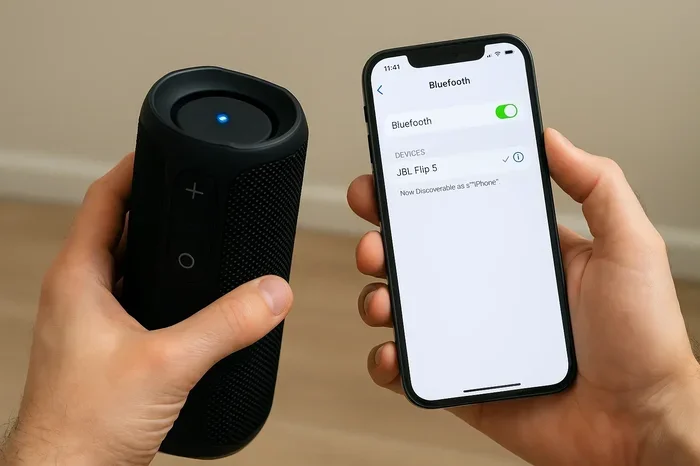
- Turn on your Bluetooth speaker and set it to pairing mode.
- Open Bluetooth settings on your phone or computer.
- Select your speaker from the list of available devices.
- Wait for the connection confirmation. You will hear a tone or see a light.
- Start playing music. The audio streams directly from your device to the speaker.
That is it. No internet needed at any point. This is why Bluetooth speakers are so popular for outdoor events and travel. They give you wireless audio freedom without any extra setup.
Bluetooth Protocol and Device Connectivity
Behind the scenes, Bluetooth uses a specific set of rules called a protocol. This protocol handles the device connectivity between your source device and the speaker. The latest versions, like Bluetooth 5.0 and 5.3, offer better range and stronger signals. Older versions still work fine for basic audio streaming but may have shorter range.
Connecting a Bluetooth Speaker Without Internet: Step by Step
Setting up a Bluetooth speaker without internet is straightforward. You do not need any special skills or equipment. Follow these simple steps to get started.
Step 1: Charge Your Speaker Fully
Before you begin, make sure your Bluetooth speaker battery is charged. A low battery can cause connection problems. Most speakers take one to two hours to charge fully. A full charge gives you several hours of playback time.
Step 2: Put Your Speaker in Pairing Mode
Every speaker has a slightly different way to enter pairing mode. Usually, you press and hold the Bluetooth button. The LED light will start flashing. This tells your phone that the speaker is ready to connect.
Step 3: Enable Bluetooth on Your Source Device
Go to your phone or tablet settings. Turn on Bluetooth. Wait a few seconds for your device to scan for nearby Bluetooth devices. Your speaker should appear on the list.
Step 4: Pair and Play
Tap on your speaker name when it appears. Wait for the connection to establish. Once paired, you can play music from any app. Spotify, Apple Music, YouTube, or even local files stored on your device. All of this works without a single byte of internet data.
This is the beauty of Bluetooth connection. It is direct, fast, and completely independent of any network.
When Might You Need Internet with a Bluetooth Speaker?
While the Bluetooth connection itself does not need internet, there are situations where internet access plays a role. Understanding these scenarios helps you plan better.
Streaming Music from Online Services
If you want to play music from Spotify, Apple Music, or Tidal, you need internet to download or stream that content. But once the music is playing, the Bluetooth signal carries the audio to your speaker. The internet is only needed on the source device, not the speaker itself.
Updating Speaker Firmware
Some wireless speakers receive firmware updates over Wi-Fi. These updates can improve Bluetooth audio performance and fix bugs. If your speaker supports Wi-Fi updates, you will need internet for this process only. It is not needed for everyday use.
Using Voice Assistants
Speakers with built-in voice assistants like Alexa or Google Assistant need internet to process commands. You can still use Bluetooth playback without internet. But voice commands will not work offline.
Multi-Room Audio Setups
Some advanced speaker setups use a home Wi-Fi network to link multiple speakers together. In this case, internet helps the speakers communicate with each other. But even here, the Bluetooth connection between each speaker and your device remains offline.
Bluetooth Speaker vs Wi-Fi Speaker: Key Differences
People often confuse Bluetooth speakers with Wi-Fi speakers. They are different technologies. Each has its own strengths. Let us compare them side by side.
| Feature | Bluetooth Speaker | Wi-Fi Speaker |
|---|---|---|
| Internet Required | No | Yes |
| Range | Up to 30 feet | Up to 150 feet |
| Setup | Simple pairing | Requires Wi-Fi network |
| Portability | Very portable | Less portable |
| Audio Quality | Good to excellent | Excellent, higher resolution |
| Offline Use | Fully works offline | Limited offline playback |
| Multi-Room Support | Not built-in | Yes, through app |
| Price Range | Budget to mid-range | Mid-range to premium |
As you can see, Bluetooth speakers win for portability and offline use. Wi-Fi speakers are better for whole-home audio and higher resolution audio. Your choice depends on how you plan to use your wireless speaker.
Troubleshooting Bluetooth Speaker Connection Issues
Sometimes your Bluetooth connection may not work as expected. This does not mean you need internet. It usually means something else needs fixing. Here are the most common issues and solutions.
Speaker Not Showing Up in Device List
If your speaker does not appear on your phone, try these steps. First, make sure the speaker is in pairing mode. The flashing LED light is your indicator. Second, turn Bluetooth off and back on your phone. Third, restart the speaker and try again. These simple steps fix most speaker connectivity issues.
Poor Audio Quality or Interference
If your audio streaming sounds choppy or distorted, move closer to the speaker. Walls, microwaves, and other electronics can interfere with the Bluetooth frequency. Moving to a different room often solves this problem quickly.
Speaker Keeps Disconnecting
A Bluetooth speaker battery that is low can cause frequent disconnections. Charge your speaker fully before use. Also, check that your source device has enough battery. Low power on either device can weaken the wireless connection.
Tips for the Best Bluetooth Speaker Experience
Getting the most out of your Bluetooth speaker is easy with a few smart habits. These tips help you enjoy better wireless audio every time.
- Keep your devices updated. Software updates improve Bluetooth audio performance and fix bugs.
- Store your speaker properly. Keep it in a cool, dry place when not in use.
- Clean the charging port. Dust in the port can cause charging problems.
- Use lossless audio when possible. Some apps let you choose audio quality. Higher quality files sound better through Bluetooth.
- Turn off Bluetooth on unused devices. This reduces interference and keeps your connection strong.
- Know your speaker’s range. Stay within range for the best device connectivity and uninterrupted playback.
Key Takeaways
- No internet is needed to connect a Bluetooth speaker. Bluetooth uses its own radio signals to transmit audio directly between devices.
- Bluetooth pairing is simple and fast. You just turn on Bluetooth, select your speaker, and start playing music.
- Internet is only needed for streaming online music. The speaker itself does not require any data connection for playback.
- Bluetooth speakers are highly portable. They work anywhere, from your backyard to a remote camping site.
- Firmware updates may require Wi-Fi. But this is separate from everyday Bluetooth use and playback.
- Common connection issues are easy to fix. Restarting devices and checking battery levels solve most problems.
- Bluetooth speakers are different from Wi-Fi speakers. Bluetooth speakers work offline while Wi-Fi speakers need a network.
Frequently Asked Questions
Do Bluetooth speakers work without Wi-Fi?
Yes, absolutely. Bluetooth speakers use their own wireless signal to connect to your device. They do not need Wi-Fi or any internet connection. You can pair them and play music anywhere, even in areas with no network coverage at all.
Can I connect a Bluetooth speaker to my phone if I have no data or Wi-Fi?
Yes, you can. Bluetooth works independently of cellular data and Wi-Fi. As long as your phone has Bluetooth enabled and is charged, it can connect to your speaker. Your music library stored on the device plays without any internet access.
Why does my Bluetooth speaker need Wi-Fi sometimes?
Some smart speakers use Wi-Fi for features like voice assistants, firmware updates, or multi-room setups. But the core Bluetooth connection does not require Wi-Fi. If you only want to play music via Bluetooth, internet is not necessary.
How far can a Bluetooth speaker be from my phone without internet?
Most Bluetooth speakers work within 30 feet of your source device. Newer versions with Bluetooth 5.0 can reach up to 80 feet in open spaces. This range does not depend on internet at all. It is based on the Bluetooth signal strength between the two devices.
Can I use a Bluetooth speaker outdoors where there is no internet?
Yes, this is one of the biggest advantages of Bluetooth speakers. They are perfect for outdoor use. Whether you are at the beach, on a hike, or in a park, your speaker works without any internet. Just make sure your phone has music downloaded or stored locally.
Does a Bluetooth speaker use my phone’s data when connected?
No, it does not. The Bluetooth connection uses its own radio frequency. It does not consume your cellular data plan. However, if you are streaming music from an online service, that streaming uses data. The Bluetooth part of the connection itself uses zero data.
=== CONCLUSION ===
The answer to the question do you need internet to connect to Bluetooth speaker is a clear no. Bluetooth technology is designed to work independently. It creates a direct, wireless link between your device and your speaker. No router, no Wi-Fi, no cellular data required.
This makes Bluetooth speakers incredibly versatile. You can take them anywhere and enjoy your favorite wireless audio without worrying about network coverage. Whether you are at home, outdoors, or traveling, your Bluetooth speaker will connect and play just fine.
Understanding how Bluetooth connection works gives you confidence. You no longer need to wonder if you can use your speaker in certain situations. The answer is always yes. As long as your source device has music stored or downloaded, you are good to go.
So the next time someone asks if a Bluetooth speaker needs internet, you will know the answer. Share this knowledge with friends and family. Help them enjoy offline music and hassle-free audio streaming with their wireless speakers. The freedom of Bluetooth is yours to enjoy.