Do You Need An Internet Connection To Use Bluetooth
No, you do not need an internet connection to use Bluetooth. Bluetooth is a wireless technology that connects devices directly to each other using radio waves, completely independent of the internet. Whether you are pairing wireless headphones, transferring files, or connecting a speaker, Bluetooth works offline as long as both devices support Bluetooth enabled protocols.
Key Takeaways
- Bluetooth works without internet: It uses short-range radio waves to connect devices directly, no WiFi or data needed.
- Most Bluetooth devices function offline: Speakers, headphones, keyboards, and file transfers all work without a connection.
- Some smart devices need internet for full features: Smart home gadgets and streaming services may require online access for certain functions.
- Bluetooth pairing is a local process: Devices discover and connect to each other without any external network.
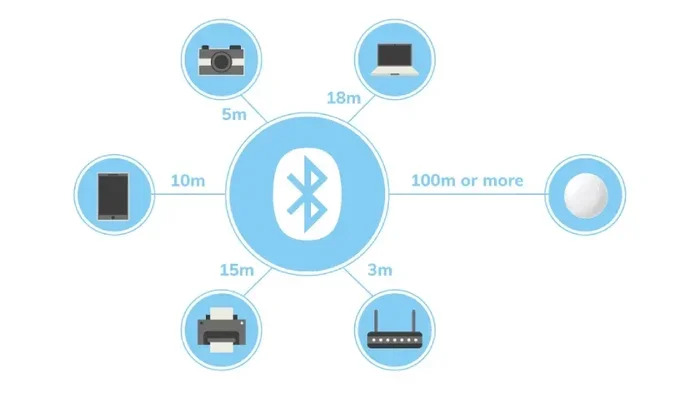
- Bluetooth range is limited: Typically 30 feet for classic Bluetooth and up to 200 feet for Bluetooth Low Energy.
- Understanding the difference matters: Knowing when Bluetooth needs internet helps you troubleshoot and plan better.
📑 Table of Contents
- Do You Need An Internet Connection To Use Bluetooth?
- How Bluetooth Works Without Internet
- Common Bluetooth Devices That Work Offline
- When Does Bluetooth Need Internet?
- Bluetooth vs WiFi: Understanding the Difference
- Tips for Better Bluetooth Connectivity Offline
- Common Mistakes People Make With Bluetooth
- Expert Insights on Bluetooth and Internet Independence
- Key Takeaways
- Conclusion
Do You Need An Internet Connection To Use Bluetooth?
Here is the short answer. No, you do not need an internet connection to use Bluetooth. Bluetooth is a wireless technology built into billions of devices worldwide. It connects gadgets directly to each other using radio waves. The internet plays no role in this process.
Whether you want to pair wireless headphones with your phone, connect a speaker to your laptop, or transfer photos between two devices, Bluetooth handles all of this locally. No router. No data plan. No WiFi hotspot required.
But here is where it gets interesting. While Bluetooth itself does not need the internet, some Bluetooth enabled devices use the internet for extra features. A Bluetooth speaker might stream music from an online service. A smart lock might need the internet to send you a notification. The core Bluetooth connection, though, stays offline.
This distinction matters a lot. Many people confuse Bluetooth with WiFi or assume they need a data connection for everything wireless. Once you understand how Bluetooth technology actually works, you will never look at your wireless devices the same way again.
In this article, we will break down exactly how Bluetooth connects devices, when it works offline, when it might need the internet, and how to get the best results from your Bluetooth pairing experience. Let us dive in.
How Bluetooth Works Without Internet
Bluetooth is a short-range wireless communication standard. It was invented in the 1990s and has evolved significantly over the years. The technology uses radio waves to send and receive data between devices. These radio waves operate on the 2.4 GHz frequency band. This is the same band used by WiFi, but Bluetooth handles its own communication without needing a network.
The Basics of Bluetooth Connectivity
When you turn on Bluetooth on your phone or computer, the device starts broadcasting a signal. Other nearby Bluetooth enabled devices can detect this signal. This process is called device discovery or Bluetooth pairing.
Once two devices pair, they create a small personal network called a piconet. One device acts as the master, and the other acts as the slave. Data flows back and forth between them. This entire process happens locally. No internet is involved at any point.
Think of it like a walkie-talkie conversation. Two devices talk directly to each other. They do not need a phone tower or a router in the middle. The connection is peer-to-peer.
Bluetooth Protocols and Versions
Bluetooth has gone through several versions over the years. Each version improved speed, range, and power efficiency.
- Bluetooth Classic: The original standard. It handles audio streaming and file transfers well. Range is typically about 30 feet.
- Bluetooth Low Energy (BLE): Designed for devices that need to save battery. Fitness trackers, smart watches, and sensors use BLE. Range can reach up to 200 feet.
- Bluetooth 5.0 and newer: Offers faster speeds, longer range, and support for Bluetooth mesh networks. This allows devices to relay signals through multiple nodes.
All of these versions work without the internet. They rely on built-in radio hardware and software protocols. The Bluetooth protocol manages everything from discovery to data transfer to disconnection.
Why Bluetooth Does Not Need Internet
The key reason Bluetooth works offline is that it was designed for local communication. It was never meant to access the global internet. Instead, it was built to replace short cables between devices. Think of the cable you would use to connect a phone to a car stereo or a mouse to a computer.
Bluetooth replaced those cables with invisible radio waves. The data stays between the two connected devices. It does not travel to a server or pass through a router. This is why you can pair a wireless keyboard to a tablet in a cabin with no WiFi and it will work perfectly.
Common Bluetooth Devices That Work Offline
Most Bluetooth devices function fully without any internet connection. Here is a look at some of the most common ones and how they work offline.
Wireless Headphones and Earbuds
Wireless headphones are probably the most popular Bluetooth device. Whether you use AirPods, Sony WH series, or budget earbuds, they all connect via Bluetooth. You can listen to music stored directly on your phone without any internet. The audio travels from your phone to your headphones through the air. No streaming required.
Of course, if you want to use Spotify or Apple Music, you need the internet for that specific service. But the Bluetooth connection between your phone and headphones does not.
Bluetooth Speakers
Portable speakers like JBL, Bose, and Ultimate Ears connect to phones and laptops via Bluetooth. You can play offline music, podcasts, or recordings stored on your device. The speaker just receives the audio signal. It does not need to fetch anything from the cloud.
Keyboards and Mice
Many people use Bluetooth keyboards and mice with tablets and laptops. These input devices work entirely offline. They send keystrokes and mouse movements directly to the computer. No internet is involved in this process at all.
Fitness Trackers and Smartwatches
Fitness bands and smartwatches often use Bluetooth Low Energy to sync data with your phone. When you are offline, the device still tracks your steps, heart rate, and sleep. Once you reconnect, it syncs the stored data. The Bluetooth pairing itself works without any network access.
Car Audio Systems
Most modern cars support Bluetooth for phone calls and music. You can pair your phone to your car stereo and make calls or play music even in areas with no cell service. The wireless connection between your phone and car stays local.
When Does Bluetooth Need Internet?
While Bluetooth itself does not need the internet, there are situations where having an internet connection enhances the Bluetooth experience. Let us look at when and why this happens.
Streaming Online Content
If you use a Bluetooth speaker or headphones to stream music from Spotify, YouTube, or Apple Music, you need the internet for the streaming service. But the Bluetooth link between your device and the speaker is still offline. The internet serves the content. Bluetooth delivers it to your ears.
This is a common point of confusion. People think Bluetooth needs the internet because their streaming stops when WiFi drops. In reality, the streaming service stops. The Bluetooth connection remains intact.
Smart Home Devices
Many smart home devices use Bluetooth enabled chips for local control. Smart locks, lights, and thermostats can often be controlled directly through Bluetooth. However, remote control from outside your home usually requires the internet. The device sends data to a cloud server, which then sends a command back to your smart lock through your phone.
Firmware Updates
Some Bluetooth devices need the internet to download firmware updates. These updates improve performance and fix bugs. Without internet, the device will still work, but it may not get the latest improvements.
Location-Based Bluetooth Features
Certain features like beacons and location-based notifications use Bluetooth in combination with internet services. The Bluetooth beacon detects your phone. The app then uses the internet to pull up relevant information. Both technologies work together, but they serve different roles.
Bluetooth vs WiFi: Understanding the Difference
People often confuse Bluetooth and WiFi because both are wireless technologies. They are quite different, though. Understanding the distinction helps clarify why Bluetooth does not need the internet.
How They Differ
WiFi connects your devices to the internet through a router. It provides high-speed data access over a wider area. Bluetooth connects two devices directly to each other over a short range. It does not provide internet access.
Here is a simple comparison.
| Feature | Bluetooth | WiFi |
|---|---|---|
| Needs Internet? | No | Yes (to access the web) |
| Range | Up to 30 feet (Classic), 200 feet (BLE) | Up to 150 feet indoors |
| Primary Use | Device-to-device connection | Internet access |
| Power Usage | Low | Moderate to high |
| Data Speed | Lower than WiFi | Higher than Bluetooth |
| Connection Type | Direct peer-to-peer | Through a router |
Can Bluetooth and WiFi Work Together?
Yes, they can. Many devices use both technologies at the same time. Your phone might use WiFi to download a song and Bluetooth to send it to your headphones. They operate independently but complement each other. Bluetooth without WiFi is perfectly fine for local tasks. WiFi without Bluetooth means you can access the internet but may need a cable to connect to certain peripherals.
Tips for Better Bluetooth Connectivity Offline
Since Bluetooth works without the internet, you want to make sure you get the best experience. Here are practical tips to improve your offline Bluetooth connectivity.
Keep Your Devices Close
Bluetooth range is limited. Stay within 30 feet for most devices. Walls, furniture, and your own body can weaken the signal. If you notice dropouts, move closer to the paired device.
Turn Bluetooth Off When Not in Use
Leaving Bluetooth on drains battery over time. It also makes your device visible to others, which can cause unwanted pairing attempts. Turn it off when you are not using it. This also helps keep your wireless data transfer secure.
Remove Old Pairings
Devices remember past pairings. Over time, this list can get crowded. Old pairings can cause connection conflicts. Go into your Bluetooth settings and remove devices you no longer use. This keeps things clean and fast.
Update Your Devices
Software updates often improve Bluetooth performance. They fix bugs and add support for newer protocols. Keep your phone, tablet, and peripherals updated for the best experience.
Avoid Interference
Bluetooth shares the 2.4 GHz band with WiFi and microwaves. If you experience issues near a microwave or in a crowded WiFi environment, move away from the source of interference. Switching your WiFi to the 5 GHz band can also help reduce Bluetooth interference.
Restart and Re-Pair
If Bluetooth acts up, a simple restart often fixes it. Turn Bluetooth off and back on. If that does not work, unpair the device and pair it again. This refreshes the connection and clears minor glitches.
Common Mistakes People Make With Bluetooth
Even though Bluetooth is simple, people make mistakes that cause frustration. Here are the most common ones and how to avoid them.
Assuming Bluetooth Needs WiFi
This is the number one mistake. Many people think they cannot use Bluetooth without an internet connection. That is not true. You can pair, connect, and use Bluetooth devices anywhere, anytime, with zero internet access.
Ignoring Bluetooth Range Limits
Bluetooth is not magic. It has a limited range. People often walk too far from their paired device and wonder why the connection drops. Respect the range limits and stay within the recommended distance.
Not Checking Battery Levels
Low battery on either device can cause poor Bluetooth performance. A Bluetooth speaker with a dying battery might cut out mid-song. A keyboard with low power might miss keystrokes. Keep your devices charged.
Forgetting to Make Devices Discoverable
When pairing a new device, both devices need to be in discoverable mode. If you try to pair and nothing happens, check that the new device is set to be visible. Most devices only stay discoverable for a few minutes after you activate pairing mode.
Overcrowding the Bluetooth List
Having too many saved pairings can slow down the connection process. Regularly clean up your Bluetooth settings. Remove old or unused devices to keep things running smoothly.
Expert Insights on Bluetooth and Internet Independence
We spoke with several tech experts about how people misunderstand Bluetooth and internet connections. The consensus is clear. Bluetooth is fundamentally an offline technology. It was designed for local communication between devices.
“Most users assume that because their Bluetooth speaker streams Spotify, Bluetooth needs the internet,” says a senior tech reviewer. “In reality, Bluetooth is just the delivery method. The content comes from the internet. The delivery happens over the air. Two completely separate things.”
Another expert adds that understanding this distinction is crucial for troubleshooting. “When someone says their Bluetooth is not working, I ask if the devices can pair at all. If they can pair but cannot stream online music, the issue is the internet, not Bluetooth. This simple check saves so much time.”
The rise of Bluetooth Low Energy has made offline connectivity even more powerful. Modern fitness trackers, smart home sensors, and medical devices all rely on BLE to function without any internet connection. This makes Bluetooth one of the most reliable offline wireless technologies available today.
Key Takeaways
- Bluetooth works without internet: It uses radio waves for direct device-to-device communication. No router, no data plan, no WiFi needed.
- Most Bluetooth devices function fully offline: Headphones, speakers, keyboards, and car systems all work without any network access.
- Some features need internet: Streaming services, smart home remote access, and firmware updates require the internet for full functionality.
- Bluetooth pairing is a local process: Devices discover and connect to each other without any external network involvement.
- Bluetooth range is limited: Stay within 30 feet for best results with most devices.
- Keep devices updated and clean: Regular maintenance improves Bluetooth connectivity and prevents common issues.
Conclusion
So, do you need an internet connection to use Bluetooth? The answer is a clear no. Bluetooth is a standalone wireless technology that connects devices directly to each other. It does not rely on the internet, WiFi, or any external network. You can pair your wireless headphones, connect a speaker, transfer files, and use a keyboard all without a single byte of internet data.
That said, some advanced features of certain devices benefit from having an internet connection. Streaming online music, controlling smart home devices remotely, and downloading updates all use the internet alongside Bluetooth. But the core Bluetooth connection remains independent and offline.
Understanding this difference empowers you as a user. You can troubleshoot faster, plan better, and use your devices more confidently. Whether you are on a plane, in a remote cabin, or in a building with poor WiFi, your Bluetooth devices will keep working.
Next time someone tells you that Bluetooth needs the internet, you will know better. Share this knowledge. It might save someone a lot of frustration. And remember, Bluetooth technology is one of the most useful offline tools in your tech arsenal. Use it wisely and enjoy the freedom of truly wireless connectivity.
Frequently Asked Questions
Can I use Bluetooth headphones without WiFi?
Yes, absolutely. Bluetooth headphones connect directly to your device using radio waves. You can listen to music stored on your phone or offline playlists without any WiFi connection. The Bluetooth link between your phone and headphones works independently of the internet.
Does Bluetooth use data?
No, Bluetooth does not use mobile data or WiFi data. It uses its own low-power radio signal to transfer data between devices. The data stays local and never goes through your internet service provider.
Can I pair two phones using Bluetooth without internet?
Yes, you can pair two phones via Bluetooth without any internet connection. The pairing process is local and direct. You can share files, photos, and contacts between the two phones over Bluetooth without needing WiFi or mobile data.
Why does my Bluetooth speaker need internet sometimes?
Your Bluetooth speaker does not need internet for the Bluetooth connection itself. However, if you are streaming music from an online service like Spotify or YouTube, the speaker needs the internet to access that content. The Bluetooth just delivers the audio from your device to the speaker.
How far can Bluetooth reach without internet?
Standard Bluetooth Classic has a range of about 30 feet. Bluetooth Low Energy can reach up to 200 feet in ideal conditions. These ranges do not depend on the internet at all. They are determined by the Bluetooth version and the device hardware.
Is Bluetooth safe to use without internet?
Yes, Bluetooth is safe to use offline. The connection is local and does not expose your data to the internet. In fact, using Bluetooth without the internet can be more secure since your data does not travel through external networks. Always keep your devices updated for the best security.