Do Wireless Microphones Use Bluetooth to Stream Audio
Do wireless microphones use Bluetooth? The answer is both yes and no. While some wireless microphones rely on Bluetooth technology to stream audio, many professional systems use radio frequency (RF) signals instead. Understanding the difference helps you choose the right microphone for your needs, whether you are recording at home, performing live, or streaming content. This guide breaks down how each technology works, their pros and cons, and which option fits your setup best.
Have you ever wondered whether your wireless microphone uses Bluetooth? Maybe you are setting up a home studio, planning a live event, or shopping for a new microphone. Either way, the question of how wireless microphones actually transmit audio comes up a lot.
The short answer is that some do, and some do not. Bluetooth is just one of several technologies used in wireless microphones today. The rest of this article will walk you through everything you need to know. We will cover how each technology works, what the differences are, and how to pick the right one for your situation.
By the end, you will have a clear picture of wireless microphone technology. You will know exactly what to look for when buying your next mic. Let us dive in.
Key Takeaways
- Not all wireless microphones use Bluetooth: Many rely on RF signals, Wi-Fi, or proprietary digital protocols instead.
- Bluetooth microphones offer convenience: They are easy to pair with phones, laptops, and tablets for casual use.
- RF wireless systems deliver better audio quality: Professional performers and broadcasters prefer them for reliability and range.
- Bluetooth has range limitations: Typically around 30 feet, while RF systems can reach 300 feet or more.
- Latency matters for live use: Bluetooth can introduce slight delays, while RF systems offer near-instant audio transmission.
- Price varies widely: Bluetooth options start under $50, while professional RF systems can cost several hundred dollars.
- Your use case determines the best choice: Casual users benefit from Bluetooth, while serious performers need RF or digital wireless.
📑 Table of Contents
- How Wireless Microphones Transmit Audio
- Bluetooth vs. RF Wireless Microphones: Key Differences
- Bluetooth Wireless Microphones: What to Know
- RF Wireless Microphones: The Professional Choice
- Wireless Microphone Connectivity: Beyond Bluetooth and RF
- Common Wireless Microphone Problems and How to Fix Them
- How to Choose the Right Wireless Microphone
- Expert Tips for Getting the Best Sound from Your Wireless Microphone
- Frequently Asked Questions
- Final Thoughts
How Wireless Microphones Transmit Audio
Wireless microphones turn sound into a signal and send it without cables. But how that signal travels depends on the technology inside the microphone. There are a few main methods used today. Each has its own strengths and weaknesses.
Bluetooth Technology in Microphones
Bluetooth is a short-range wireless technology. It connects devices using radio waves in the 2.4 GHz band. Many people know Bluetooth from wireless headphones and speakers. It works the same way with microphones.
A Bluetooth microphone pairs with your phone, laptop, or tablet. Once paired, it streams audio in real time. This makes Bluetooth mics super convenient for everyday use. You can sing into your phone from across the room. No cables needed.
However, Bluetooth has limits. The range is usually about 30 feet. Audio quality can compress slightly. And there can be a small delay, called latency. For casual recording or karaoke night, that is usually fine. For professional use, it may not be enough.
Radio Frequency (RF) Wireless Systems
RF wireless microphones use radio waves on specific frequencies. These systems include a transmitter and a receiver. The microphone sends the signal to the receiver, which connects to your audio gear.
RF systems are very common in live performances. They offer a much longer range than Bluetooth. Many can reach 300 feet or more. The audio quality is also much better. There is very little delay, which matters when you are on stage.
Professional musicians, DJs, and broadcasters rely on RF systems. Brands like Shure, Sennheiser, and Audio-Technica make popular models. These systems use different frequency bands, including VHF and UHF. Each band has its own advantages for different environments.
Wi-Fi and Digital Wireless Systems
Some modern microphones use Wi-Fi to stream audio. These systems connect to your local network. They can transmit over longer distances than Bluetooth. Digital wireless systems also use encoded signals for secure, high-quality audio.
Digital wireless microphones are becoming more popular. They offer excellent sound quality and less interference. Companies like Shure and Sennheiser have made big advances in this area. These systems are often used in theater, houses of worship, and large events.
Bluetooth vs. RF Wireless Microphones: Key Differences
Not all wireless microphones are created equal. Bluetooth and RF systems work very differently. Understanding the differences helps you make the right choice. Here is a side-by-side look at the main factors.
| Feature | Bluetooth Microphones | RF Wireless Microphones |
|---|---|---|
| Transmission Range | Up to 30 feet | Up to 300+ feet |
| Audio Quality | Good, with some compression | Excellent, studio-grade |
| Latency | Slight delay possible | Near-zero delay |
| Ease of Setup | Very easy, quick pairing | Moderate, frequency tuning needed |
| Price Range | $20 to $200 | $200 to $2,000+ |
| Interference Risk | Moderate | Low (with proper frequency choice) |
| Best For | Casual use, home recording, travel | Live performances, broadcasting, events |
As you can see, both types have a place. Bluetooth wins for convenience and affordability. RF wins for quality and reliability. Your needs will decide which one is right for you.
Bluetooth Wireless Microphones: What to Know
Bluetooth microphones have become very popular in recent years. They are compact, easy to use, and work with many devices. But there are a few things you should understand before buying one.
How Bluetooth Pairing Works
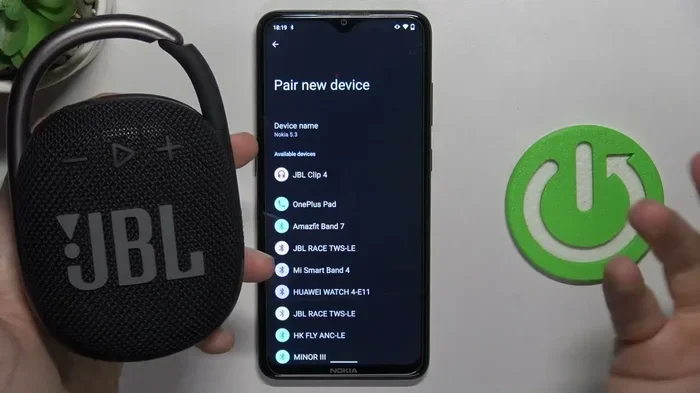
Pairing a Bluetooth microphone is simple. You turn on the mic and put it in pairing mode. Then you go to your device’s Bluetooth settings. Select the microphone from the list. Once connected, audio flows wirelessly.
Most Bluetooth microphones support hands-free profiles. This means you can use them for calls, voice recording, and even live streaming. Some models also support multipoint pairing, letting you connect to two devices at once.
Audio Quality and Codecs
Bluetooth uses audio codecs to compress sound before sending it. The most common codec is SBC. It works well but does compress audio. Newer codecs like aptX and LDAC offer better quality. They preserve more of the original sound detail.
If audio quality matters to you, look for a mic that supports aptX or AAC. These codecs reduce the quality loss that Bluetooth can cause. For most casual users, standard Bluetooth audio is perfectly fine.
Battery Life and Portability
Bluetooth microphones are usually battery powered. Many offer 6 to 12 hours of use per charge. Some rechargeable models come with USB-C cables for easy charging. This makes them great for travel and on-the-go recording.
Portability is one of the biggest advantages of Bluetooth mics. They are lightweight and compact. You can toss one in your bag and take it anywhere. That is a big reason why they are so popular for vloggers and content creators.
Common Uses for Bluetooth Microphones
- Recording voiceovers on a smartphone
- Live streaming on platforms like Twitch and YouTube
- Karaoke sessions with friends
- Podcasting with a portable setup
- Video conferencing and online meetings
- Singing along with music apps
Bluetooth microphones cover a wide range of everyday uses. They are versatile and accessible. For many people, they are the go-to choice for wireless audio.
RF Wireless Microphones: The Professional Choice
Radio frequency wireless microphones are the backbone of professional audio. They are used on stages, in studios, and at large events around the world. Here is why they remain so popular.
How RF Wireless Systems Work
An RF wireless microphone system has two main parts. The transmitter sends the audio signal. The receiver picks it up and passes it to your mixer or recorder. The transmitter can be built into the microphone or attached as a belt pack.
These systems operate on specific frequency bands. VHF (very high frequency) and UHF (ultra high frequency) are the most common. UHF systems tend to perform better in crowded RF environments. They offer more channels and less interference.
Advantages of RF Systems
- Longer range: You can move freely across a large stage or venue.
- Better audio quality: RF systems transmit full-range audio without compression.
- Low latency: The signal arrives almost instantly.
- Less interference: With proper frequency coordination, RF stays clean.
- Reliability: Professional RF systems are built to perform under pressure.
Choosing the Right RF System
When shopping for an RF wireless microphone, consider a few key factors. First, think about the range you need. A small venue requires less range than a large concert hall. Second, consider the number of microphones you will use at once. More mics mean you need more channels.
Also, check the frequency band. In some countries, certain frequencies require a license. UHF systems are generally the best choice for most users. They offer the best balance of range, quality, and reliability.
Popular RF Wireless Microphone Brands
- Shure: Known for the ULX and SLX series. Trusted by professionals worldwide.
- Sennheiser: Offers the EW series with excellent sound and build quality.
- Audio-Technica: Provides affordable RF systems with solid performance.
- Rode: Makes wireless systems popular with content creators and videographers.
- Sony: Offers digital wireless systems with outstanding audio clarity.
Each brand has its strengths. Shure and Sennheiser lead in professional markets. Audio-Technica and Rode offer great value for semi-pro users. Sony is making waves with its digital wireless technology.
Wireless Microphone Connectivity: Beyond Bluetooth and RF
Bluetooth and RF are not the only ways microphones go wireless. New technologies continue to emerge. Understanding these options gives you more choices.
Wi-Fi Microphones
Wi-Fi microphones connect to your wireless network. They can stream audio over longer distances than Bluetooth. This makes them useful for large venues and multi-room setups. Some smart microphones use Wi-Fi for real-time audio processing and effects.
Digital Wireless Protocols
Many modern wireless microphones use proprietary digital protocols. These systems encode audio digitally before transmission. They offer excellent sound quality and security. Digital wireless systems are less prone to interference and eavesdropping.
Shure’s Axient Digital system is a great example. It uses advanced digital technology to deliver pristine audio. It also includes features like frequency scanning and backup channels for rock-solid performance.
Infrared and Other Technologies
Some specialized microphones use infrared signals. These are common in conference rooms and lecture halls. Infrared offers secure, directional audio transmission. However, it requires line of sight between the transmitter and receiver.
Other emerging technologies include laser-based transmission and mesh networks. These are still niche but show promise for the future of wireless audio.
Common Wireless Microphone Problems and How to Fix Them
Wireless microphones can have issues. Knowing what causes them helps you troubleshoot faster. Here are the most common problems and their solutions.
Signal Dropouts
Signal dropouts happen when the connection between the mic and receiver breaks. This is common with Bluetooth when you move too far away. For RF systems, it can happen due to interference or physical obstacles.
To fix dropouts, stay within range. For RF systems, try changing the frequency. Avoid placing receivers near metal objects or walls that block signals.
Audio Interference and Static
Interference comes from other wireless devices. Wi-Fi routers, cell phones, and even LED lights can cause static. This is especially common in crowded RF environments like concerts and conferences.
The best fix is frequency scanning. Most professional RF systems have an auto-scan feature. This finds the cleanest frequency for your setup. For Bluetooth, moving away from other 2.4 GHz devices helps.
Battery Problems
Nothing is worse than a microphone dying mid-performance. Battery life varies by model and usage. Rechargeable batteries save money over time. Always charge your batteries fully before an important event.
Keep spare batteries on hand if you use disposable ones. For Bluetooth mics, carry the charging cable. A quick top-up between sessions can keep you going all day.
Latency Issues
Latency is the delay between speaking and hearing the audio. Bluetooth adds more latency than RF systems. For most casual uses, this delay is barely noticeable. But for live performers, even a small delay can throw off timing.
If latency is a problem, switch to an RF or digital wireless system. These offer near-instant audio transmission. Some Bluetooth devices also have low-latency modes worth trying.
How to Choose the Right Wireless Microphone
With so many options available, choosing the right microphone can feel overwhelming. Here is a simple guide to help you decide.
Consider Your Use Case
Think about where and how you will use the microphone. Are you recording at home? Performing live? Streaming content? Each use case has different needs.
- Home recording: A Bluetooth mic is often enough. It is easy to set up and affordable.
- Live performances: Go with an RF wireless system. It offers the range and reliability you need.
- Streaming and content creation: Bluetooth or digital wireless both work well. Choose based on your setup.
- Conferences and presentations: A Wi-Fi or digital wireless mic with a lapel option works great.
Set a Budget
Wireless microphones range from under $20 to over $2,000. Set a realistic budget before shopping. For most casual users, a good Bluetooth mic costs $50 to $150. Professional RF systems typically start around $300.
Remember that the microphone is only part of the cost. You may also need a receiver, cables, or a mixer. Factor those into your budget too.
Read Reviews and Test Before Buying
Always read reviews before purchasing. Look for feedback on audio quality, range, and battery life. If possible, test the microphone in person. Many music stores let you try wireless systems before buying.
Expert Tips for Getting the Best Sound from Your Wireless Microphone
Even the best microphone can sound bad if you do not set it up right. Here are some expert tips to help you get the most out of your wireless mic.
- Position the mic correctly: Keep it 2 to 4 inches from your mouth. This gives the clearest sound.
- Avoid plosive sounds: Use a pop filter to reduce harsh P and B sounds.
- Keep the receiver in line of sight: Especially for RF and digital systems. Walls and obstacles weaken the signal.
- Scan for clean frequencies: Use the auto-scan feature on RF systems before each use.
- Charge batteries fully: A low battery can cause audio dropouts and poor sound quality.
- Update firmware: Many wireless mics have firmware updates that improve performance.
These small steps make a big difference. They help you get clean, reliable audio every time you use your microphone.
Frequently Asked Questions
Do all wireless microphones use Bluetooth?
No, not all wireless microphones use Bluetooth. Many professional systems use radio frequency (RF) signals, Wi-Fi, or proprietary digital protocols. Bluetooth is just one of several wireless technologies used in microphones today.
Can I use a Bluetooth microphone with any device?
Most Bluetooth microphones work with any device that supports Bluetooth. This includes smartphones, tablets, laptops, and desktop computers. However, some devices may require a Bluetooth adapter if they do not have built-in Bluetooth support.
Is Bluetooth good enough for live performances?
Bluetooth can work for small, informal live performances. However, it has limitations. Range is short, and there can be slight latency. For professional live events, RF wireless systems are the better choice.
What is the difference between a Bluetooth mic and an RF mic?
A Bluetooth mic connects directly to your device using Bluetooth technology. An RF mic uses a separate transmitter and receiver that connect to your audio equipment. RF mics offer better range, audio quality, and reliability for professional use.
How far can a Bluetooth microphone reach?
Most Bluetooth microphones have a range of about 30 feet. This can vary depending on the device and environment. Walls, furniture, and other obstacles can reduce the effective range.
Are Bluetooth wireless microphones worth buying?
Yes, Bluetooth microphones are worth buying for casual and everyday use. They are affordable, portable, and easy to set up. However, for professional audio work, consider an RF or digital wireless system instead.
Final Thoughts
Do wireless microphones use Bluetooth? Some do, but many others rely on different technologies. Bluetooth microphones are convenient and affordable. They are perfect for casual users, home recording, and everyday tasks. RF wireless microphones offer superior audio quality, range, and reliability. They are the go-to choice for professionals and serious performers.
Wi-Fi and digital wireless systems add even more options. Each technology has its place in the world of wireless audio. The key is understanding what you need and choosing accordingly.
Take some time to evaluate your setup. Consider your budget, your use case, and the environments where you will use the microphone. With the right knowledge, you can find a wireless microphone that delivers exactly the sound you want. Whether you choose Bluetooth or RF, the right mic will make your audio experience better and more enjoyable.
Now that you know how wireless microphones work, you are ready to make a smart choice. Happy recording, streaming, or performing. The best microphone is the one that fits your needs and helps you sound your best every time.