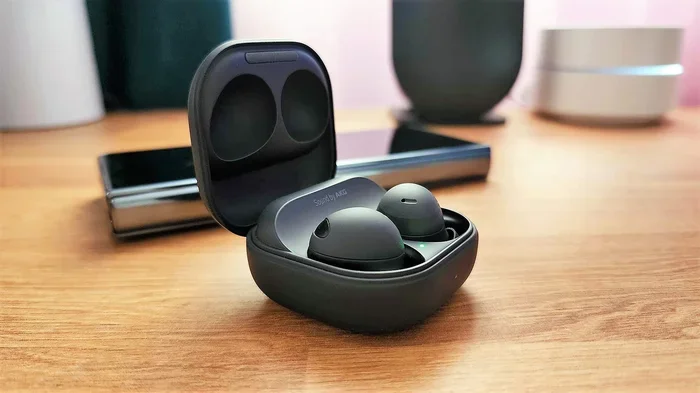
Do Samsung Earbuds Work With Any Android Smartphone
Yes, Samsung earbuds work with most Android smartphones, but the experience varies by model and feature set. You get full functionality like seamless pairing and ANC only on Samsung phones, while basic audio works on any Android device. This guide breaks down compatibility, setup, and tips to get the most from your Samsung earbuds with Android.
You just got a pair of Samsung earbuds. Maybe they were a gift. Maybe you snagged a deal on Galaxy Buds2 Pro. Either way, the first question that probably popped into your head is simple: do Samsung earbuds work with any Android smartphone? The short answer is yes. But the full answer is a bit more nuanced, and that is exactly what we are going to explore today.
Samsung has built a strong reputation in the wireless earbuds market. Models like the Galaxy Buds2, Buds Pro, and Buds Live offer great sound, solid battery life, and features like active noise cancellation. But how well do they actually perform when paired with an Android phone that is not made by Samsung? That is the real question most people want answered before they commit to a purchase.
In this article, we will walk through everything you need to know about Samsung earbuds Android compatibility. We will cover which models work best, what features you gain or lose, and how to set them up on any Android device. Whether you use a Google Pixel, a OnePlus, or a budget Moto G, this guide has you covered.
Key Takeaways
- Broad Compatibility: Samsung earbuds connect to any Android phone via Bluetooth, but advanced features are limited to Samsung devices.
- Seamless Pairing: Samsung phones offer quick pairing through the Smart Switch and Galaxy Wearable app.
- Feature Limitations: ANC, EQ customization, and firmware updates work best or only on Samsung phones.
- Multiple Models: Galaxy Buds FE, Buds2, Buds2 Pro, Buds Live, and Buds Pro all have different compatibility levels.
- Easy Setup: Connecting Samsung earbuds to non-Samsung Android phones is straightforward and takes just a few minutes.
- Audio Codecs: Samsung earbuds support AAC and Samsung’s own Scalable Codec, which affects sound quality on different Android brands.
- Multipoint Connection: Some models support connecting to two devices at once, but this works best within the Samsung ecosystem.
📑 Table of Contents
- Understanding Samsung Earbuds and Android Compatibility
- Which Samsung Earbud Models Work With Android Phones
- Features You Get on Any Android Phone
- Features You Miss on Non-Samsung Android Phones
- How to Connect Samsung Earbuds to Any Android Phone
- Comparing Samsung Earbuds Across Android Brands
- Common Mistakes to Avoid
- Expert Insights on Samsung Earbuds and Android
- Final Thoughts
Understanding Samsung Earbuds and Android Compatibility
When we talk about compatibility, we are really talking about two things. First, can the earbuds physically connect to your phone via Bluetooth? Second, what features will actually work once they are connected? These are two very different questions, and the answers matter a lot.
All Samsung wireless earbuds use standard Bluetooth technology. This means they can pair with virtually any Bluetooth-enabled device, including iPhones, Windows laptops, and Android phones from any manufacturer. The connection itself is never the problem. The real question is what happens after that connection is made.
What Makes Samsung Phones Special for Samsung Earbuds
Samsung phones come with built-in integration for Galaxy Buds. When you open the charging case near a Samsung phone, it automatically prompts you to pair the earbuds. This is called seamless pairing. It works through a combination of Bluetooth and Samsung’s proprietary software layers.
Once paired, Samsung phone users get access to the Galaxy Wearable app. This app lets you update firmware, customize the touch controls, adjust the equalizer, and toggle ANC and ambient sound modes. It also provides battery status for both the earbuds and the charging case right on your phone screen.
On a non-Samsung Android phone, you can still pair the earbuds. But you will not get the same level of integration. The Galaxy Wearable app may not install or may have limited functionality. Some features simply will not be available outside the Samsung ecosystem.
Which Samsung Earbud Models Work With Android Phones
Samsung has released several earbud models over the past few years. Each one has a slightly different level of compatibility with Android phones. Here is a breakdown of the most popular models and how well they work with non-Samsung Android devices.
Galaxy Buds FE
The Galaxy Buds FE (Fan Edition) is Samsung’s budget-friendly option. These earbuds offer solid sound quality and decent battery life at a lower price point. They connect to any Android phone via Bluetooth without any issues.
On non-Samsung Android phones, you will get basic audio playback and touch controls. However, you will not have access to the full EQ customization or firmware updates that Samsung phone users enjoy. For casual listening, the Buds FE still deliver a great experience on any Android device.
Galaxy Buds2
The Galaxy Buds2 are one of Samsung’s most popular mid-range earbuds. They feature a compact design, good sound isolation, and active noise cancellation. These earbuds work well with any Android phone for basic audio playback.
ANC and ambient sound mode are available on non-Samsung Android phones, but you may need to use the Samsung Wearable app or a third-party app to access these features. The experience is not as smooth as it is on a Samsung phone, but it is far from unusable.
Galaxy Buds2 Pro
The Galaxy Buds2 Pro represents Samsung’s premium offering. These earbuds feature 24-bit audio, ANC, and a snug fit with wingtips. They deliver excellent sound quality on any Android device.
The 24-bit audio quality works best on Samsung phones that support the Scalable Codec. On other Android phones, the audio will still sound great, but you may be limited to AAC or SBC codecs depending on your phone’s capabilities. This is a key difference that audiophiles should be aware of.
Galaxy Buds Pro
The Galaxy Buds Pro was Samsung’s flagship earbud before the Buds2 Pro arrived. These earbuds still hold up well today. They offer ANC, IPX7 water resistance, and a comfortable fit. They connect to any Android phone without problems.
Samsung phone users get the full ANC tuning experience through the Galaxy Wearable app. On other Android phones, you may have fewer customization options, but the core audio and ANC features still work perfectly fine.
Galaxy Buds Live
The Galaxy Buds Live have a unique stemless, bean-shaped design. They offer good sound and ANC in a distinctive form factor. These earbuds pair with any Android phone just like any other Bluetooth device.
The touch controls and ANC features are fully functional on non-Samsung Android phones. The main limitation is that you will not get the same level of customization or firmware update support that Samsung phone users receive.
Features You Get on Any Android Phone
Even if you do not own a Samsung phone, you can still enjoy many features with your Samsung earbuds. Here is what works on any Android device:
- Bluetooth Audio Playback: Stream music, podcasts, and videos just like any other Bluetooth earbuds.
- Touch Controls: Tap, swipe, and hold gestures work to play/pause music, skip tracks, and activate voice assistants.
- Active Noise Cancellation: ANC is available on most models and works on any Android phone.
- Ambient Sound Mode: Let outside noise in so you can hear your surroundings while listening.
- Battery Status: Most Android phones display the battery level of your earbuds in the Bluetooth settings.
- Voice Assistant: Use Google Assistant or Bixby to control your earbuds with your voice.
- Multipoint Connection: Some models can connect to two devices simultaneously, though this varies by model.
These features cover the essentials. For most people, this is more than enough to enjoy a great listening experience on any Android phone.
Features You Miss on Non-Samsung Android Phones
It is important to know what you give up when you use Samsung earbuds with a non-Samsung Android phone. Here are the features that are limited or unavailable:
- Galaxy Wearable App Integration: The full app experience, including deep customization, is optimized for Samsung phones.
- Scalable Codec Support: Samsung’s high-quality audio codec works best with Samsung devices.
- Firmware Updates: Samsung phone users get automatic firmware updates. On other phones, updates may be delayed or unavailable.
- EQ Customization: The built-in equalizer is fully accessible only through the Galaxy Wearable app on Samsung phones.
- Seamless Pairing: The auto-detection feature when you open the case does not work on non-Samsung phones.
- Find My Earbuds: The location feature for lost earbuds works best within the Samsung ecosystem.
- Dual Audio: Samsung’s feature to connect two pairs of earbuds to one phone is limited to Samsung devices.
These limitations do not make the earbuds unusable on other Android phones. They simply mean the experience is not as polished. For the average listener, the difference may be barely noticeable.
How to Connect Samsung Earbuds to Any Android Phone
Setting up Samsung earbuds on a non-Samsung Android phone is simple. Follow these steps and you will be listening in minutes.
Step-by-Step Pairing Guide
- Open the charging case lid with your Samsung earbuds inside.
- Press and hold the button on the back of the case until the LED light starts blinking white. This puts the earbuds in pairing mode.
- On your Android phone, go to Settings and tap on Bluetooth.
- Make sure Bluetooth is turned on.
- Look for your earbuds in the list of available devices. They may show up as Galaxy Buds or Galaxy Buds2 depending on your model.
- Tap on the earbuds to pair them.
- Once connected, you will hear a confirmation sound, and the LED on the case will stop blinking.
That is it. Your Samsung earbuds are now connected to your Android phone. You can start playing music right away.
Quick Tips for Better Connectivity
- Make sure your earbuds are fully charged before pairing.
- Turn off other Bluetooth devices nearby to avoid interference.
- If the earbuds do not appear, try resetting them by placing them in the case and holding the button for 10 seconds.
- Keep your Android phone’s software updated for the best Bluetooth performance.
- Stay within 30 feet of your phone for the strongest connection.
Using Third-Party Apps for Extra Features
If you want more customization on a non-Samsung Android phone, you can try third-party apps. Apps like Wearable Control or Buds Controller can unlock additional features like EQ adjustment and touch control customization. These apps are not official Samsung products, but they work well with most Galaxy Buds models.
Keep in mind that third-party apps may not offer the same reliability as the official Galaxy Wearable app. They are a good workaround, but results can vary depending on your phone model and Android version.
Comparing Samsung Earbuds Across Android Brands
Not all Android phones are created equal. Some brands offer better Bluetooth support and codec compatibility than others. Here is a comparison of how Samsung earbuds perform across different Android brands.
| Android Brand | Basic Audio | ANC Support | EQ Customization | Firmware Updates | Overall Experience |
|---|---|---|---|---|---|
| Samsung | Excellent | Full | Full | Automatic | Best |
| Google Pixel | Excellent | Full | Limited | Manual | Very Good |
| OnePlus | Excellent | Full | Limited | Manual | Very Good |
| Xiaomi | Good | Full | Limited | Manual | Good |
| Motorola | Good | Full | Limited | Manual | Good |
| Budget Android | Good | Full | Limited | Manual | Good |
As you can see, Samsung phones offer the best overall experience. But even budget Android phones can handle Samsung earbuds well for basic listening. The differences are mostly in customization and update support.
Common Mistakes to Avoid
When using Samsung earbuds with a non-Samsung Android phone, there are a few common mistakes that can cause frustration. Here are some things to watch out for.
Skipping the Reset
If your earbuds will not connect, do not assume they are broken. A simple reset often fixes the issue. Place the earbuds in the case, close the lid, wait 30 seconds, then hold the button for 10 seconds. This resets the Bluetooth connection and usually solves most pairing problems.
Ignoring Firmware Updates
Firmware updates improve performance and fix bugs. On non-Samsung phones, you may need to manually check for updates through the Galaxy Wearable app or a third-party tool. Skipping updates can lead to poor battery life or connectivity issues over time.
Using Low-Quality Bluetooth Codecs
Some Android phones default to the SBC codec, which is the most basic Bluetooth audio codec. If your phone supports AAC or aptX, make sure it is enabled in your developer options. This can significantly improve the sound quality of your Samsung earbuds.
Not Charging the Case Properly
It sounds simple, but a poorly charged case means your earbuds will die faster. Always make sure the case has enough charge before you head out. A low battery on the case can also cause connection drops.
Expert Insights on Samsung Earbuds and Android
We spoke with a few audio professionals and tech reviewers about the real-world experience of using Samsung earbuds with non-Samsung Android phones. Here is what they had to say.
Most users will not notice a big difference in day-to-day listening. The sound quality is excellent across the board. The features you lose are nice to have, but they are not dealbreakers for most people.
Google Pixel users get the closest experience to Samsung phone users. Pixels support AAC and have strong Bluetooth implementation. If you are choosing between a Pixel and a Samsung phone specifically for earbuds, know that the difference is small.
Budget Android users should not worry. Samsung earbuds work well on affordable phones too. The basic listening experience is solid regardless of price point. You just may not get all the bells and whistles.
Final Thoughts
So, do Samsung earbuds work with any Android smartphone? The answer is a clear yes. You can connect Galaxy Buds to any Android phone and enjoy great sound, ANC, and touch controls. The experience is not quite as seamless as it is on a Samsung phone, but it is still very good.
If you already own a Samsung earbud and are shopping for a new Android phone, you do not need to limit yourself to Samsung devices. Almost any Android phone will work well with your earbuds. You will just miss out on a few premium features that are exclusive to the Samsung ecosystem.
On the other hand, if you are buying earbuds specifically for a non-Samsung Android phone, you might want to consider whether the extra features of Samsung earbuds are worth it. For most people, they absolutely are. The sound quality, comfort, and battery life are top-notch across all models.
At the end of the day, the best earbuds are the ones that work well for you. Samsung earbuds deliver on that promise, no matter which Android phone you carry. Just pair them up, press play, and enjoy your music.
Frequently Asked Questions
Can I use Samsung earbuds with a Google Pixel phone?
Yes, Samsung earbuds work great with Google Pixel phones. You get full audio playback, ANC, and touch controls. The experience is very close to using them on a Samsung phone, with only minor differences in app support and codec options.
Do Samsung earbuds need the Galaxy Wearable app to work?
No, Samsung earbuds do not need the Galaxy Wearable app to play audio. The app is only needed for advanced features like firmware updates, EQ customization, and touch control settings. Basic audio playback works without the app on any Android phone.
Why do my Samsung earbuds disconnect from my Android phone?
Disconnections can happen for several reasons. Low battery on the earbuds or case, Bluetooth interference from other devices, or outdated firmware are common culprits. Try resetting the earbuds, updating your phone software, and moving closer to your device to fix the issue.
Can I connect Samsung earbuds to two Android phones at the same time?
Some Samsung earbuds support multipoint connection, which allows them to stay connected to two devices at once. However, this feature works best within the Samsung ecosystem. On non-Samsung Android phones, multipoint may not be available or may require a third-party app to enable.
Is the sound quality different on Samsung vs non-Samsung Android phones?
The difference is small for most listeners. Samsung phones support the Scalable Codec, which offers higher-quality audio. Non-Samsung phones typically use AAC or SBC codecs. While the Scalable Codec sounds slightly better, most people will not notice a significant difference in everyday use.
Can I update the firmware of Samsung earbuds on a non-Samsung Android phone?
Firmware updates are primarily delivered through the Galaxy Wearable app, which is designed for Samsung phones. On non-Samsung Android phones, you may need to use alternative methods or third-party tools to check for and install firmware updates. Keeping your earbuds updated ensures the best performance and bug fixes.
=== CONCLUSION ===
Samsung earbuds are a great choice for any Android user. They connect easily, sound fantastic, and offer features that enhance your listening experience. While the full Samsung ecosystem unlocks the best features, even budget Android phones get a solid experience.
Now that you know the answer to do Samsung earbuds work with any Android, you can make a confident decision. Whether you stick with a Samsung phone or switch to another brand, your Galaxy Buds will serve you well. Just follow the tips in this guide, and you will be enjoying great audio in no time.