Can You Use Alcohol Wipes On Projector Lens Safely
Can you use alcohol wipes on projector lens? The short answer is it depends on the type of alcohol and the lens coating. Using the wrong wipe can damage your projector lens and ruin image quality. This guide covers the risks, safe alternatives, and step-by-step cleaning methods. You will learn how to keep your projector lens spotless without causing harm.
You just got your projector set up for movie night. The screen looks great, but then you notice it. A smudge. A fingerprint. A dusty streak right in the middle of the lens. Your first instinct might be to grab an alcohol wipe from the bathroom counter and give it a quick wipe. But wait. Before you do that, you need to know the answer to a very important question. Can you use alcohol wipes on projector lens safely?
The truth is, not all cleaning methods are created equal when it comes to projector lenses. These lenses have special coatings that make your images look sharp and bright. A wrong move can permanently damage those coatings. It can even shorten the life of your projector. That is why we put together this complete guide. We will walk you through everything you need to know about cleaning projector lenses the right way.
Key Takeaways
- Not all alcohol wipes are safe: Harsh chemicals can strip the anti-reflective coating on projector lenses.
- Isopropyl alcohol is the safer option: Use 70% or less concentration with a soft microfiber cloth.
- Avoid household cleaning wipes: They contain additives that can leave residue or scratch the lens surface.
- Dry cleaning first is always best: Remove loose dust before applying any liquid to prevent scratches.
- Prevention matters: Covering your projector when not in use reduces the need for frequent cleaning.
- When in doubt, use lens-specific products: Dedicated projector lens cleaners are designed to be gentle and effective.
📑 Table of Contents
- Why Projector Lens Cleaning Matters
- Can You Use Alcohol Wipes on Projector Lens?
- The Risks of Using Alcohol Wipes on Your Lens
- Safe Alternatives to Alcohol Wipes
- Step-by-Step Guide to Cleaning Your Projector Lens
- Common Mistakes to Avoid
- How Often Should You Clean Your Projector Lens?
- Expert Tips for Long-Term Lens Care
- What About Other Cleaning Products?
- Frequently Asked Questions
- Final Thoughts
Why Projector Lens Cleaning Matters
Your projector lens is one of the most delicate parts of the entire setup. It is made of glass or special plastics with thin coatings. These coatings help control light and color. When those coatings get damaged, your image quality drops fast. Colors might look washed out. Edges might get blurry. You might even notice dark spots.
Dust and fingerprints build up over time. Every time you use the projector, tiny particles settle on the lens. Humidity can add a film. Smoke and cooking grease can make things worse. Regular cleaning keeps your projector performing at its best. But cleaning it the wrong way can cause more harm than good.
The Cost of a Damaged Lens
Replacing a projector lens can be expensive. Some lenses cost hundreds of dollars. In some cases, you might need to replace the entire projector. That is why understanding how to clean it safely is so important. A little knowledge can save you a lot of money and headache.
Even small scratches from improper cleaning can scatter light. This reduces the sharpness of your projected image. Over time, the damage adds up. A lens that once produced crystal-clear images might start looking fuzzy or hazy. Proper cleaning prevents this slow decline in image quality.
Can You Use Alcohol Wipes on Projector Lens?
This is the big question. And the answer is not a simple yes or no. It depends on several factors. Let us break it down so you can make the best decision for your gear.
What Are Alcohol Wipes Made Of?
Most alcohol wipes you find at the store contain isopropyl alcohol. They also have other ingredients. These can include fragrances, surfactants, and moisturizing agents. Those extra ingredients are fine for cleaning your hands or a desk. They are not fine for a projector lens.
Household alcohol wipes are designed for surfaces like tables, phones, and countertops. They are not designed for optical equipment. The chemicals in these wipes can dissolve the protective coatings on your lens. They can also leave behind a residue that is hard to remove.
When Alcohol Wipes Might Be Okay
There is one exception. If you use pure isopropyl alcohol at 70% concentration or lower, and you apply it with a clean microfiber cloth, it can be safe. But you need to be very careful. You should never pour the alcohol directly on the lens. Instead, dampen the cloth lightly and gently wipe the surface.
Even then, you should check your projector manual first. Some manufacturers explicitly warn against using any alcohol-based products. Others give specific guidelines for safe cleaning. Always check before you start.
The Risks of Using Alcohol Wipes on Your Lens
Understanding the risks helps you make better choices. Let us look at what can go wrong when you use the wrong cleaning method on your projector lens.
Damaging the Anti-Reflective Coating
Most projector lenses have an anti-reflective coating. This coating reduces glare and improves image brightness. Alcohol can dissolve this coating over time. Once the coating is damaged, it cannot be repaired. You will see a permanent drop in image quality.
The coating is very thin. It is much thinner than a human hair. Harsh chemicals eat away at it little by little. You might not notice the damage right away. But after several cleanings with the wrong product, the effect becomes obvious.
Leaving Residue Behind
Many alcohol wipes contain lotions and fragrances. These leave a film on surfaces. On a projector lens, this film scatters light. It creates a hazy look. The haze reduces contrast and sharpness. You might think the image looks fine at first. But over time, the residue builds up and gets worse.
Removing this residue is very difficult. You might need special lens cleaning solutions to get it off. In some cases, the residue is permanent. This is why it is better to avoid anything that is not specifically designed for optical lenses.
Causing Micro-Scratches
Alcohol wipes are not as soft as microfiber cloths. The wipe material can be abrasive. When you rub a lens with an alcohol wipe, tiny scratches can form. These scratches are called micro-scratches. You cannot see them with the naked eye. But they affect how light passes through the lens.
Micro-scratches scatter light in different directions. This reduces the overall clarity of your projected image. The more you wipe with the wrong material, the more scratches accumulate. Eventually, the image quality suffers noticeably.
Safe Alternatives to Alcohol Wipes
The good news is there are many safe ways to clean your projector lens. You do not need to take risks with harsh chemicals. Here are the best alternatives that will keep your lens clean without causing damage.
Microfiber Cloths
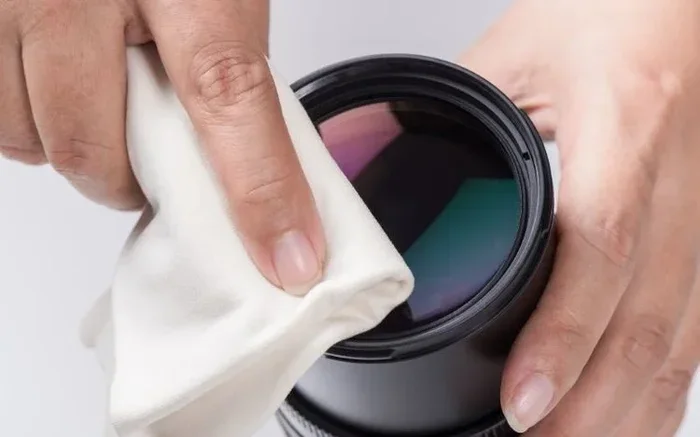
A soft microfiber cloth is the safest tool for dry cleaning. It picks up dust and fingerprints without scratching the surface. Always use a clean cloth. Never reuse a cloth that has been washed with fabric softener. The softener leaves a residue that can transfer to your lens.
Hold the cloth gently against the lens. Wipe in a circular motion starting from the center. Move outward slowly. Do not press hard. Let the cloth do the work. This method works well for light dust and smudges.
Lens Cleaning Solution
For tougher spots, use a lens cleaning solution made for optical equipment. These solutions are formulated to be safe on coatings. They evaporate quickly and leave no residue. You can buy them at camera stores or online.
Apply one or two drops to a microfiber cloth. Never apply the solution directly to the lens. Gently wipe the surface using circular motions. Let the lens air dry completely before using the projector.
Compressed Air
For loose dust, compressed air is a great first step. It blows particles away without touching the lens surface. Hold the can upright. Use short bursts from about six inches away. Do not tilt the can. Tilting can cause liquid propellant to spray onto the lens.
Always clean the surrounding area first. This prevents dust from falling onto the lens after you have cleaned it. Compressed air is especially useful before you do any wet cleaning.
Lens Cleaning Pens
Lens cleaning pens are portable and convenient. They have a soft brush on one end and a cleaning tip on the other. The brush removes loose dust. The cleaning tip picks up oils and smudges. These pens are great for on-the-go maintenance.
They are not a replacement for deep cleaning. But they are perfect for quick touch-ups between sessions. Keep one in your projector bag or case for easy access.
Step-by-Step Guide to Cleaning Your Projector Lens
Now that you know what to avoid and what to use, here is a step-by-step guide. Follow these steps for safe and effective projector lens cleaning.
Step 1: Turn Off and Unplug the Projector
Safety first. Turn off the projector and unplug it from the power source. Wait at least 30 minutes for the lens to cool down. A warm lens can attract dust and make cleaning harder. It can also cause cleaning solutions to evaporate too quickly.
Step 2: Inspect the Lens
Look at the lens closely. Use a flashlight if needed. Check for dust, fingerprints, smudges, and any sticky spots. This inspection helps you choose the right cleaning method.
Step 3: Remove Loose Dust
Use compressed air or a soft brush to remove loose dust. Hold the can or brush at an angle. Do not touch the lens surface. This step prevents dust particles from scratching the lens during wet cleaning.
Step 4: Apply Cleaning Solution
Put a small amount of lens cleaning solution on a microfiber cloth. Use a clean cloth every time. Gently wipe the lens in circular motions. Start from the center and move outward.
Step 5: Dry the Lens
Use a dry part of the microfiber cloth to remove any remaining moisture. Make sure the lens is completely dry before you turn the projector back on. Any moisture left on the lens can affect image quality.
Step 6: Reassemble and Test
Once the lens is dry, reattach any lens caps or covers. Plug the projector back in and turn it on. Check the image quality. The picture should look clear and sharp. If you still see spots, repeat the cleaning process.
Common Mistakes to Avoid
Even with the best intentions, people make mistakes when cleaning projector lenses. Here are the most common ones and how to avoid them.
Using Paper Towels or Tissue
Paper towels and tissues seem soft. But they are actually abrasive at the microscopic level. They can scratch your lens. They also leave behind tiny fibers. Always use a microfiber cloth instead.
Using Tap Water
Tap water contains minerals and chlorine. These can leave spots on the lens. They can also damage coatings over time. Always use distilled water or a proper lens cleaning solution.
Wiping Too Hard
Pressure does not help. It causes micro-scratches and can even crack the lens. Use gentle, light strokes. Let the cleaning tool do the work for you.
Cleaning Too Often
Every time you clean a lens, you risk adding tiny scratches. Only clean when necessary. If the image quality is still good, leave the lens alone. When you do clean, make it count by doing it right.
Ignoring the Projector Manual
Every projector is different. The manufacturer knows the lens best. Always read the manual before using any cleaning product. The manual will tell you what is safe and what is not.
How Often Should You Clean Your Projector Lens?
The frequency of cleaning depends on your environment. If you use the projector in a dusty room, you might need to clean more often. If you keep the projector covered when not in use, cleaning will be less frequent.
As a general rule, inspect the lens every few weeks. Clean it only when you notice a decline in image quality. Most users find that cleaning once a month is enough. Some clean even less frequently.
The key is to be gentle and infrequent. Over-cleaning causes more problems than under-cleaning. When you do clean, follow the steps we outlined above for the best results.
Expert Tips for Long-Term Lens Care
Taking care of your projector lens goes beyond just cleaning. Here are some expert tips to keep your lens in great shape for years.
- Use a lens cap: Always put the lens cap on when the projector is not in use. This prevents dust from settling on the lens.
- Keep the projector covered: Use a dust cover or a projector case when storing it. This protects the lens and other parts from airborne particles.
- Control the environment: Keep the projector room clean and dust-free. Consider an air purifier if dust is a persistent problem.
- Handle with clean hands: Oils from your fingers transfer easily to the lens. Always wash and dry your hands before touching the projector.
- Store properly: When traveling, use a padded carrying case. This prevents bumps and scratches during transport.
These small habits add up over time. They can significantly extend the life of your projector lens. They also keep your image quality at its best session after session.
What About Other Cleaning Products?
You might wonder about other household cleaning products. Can you use glass cleaner on a projector lens? What about lens wipes meant for eyeglasses? Here is a quick look at common products and whether they are safe.
- Glass cleaner: Not recommended. It can damage lens coatings and leave residue.
- Eyeglass wipes: Some are safe. Check the ingredients. Avoid wipes with ammonia or alcohol.
- Baby wipes: Not recommended. They contain moisturizers and fragrances that leave residue.
- Lens pens: Great for quick cleaning. They are designed for optical surfaces.
- Lens cleaning kits: The best option. They include everything you need for safe cleaning.
When you are unsure about a product, stick with dedicated lens cleaning supplies. They are worth the small investment. They protect your projector and your image quality.
Frequently Asked Questions
What happens if you use alcohol wipes on a projector lens?
Using alcohol wipes can damage the anti-reflective coating on the lens. It may also leave a residue that creates a hazy image. In some cases, the chemicals can cause micro-scratches that scatter light and reduce sharpness. The damage may not be visible right away but builds up over time.
Can isopropyl alcohol damage a projector lens?
Pure isopropyl alcohol at 70% concentration or lower is generally safer than household alcohol wipes. However, it should only be used on a microfiber cloth, never applied directly to the lens. Always check your projector manual first, as some manufacturers advise against any alcohol-based cleaning.
What is the best way to clean a projector lens?
The best method is to use a microfiber cloth with a dedicated lens cleaning solution. Start by removing loose dust with compressed air or a soft brush. Then gently wipe the lens in circular motions from the center outward. Let it dry completely before turning the projector back on.
How often should you clean a projector lens?
Clean the lens only when you notice a decline in image quality. Most users find cleaning once a month is sufficient. Over-cleaning can cause micro-scratches, so it is better to clean less often but more carefully. Always inspect the lens first to see if cleaning is actually needed.
Can you use eyeglass wipes on a projector lens?
Some eyeglass wipes are safe, but others contain alcohol or ammonia that can damage lens coatings. Check the ingredients carefully. Wipes without alcohol, ammonia, or fragrances are the safest choice. When in doubt, use a dedicated projector lens cleaning kit instead.
Why does my projector lens get dirty so quickly?
Projector lenses attract dust because they are often in open or semi-open environments. Airborne particles settle on the lens surface naturally. Humidity, smoke, and cooking grease can speed up the buildup. Using a dust cover when the projector is not in use helps reduce how quickly the lens gets dirty.
Final Thoughts
The question of whether you can use alcohol wipes on a projector lens comes down to caution and care. The safest answer is to avoid household alcohol wipes altogether. They contain ingredients that can harm your lens coatings and leave residue behind. Instead, stick with microfiber cloths, lens cleaning solutions, and compressed air. These tools are designed for optical surfaces and will keep your projector lens in great shape.
Cleaning your projector lens does not have to be scary. With the right tools and the right technique, it is simple and effective. You will notice a big difference in image quality after a proper cleaning. More importantly, you will protect your investment for years to come.
Remember, your projector lens is a precision instrument. Treat it with care. Clean it gently, clean it infrequently, and always use products made for optical equipment. Your projector will reward you with sharp, bright, beautiful images every time you turn it on. Proper projector lens care is one of the easiest ways to get the most out of your setup. Start today, and your future movie nights will thank you for it.