Emoji Disabilities How Accessible Symbols Impact Everyone
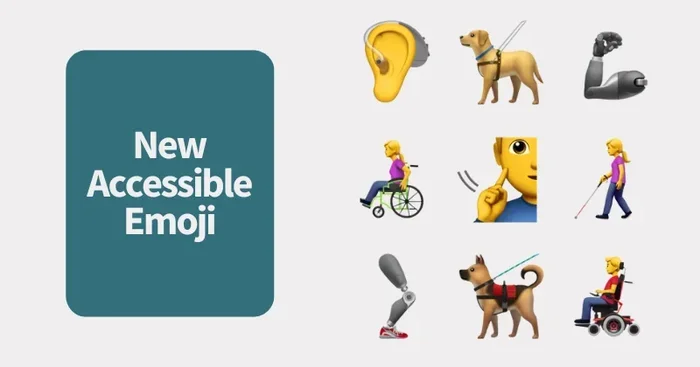
Emoji disabilities refer to the barriers that emojis create for people with visual, cognitive, or motor impairments. When symbols lack proper descriptions or accessible alternatives, they exclude millions of users from digital conversations. Accessible emojis and inclusive design ensure that everyone — regardless of ability — can participate fully in online communication.
Emojis are everywhere. They fill our text messages, social media posts, and even professional emails. These small digital symbols help us express emotions, add humor, and make conversations feel more personal. But here is something many people overlook: emoji disabilities create real barriers for millions of users worldwide.
When emojis lack proper descriptions or accessible alternatives, they become invisible to people who rely on screen readers or have visual impairments. The same symbols that bring joy to some users can cause confusion, frustration, or complete exclusion for others. This is where accessible emojis and inclusive design come into play.
Understanding emoji disabilities is not just about compliance or checking a box. It is about making sure everyone can participate in digital conversations. Whether you are a developer, a content creator, or simply someone who sends emojis in group chats, this topic matters to you. Let us explore how symbol accessibility impacts all of us and what we can do about it.
Key Takeaways
- Emoji disabilities create real barriers: Without alt text and accessible descriptions, emojis can be meaningless to screen reader users and those with visual impairments.
- Inclusive design benefits everyone: Accessible symbols improve the experience for all users, not just those with disabilities.
- WCAG compliance matters: Following web content accessibility guidelines ensures digital content is usable by the widest possible audience.
- Unicode and developers play a key role: The Unicode Consortium and tech companies are continuously working to improve emoji accessibility.
- Simple changes make a big difference: Adding alt text, using text alternatives, and choosing clear emojis can dramatically improve digital accessibility.
- Cognitive accessibility is just as important: Emojis should be simple, recognizable, and not overwhelming for users with cognitive disabilities.
- You can take action today: Small adjustments in how you use emojis can make online spaces more welcoming and inclusive.
📑 Table of Contents
What Are Emoji Disabilities?
The term emoji disabilities describes the accessibility challenges that emojis present to people with various impairments. These challenges are not about the emojis themselves being broken. Instead, they arise from how emojis are designed, implemented, and used across digital platforms.
Most people think of emojis as simple pictures. But for users who depend on assistive technology, an emoji is a piece of code that a device must interpret and communicate. When that interpretation fails or is missing, the emoji becomes a barrier.
Visual Impairments and Emojis
People with visual impairments may have low vision, color blindness, or complete blindness. For blind users, emojis are read aloud by screen readers using built-in descriptions. If those descriptions are missing, vague, or misleading, the user loses the meaning entirely.
Consider this example. A message reads, “That movie was fire 🔥.” A sighted user instantly understands the slang meaning. But a blind user whose screen reader says, “Fire emoji,” might not grasp the casual excitement the sender intended. This gap in semantic meaning is at the heart of emoji disabilities.
Color blindness is another factor. Some emojis rely heavily on color to convey meaning. A red heart versus a green heart might look nearly identical to someone with certain types of color vision deficiency. Without clear context, the symbolic representation falls flat.
Cognitive and Neurological Challenges
Cognitive accessibility is a less discussed but equally important aspect of emoji disabilities. Users with learning disabilities, attention disorders, or neurological conditions may struggle with the rapid-fire, layered meanings that emojis carry.
Modern communication uses emojis like a second language. A single message might contain a fist bump, a laughing face, and a fire emoji, each shifting the tone in different directions. For some users, parsing all of these symbols at once is overwhelming. Digital accessibility means reducing that cognitive load wherever possible.
Motor Impairments and Emoji Usage
Users with motor impairments may rely on alternative input devices like eye-tracking systems, head pointers, or switch controls. Navigating through hundreds of emojis on a tiny keyboard can be a tedious and frustrating experience. The user experience design of emoji pickers often fails to account for these users.
When selecting an emoji requires precise tapping or scrolling through long grids, it becomes a barrier. Accessible emojis should be easy to find and insert, regardless of a user’s physical abilities.
How Screen Readers Handle Emojis
Screen readers are essential assistive technology tools for blind and low-vision users. These software programs read aloud the content on a screen, translating text and symbols into speech or braille output. But how they handle emojis varies widely.
The Problem with Default Descriptions
Most operating systems assign a default description to each emoji. For example, the thumbs-up emoji might be read as “Thumbs up sign.” On the surface, this seems fine. But the problem arises when the same emoji carries different meanings in different contexts.
A thumbs-up might mean approval in one conversation and sarcasm in another. Without alt text for emojis or additional context, screen reader users miss the nuance. This is a core issue within emoji disabilities that affects daily digital communication.
Unicode and Emoji Standards
The Unicode Consortium is the organization responsible for standardizing emojis across platforms. They assign each emoji a unique code point and define its official name. While this standardization helps consistency, it does not always address accessibility needs.
The Unicode Consortium has made progress in recent years. They now include more descriptive names and work on improving how platforms present emojis to assistive technology. However, there is still a long road ahead to fully resolve emoji disabilities at the standards level.
Platform Differences in Emoji Accessibility
Not all platforms handle emojis the same way. Apple, Google, Microsoft, and Samsung each render emojis differently and provide varying levels of alt text for emojis. A message sent from an iPhone might be read differently than the same message on Android.
These inconsistencies create confusion. A user who switches between devices or communicates across platforms may encounter different descriptions for the same emoji. This fragmentation weakens digital accessibility and reinforces emoji disabilities.
WCAG and Emoji Accessibility Guidelines
The Web Content Accessibility Guidelines, known as WCAG, set the global standard for digital accessibility. These guidelines apply to websites, apps, and digital content of all kinds. Understanding how WCAG relates to emojis is essential for anyone building or managing digital experiences.
WCAG Success Criteria Relevant to Emojis
Several WCAG success criteria directly address emoji disabilities:
- Non-text Content (1.1.1): All non-text content must have a text alternative that serves the equivalent purpose. Emojis fall under this rule because they are visual symbols.
- Adaptable Content (1.3.1): Information and structure must be programmatically determinable. Emojis must be readable by assistive technology and not rely solely on visual presentation.
- Distinguishable Content (1.4.1): Color must not be the only visual means of conveying information. Emojis that depend on color alone violate this guideline.
- Readable Content (3.1.5): Content should be readable and understandable. Complex or ambiguous emoji usage can reduce readability for users with cognitive disabilities.
WCAG Compliance in Practice
Achieving WCAG compliance with emojis requires intentional effort. Developers should ensure that every emoji has a meaningful text alternative. Content creators should avoid stacking too many emojis in a single line, which creates confusion for screen reader users.
Testing with actual screen readers is one of the best ways to identify emoji disabilities in your content. Tools like NVDA, JAWS, and VoiceOver can reveal how emojis are interpreted and where gaps exist. This hands-on testing should be a regular part of any accessibility audit.
The Impact of Emoji Disabilities on Daily Communication
Emoji disabilities are not abstract concepts. They affect real people in real conversations every day. Understanding this impact helps us appreciate why accessible symbols matter so much.
Social Media and Emoji Barriers
Social media platforms are built around visual communication. Emojis drive engagement, express tone, and replace entire words. But for users with emoji disabilities, these platforms can feel like a closed club.
A tweet full of emojis might be fun for sighted users but completely opaque to someone using a screen reader. The same applies to Instagram captions, TikTok comments, and Facebook posts. When emojis replace words without text alternatives, they exclude a significant portion of the audience.
Workplace Communication
Emojis have made their way into professional settings. Slack messages, email signatures, and team chat channels all use emojis regularly. For employees with visual impairments or cognitive disabilities, these symbols can create misunderstandings or feelings of exclusion.
Inclusive design in workplace tools means ensuring that emojis enhance communication rather than hinder it. Simple steps like adding brief descriptions or using emojis sparingly can make a huge difference.
Education and Learning Platforms
Educational platforms increasingly use emojis to make content more engaging. Quizzes, discussion boards, and interactive lessons all incorporate emojis. But if those emojis are not accessible, students with disabilities miss out on the same learning experience as their peers.
Disability inclusion in education means designing content that works for every learner. Accessible emojis, clear descriptions, and thoughtful placement all contribute to a more equitable learning environment.
Practical Tips for Creating Accessible Emoji Content
Addressing emoji disabilities does not require advanced technical skills. Anyone who creates digital content can take simple steps to improve accessibility. Here are practical tips that make a real difference.
Add Alt Text to Emojis
The single most effective step is adding alt text for emojis. Alt text gives screen readers something to read aloud, replacing the default emoji description with a more meaningful one.
For example, instead of relying on “Fire emoji,” you can add alt text that says “This means the content was amazing.” This small change transforms the emoji from a barrier into a clear communication tool.
Use Emojis as Supplements, Not Replacements
Emojis should enhance text, not replace it. A message that says “Great job 👏” is clear. A message that says only “👏👏👏” is ambiguous and inaccessible. Keep the words, and let emojis add personality.
This practice supports cognitive accessibility by reducing the mental effort needed to interpret a message. It also helps users of assistive technology understand the full meaning of each communication.
Limit Emoji Stacking
Stacking multiple emojis in a row might look fun, but it creates chaos for screen readers. Each emoji is read aloud individually, which can result in a confusing string of words.
Limit yourself to two or three emojis per message. Choose the ones that carry the most meaning. This simple habit improves digital accessibility for everyone.
Choose Emojis with Clear Meanings
Not all emojis are equally clear. Some emojis have obvious meanings, while others are ambiguous or culturally specific. When aiming for accessible emojis, choose symbols that are universally understood.
A smiley face, a heart, or a checkmark are generally safe choices. Emojis with niche meanings or cultural references may confuse users who are unfamiliar with them. Prioritize clarity over cleverness.
Test Your Content with Screen Readers
If you want to know how your content sounds to users with visual impairments, test it with a screen reader. Turn on VoiceOver on your iPhone or use NVDA on your computer and navigate through your content.
You will quickly notice which emojis are clear and which ones cause confusion. This testing habit is one of the best ways to identify and fix emoji disabilities in your own content.
Advocate for Better Emoji Standards
Individual efforts matter, but systemic change requires advocacy. Support organizations like the Unicode Consortium and W3C that work on accessibility standards. Share your experiences with emoji disabilities and encourage platforms to improve their implementation.
When enough people raise their voices, companies listen. Your advocacy can help push the entire industry toward more inclusive digital communication.
The Future of Accessible Emojis
The conversation around emoji disabilities is evolving rapidly. Tech companies, accessibility advocates, and standards organizations are all working to make emojis more inclusive. The future looks promising, but there is still work to be done.
Emerging Technologies and Solutions
Artificial intelligence is beginning to play a role in emoji accessibility. AI-powered tools can now generate more accurate emoji descriptions based on context. This means a fire emoji in a casual text might be described differently than the same emoji in a warning message.
Machine learning models are also being trained to suggest text alternatives for emojis automatically. These tools could make digital accessibility easier for content creators who are not accessibility experts.
The Role of Inclusive Design
Inclusive design is not a trend. It is a fundamental principle that should guide every digital product. When designers consider the full range of human ability from the start, emoji disabilities become far easier to prevent.
Companies like Apple, Google, and Microsoft are investing more resources in accessible emoji design. Newer emojis come with better descriptions, more distinct appearances, and improved support for assistive technology. These developments signal a shift toward a more inclusive digital world.
What You Can Do Right Now
You do not need to wait for the future to make a difference. Start today by reviewing how you use emojis in your own content. Ask yourself whether your messages are clear to someone who cannot see them.
Share what you learn with others. Talk to your team about disability inclusion. Small actions, multiplied across millions of users, can create a more accessible internet for everyone.
Conclusion
Emoji disabilities are a real and pressing issue in digital communication. They affect people with visual impairments, cognitive disabilities, and motor challenges every single day. But the good news is that awareness is growing, and solutions are within reach.
By adding alt text for emojis, using emojis as supplements rather than replacements, and following WCAG guidelines, we can all contribute to a more accessible online world. Accessible emojis are not just a technical requirement. They are a statement that says every voice matters, every user belongs, and every symbol should be understood.
The next time you reach for an emoji, take a moment to consider who might be receiving your message. With a little thought and care, we can ensure that digital accessibility extends to even the smallest symbols in our conversations. Together, we can make online communication truly inclusive for everyone.
Frequently Asked Questions
What are emoji disabilities?
Emoji disabilities refer to the accessibility barriers that emojis create for people with visual, cognitive, or motor impairments. These barriers occur when emojis lack proper descriptions, rely on color alone, or are used in ways that confuse users of assistive technology like screen readers.
How do screen readers interpret emojis?
Screen readers read aloud the text description assigned to each emoji by the operating system. If an emoji has no description or a vague one, the user may not understand its meaning. Adding proper alt text for emojis ensures screen readers convey the intended message accurately.
Why is cognitive accessibility important for emojis?
Users with cognitive disabilities may struggle to process multiple emojis quickly or interpret layered meanings. Cognitive accessibility means keeping emoji usage simple, clear, and minimal so that all users can understand the message without extra mental effort.
What does WCAG say about emojis?
The Web Content Accessibility Guidelines require that all non-text content, including emojis, have text alternatives. WCAG also states that color must not be the only means of conveying information, which affects emojis that rely on color to differentiate meaning.
Can I make my own emojis more accessible?
Yes. You can add alt text to emojis in supported platforms, limit the number of emojis per message, choose emojis with universally clear meanings, and test your content with a screen reader. These simple steps significantly improve digital accessibility.
What is the Unicode Consortium doing about emoji accessibility?
The Unicode Consortium works to standardize emojis and improve their descriptions across platforms. They collaborate with accessibility experts to ensure that new emojis include better text alternatives and are more distinguishable for users with visual impairments and other disabilities.