Can Ipad 9 Be Updated Everything You Need to Know Today
Yes, the iPad 9 can be updated. Apple still supports the iPad 9th generation with the latest iPadOS releases. You can check your current software version and install updates easily. This guide covers compatibility, step-by-step instructions, and what to expect after updating.
Have you been asking yourself, can iPad 9 be updated? It is a fair question. The iPad 9th generation came out in 2021, and many people still use it every day. The good news is that Apple keeps supporting this tablet with fresh software updates.
Whether you want the newest iPadOS features, better security, or just a smoother experience, updating your iPad 9 is the way to go. In this guide, we will walk you through everything you need to know. We will cover compatibility, how to update, what changes you will see, and how long Apple will keep supporting this device.
Let us dive right in. No confusing tech talk, just clear and simple answers you can use right away.
Key Takeaways
- The iPad 9 supports the latest iPadOS updates: Apple continues to release new software for this model.
- Updating is simple and free: You just need Wi-Fi and enough battery life.
- The iPad 9 runs iPadOS 17 and iPadOS 18: Both offer great new features.
- Apple supports the iPad 9 for several more years: Expect continued updates through at least 2026.
- Common update issues are easy to fix: Storage, Wi-Fi, and restart problems have simple solutions.
- Regular updates keep your iPad secure: Security patches protect your data and privacy.
- Back up before every update: This prevents data loss if something goes wrong.
📑 Table of Contents
- What Operating System Does the iPad 9 Run?
- Can You Update the iPad 9 to the Latest iPadOS?
- How to Update Your iPad 9 Step by Step
- What Happens When You Update the iPad 9?
- Common Problems When Updating iPad 9
- How Long Will Apple Support the iPad 9?
- Frequently Asked Questions About iPad 9 Updates
- Final Thoughts
What Operating System Does the iPad 9 Run?
The iPad 9 launched with iPadOS 15. Since then, Apple has pushed several major updates to this tablet. The operating system is what makes your iPad run apps, show notifications, and keep your data safe.
Right now, the iPad 9th generation can run the latest versions of iPadOS. This means you get access to new tools, better performance, and improved security. Here is a quick look at the software versions the iPad 9 supports:
- iPadOS 15 — The version the iPad 9 launched with.
- iPadOS 16 — A major free update Apple pushed out.
- iPadOS 17 — Added new widgets and better lock screen features.
- iPadOS 18 — The latest release with AI-powered features.
Apple typically supports each iPad for about five to six years. Since the iPad 9 came out in 2021, you can expect updates through at least 2026 or 2027. That is great news for current owners.
How to Check Your Current iPadOS Version
Before you update, it helps to know what you are running. Here is how you check:
- Open the Settings app on your iPad 9.
- Tap General.
- Tap About.
- Look for Software Version. This tells you exactly what you have.
If your version is older, do not worry. Apple makes it easy to catch up. Just follow the steps in the next section.
Can You Update the iPad 9 to the Latest iPadOS?
The short answer is yes. The iPad 9 is fully compatible with the latest iPadOS releases. Apple designed this tablet to receive updates for several years after its release.
Here is what you need to know about updating your iPad 9 to the newest software:
iPadOS 17 and the iPad 9
iPadOS 17 brought exciting changes. It introduced interactive widgets, a redesigned lock screen, and improved FaceTime features. The iPad 9 handled this update well. Most users reported smooth performance and no major issues.
Apple made iPadOS 17 available as a free download. You simply needed to connect to Wi-Fi, plug in your device, and follow the on-screen prompts.
iPadOS 18 and the iPad 9
iPadOS 18 is the newest major release. It brings AI-powered features called Apple Intelligence, a smarter calculator app, and improved multitasking tools. The iPad 9 fully supports this update.
Some AI features may run slightly slower on older hardware. But the core iPadOS 18 experience on the iPad 9 is fast and reliable. Apple optimized the software to work well across all supported tablets.
Will Future iPadOS Updates Work on the iPad 9?
Apple has not announced iPadOS 19 yet, but history tells us what to expect. The company usually supports each iPad for about five years. Since the iPad 9 launched in 2021, it should receive updates through iPadOS 2026 or beyond.
Of course, this depends on Apple’s decisions. But so far, the track record looks strong. Apple has a reputation for long software support on its tablets.
How to Update Your iPad 9 Step by Step
Updating your iPad 9 is easy. You do not need any special tools or technical skills. Here is the full process.
Updating Over Wi-Fi
This is the most common way to update. Follow these steps:
- Plug your iPad 9 into a power source. You need at least 50% battery.
- Connect to a Wi-Fi network. Make sure it is stable.
- Open the Settings app.
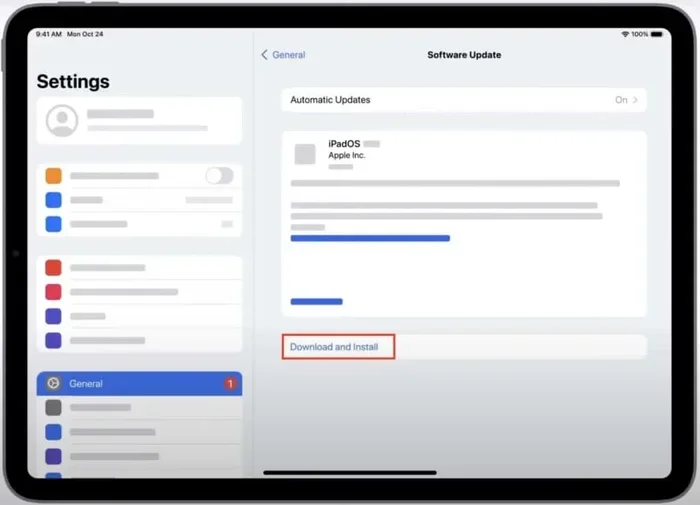
- Tap General.
- Tap Software Update.
- If an update is available, tap Download and Install.
- Enter your passcode if prompted.
- Wait for the download to finish. This may take a few minutes.
- Tap Install Now or choose Install Tonight.
Your iPad will restart during the installation. This is normal. Do not turn off the device while it is updating.
Updating via Mac or PC
You can also update your iPad 9 using a computer. This is helpful if you do not have enough storage on the tablet.
Using a Mac:
- Open Finder on your Mac.
- Connect your iPad 9 with a USB cable.
- Click on your iPad in the sidebar.
- Click Check for Update.
- Follow the on-screen instructions.
Using a PC:
- Open iTunes or the Apple Devices app.
- Connect your iPad 9 with a USB cable.
- Click on your device.
- Click Check for Update.
- Download and install the latest iPadOS.
Quick Tips for a Smooth Update
Here are some tips that make the update process easier:
- Back up your iPad first. Use iCloud or your computer to save your data.
- Clear some storage space. You need at least 5GB free for most updates.
- Use a strong Wi-Fi signal. A weak connection can cause the download to fail.
- Be patient. The whole process can take 20 to 45 minutes.
- Do not force restart. Let the iPad finish on its own.
What Happens When You Update the iPad 9?
Updating your iPad 9 brings several benefits. Let us look at what changes you will notice.
New Features You Get
Each iPadOS update adds cool new features. Here are some highlights from recent updates:
- Improved multitasking: Split view and stage manager work better.
- New widgets: Home screen widgets are more interactive and useful.
- Better handwriting: Apple Pencil support has improved.
- Enhanced privacy: New security settings protect your data.
- Apple Intelligence: AI-powered tools help with writing, summarizing, and more.
The iPad 9 handles all of these features well. You may notice some AI features are limited compared to newer iPads. But the core experience is excellent.
Performance Changes After Updating
Some people worry that updates slow down older devices. This is not usually the case with the iPad 9. Apple optimizes each iPadOS release to run smoothly on supported hardware.
You might notice a slight slowdown for the first day or two after an update. This is normal. The iPad is reindexing files and optimizing storage. After that, performance returns to normal.
Here is a quick comparison of how the iPad 9 performs after updates:
- App loading times: About the same as before the update.
- Battery life: May dip slightly for a day, then returns to normal.
- General speed: Smooth and responsive with no major lag.
- Storage usage: The update may take up 3 to 6GB of space.
Security Improvements
One of the best reasons to update is security. Apple releases security patches with every update. These patches fix vulnerabilities that hackers could exploit.
Keeping your iPad 9 updated means your personal data stays safe. This is especially important if you use your tablet for banking, shopping, or storing sensitive files.
Common Problems When Updating iPad 9
Sometimes things do not go smoothly. Here are the most common issues and how to fix them.
iPad 9 Update Stuck or Failed
If your update gets stuck, do not panic. Try these steps:
- Check your Wi-Fi connection. Switch to a different network if needed.
- Make sure your battery is charged above 50%.
- Restart your iPad 9 and try again.
- Delete the failed update and download it fresh.
- If nothing works, connect to a computer and update via Finder or iTunes.
Not Enough Storage Space
Updates need free space to download and install. If your iPad 9 is full, you have a few options:
- Delete unused apps. Go through your home screen and remove apps you no longer use.
- Offload photos. Move them to iCloud or a computer.
- Clear Safari cache. Go to Settings > Safari > Clear History and Website Data.
- Delete old messages. Some conversations take up more space than you think.
iPad Gets Hot During Update
A warm iPad during an update is normal. The processor works hard to install new software. However, if it gets too hot, here is what you can do:
- Remove the case while updating.
- Update in a cool room.
- Do not use the iPad while it is installing.
- Let it finish without interruption.
How Long Will Apple Support the iPad 9?
This is one of the most common questions about the iPad 9. People want to know how long they will receive software updates.
Expected End of Support
Apple has a strong track record of supporting tablets for about five to six years. The iPad 9 launched in September 2021. Based on this pattern, Apple will likely continue supporting it through 2026 or 2027.
After that, the iPad 9 will still work fine. It just will not receive new iPadOS versions or security patches. Many people continue using unsupported iPads for years without major issues.
Tips to Keep Your iPad 9 Running Smoothly
Want to extend the life of your iPad 9? Here are some simple tips:
- Update regularly. Always install the latest iPadOS when available.
- Restart your iPad weekly. This clears memory and prevents slowdowns.
- Keep storage above 10%. A full device runs slower.
- Use a screen protector. This keeps the display in good shape.
- Avoid extreme temperatures. Heat and cold can damage the battery.
- Charge smartly. Try to keep the battery between 20% and 80%.
These habits keep your iPad 9 running like new for many years. They are simple but very effective.
Frequently Asked Questions About iPad 9 Updates
Let us answer some of the most common questions people ask about updating the iPad 9.
Can I update my iPad 9 to iPadOS 18?
Yes, you can. The iPad 9th generation is fully compatible with iPadOS 18. Apple released this update to all supported iPads, including the iPad 9. Just make sure you have enough storage and a stable Wi-Fi connection before you start.
How do I know if my iPad 9 can be updated?
Go to Settings > General > Software Update. If an update is available, you will see it listed there. If your iPad 9 is already up to date, you will see a message saying your software is current.
Will updating the iPad 9 delete my data?
No, updating does not delete your data. However, it is always smart to back up your iPad 9 before any update. Use iCloud or connect to your computer. This way, you are safe if anything unexpected happens.
Why is my iPad 9 update taking so long?
Update download times depend on your Wi-Fi speed and the size of the update. A typical iPadOS update is about 2 to 5GB. On a fast connection, it takes 10 to 20 minutes. On a slow connection, it can take over an hour. Installation itself usually takes 5 to 15 minutes.
Can I downgrade my iPad 9 if I do not like the new iPadOS?
Apple usually stops signing older iPadOS versions shortly after releasing a new one. This means you cannot downgrade after a few days. Always read about new features before updating, so you are sure you want the change.
Is it safe to update the iPad 9?
Absolutely. Updating your iPad 9 is safe and recommended. Each update includes security patches, bug fixes, and performance improvements. Apple tests every release thoroughly before releasing it to the public.
Final Thoughts
The iPad 9 is a great tablet that continues to receive strong support from Apple. The answer to can iPad 9 be updated is a clear and confident yes. You can install the latest iPadOS, enjoy new features, and keep your device secure.
Updating your iPad 9 is simple, free, and worth the effort. It takes just a few minutes and brings noticeable improvements. You get better performance, new tools, and stronger protection for your personal data.
Remember to back up your iPad before every update. Keep enough storage space. And stay connected to a reliable Wi-Fi network. Follow these simple steps, and your iPad 9 will keep running smoothly for years to come.
So go ahead. Check for your next iPadOS update today. Your iPad 9 is ready for it.