Can Hp Laptops Be Repaired Everything You Need To Know
Yes, HP laptops can be repaired in most cases, whether it is a broken screen, dead battery, or overheating problem. Many common HP laptop issues are fixable at home or through a certified service center. Understanding your warranty, repair options, and costs helps you make the best decision. This guide covers everything you need to know about HP laptop repair and how to get your device running again.
Your HP laptop suddenly froze, won’t turn on, or started making weird noises. Panic sets in. You wonder if it is all over. The good news is that HP laptops can be repaired in the vast majority of cases. Whether the problem is minor or major, there is almost always a solution. This guide walks you through everything you need to know about fixing an HP laptop. We cover common issues, repair options, costs, and how to decide between DIY fixes and professional help.
HP is one of the most popular laptop brands in the world. Millions of people use HP laptops every day for work, school, and entertainment. Because of this popularity, finding repair parts, guides, and technicians is relatively easy. But that does not mean every repair is simple. Some issues need expert attention. Others can be fixed in minutes at home. Let us dive into the details so you know exactly what to do when your HP laptop breaks down.
Key Takeaways
- Most HP laptop problems are repairable: From screen issues to battery failure, HP laptops can usually be fixed affordably.
- Warranty matters a lot: If your HP laptop is still under warranty, repairs may be free or heavily discounted.
- DIY repair works for simple issues: Replacing RAM, upgrading storage, or cleaning dust can be done at home with basic tools.
- Professional repair is best for complex problems: Motherboard failure, water damage, and hinge repairs need expert hands.
- Repair costs vary widely: Simple fixes cost under $100, while major repairs like motherboard replacement can run $300 or more.
- Regular maintenance prevents problems: Cleaning vents, updating drivers, and handling your laptop carefully extends its lifespan.
📑 Table of Contents
- Common HP Laptop Problems and How to Fix Them
- Is It Worth Repairing Your HP Laptop?
- DIY HP Laptop Repair Tips
- When to Seek Professional HP Laptop Repair
- HP Laptop Repair Costs and Warranty Information
- How to Choose the Right HP Laptop Repair Service
- Preventing Future HP Laptop Problems
- Final Thoughts on HP Laptop Repair
Common HP Laptop Problems and How to Fix Them
HP laptops are built well, but they are not immune to problems. Over time, wear and tear takes a toll. Some issues develop slowly, while others hit suddenly. Knowing the common problems helps you diagnose issues faster. Here are the most frequent HP laptop problems and how to address them.
HP Laptop Not Turning On
This is one of the most stressful problems. You press the power button and nothing happens. Before you assume the worst, try these steps. First, check the power adapter. Make sure it is plugged in properly. Try a different outlet. Sometimes the outlet is the problem, not the laptop. Next, remove the battery if it is removable. Hold the power button for 15 seconds. Reconnect the battery and try again. This simple reset often fixes the issue.
If the laptop still does not turn on, the problem could be deeper. The HP laptop motherboard might be failing. The power jack could be damaged. In these cases, you need professional HP laptop repair. A technician can test the motherboard and power circuit to find the exact cause.
HP Laptop Screen Issues
A cracked or flickering screen is a common complaint. If your HP laptop screen is cracked, replacement is usually the only fix. The good news is that HP screen replacements are widely available. You can buy replacement panels online for most HP models. The cost typically ranges from $80 to $200 depending on the model and resolution.
Flickering or dim screens often point to a different problem. The inverter or backlight may be failing. Sometimes a loose cable causes the issue. Before replacing the entire screen, try adjusting the brightness. Check the display cable connection. If the problem persists, a technician can diagnose whether it is the screen or the internal display cable.
HP Laptop Overheating
HP laptop overheating is a very common issue. Dust builds up inside the laptop over time. The fan works harder to cool the system. Eventually, the laptop gets too hot and slows down. This is the laptop’s way of protecting itself.
To fix overheating, start by cleaning the vents. Use compressed air to blow dust out of the cooling vents. You can also open the back panel and clean the fan and heatsink directly. Applying fresh thermal paste to the CPU and GPU can also help. If the fan itself is broken, it needs replacement. Fan replacement for HP laptops usually costs between $30 and $80.
HP Laptop Battery Not Holding Charge
Batteries degrade over time. After a few hundred charge cycles, the battery capacity drops significantly. If your HP laptop battery dies within an hour, it is probably time for a replacement. HP batteries are relatively affordable and easy to swap out on most models.
Before buying a new battery, check your battery health. Windows has a built-in battery report feature. Open Command Prompt and type powercfg /batteryreport. This generates a detailed report showing your battery capacity and wear level. If the battery is genuinely degraded, a replacement will restore your laptop’s portability.
HP Laptop Keyboard Not Working
A malfunctioning keyboard is frustrating. Keys may stick, stop working entirely, or type random characters. Spilled liquids are a common cause of keyboard failure. If you spill something on your keyboard, turn off the laptop immediately. Flip it upside down and let it drain. Do not try to use it until it is completely dry.
For keyboards that are physically damaged, replacement is the best option. HP laptop keyboards are usually easy to replace. They snap in and out with a few screws. Replacement keyboards cost between $20 and $60. You can find them on Amazon or eBay for most HP models.
Is It Worth Repairing Your HP Laptop?
Not every repair makes financial sense. Before spending money, you need to weigh the costs against the value of the laptop. Here are some factors to consider when deciding whether to repair your HP laptop.
Age of the Laptop
The age of your laptop matters a lot. If your HP laptop is less than three years old, repairs are almost always worth it. These laptops still have modern specs and plenty of life left. If the laptop is five years old or older, you need to think harder. The repair cost might be better spent on a new machine.
Cost of Repair vs. Replacement
A general rule of thumb is this: if the repair costs more than half the price of a new laptop, replacement makes more sense. For example, if a motherboard replacement costs $400 and a new HP laptop costs $600, buying new is the smarter choice. But if a screen replacement costs $100 and the laptop is still fast and functional, go ahead and repair it.
What You Use the Laptop For
Think about your needs too. If you use the laptop for basic tasks like browsing and word processing, an older model still works fine. But if you need it for gaming, video editing, or programming, an older machine might struggle even after repair. In that case, upgrading might be the better path.
DIY HP Laptop Repair Tips
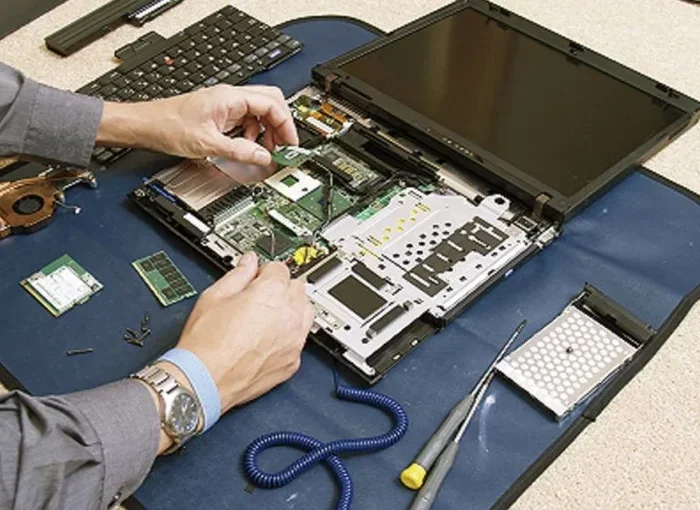
Not every repair requires a professional. Many common issues can be fixed at home with basic tools and a little patience. DIY HP laptop repair can save you a lot of money and teach you valuable skills. Here are some repairs you can do yourself.
Upgrading RAM
Adding more RAM is one of the easiest upgrades you can make. It speeds up multitasking and improves overall performance. Most HP laptops have accessible RAM slots on the bottom. You just need to unscrew the panel, push the new RAM stick in at an angle, and press it down until it clicks. The whole process takes about 10 minutes.
Replacing the Hard Drive
If your laptop is slow, swapping in a solid-state drive (SSD) can transform its performance. An HP laptop hard drive replacement with an SSD is a popular upgrade. You will need a screwdriver and your operating system installation media. Clone your old drive to the new one, swap them out, and enjoy dramatically faster boot times.
Cleaning Internal Components
Regular cleaning prevents many common problems. Open the back panel every six months and blow out dust with compressed air. Clean the fan blades gently. Check for any loose cables or connections. This simple maintenance routine keeps your laptop running cool and quietly.
Replacing the Charging Port
A damaged charging port is annoying but fixable. You will need a soldering iron and some patience. If you are not comfortable with soldering, take it to a professional. But for those who enjoy tinkering, replacing a charging port is a manageable DIY project.
Quick Tips for Safe DIY Repair
- Always unplug the laptop and remove the battery before opening it.
- Use the right tools. A quality screwdriver set makes a big difference.
- Take photos before disconnecting anything. This helps you remember how things connect.
- Ground yourself to prevent static damage to components.
- Work on a clean, flat surface with good lighting.
- Go slow. Do not force any components. If something does not fit, check your alignment.
When to Seek Professional HP Laptop Repair
Some repairs are simply too complex or risky for DIY. Knowing when to call in a professional saves you time, money, and the risk of making things worse. Here are situations where professional HP laptop repair is the right choice.
Motherboard Failure
The motherboard is the heart of your laptop. When it fails, the consequences are serious. Symptoms include the laptop not turning on, random shutdowns, or USB ports stopping working. Motherboard repair requires advanced diagnostic equipment and soldering skills. Leave this to trained technicians at an HP laptop service center.
Water Damage
If your laptop gets wet, turn it off immediately. Do not try to turn it on to see if it still works. Water causes short circuits that can destroy components. Take it to a professional as soon as possible. The sooner it is opened and dried, the better the chances of recovery. Attempting to fix water damage yourself often makes things worse.
Broken Hinge or Chassis
A broken hinge is more than just annoying. It can damage the display cable over time. Replacing hinges requires careful disassembly of the entire screen assembly. If you are not experienced, you risk cracking the display or damaging the cable. Professional repair ensures the job is done correctly.
Blue Screen of Death (BSOD)
The HP laptop blue screen error can have many causes. It could be a software issue, a driver problem, or failing hardware. If you have tried restarting, updating drivers, and running diagnostics without success, a professional can pinpoint the root cause. They have access to advanced diagnostic tools that most users do not have.
HP Laptop Repair Costs and Warranty Information
Understanding repair costs helps you budget and make informed decisions. Costs vary based on the problem, the model, and where you get the repair done. Here is a breakdown of typical HP laptop repair costs.
Average Repair Cost Table
Here is a general overview of what common repairs cost:
- Screen replacement: $80 to $200
- Battery replacement: $30 to $70
- Keyboard replacement: $20 to $60
- Fan replacement: $30 to $80
- Charging port repair: $50 to $120
- Hard drive or SSD replacement: $40 to $100 (not including the drive cost)
- RAM upgrade: $20 to $50 (not including the RAM cost)
- Motherboard replacement: $200 to $500
- Hinge repair: $80 to $200
- Water damage repair: $100 to $300
HP Laptop Warranty Coverage
Before paying for any repair, check your warranty status. HP offers different types of warranty coverage. Standard warranties typically cover parts and labor for one year from purchase. Some models come with extended warranty options. HP also offers accidental damage protection in certain plans.
If your HP laptop is under warranty, repairs are usually free or very low cost. Contact HP support or visit an authorized service center. They will diagnose the issue and handle the repair at no charge if it is covered. Keep your proof of purchase and warranty documents handy.
For laptops outside the warranty period, you still have options. HP offers paid repair services through their website. You can also visit third-party repair shops, which are often more affordable. Independent technicians may charge less than HP’s official service centers for the same repair.
How to Choose the Right HP Laptop Repair Service
Not all repair services are created equal. Choosing the right one ensures your laptop gets fixed properly and safely. Here are tips for finding a trustworthy HP laptop repair service.
Check for Certification
Look for technicians who are certified by HP or have vendor-neutral certifications like CompTIA A+. Certification means they have the training and knowledge to handle your laptop correctly. An HP authorized service center is your safest bet, but reputable independent shops can also do excellent work.
Read Reviews and Ask for Recommendations
Check online reviews before committing to a repair shop. Look for shops with consistently high ratings and positive customer feedback. Ask friends, family, or coworkers for recommendations. Personal experiences are often the most reliable source of information.
Get a Quote Before Committing
Always ask for a diagnostic fee and repair estimate upfront. Reputable shops will diagnose the problem and give you a clear cost breakdown before starting any work. If a shop pressures you into repairs without explaining the problem, that is a red flag.
Ask About Warranty on Repairs
A good repair shop stands behind their work. Ask if they offer a warranty on the repair itself. Most reputable shops provide at least a 30-day warranty on parts and labor. This gives you peace of mind in case the same issue comes back.
Consider Turnaround Time
How quickly do you need the laptop back? Some repairs take just a day or two. Others, like motherboard replacement, might take a week or more. Ask about turnaround time when you drop off your laptop. Choose a service that can meet your timeline without rushing the repair.
Preventing Future HP Laptop Problems
Prevention is always better than cure. Taking care of your HP laptop can prevent many common issues and extend its lifespan significantly. Here are simple habits that make a big difference.
- Keep your laptop clean. Dust the vents and keyboard regularly. Use compressed air every few months.
- Use a cooling pad. This helps prevent overheating, especially during heavy use.
- Update your software. Keep Windows, drivers, and BIOS up to date. Updates often include bug fixes and performance improvements.
- Avoid eating or drinking near the laptop. Spills cause some of the most expensive and damaging repairs.
- Handle the laptop gently. Do not slam the lid shut. Open and close it carefully to protect the hinges.
- Use a surge protector. Power surges can damage your laptop’s internal components.
- Backup your data regularly. If something goes wrong, you do not lose your important files.
These habits take minimal effort but pay off enormously over time. A well-maintained HP laptop can last five to seven years or more. The key is consistency and care.
Final Thoughts on HP Laptop Repair
The answer to the question can HP laptops be repaired is a resounding yes. Whether your laptop has a cracked screen, a dead battery, a broken hinge, or something more complex like motherboard failure, there is almost always a repair path. The key is diagnosing the problem correctly, choosing the right repair option, and working with a trusted technician when needed.
Do not throw away a perfectly good laptop just because something went wrong. Most HP laptop problems are fixable, often for a fraction of the cost of a new machine. Start with the simple fixes. Check your warranty. Try a DIY approach if you feel comfortable. And when the problem is beyond your skill level, seek professional help from a certified HP laptop repair service.
Your HP laptop is an investment. Taking care of it and fixing problems promptly keeps it running strong for years. Use the information in this guide to make smart repair decisions and get the most value from your device.
Frequently Asked Questions
How long does HP laptop repair usually take?
Most common repairs like screen or battery replacement take one to three days. More complex repairs such as motherboard fixes may take a week or longer. The turnaround time depends on the problem and the availability of parts.
Is it cheaper to repair or replace an HP laptop?
Repairs are usually cheaper than replacement, especially for issues under $200. If the repair cost exceeds half the price of a new laptop, replacement often makes more sense. Consider the age and condition of your laptop before deciding.
Can I repair my HP laptop myself?
Yes, many repairs like RAM upgrades, battery swaps, and keyboard replacements are straightforward DIY jobs. However, complex repairs involving the motherboard or water damage should be left to professionals to avoid causing further damage.
Does HP still repair out-of-warranty laptops?
Yes, HP offers paid repair services even after the warranty expires. You can contact HP support or visit an authorized service center. Third-party repair shops are also a more affordable alternative for out-of-warranty repairs.
How do I know if my HP laptop needs a new screen or just a cable?
A cracked or visibly damaged screen needs full replacement. If the screen is dark but you can see a faint image with a flashlight, the backlight or cable might be the issue. A professional technician can test this and give you a definitive diagnosis.
What should I do if my HP laptop gets water on it?
Turn it off immediately and unplug the power adapter. Remove the battery if possible. Do not try to turn it on. Take it to a professional repair service as soon as possible. The faster it is dried and inspected, the better the chances of a successful repair.