Can A Lenovo Screen Be Fixed With These Quick Tips
Can A Lenovo Screen Be Fixed? Yes, most Lenovo screen issues are repairable with the right approach. Whether you have a cracked panel, flickering display, or dead pixels, this guide covers quick tips and professional solutions to get your screen working again.
Have you ever looked at your Lenovo laptop and thought, “Can A Lenovo Screen Be Fixed?” Maybe the display cracked after a drop. Maybe the screen started flickering one day and never stopped. Either way, a broken or malfunctioning screen can make your laptop feel useless.
The good news is that most Lenovo screen problems can be fixed. Whether the issue is minor or severe, there are solutions available. In this guide, we will walk through every step to help you understand your options. You will learn quick fixes you can try at home. You will also discover when to call a professional. Let us get started.
Key Takeaways
- Most Lenovo screen problems are fixable: cracks, flickering, dimming, and dead pixels can often be resolved.
- DIY fixes work for minor issues: loose cables and software glitches can be solved at home.
- Professional repair costs vary: expect to pay between $50 and $200 depending on the model.
- Warranty may cover the cost: check your Lenovo warranty before paying for repairs.
- Prevention is key: simple habits can protect your Lenovo screen from future damage.
📑 Table of Contents
Why Does A Lenovo Screen Break?
Before we fix anything, it helps to understand what went wrong. Lenovo screens can break for many reasons. Some causes are obvious. Others sneak up on you over time.
Common Causes Of Screen Damage
Physical damage is the number one reason screens fail. Dropping your laptop is the most common culprit. Even a small fall can crack the display panel. Pressure on the screen is another big one. Shutting your laptop with a pen or object on the keyboard can leave permanent marks.
Liquid spills happen often too. Coffee, water, or any liquid can seep into the screen layers. This causes spots, lines, or complete screen failure. Over time, the backlight can also wear out. When this happens, your screen gets dim or dark.
Hardware Issues vs Software Glitches
Not every screen problem is physical. Sometimes the issue is software related. A driver update gone wrong can cause a black screen. A faulty cable connection can make the display flicker. Before you assume the worst, check if the problem is software or hardware.
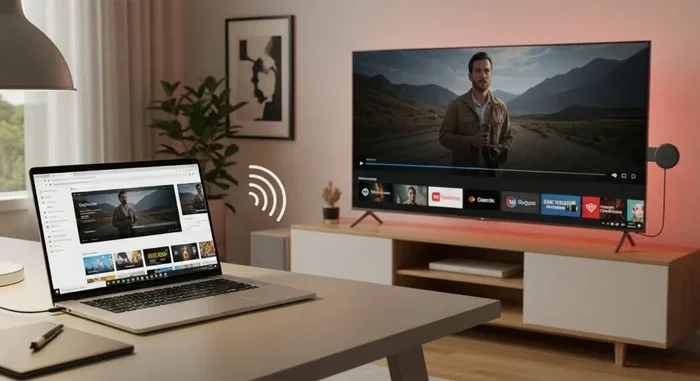
Try connecting your Lenovo to an external monitor. If the external screen works fine, the problem is likely with the laptop panel. If the external screen also shows issues, the problem could be with the graphics card or motherboard. This simple test saves a lot of guesswork.
Can A Lenovo Screen Be Fixed At Home?
Some screen problems are easy to fix on your own. You do not need to be a tech expert. With the right tools and a little patience, you can solve many issues at home.
Quick Fixes You Can Try Yourself
Start with the simplest solutions first. A loose display cable is a common cause of flickering or blank screens. Open your laptop carefully and reseat the cable connection. This often solves the problem instantly.
Here are some quick home fixes to try:
- Restart your laptop: A simple reboot can fix temporary display glitches.
- Update your display drivers: Outdated drivers often cause flickering or distortion.
- Adjust brightness settings: A dim screen might just need a brightness bump.
- Check the power supply: A weak battery can cause display issues.
- Run the built-in diagnostics: Lenovo has a built-in tool to check hardware health.
These steps take only a few minutes. They cost nothing. And they solve many common problems.
When DIY Repair Is A Bad Idea
Not every fix belongs at home. If your screen is physically cracked, replacing it yourself is risky. You could damage the motherboard or other components. You might also void your warranty if you open the laptop without proper authorization.
Also, if you are not comfortable working with small electronics, it is best to seek professional help. A wrong move can turn a simple screen repair into a much bigger problem.
How Much Does Lenovo Screen Repair Cost?
Cost is one of the biggest concerns when fixing a Lenovo screen. The good news is that most repairs are affordable. But the price depends on several factors.
Professional Repair vs Replacement
Professional repair shops typically charge between $50 and $200 for a Lenovo screen replacement. The exact price depends on your model. ThinkPad models often have cheaper replacement parts. Yoga or IdeaPad models may cost a bit more.
If you go the replacement route, you can buy a new panel online for $30 to $150. DIY replacement saves money but requires skill and patience. Always compare the cost of repair against the price of a new laptop before deciding.
Warranty And Coverage Options
Check your Lenovo warranty before paying for anything. Many Lenovo laptops come with a one-year limited warranty. If your screen broke due to a manufacturing defect, Lenovo may cover the cost.
Accidental damage protection plans also help. If you purchased one of these, your cracked screen might be fully covered. Contact Lenovo support to check your coverage status. It is always worth asking before you pay out of pocket.
Step-By-Step Guide To Fixing A Lenovo Screen
If you have decided to tackle the repair yourself, here is a step-by-step guide. Follow these steps carefully to avoid making things worse.
Checking The Connections First
Start by powering off your laptop completely. Unplug it from the charger. Remove the battery if possible. Open the back panel using the right screwdriver.
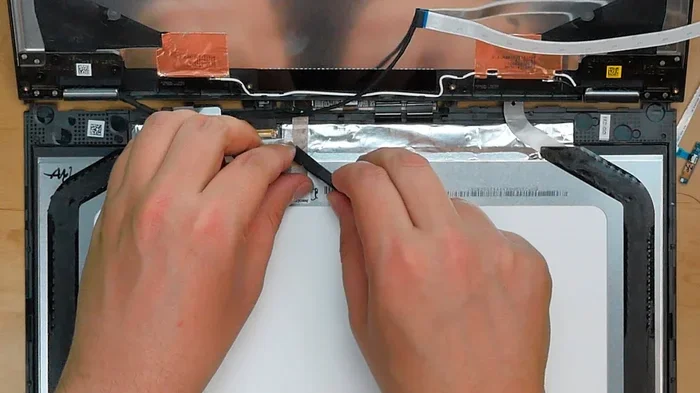
Locate the display cable. This is the thin ribbon cable that connects the screen to the motherboard. Gently unplug it and plug it back in. Make sure the connection is secure. Close the panel, reconnect the battery, and power on your laptop.
This simple step fixes many flickering and blank screen issues. If the problem persists, you may need to replace the panel entirely.
Replacing The Display Panel
Replacing the panel is the next step if the cable fix did not work. Here is what you need to do:
- Find the correct replacement panel: Search for your exact Lenovo model number online. Match the panel size and connector type.
- Remove the bezel: The bezel is the plastic frame around the screen. Use a plastic spudger to gently pry it off.
- Unscrew the old panel: There are usually four to six screws holding the panel in place.
- Disconnect the cable: Carefully unplug the display cable from the old panel.
- Install the new panel: Connect the cable to the new panel. Screw it in place. Reattach the bezel.
- Test the screen: Power on your laptop and check if the new display works correctly.
This process takes about 30 to 45 minutes. Watch a video tutorial for your specific model before starting. It makes a big difference.
Preventing Future Lenovo Screen Damage
Once your Lenovo screen is fixed, you want to keep it that way. Prevention is always easier and cheaper than repair. A few simple habits go a long way.
Protective Measures
Invest in a sturdy laptop sleeve or case. This protects your screen from bumps and scratches during transport. Avoid placing heavy objects on top of your closed laptop. Even a small amount of pressure can crack the display over time.
Clean your screen with a microfiber cloth only. Avoid using harsh chemicals or paper towels. These can scratch the surface and damage the anti-glare coating. A clean screen also reduces eye strain during long work sessions.
Best Practices For Screen Longevity
Adjust your brightness to a comfortable level. Running your screen at maximum brightness all day drains the backlight faster. Close the laptop lid gently. Slamming it shut puts stress on the panel and hinges.
Keep your laptop on a flat, stable surface. Using it on a bed or pillow blocks ventilation and can cause overheating. Over time, heat damage affects the display components too.
When To Seek Professional Help
Sometimes the screen problem is beyond a simple fix. Knowing when to call a professional saves time and money.
Signs You Need Expert Assistance
Watch for these warning signs. If your Lenovo screen shows horizontal or vertical lines that do not go away, the panel is likely damaged. If the screen goes completely black but the laptop is still running, the backlight or inverter may have failed. If you see a large crack or shattered glass, professional replacement is the safest option.
Also seek help if you notice a blue screen that keeps appearing. This could indicate a deeper issue beyond just the display panel. A professional can diagnose the root cause correctly.
Choosing The Right Repair Service
Not all repair shops are created equal. Look for certified technicians who specialize in Lenovo laptops. Ask for a free diagnostic before committing to any repair. Get a written estimate that includes parts and labor costs.
Check online reviews and ratings before choosing a service center. A reputable shop will offer a warranty on their repair work. This gives you peace of mind if something goes wrong after the fix.
Final Thoughts
So, can A Lenovo Screen Be Fixed? Absolutely. Most screen issues are repairable, whether through a simple cable reseating or a full panel replacement. The key is identifying the problem early and choosing the right solution.
Start with the quick fixes at home. They are free and take only minutes. If those do not work, consider professional repair or a DIY replacement. Always check your warranty coverage first. And once your screen is fixed, take steps to protect it from future damage.
Your Lenovo laptop is a valuable investment. Do not let a broken screen force you into buying a new one. With the right approach, you can bring your display back to life and keep working, browsing, and creating without interruption.
Frequently Asked Questions
How long does it take to fix a Lenovo screen?
A simple cable fix takes about 15 minutes. A full panel replacement usually takes 30 to 60 minutes if you are doing it yourself. Professional repair shops typically complete the job within one to two business days.
Is it cheaper to replace a Lenovo screen yourself?
Yes, replacing the screen yourself is usually cheaper. Replacement panels cost between $30 and $150 online. Professional repair shops charge $50 to $200 for labor and parts combined. However, DIY repair requires some technical skill and patience.
Can a cracked Lenovo screen be repaired without replacement?
Unfortunately, a physically cracked screen cannot be repaired without replacement. Screen repair tape or sealants only provide temporary protection. The display panel itself must be swapped out to restore full functionality.
Will fixing my Lenovo screen void the warranty?
It depends on your warranty terms. If you open the laptop yourself and the warranty is still active, Lenovo may deny coverage. Authorized repair centers perform screen replacements without voiding the warranty. Always check with Lenovo support first.
Why is my Lenovo screen flickering?
Flickering can be caused by a loose display cable, outdated drivers, or a failing backlight. Try reseating the cable and updating your display drivers first. If the flickering continues, the panel may need replacement.
How do I know if my Lenovo screen needs replacement or just repair?
If you see cracks, dead pixels, or large dark spots, the panel needs replacement. If the screen flickers or goes dim, the issue might be a cable or backlight problem. Connecting to an external monitor helps you determine the root cause quickly.
=== CONCLUSION ===
Can A Lenovo Screen Be Fixed? The answer is a clear yes. Most Lenovo screen problems, from minor flickering to full cracks, have practical solutions. You now have the knowledge to try simple fixes at home. You also know when to call in a professional. The cost of repair is usually much lower than buying a new laptop.
Take action today. Try the quick fixes first. Check your warranty. And if the problem is serious, do not hesitate to get it repaired. A working screen means a working laptop. Your Lenovo deserves to look and perform its best. Start your repair journey now and bring your screen back to life.