Can Wi Fi Be Used Without Password And How To Connect Safely
Yes, Wi-Fi can be used without a password in many situations. Open networks, guest networks, and default router settings often allow internet access without a password. However, connecting to an unprotected Wi-Fi network comes with real risks to your data privacy and cyber security. This guide shows you exactly how to connect safely and what steps to take to protect your personal information.
Have you ever walked into a coffee shop, airport, or hotel and wanted to jump online right away? The idea of using Wi-Fi without a password can feel like a lifesaver. But is it really that simple? And more importantly, is it safe?
In this guide, we will walk you through everything you need to know about using a wireless internet connection without a password. We will cover how open networks work, the risks involved, and practical steps you can take to browse safely. Whether you are a casual user or someone who relies on Wi-Fi every day, this article has something for you.
Let us start with the basics. A Wi-Fi network without a password is called an open network. It means anyone within Wi-Fi range can connect to the internet without entering a network password. This is common in public spaces like malls, restaurants, and libraries. But it also happens at home when a router is left unsecured or set up with default settings.
Key Takeaways
- Wi-Fi Without a Password Is Possible: Many networks, including public hotspots and open networks, let you connect without entering a password.
- Safety Is a Real Concern: Open networks lack Wi-Fi encryption, which means your data can be intercepted by others on the same network.
- Use a VPN for Protection: A virtual private network is the single best tool to keep your browsing safe on unsecured networks.
- Guest Networks Add Security: Setting up a guest network on your router lets visitors connect without sharing your main network password.
- Avoid Sensitive Tasks on Open Wi-Fi: Banking, shopping, and logging into accounts are risky on unprotected connections.
- Secure Your Own Network: Change default router settings, use WPA2 or WPA3 encryption, and keep your firmware updated.
📑 Table of Contents
- What Is a Wi-Fi Network Without a Password?
- Common Ways to Connect to Wi-Fi Without a Password
- Is It Safe to Use Wi-Fi Without a Password?
- How to Connect Safely to Open Networks
- How to Set Up a Guest Network for Visitors
- Tips to Protect Your Own Wi-Fi Network
- Comparison: Secured vs. Unsecured Wi-Fi Networks
What Is a Wi-Fi Network Without a Password?
When a Wi-Fi network does not require a password, it is using an open authentication method. This means the wireless access point does not check for credentials before letting a device connect. The internet connection is available to anyone nearby who knows how to find the network.
Think of it like an open door. Anyone can walk in. That is convenient for guests, but it also means anyone can enter. The same idea applies to an open wireless network.
How Open Networks Work
Here is a simple breakdown of how an open Wi-Fi network operates:
- The router broadcasts a wireless signal.
- The signal appears on your device as an available network.
- You tap on the network name and hit connect.
- You get internet access immediately without typing any password.
That is it. No encryption, no authentication, no network password. The data travels between your device and the router without protection. This is the core reason why security experts advise caution when using these networks.
Common Places With Open Networks
You will find open networks in many everyday locations:
- Coffee shops and cafes – Many shops offer free Wi-Fi hotspot access for customers.
- Airports and train stations – Travelers rely on public Wi-Fi to stay connected.
- Hotels – Guests often connect through a lobby or room network without a password.
- Libraries – Public libraries provide free internet access to visitors.
- Shopping malls – Some malls offer free internet as a service to shoppers.
In all these cases, the network password is either missing or shared openly. The goal is convenience. But convenience often comes at a cost to data privacy.
Common Ways to Connect to Wi-Fi Without a Password
There are several methods people use to access a network without a password. Some are intentional, and some happen by accident. Let us explore the most common ones.
Public Wi-Fi Hotspots
This is the most common way people connect to Wi-Fi without a password. Businesses set up a Wi-Fi hotspot and leave it open so customers can connect easily. All you need to do is select the network on your device and tap connect.
Some hotspots require you to accept terms and conditions on a login page before granting access. Others let you connect right away. Either way, no password is needed.
Unsecured Home Networks
Sometimes, a neighbor or a nearby business leaves their Wi-Fi network unsecured. This happens when the router is set up without enabling Wi-Fi encryption. The network appears as an open option on your device.
While it might be tempting to connect, keep in mind that this is not your network. Using someone else’s unsecured connection without permission raises ethical and legal questions in many places.
Default Router Settings
Many routers come from the factory with a default password or no password at all. If a user never changes these settings, the network remains open. This is a common mistake that puts home networks at risk.
If you have ever set up a router and skipped the security settings, your network might be an open network right now. It is worth checking your router settings to confirm.
Wi-Fi Direct and Device Sharing
Some devices can share an internet connection directly through Wi-Fi Direct or Bluetooth tethering. In these cases, one device acts as a wireless access point, and other devices connect without a traditional network password. This is useful for quick file sharing or temporary internet access.
Is It Safe to Use Wi-Fi Without a Password?
The short answer is no, it is not completely safe. When a network has no password, it also has no Wi-Fi encryption. That means the data traveling between your device and the internet is visible to anyone else on the same network.
What Risks Do Open Networks Pose?
Using an unprotected wireless connection exposes you to several threats:
- Man-in-the-Middle Attacks: A hacker on the same network can intercept the data you send and receive. This includes passwords, messages, and browsing history.
- Packet Sniffing: Cyber criminals use tools to capture data packets traveling over an open network. They can extract sensitive information from these packets.
- Rogue Hotspots: A fake network with a similar name to a legitimate one can trick your device into connecting. Once connected, the attacker can monitor all your activity.
- Malware Distribution: Some open networks are used to push malware onto connected devices through vulnerabilities in outdated software.
Why Data Privacy Matters on Open Networks
Every time you browse the web, you send and receive data. On a secure network, this data is encrypted. On an open network, it is not. That means your email passwords, banking details, and personal messages could be visible to others.
This is why cyber security experts strongly recommend using a VPN or avoiding sensitive tasks on open networks altogether.
How to Connect Safely to Open Networks
If you must use a network without a password, there are steps you can take to reduce the risks. These tips will help you stay safe while enjoying the convenience of free internet access.
Use a Virtual Private Network (VPN)
A VPN is the most effective tool for staying safe on an open network. It creates an encrypted tunnel between your device and a secure server. Even if someone on the same network tries to intercept your data, they will only see scrambled, unreadable information.
Here is how to use a VPN effectively:
- Choose a reputable VPN service.
- Install the VPN app on your device.
- Turn on the VPN before connecting to any open network.
- Verify that the VPN connection is active before browsing.
Using a VPN should be your first line of defense whenever you connect to a public Wi-Fi hotspot.
Stick to HTTPS Websites
Look for the padlock icon in your browser’s address bar. This means the website uses HTTPS, which encrypts the data between your browser and the website. Even on an open network, HTTPS adds a layer of protection.
Avoid entering personal information on HTTP websites. These sites do not encrypt your data, making it easy for attackers to read.
Turn Off Auto-Connect
Many devices have a feature that automatically connects to known Wi-Fi networks. This can be dangerous on open networks. Your device might connect to a rogue hotspot without you even noticing.
Go to your Wi-Fi settings and disable the auto-connect feature. This gives you full control over which networks your device joins.
Disable File Sharing and AirDrop
When connected to an open network, turn off file sharing, AirDrop, and any other sharing features. This prevents other users on the same network from accessing your device or sending you unwanted files.
Keep Your Software Updated
Software updates often include security patches that fix known vulnerabilities. An outdated device is much easier to attack on an unprotected network. Make sure your operating system, browser, and apps are always up to date.
Forget Networks After Use
After you leave a public location, go to your Wi-Fi settings and forget the network. This prevents your device from automatically connecting to the same network the next time you are in the area.
How to Set Up a Guest Network for Visitors
If you want to let friends or visitors use your internet without giving them your main network password, a guest network is the best solution. A guest network is a separate wireless access point that provides internet access without giving visitors access to your personal devices or files.
Benefits of a Guest Network
- Keeps your main network secure: Visitors cannot access your connected devices or shared files.
- Easy to set up: Most modern routers have a guest network feature built into the settings.
- You can set a separate password: Even if the guest network password is shared, your main network stays protected.
- You can limit bandwidth: Some routers let you control how much speed guest users get.
How to Enable a Guest Network
Here is a simple step-by-step guide:
- Log in to your router’s admin panel. You can usually do this by typing the router’s IP address into your browser.
- Look for the guest network or guest access section in the settings.
- Turn on the guest network feature.
- Set a network name and password for the guest network.
- Save your settings and restart the router if needed.
Once set up, your guests can connect to the guest network without needing your main network password. It is a simple but powerful way to maintain your Wi-Fi security while still being hospitable.
Tips to Protect Your Own Wi-Fi Network
Protecting your own network is just as important as staying safe on open networks. If your home network is left unsecured, anyone nearby can use it, slow down your internet, or even access your personal files.
Change the Default Router Password
Most routers come with a default admin password that is easy to guess. Change it to a strong, unique password as soon as you set up the router. This prevents unauthorized users from accessing your router settings.
Enable WPA2 or WPA3 Encryption
WPA2 and WPA3 are the current Wi-Fi encryption standards. They scramble the data on your network so that only devices with the correct password can access it. If your router still uses WEP or no encryption at all, it is time to upgrade your settings.
Use a Strong Network Password
A weak password makes it easy for anyone to connect to your network. Use a long, complex password that includes a mix of letters, numbers, and symbols. Avoid using common words or personal information.
Keep Your Router Firmware Updated
Router manufacturers release firmware updates to fix security vulnerabilities. Check for updates regularly and install them as soon as they are available. An outdated router is a common target for cyber attacks.
Turn Off WPS
Wi-Fi Protected Setup (WPS) is a feature that allows devices to connect with the push of a button or a PIN. While convenient, WPS has known security flaws. Turn it off in your router settings to improve your network security.
Monitor Connected Devices
Most routers let you view a list of connected devices. Check this list regularly to make sure no unauthorized devices are using your network. If you see an unknown device, change your password immediately.
Place Your Router in a Central Location
The further your Wi-Fi signal travels, the more people can potentially access it. Placing your router in a central location in your home helps limit the signal range and reduces the chance of outsiders connecting to your network.
Comparison: Secured vs. Unsecured Wi-Fi Networks
Understanding the difference between a secured and an unsecured network helps you make better decisions about when and how to connect. Here is a quick comparison:
- Secured Network: Requires a password, uses WPA2 or WPA3 encryption, protects your data, and limits access to authorized users.
- Unsecured Network: No password needed, no encryption, data is visible to others, and anyone within range can connect.
Always prefer a secured network whenever possible. If you must use an unsecured network, follow the safety tips outlined in this article.
Using Wi-Fi without a password is a reality of modern life. Public hotspots, open networks, and guest access all make it possible to stay connected without a password. But with that convenience comes real risks to your data privacy and cyber security.
The key is to be smart about it. Use a VPN, stick to HTTPS websites, and avoid sensitive tasks on open networks. If you are managing your own network, enable encryption, change default passwords, and set up a guest network for visitors.
By following the steps in this guide, you can enjoy the freedom of wireless internet access while keeping your personal data safe. Stay informed, stay cautious, and always prioritize your online security.
Frequently Asked Questions
Can I use Wi-Fi without a password at home?
Yes, you can leave your home Wi-Fi network open by not setting a password. However, this is not recommended because anyone nearby can connect to your network, use your internet, and potentially access your personal files. Always secure your home network with a strong password and WPA2 or WPA3 encryption.
Is it illegal to connect to someone else’s open Wi-Fi?
The legality varies by country and local laws. In many places, accessing an unsecured network without the owner’s permission may be considered unauthorized use. To stay on the right side of the law, always ask for permission or use your own mobile data or a trusted public network.
Can hackers steal my data on an open Wi-Fi network?
Yes, hackers can intercept data on open networks using techniques like packet sniffing and man-in-the-middle attacks. This is why it is critical to use a VPN, avoid logging into sensitive accounts, and stick to HTTPS websites when browsing on unprotected networks.
What is the difference between WPA2 and WPA3 encryption?
WPA3 is the latest Wi-Fi encryption standard and offers stronger security than WPA2. It includes features like individualized data encryption and protection against brute-force attacks. If your router supports WPA3, enable it for the best protection on your wireless internet connection.
Do I need a VPN even on password-protected networks?
A VPN adds an extra layer of protection on any network, including password-protected ones. However, it is especially important on open or unsecured networks where data is not encrypted by the network itself. Using a VPN on public Wi-Fi hotspots helps keep your browsing private and secure.
How can I tell if a Wi-Fi network is secure?
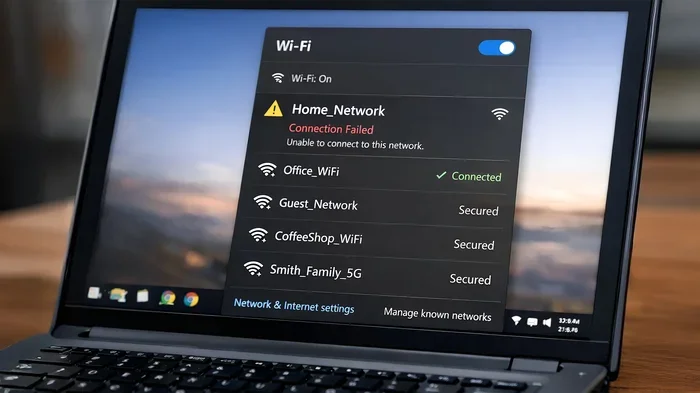
Check your Wi-Fi settings on your device. A secure network will show a lock icon next to the network name, indicating it requires a password. An open network will have no lock icon and will connect without any credentials. Always look for the lock symbol before connecting.
=== CONCLUSION ===
Can Wi Fi Be Used Without Password? The answer is yes. Open networks, public hotspots, and unsecured routers all make it possible to connect without a password. But convenience should never come at the cost of your safety.
By understanding how open networks work and following the safety tips in this guide, you can browse with confidence. Use a VPN, keep your software updated, and always be mindful of the networks you connect to. Protecting your data starts with the choices you make every time you go online.