Are Office Printers Laser Or Inkjet Which Is Better
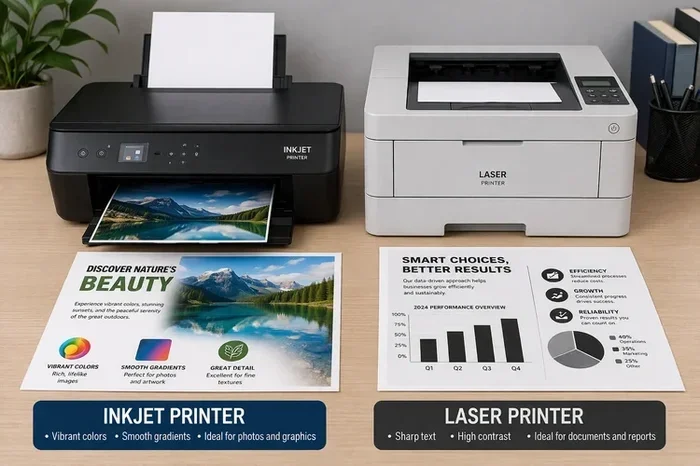
When it comes to Are Office Printers Laser Or Inkjet, the answer depends on your printing needs, budget, and volume. Laser printers excel at fast, sharp text and high-volume jobs, while inkjet printers shine in color-rich graphics and photo printing. This guide breaks down every key difference so you can make a confident choice for your workspace.
Every office needs a printer. It is one of those machines you cannot do without, yet most people put very little thought into choosing the right one. When you walk into an office supply store or browse online, you see two main types: laser printers and inkjet printers. The debate between office printers laser or inkjet has been going on for decades, and for good reason. Each technology has strengths, weaknesses, and ideal use cases.
If you have ever stood in front of a shelf of printers wondering which one to grab, you are not alone. The wrong choice can cost you money, time, and frustration. This article will walk you through everything you need to know about laser vs inkjet printers. By the end, you will know exactly which type fits your office best.
We will cover how each type works, what they cost, which one prints faster, and much more. Whether you run a small home office or manage a large corporate floor, this guide has you covered. Let us dive in and settle the office printers laser or inkjet debate once and for all.
Key Takeaways
- Laser printers are ideal for high-volume text printing: They use toner cartridges and deliver fast, clean results at a lower cost per page.
- Inkjet printers offer superior color quality: They use liquid ink and are perfect for graphics, photos, and small offices with mixed printing needs.
- Cost matters in the long run: Laser printers cost more upfront but save money over time. Inkjets are cheaper to buy but may cost more per page.
- Maintenance and durability differ: Laser units last longer with less upkeep, while inkjets need regular use to prevent ink from drying out.
- Your printing volume decides the winner: High-volume offices should lean laser. Low-volume or creative teams should lean inkjet.
- Wireless and all-in-one options exist in both types: You do not have to sacrifice features no matter which technology you choose.
📑 Table of Contents
What Are Office Printers Laser Or Inkjet?
The question Are Office Printers Laser Or Inkjet comes down to two different printing technologies. A laser printer uses a laser beam to create an image on a drum. That drum then transfers toner, a fine powder, onto paper. The toner is bonded to the page through heat and pressure. The result is sharp, smudge-free text that dries instantly.
An inkjet printer works in a completely different way. It sprays tiny droplets of liquid ink directly onto paper through microscopic nozzles. These droplets combine to form text and images. Inkjets are known for their ability to produce vibrant colors and smooth gradients. They are the go-to choice for anyone who prints photos or colorful graphics.
Both types serve the same basic purpose: putting digital content onto paper. But the way they do it, the costs involved, and the quality they deliver are very different. Understanding these differences is the first step toward making the right call for your workspace.
How Does Each Technology Affect Print Quality?
Print quality is one of the most important factors to consider. When it comes to office printers laser or inkjet, the answer depends on what you are printing most often.
Laser printers produce crisp, razor-sharp text. The toner bonds tightly to paper, which means no bleeding or feathering. If your office prints mostly documents, reports, contracts, and invoices, a laser unit will deliver clean and professional results every time. The print resolution of modern laser printers is excellent, often reaching 1200 dpi or higher.
Inkjet printers shine when it comes to color and images. Because they spray liquid ink in tiny droplets, they can blend colors smoothly. This makes them perfect for color printing photos, marketing materials, and designs with gradients. The print resolution of inkjets can also be very high, sometimes exceeding 4800 dpi. However, text quality on cheap inkjets may not match the sharpness of a laser printer.
How Laser Printers Work And What They Do Best
A laser printer might sound like a complex machine, but the process is actually quite elegant. Here is how it works in simple terms:
- The laser beam draws the page image onto a rotating drum.
- The drum becomes electrically charged in the areas where the image will appear.
- Toner particles stick to the charged areas of the drum.
- The toner transfers from the drum onto the paper.
- Heat and pressure fuse the toner permanently onto the page.
The entire process happens in seconds. This is why laser printers are known for their speed. A standard monochrome laser printer can output 20 to 40 pages per minute. Even color laser units are fast by comparison.
Why Laser Printers Excel In Busy Offices
Laser printers are built for volume. They have a high duty cycle, which means they can handle thousands of pages per month without breaking a sweat. If your office prints hundreds of pages daily, a laser unit is the way to go.
Here are the key advantages of choosing a laser printer for your office:
- Fast print speeds: Laser printers outpace inkjets in raw speed, making them ideal for high-volume environments.
- Lower cost per page: Toner cartridges last much longer than ink cartridges, reducing the cost per printed page significantly.
- Sharp text quality: The precision of laser technology delivers clean, professional-looking documents every time.
- No smudging: Because the toner is fused with heat, prints are dry the moment they leave the machine.
- Durability: Laser printers are built to last. They handle heavy use with minimal wear and tear.
- Less maintenance: There are fewer moving parts and no ink to dry out, which means less upkeep over time.
One thing to keep in mind is that laser printers typically cost more upfront. However, the savings on printer maintenance and replacement supplies often offset that initial investment over time.
When A Laser Printer Is Not The Right Choice
Laser printers are not perfect for every situation. They struggle with certain tasks that inkjets handle easily. If your office needs to print high-quality photos or detailed graphics regularly, a laser printer may not deliver the results you want. The color options on laser printers are also more limited and expensive compared to inkjets.
Additionally, laser printers tend to be larger and heavier. They take up more desk space, which can be a concern in smaller offices or home workstations.
How Inkjet Printers Work And What They Do Best
An inkjet printer works by pushing tiny droplets of liquid ink through print heads onto paper. The print head moves back and forth across the page, depositing ink in precise patterns. These droplets are so small that they blend together to create smooth images and rich colors.
Why Inkjet Printers Are Popular For Home And Small Offices
Inkjet printers have several advantages that make them a popular choice. Here is why many people prefer them:
- Lower upfront cost: Inkjet printers are generally cheaper to buy than laser units. You can find solid models for under $100.
- Excellent color printing: Inkjets produce vivid, lifelike colors that are ideal for photos, flyers, and marketing materials.
- Compact size: Most inkjet printers are smaller and lighter, making them easy to fit on a desk or shelf.
- Versatility: Many inkjets can print on different paper types, including glossy photo paper, cardstock, and even fabric.
- Quiet operation: Inkjets tend to run more quietly than laser printers, which is a plus in open offices.
- All-in-one features: Many inkjet models include scanning, copying, and faxing built in, making them true all-in-one printers.
If you run a home office or a small creative team, an inkjet printer is often the most practical choice. The ability to print high-quality color documents and photos at a low upfront cost is hard to beat.
The Hidden Costs Of Inkjet Printing
While inkjet printers are cheap to buy, they can be expensive to run. Ink cartridges need to be replaced frequently, especially if you print a lot. The cost per page for inkjet printing is generally higher than for laser printing. Over time, those cartridge costs can add up fast.
Another issue is ink drying out. If you do not print regularly, the ink inside the nozzles can dry and clog the print head. This leads to poor print quality and the need for cleaning cycles, which waste ink. Regular use and proper printer maintenance are essential to keep an inkjet running smoothly.
Laser Or Inkjet: Head-To-Head Comparison
Now that we have covered how each type works, let us put them side by side. This comparison table breaks down the key factors you need to consider when deciding between office printers laser or inkjet.
| Feature | Laser Printer | Inkjet Printer |
|---|---|---|
| Print Speed | Fast (20-40+ ppm) | Slower (5-15 ppm) |
| Text Quality | Excellent and sharp | Good, but less crisp |
| Color Quality | Good, but limited | Excellent and vibrant |
| Upfront Cost | Higher ($200-$500+) | Lower ($50-$200) |
| Cost Per Page | Lower | Higher |
| Duty Cycle | High (thousands of pages) | Moderate (hundreds to thousands) |
| Maintenance | Low | Moderate to high |
| Size | Larger and heavier | Compact and lightweight |
| Wireless Connectivity | Available on most models | Available on most models |
| Photo Printing | Not ideal | Excellent |
| Energy Efficiency | Higher energy use during printing | Lower energy use overall |
| Best For | High-volume text printing | Color graphics and photos |
As you can see from the table above, neither type is objectively better. It all comes down to what your office needs most. A high-volume law firm or accounting office will benefit greatly from a laser printer. A graphic design studio or a busy home office that prints photos will get more value from an inkjet printer.
Quick Tips For Reading This Comparison
- Focus on your monthly volume: If you print more than 1,000 pages a month, lean toward laser.
- Think about what you print most: Text-heavy documents favor laser. Color images and photos favor inkjet.
- Consider the total cost: Do not just look at the purchase price. Factor in the ongoing cost of supplies.
- Check for wireless features: Both types offer wireless printer options now, so connectivity should not be a deciding factor.
Which Printer Type Fits Your Office Needs
Choosing between laser and inkjet printers comes down to understanding your specific situation. Let us look at a few common scenarios to help you decide.
Scenario 1: High-Volume Corporate Office
If your office prints hundreds of pages every day, mostly text documents, reports, and internal memos, a laser printer is the clear winner. The speed, low cost per page, and high duty cycle make it the most practical choice. Look for a model with duplex printing to save on paper and a high-yield toner cartridge to reduce supply costs.
Scenario 2: Small Business Or Home Office
For a small business or home office that prints a mix of documents and occasional color materials, an inkjet printer offers the best value. You get color printing at a low upfront cost, and the compact size fits well on a desk. An all-in-one printer with scanning and copying capabilities adds even more value for a small workspace.
Scenario 3: Creative Or Design-Focused Team
If your team works with images, designs, or marketing materials, an inkjet printer is a must. The color accuracy and smooth gradients that inkjets produce are unmatched by laser technology. Look for models with at least six ink cartridges for the best color range.
Scenario 4: Budget-Conscious Startup
Startups with tight budgets should consider an inkjet printer for everyday use and invest in a laser printer only when volume grows. This approach keeps initial costs low while allowing room to scale up as the business expands.
Expert Insight: What Professionals Recommend
Most office equipment experts agree on one key point: match the printer to your most common printing task. If text is king in your office, go laser. If color and images dominate your print jobs, go inkjet. Trying to force one technology to do both jobs often leads to disappointment and wasted money.
Another expert tip is to always check the printer warranty before purchasing. A longer warranty gives you peace of mind and protects your investment. Look for at least a one-year warranty, and consider extended coverage for high-use environments.
Common Mistakes When Choosing Between Laser And Inkjet
Many people make avoidable mistakes when selecting a printer. Here are the most common ones and how to steer clear of them.
Mistake 1: Only Looking At The Purchase Price
The cheapest printer at the store is not always the cheapest to own. Inkjet printers often have low sticker prices but high ongoing costs. Before buying, calculate the cost per page for both the initial purchase and the supplies you will need over the next year or two.
Mistake 2: Ignoring Print Volume
Buying an inkjet for a high-volume office is a recipe for frustration. The machine will slow down, the ink will run out constantly, and printer maintenance will eat into your productivity. Always match the printer to your expected monthly volume.
Mistake 3: Overlooking Paper Handling
Paper handling capabilities matter more than most people realize. If you need to print on different paper sizes or types, check that the printer supports those options. Some inkjets have limited paper trays, which can be a hassle in a busy office.
Mistake 4: Forgetting About Energy Efficiency
Energy efficiency is an often-overlooked factor. Laser printers use more energy during the printing process because of the heating element. Inkjets use less energy overall. If your office is focused on reducing its environmental footprint, this is worth considering.
Mistake 5: Skipping Regular Maintenance
Both types of printers need regular care. Inkjets need print head cleanings and ink cartridge replacements. Laser printers need toner cartridge swaps and occasional drum replacements. Skipping maintenance leads to poor print quality and shorter machine life.
Making The Final Decision
By now, you should have a clear picture of the office printers laser or inkjet landscape. Let us wrap up with a few final thoughts to help you make your decision with confidence.
The best printer for your office is the one that matches your most frequent printing needs. If you print a lot of text documents and value speed and low running costs, go with a laser printer. If you need vibrant color, photo-quality output, and a lower upfront price, choose an inkjet printer.
Do not forget to think about the future. Will your printing needs grow? Do you need wireless printer capabilities? Would an all-in-one printer save you space and money? Answering these questions will help you find the perfect fit.
Take the time to compare a few models before you buy. Read reviews, check supply costs, and consider the total cost of ownership. A little research upfront saves a lot of headaches down the road.
The debate between office printers laser or inkjet does not have a one-size-fits-all answer. But with the right information, you can make a choice that serves your office well for years to come. Trust your instincts, follow the guidance in this article, and you will end up with a printer that delivers exactly what you need.
Final Thoughts On Are Office Printers Laser Or Inkjet
Both laser printers and inkjet printers have earned their place in offices around the world. Each brings something valuable to the table. The key is understanding your own needs and choosing accordingly. Whether you prioritize speed, color quality, upfront cost, or long-term savings, there is a perfect printer out there for you.
Take action today. Review your printing habits, set a budget, and pick the printer that makes the most sense. Your future self will thank you every time you hit that print button.
Frequently Asked Questions
Is a laser printer or inkjet printer better for a home office?
For most home offices, an inkjet printer is the better choice. It costs less upfront, handles color printing well, and is compact enough for small spaces. However, if you print a lot of text documents, a laser printer may save you money in the long run.
Which type of printer has a lower cost per page?
Laser printers have a significantly lower cost per page. Toner cartridges last much longer than ink cartridges and can produce thousands of pages before needing replacement. This makes laser printers more cost-effective for high-volume printing.
Can an inkjet printer handle high-volume printing tasks?
Inkjet printers can handle moderate volume, but they are not ideal for very high-volume tasks. They print more slowly than laser printers, and the ink cartridges need frequent replacement. For offices printing more than 1,000 pages per month, a laser printer is usually a better fit.
Do laser printers print in color?
Yes, color laser printers are available. However, they cost more than monochrome laser printers and the color toner cartridges are expensive. If color printing is a major part of your work, an inkjet printer will give you better color quality at a lower cost.
How often do I need to replace ink cartridges in an inkjet printer?
It depends on how much you print. For light users, cartridges may last several months. For heavy users, they could need replacement every week or two. To save money, consider printers with individual color cartridges so you only replace the color you run out of.
Are wireless printers available in both laser and inkjet types?
Yes, both laser and inkjet printers come in wireless models. Most modern printers offer Wi-Fi connectivity, allowing you to print from laptops, phones, and tablets. This feature is now standard across both printer types, so it should not influence your decision.
=== CONCLUSION ===
The question Are Office Printers Laser Or Inkjet Which Is Better has no single answer. It depends entirely on your needs, budget, and printing habits. Laser printers win for speed, volume, and low cost per page. Inkjet printers win for color quality, upfront affordability, and versatility. Use the comparison table and scenarios in this guide to find the right match for your office. Make a smart choice today, and enjoy reliable, high-quality printing for years to come.


