Are Long Hdmi Cables Ok Here Is What You Need To Know
Are long HDMI cables OK? The short answer is yes, but there are important limits you need to know. HDMI cable length directly impacts signal quality, and going too far without the right cable type can cause signal loss, dropped resolution, or no picture at all. This guide covers everything from passive vs active HDMI cable options to real-world fixes that keep your setup running smoothly.
Have you ever unboxed a really long HDMI cable and wondered if it would actually work? Maybe you are setting up a home theater in a large living room or running a cable across an office space. The question Are Long HDMI Cables OK comes up a lot, and for good reason. Cable length matters more than most people think when it comes to delivering clean audio and video signals.
The truth is that not all long HDMI cables are created equal. A cheap 50-foot cable might work fine for basic HD content but fail completely when you try to push 4K resolution. On the other hand, a well-built long HDMI cable can easily span 50 feet or more without any issues at all. The key is understanding how HDMI signal degradation works and choosing the right cable for your specific setup.
In this article, we will walk through everything you need to know about using long HDMI cables. We will cover how signal loss happens, the difference between passive and active cables, real-world length limits, and practical tips to get the best performance. Whether you are a casual viewer or a serious home theater enthusiast, this guide has you covered.
So let us dive in and break down the facts about long HDMI cables. By the end, you will know exactly what to look for and what to avoid. No more guessing. No more flickering screens. Just clear, practical advice you can use right away.
Key Takeaways
- Long HDMI cables can work well as long as you stay within the right length limits for your resolution and cable type.
- Passive cables are fine up to about 15 feet, but longer runs need active or fiber optic options.
- Signal loss is the biggest risk with long runs, and it can cause flickering, no signal, or reduced picture quality.
- Fiber optic HDMI cables offer the best performance for long distances and support 4K and even 8K.
- HDMI extenders and over-Ethernet solutions give you flexible options for running cables across rooms or buildings.
- Gold-plated connectors and proper shielding help maintain signal integrity over longer distances.
- Buying the right cable for your needs saves money and avoids frustrating setup problems.
📑 Table of Contents
What Happens When HDMI Cables Get Long
When you send a digital signal through a copper cable, the signal weakens as it travels farther. This is called HDMI signal degradation. Think of it like shouting across a room. The further away someone is, the harder it is to hear every word clearly. The same thing happens with electrical signals inside a cable.
For short runs, this weakening is barely noticeable. But as the HDMI cable length increases, problems start to show up. Here is what can happen when your cable gets too long:
- Flickering or intermittent signal – The picture drops in and out randomly.
- No signal at all – Your TV or projector shows a blank screen.
- Reduced resolution – The device drops from 4K down to 1080p or lower.
- Audio dropouts – Sound cuts out or becomes choppy.
- Sparkles or white dots – Tiny visual artifacts appear on screen.
These issues are more common with higher resolutions because 4K and 8K signals carry much more data. A 4K HDMI cable needs more bandwidth than a standard 1080p connection. More data means the signal is more sensitive to distance and interference.
Why Resolution Matters for Cable Length
The resolution you are trying to send plays a huge role in how far a cable can reach. A basic 1080p signal is fairly forgiving. It can travel through a long copper cable without much trouble. But 4K at 60Hz demands a lot more from the cable.
Here is a simple way to think about it. Imagine carrying water through a hose. A thin stream of water (1080p) can travel through a long hose just fine. But a heavy rush of water (4K) needs a wider, better-built hose to make it all the way through without losing pressure. That is basically what happens with HDMI bandwidth and cable length.
Most manufacturers rate their cables for specific resolutions at specific lengths. Always check the resolution support specs before buying. A cable rated for 1080p at 50 feet might not handle 4K at that same distance.
Passive vs Active Long HDMI Cables
Not all long HDMI cables use the same technology. There are two main types you should know about: passive cables and active cables. Each has its own strengths and ideal use cases.
Passive HDMI Cables
A passive HDMI cable is the standard type you find in most stores. It uses copper wiring to carry the signal. These cables are simple, affordable, and work great for short to medium distances.
The general rule for passive cables is that they work well up to about 15 feet for 4K content. Some high-quality passive cables can stretch to 25 or 30 feet for 1080p. But beyond that, you start risking signal loss.
Passive cables have no built-in amplification. They rely entirely on the source device to push the signal through. This makes them simple and reliable for shorter runs. If your setup is within 15 feet, a good passive cable is usually all you need.
Active HDMI Cables
An active HDMI cable has built-in electronics that boost the signal as it travels. Think of it like a relay runner who gets a speed boost at the halfway point. These cables can handle much longer distances without losing quality.
Active cables typically work well up to 50 feet or even 100 feet for 4K content. They do need a power source in most cases, which usually comes from the HDMI port on your TV or source device. This is called HDCP-powered active cables, and they draw a tiny bit of power from the connection itself.
Here are some quick facts about active cables:
- Built-in signal amplification keeps the picture and sound crisp.
- They work for longer runs than passive cables.
- They cost more than standard passive options.
- They may require external power in some configurations.
- They are bulkier than passive cables due to the extra electronics.
Fiber Optic HDMI Cables
Fiber optic HDMI cables are the heavyweight champions of long-distance connections. Instead of copper, they use light to carry the signal. This means almost zero signal loss, even over very long distances.
Fiber optic cables can easily handle 100 feet or more of long distance HDMI runs while still supporting 4K and even 8K resolution. They are thin, flexible, and resistant to electromagnetic interference. If you need to run a cable across a large room or through a building, fiber optic is the way to go.
The trade-off is cost. Fiber optic HDMI cables are significantly more expensive than copper options. But for serious setups where quality and distance matter, they are worth every penny.
How Far Can HDMI Cables Go
The cable length limit depends on several factors. The cable type, the resolution, the version of HDMI, and the quality of the cable all play a role. Let us break it down by common scenarios.
| Cable Type | Max Length (1080p) | Max Length (4K) | Best For |
|---|---|---|---|
| Passive Copper | 25-50 feet | 10-15 feet | Short home setups |
| Active Copper | 50-100 feet | 30-50 feet | Medium to long runs |
| Fiber Optic | 100+ feet | 100+ feet | Large rooms and commercial use |
| HDMI over Ethernet | 150+ feet | 100+ feet | Whole-home installations |
These numbers are general guidelines. Real-world performance can vary based on cable quality, the devices you are using, and your environment. A premium active cable might outperform a budget fiber optic option in some cases.
The Role of HDMI Version
Different HDMI versions support different features. HDMI 2.0 handles 4K at 60Hz, while HDMI 2.1 supports 4K at 120Hz and even 8K. Newer versions demand more bandwidth, which can make long cable runs trickier.
If you are using HDMI 2.1 features like 4K 120Hz or Variable Refresh Rate, you need a cable rated for that bandwidth. A standard HDMI 2.0 cable might work for shorter 4K runs, but pushing high-bandwidth features over long distances requires a premium cable with excellent cable shielding.
HDCP Compliance and Long Runs
HDCP stands for High-bandwidth Digital Content Protection. It is a copy protection system built into HDMI. When you run a long cable, HDCP handshake issues can sometimes pop up.
This means your devices might not recognize each other properly. The result can be a blank screen or a warning message about unsupported content. To avoid this, make sure all your cables and devices are HDCP compliant. Using certified cables reduces the risk of these annoying handshake problems.
Best Long HDMI Cables for Different Needs
Not every setup is the same. Your ideal cable depends on how far you need to run it, what resolution you want, and your budget. Here are some practical recommendations.
For Home Theater Setups Under 20 Feet
A high-quality passive HDMI cable is usually the best choice. Look for cables labeled as 4K HDMI cable rated for 4K at 60Hz. Brands that use good cable shielding and gold-plated connectors will give you reliable performance.
Brands like Mediabridge, Cable Matters, and Belkin make excellent passive cables in this range. You do not need to spend a fortune. A well-made 15-foot passive cable can be found for under $20.
For Medium Runs Between 20 and 50 Feet
This is where active HDMI cables shine. They provide the signal boost needed to maintain quality over longer distances. Look for cables that are specifically rated for 4K over 30 feet or more.
Some popular options include the Cable Matters active HDMI cables and the Tripp Lite active runs. These cables handle the extra distance without sacrificing resolution support or introducing noticeable latency.
For Very Long Runs Over 50 Feet
For distances beyond 50 feet, you have two strong options: fiber optic cables and HDMI extenders. Fiber optic HDMI cables offer a direct, plug-and-play solution with excellent quality.
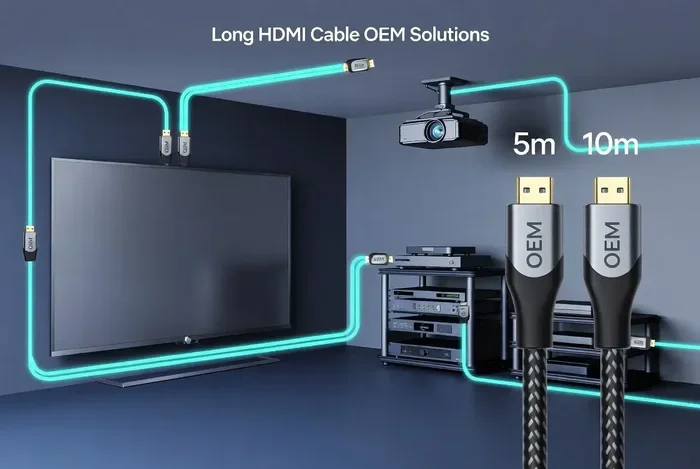
HDMI extenders use Ethernet cabling to stretch the signal much further. This is called HDMI over Ethernet, and it is popular in commercial installations and whole-home setups. An extender kit typically includes a sender unit and a receiver unit. You run a short HDMI cable from your source to the sender, then use Ethernet cable to reach the receiver near your display.
For Gaming Setups
Gamers need low latency and consistent resolution support. For gaming at 4K 120Hz, you need an HDMI 2.1 certified cable. Over long distances, this means going with a premium active HDMI cable or a fiber optic option.
Avoid cheap unbranded cables for gaming. They often have poor cable shielding and cannot handle the high bandwidth required. The result is input lag, dropped frames, or no signal at all.
Common Problems and How to Fix Them
Even with the right cable, long HDMI runs can sometimes cause issues. Here are the most common problems and how to solve them.
Flickering or Intermittent Signal
Flickering usually means the signal is weak. This happens when the cable is too long for the resolution being sent, or when the cable quality is poor. Try lowering the resolution temporarily to see if the flickering stops. If it does, your cable cannot handle the full bandwidth at that distance.
Quick fix: Switch to an active cable or a fiber optic cable. Also check that all connections are snug and secure. A loose connection can mimic signal degradation.
No Signal at All
A complete loss of signal can be caused by several things. The cable might be too long for the resolution. The connectors might be damaged. Or there could be an HDCP handshake issue.
Quick fix: Try a shorter cable first to rule out length as the problem. Then check that both ends of the cable are firmly plugged in. If you are using an active cable, make sure it is getting power from the HDMI ports.
Reduced Resolution or Black Screen
Sometimes your TV or projector shows the correct signal for a moment and then drops to a lower resolution. This is a classic sign of HDMI signal degradation over a long run.
Quick fix: Check the resolution settings on your source device. Manually set it to the correct resolution instead of letting the device auto-detect. If the problem persists, upgrade to a better cable type.
Audio and Video Sync Issues
When audio and video fall out of sync, it can be very annoying. Long cables can sometimes introduce slight delays in the signal. This is more common with very long passive runs.
Quick fix: Try an active cable or a fiber optic cable, which maintains better signal timing. You can also adjust audio delay settings in your TV or receiver to compensate.
Expert Tips for Long HDMI Cable Setups
Getting the best performance from long HDMI cables comes down to a few smart choices. Here are some tips from experienced installers and AV professionals.
Always buy certified cables. Look for HDMI Premium Certified or Ultra High Speed labels. These certifications guarantee the cable meets specific bandwidth and performance standards. A certified 4K HDMI cable gives you confidence that it will handle the data rate you need.
Measure your run before buying. Do not guess. Measure the actual distance from your source device to your display. Add a few extra feet for routing around furniture and through walls. Buying a cable that is too short is a common mistake that leads to buying extenders or replacement cables later.
Avoid sharp bends. HDMI cables should not be bent at sharp angles. Sharp bends can damage the internal wiring and weaken the signal. Use gentle curves when routing cables along baseboards or through cable management systems.
Use cable clips and conduits. Protecting your cable from physical damage extends its lifespan. Cable clips keep wires neat and prevent them from being stepped on or pinched by furniture.
Test before you install permanently. Set up your cable temporarily and watch for any issues. Play a 4K video, check the audio, and look for any visual artifacts. Fixing problems before you mount everything on the wall saves a lot of headaches.
Consider future-proofing. If you are planning a new installation, invest in a cable that supports HDMI 2.1. Even if your current devices do not use 2.1 features now, you will be ready when you upgrade. A good long HDMI cable today should work well for years to come.
Quick Tips Summary
- Buy certified cables with the right HDMI version rating.
- Measure your run and add extra length for routing.
- Avoid sharp bends that can damage internal wiring.
- Use cable management to protect cables from physical damage.
- Test before permanent installation to catch issues early.
- Future-proof your setup with HDMI 2.1 rated cables.
Common Mistakes to Avoid
Even experienced users sometimes make mistakes with long HDMI runs. Here are the ones to watch out for.
- Buying the cheapest cable available. Budget cables often have poor shielding and cannot handle long distances or high resolutions.
- Ignoring HDMI version requirements. Using an older cable with newer devices limits your features and can cause compatibility issues.
- Running HDMI cables near power cords. Electromagnetic interference from power cables can degrade the HDMI signal. Keep them separated by at least a few inches.
- Using passive cables for long 4K runs. This is the most common mistake. Passive cables simply cannot maintain 4K quality over long distances.
- Not checking connector quality. Loose or poorly made connectors cause intermittent signal problems. Look for gold-plated connectors for reliable contact.
Conclusion
So, are long HDMI cables OK? Absolutely. As long as you choose the right type for your distance and resolution needs. Long HDMI cables can deliver stunning 4K picture quality and crisp audio across impressive distances. The secret is matching the cable technology to your setup.
For short runs under 15 feet, a good passive cable works perfectly. For medium distances up to 50 feet, an active cable provides the boost you need. For really long runs, fiber optic or HDMI over Ethernet solutions keep your signal strong and your picture flawless.
Remember to check your HDMI version requirements, look for proper certifications, and avoid common pitfalls like cheap unshielded cables and sharp bends. With the right long HDMI cable, you can enjoy a seamless viewing experience no matter how far your devices are apart.
Take the time to choose wisely. Your future self will thank you every time you sit down to watch your favorite movie or game without a single interruption. Long HDMI cables are absolutely OK, and now you know exactly how to make them work perfectly for you.
Frequently Asked Questions
Can I use a long HDMI cable for 4K gaming?
Yes, but you need the right type of cable. For 4K gaming, especially at high refresh rates like 120Hz, you need an HDMI 2.1 certified active HDMI cable or a fiber optic cable. Passive cables under 15 feet can work, but longer runs need active boosting to maintain the high bandwidth that gaming requires.
Do long HDMI cables cause latency?
Good quality long HDMI cables introduce negligible latency. The signal travels at nearly the speed of light through copper or fiber. However, cheap or poorly shielded cables can cause signal issues that result in dropped frames or sync problems, which may feel like lag. Always choose certified cables for the best performance.
What is the maximum length for a single HDMI cable?
A standard passive copper HDMI cable works well up to about 15 feet for 4K content. Active copper cables can reach 50 to 100 feet. Fiber optic cables can go 100 feet or more without any signal boosters. The maximum practical length depends on your resolution and the cable technology you use.
Can I use an HDMI extender instead of a long cable?
Yes, HDMI extenders are a great alternative to very long cables. They use Ethernet cabling to stretch the HDMI signal over much longer distances. A typical extender kit can reach 150 feet or more. This is especially useful for whole-home installations or commercial setups where running a single long cable is impractical.
Are expensive HDMI cables worth it for long runs?
For long runs, yes. Premium cables have better cable shielding, higher quality conductors, and built-in signal boosting electronics. They maintain resolution support over longer distances and are less prone to interference. For short runs, a budget cable works fine, but for anything over 25 feet, investing in quality pays off.
How do I know if my HDMI cable supports 4K?
Look for the Ultra High Speed HDMI certification on the cable packaging. This label guarantees the cable can handle 4K at 60Hz and even 8K. Check the product specs for the HDMI version as well. HDMI 2.0 and above support 4K. If the cable does not list its version or resolution support, it may not be reliable for 4K content.