Can I Pair Earbuds To 2 Devices At Once Fully Explained
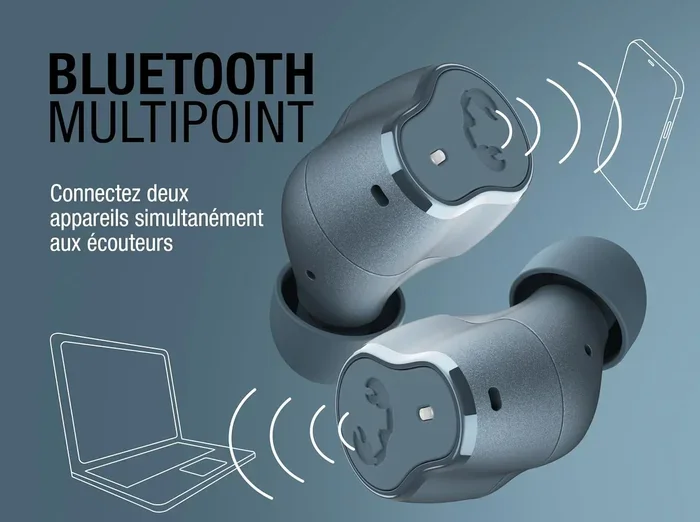
Yes, you can pair earbuds to 2 devices at once using a feature called multipoint Bluetooth pairing. This technology lets your wireless earbuds stay connected to two devices simultaneously, so you can switch seamlessly between your phone and laptop. Not all earbuds support this, but many modern true wireless models do.
Have you ever been listening to music on your phone and suddenly your laptop starts ringing? It is a frustrating moment. You want to answer the call, but you have to pause your music and reconnect your earbuds to 2 devices at once. The good news is that this is entirely possible today. Many modern wireless earbuds now support something called multipoint Bluetooth pairing. This means your earbuds can connect to two devices simultaneously without you lifting a finger. In this guide, we will explain everything you need to know about connecting earbuds to two devices. We will cover how it works, which earbuds support it, and what to do if your current pair does not.
The idea of dual device connection has been around for a while. But it has become much more accessible in recent years. Bluetooth technology has improved dramatically. Bluetooth 5.0 and newer chips handle multiple connections with ease. Brands like Sony, Jabra, Samsung, and Apple have all jumped on board. Some do it natively, while others require a workaround. Whether you are a remote worker, a student, or just someone who loves switching between devices, this guide will help you out. Let us dive in and explore everything about pairing earbuds to 2 devices at once.
Key Takeaways
- Multipoint Bluetooth is the technology that allows earbuds to connect to two devices at the same time.
- Not all earbuds support dual device connection. You need to check if your model has this feature.
- Popular brands like Sony, Jabra, and Samsung offer earbuds with multipoint pairing built in.
- Switching between devices is usually automatic, but some models require manual intervention.
- Bluetooth 5.0 and above provide better stability for dual device connections.
- Common issues include audio delay and connection drops, which can often be fixed with simple troubleshooting.
- Workaround methods exist for earbuds that don’t natively support multipoint pairing.
📑 Table of Contents
- What Does It Mean to Pair Earbuds to 2 Devices At Once?
- Which Earbuds Support Pairing to 2 Devices At Once?
- How to Set Up Dual Device Connection
- Common Problems When Pairing Earbuds to 2 Devices
- Workarounds for Earbuds Without Multipoint Support
- Multipoint vs Single Connection: Which Is Better?
- Expert Tips for Getting the Most Out of Dual Device Pairing
- Is Pairing Earbuds to 2 Devices At Once Worth It?
What Does It Mean to Pair Earbuds to 2 Devices At Once?
When we talk about pairing earbuds to 2 devices at once, we mean keeping your earbuds connected to two different sources at the same time. One device might be your smartphone. The other could be your tablet, laptop, or desktop computer. Your earbuds stay linked to both. When a call comes in on one device, the audio switches automatically. You do not need to disconnect from one device and reconnect to the other.
How Multipoint Bluetooth Works
The technology behind this is called multipoint Bluetooth. Standard Bluetooth connects one device to one accessory at a time. Multipoint changes that. It allows a single pair of wireless earbuds to maintain two active connections. The earbuds constantly scan both devices for incoming audio. When one device sends a signal, the earbuds prioritize it. Your music pauses, and the call audio takes over. Once the call ends, the music resumes.
Here is how the process typically works:
- Your earbuds connect to Device A, like your phone.
- They also stay connected to Device B, like your laptop.
- When a notification or call arrives on Device B, the earbuds switch to it.
- After the interruption ends, they return to Device A.
This entire process happens in the background. Most users barely notice it. The seamless connection is what makes multipoint so valuable. You stay in your flow without any annoying pauses or manual switching.
Why Is Dual Device Connection Important?
Think about your daily routine. You might listen to music on your phone during your commute. Then you sit at your desk and join a video call on your laptop. Without dual device connection, you would need to disconnect your earbuds from your phone and pair them to your laptop. That takes time. It is also annoying. With simultaneous connection, the switch is instant. You never miss a beat. This is especially helpful for remote workers and content creators who juggle multiple devices throughout the day.
Which Earbuds Support Pairing to 2 Devices At Once?
Not every pair of wireless earbuds supports multipoint pairing. You need to check the specifications before buying. Many premium models do offer this feature. Let us look at some popular options.
Top Earbuds With Multipoint Bluetooth
Here are some well-known earbuds that support connecting to two devices at the same time:
- Sony WF-1000XM5: These premium earbuds with dual connection offer excellent sound and reliable multipoint pairing.
- Jabra Elite 85t: Known for great call quality, these support Bluetooth multipoint effortlessly.
- Samsung Galaxy Buds2 Pro: A solid choice for Android users who want multi-device support.
- Apple AirPods Pro 2: Apple does not officially call it multipoint, but AirPods handle device switching very well across Apple devices.
- Bose QuietComfort Earbuds II: These offer stable dual device connection with top-tier noise cancellation.
- Sennheiser Momentum True Wireless 4: A great audio experience with built-in simultaneous connection support.
Budget Options for Dual Device Pairing
You do not need to spend a fortune. Several budget-friendly Bluetooth earbuds also support pairing earbuds to 2 devices at once. Brands like Anker Soundcore and JLab have introduced models with multipoint at lower price points. Always check the product listing or manual to confirm. The feature is becoming standard, but it is not universal yet.
How to Set Up Dual Device Connection
Setting up multipoint pairing is usually straightforward. But the exact steps vary by brand. Here is a general guide that applies to most wireless earbuds.
Step-by-Step Setup Process
- Charge your earbuds fully before starting. A low battery can cause connection issues.
- Turn on Bluetooth on both devices you want to connect.
- Put your earbuds in pairing mode. Most models do this by holding the power button until the LED flashes.
- Connect the first device. Go to your phone Bluetooth settings and select your earbuds.
- Connect the second device. Go to your laptop or tablet Bluetooth settings and select the same earbuds.
- Test the connection. Play audio on one device, then switch to the other. The seamless connection should work automatically.
Tips for a Stable Connection
Getting earbuds to connect to two devices is one thing. Keeping that connection stable is another. Here are some tips:
- Keep both devices within Bluetooth range. The standard range is about 30 feet. Walls and obstacles reduce this.
- Use Bluetooth 5.0 or newer on both devices for the best performance.
- Update your earbuds firmware regularly. Manufacturers often improve connection stability with updates.
- Avoid interference from Wi-Fi routers and other Bluetooth devices in crowded areas.
- Turn off Bluetooth on unused devices. This reduces clutter and improves performance.
Common Problems When Pairing Earbuds to 2 Devices
Even with the best wireless earbuds, you might run into issues. Pairing earbuds to 2 devices at once is not always perfect. Here are the most common problems and how to fix them.
Audio Delay or Latency
Audio latency is a real concern with dual device connection. When both devices are connected, there can be a slight delay. This is especially noticeable during video calls or gaming. The Bluetooth codec your devices use plays a big role here. Codecs like AAC and aptX handle audio faster than older ones. If you notice delay, try switching the Bluetooth codec in your device settings.
Connection Drops
Sometimes one of the connected devices drops out. This can happen if the device is too far away or if there is heavy Bluetooth interference. To fix this, move closer to both devices. Also, restart your earbuds by placing them back in the case for a few seconds. This refreshes the low latency connection.
Only One Device Plays Audio
This is a common frustration. You might be playing music on your laptop, but it only comes through your phone. This happens because the earbuds prioritize one active connection. To fix it, pause the audio on the first device. Then play it on the second device. The device switching should happen automatically.
Battery Drain
Keeping earbuds connected to two devices uses more battery. The earbuds are constantly monitoring two Bluetooth signals. If you notice your battery draining faster than usual, try disconnecting one device when you do not need it. This simple step can extend your listening time significantly.
Workarounds for Earbuds Without Multipoint Support
What if your favorite pair of earbuds does not support dual device connection? Do not worry. There are workarounds. They are not as smooth as native multipoint, but they work.
Use a Bluetooth Transmitter
A Bluetooth transmitter can act as a bridge. You connect the transmitter to your laptop or TV. Then your earbuds pair with the transmitter. At the same time, they stay connected to your phone. This gives you a form of simultaneous connection. It is not perfect, but it gets the job done.
Quick Reconnect Method
The simplest workaround is manual reconnecting. When your call ends on your laptop, you quickly switch your earbuds back to your phone. It takes a few seconds. It is not seamless, but many people use this method daily. It works well if you do not switch devices very often.
Use Audio Sharing Features
Some devices have built-in audio sharing features. Apple AirPods use AirPlay for this. Samsung devices support Audio Sharing between Galaxy Buds and Samsung TVs or phones. These features are not exactly the same as multipoint, but they offer similar convenience for connecting earbuds to two devices.
Multipoint vs Single Connection: Which Is Better?
Let us compare multipoint pairing with standard single connection. This will help you understand the real value.
Comparison Table
| Feature | Multipoint Connection | Single Connection |
|---|---|---|
| Number of devices | Two devices at once | One device at a time |
| Switching speed | Automatic and instant | Manual reconnect needed |
| Battery usage | Higher | Lower |
| Setup complexity | Slightly more complex | Very simple |
| Best for | Multi-device users | Single device users |
| Availability | Premium and mid-range models | Nearly all Bluetooth earbuds |
For most people who use a phone and a computer daily, multipoint Bluetooth is a game changer. If you only use one device at a time, standard single connection works perfectly fine. The choice depends on your lifestyle and how you use your wireless earbuds.
Expert Tips for Getting the Most Out of Dual Device Pairing
Want to make the most of your earbuds connecting to two devices? Here are some expert insights.
Keep Your Firmware Updated
Manufacturers regularly release firmware updates. These updates often improve Bluetooth stability and fix connection bugs. Check your earbuds app regularly. Staying updated ensures your dual device connection stays smooth.
Use the Right Bluetooth Codec
Not all Bluetooth codecs are created equal. If your devices support it, use aptX or AAC codecs. These provide better audio quality and lower latency. This matters a lot when you are switching between devices for calls and music.
Name Your Earbuds Clearly
This sounds silly, but it helps. When your earbuds show up in Bluetooth lists, give them a clear name. Something like “Work Earbuds” makes it easy to identify them across devices. It saves time when you are pairing earbuds to 2 devices at once.
Reset When Things Go Wrong
If your earbuds to 2 devices at once setup starts acting up, a reset often fixes it. Refer to your earbuds manual for the reset process. Usually, it involves holding the buttons for a specific duration. A fresh start clears most connection glitches.
Is Pairing Earbuds to 2 Devices At Once Worth It?
The short answer is yes. Pairing earbuds to 2 devices at once is incredibly convenient. It saves time, reduces frustration, and keeps you connected no matter what device you are using. If you work from home, study, or simply move between your phone and computer all day, this feature is a must-have.
The technology has matured significantly. Bluetooth multipoint is now reliable and widely available. Even budget wireless earbuds are starting to include it. The days of constantly disconnecting and reconnecting are fading. As Bluetooth 5.0 and newer chips become standard, dual device connection will only get better.
However, it is not without minor tradeoffs. Battery life can be slightly shorter. And not every pair of earbuds supports it natively. But for most users, the benefits far outweigh the drawbacks. If you are shopping for new wireless earbuds, prioritize models with multipoint pairing. Your daily routine will be much smoother.
In summary, connecting earbuds to two devices is no longer a luxury. It is becoming a standard expectation. Whether you use premium earbuds with dual connection or find a clever workaround, the goal is the same. Stay connected without interruption. Now you have all the knowledge you need to make it work.
Frequently Asked Questions
Can all Bluetooth earbuds pair to 2 devices at once?
No, not all wireless earbuds support this feature. Only models with multipoint Bluetooth can connect to two devices simultaneously. Check your earbuds specifications or manual to confirm. Many premium and mid-range brands now offer this capability.
Does pairing earbuds to 2 devices at once drain the battery faster?
Yes, maintaining two active Bluetooth connections uses more power. Your earbuds battery may drain faster than with a single connection. However, the difference is usually minor. Most users find the convenience well worth the slight battery tradeoff.
Can I connect earbuds to a phone and a laptop at the same time?
Absolutely. Pairing earbuds to 2 devices at once commonly involves a phone and a laptop. As long as both devices have Bluetooth and your earbuds support multipoint, the connection works. Audio will switch automatically between the two devices when needed.
Is there a delay when switching between devices with dual connection?
Most modern Bluetooth 5.0 earbuds switch almost instantly. You may notice a brief pause in audio during the switch. This audio latency is usually less than a second. Older Bluetooth versions may have a slightly longer delay.
What should I do if my earbuds keep disconnecting from one device?
First, make sure both devices are within Bluetooth range. Restart your earbuds by placing them in the case for 10 seconds. Also, check for firmware updates in your earbuds app. If the problem persists, reset your earbuds to factory settings and reconnect both devices.
Can I use audio sharing instead of multipoint pairing?
Yes, some brands offer audio sharing as an alternative. Apple AirPods use AirPlay, and Samsung has its own Audio Sharing feature. These are not the same as true multipoint, but they allow similar functionality. Check if your earbuds brand offers this feature in their app.
=== CONCLUSION ===
Pairing earbuds to 2 devices at once is a fantastic feature that makes modern life so much easier. Whether you are working from home, studying, or just managing a busy schedule, dual device connection keeps you connected without the hassle of constant reconnecting. Multipoint Bluetooth technology has made this seamless and reliable. Many top brands now offer earbuds with dual connection built right in. Even if your current earbuds do not support it, workarounds like Bluetooth transmitters can help. The key is to choose wireless earbuds that match your multi-device lifestyle. With the right setup, you will never miss a beat again. Start exploring your options today and enjoy the freedom of connecting earbuds to two devices effortlessly.