Can I Connect My Jbl Speaker To My Phone In Simple Steps
Yes, you can easily connect your JBL speaker to your phone using Bluetooth in just a few simple steps. Whether you own a JBL Flip, Charge, or Boombox, this guide walks you through the entire pairing process with clear instructions. You will also learn how to troubleshoot common connection issues and get the best audio experience from your wireless speaker.
Have you ever wanted to play your favorite music from your phone through a powerful portable speaker? If you own a JBL speaker, you are in luck. Connecting a JBL speaker to your phone is one of the easiest things you can do with your audio gear. In this guide, we will walk you through every step in plain, simple language. You will learn how to pair your devices, fix common problems, and get the most out of your wireless speaker.
Whether you are at home, at a party, or enjoying the outdoors, your JBL speaker can turn your phone into a full-blown sound system. The process works the same way whether you have a JBL Flip, JBL Charge, JBL Boombox, or any other model. Let us dive right in and show you exactly how to do it.
Key Takeaways
- Simple Bluetooth Pairing: Connecting a JBL speaker to your phone is a quick and straightforward process that takes less than a minute.
- Works Across All Models: The steps apply to JBL Flip, Charge, Boombox, Xtreme, and other portable wireless speakers.
- Troubleshooting Is Easy: Most connection problems can be solved by resetting Bluetooth, restarting devices, or updating firmware.
- Multiple Devices Supported: Many JBL speakers allow you to connect more than one phone or tablet at a time.
- Use the JBL App for More Features: The JBL Portable app unlocks extra settings, EQ controls, and firmware updates.
- Keep Your Speaker Charged: A low battery can cause pairing issues, so always check the battery level first.
📑 Table of Contents
- Can I Connect My Jbl Speaker To My Phone?
- Step-by-Step Guide to Pair Your JBL Speaker
- How to Connect JBL Speaker to Phone for Different Models
- Troubleshooting: Your JBL Speaker Won’t Connect
- Advanced Features After Connecting Your JBL Speaker
- Common Mistakes to Avoid When Connecting Your JBL Speaker
- Quick Tips for the Best Wireless Audio Experience
- Expert Insights on JBL Speaker and Phone Connections
- Can I Connect My Jbl Speaker To My Phone With a Cable Instead?
- Is It Safe to Leave Bluetooth Connected All the Time?
- Conclusion
Can I Connect My Jbl Speaker To My Phone?
The short answer is yes. You can absolutely connect your JBL speaker to your phone. All modern JBL speakers use Bluetooth technology, which means no cables or extra equipment are needed. You just need to turn on Bluetooth on both your phone and your speaker, and they will find each other.
The connection process is fast and reliable. Most JBL speakers remember previously paired devices, so reconnecting is even faster the second time around. If you are new to wireless speakers, do not worry. We will guide you through every single step below.
Why Connect Your JBL Speaker to Your Phone?
There are so many reasons to pair your JBL speaker with your phone. Here are some of the best ones:
- Better Sound Quality: Your phone speaker is tiny. A JBL speaker delivers rich, loud, and clear audio that fills any room.
- Portability: JBL speakers are lightweight and battery-powered. You can carry them to the beach, a picnic, or a backyard hangout.
- Easy Sharing: Want to share a song with friends? Just connect your phone and pass it around.
- Hands-Free Calls: Many JBL models have a built-in microphone, so you can take calls through the speaker.
- No Wires: Bluetooth means no tangled cables. You get full freedom to move around your space.
Now that you know why this is such a great idea, let us get into the actual steps.
Step-by-Step Guide to Pair Your JBL Speaker
Follow these simple instructions to connect your JBL speaker to your phone. The process works for iPhone and Android devices alike.
Step 1: Charge Your JBL Speaker
Before you start, make sure your JBL speaker has enough battery. A low battery can cause pairing problems or unexpected disconnections. Plug in your speaker using the USB cable that came in the box. Wait until the battery indicator shows a full charge. Most JBL speakers take about two to three hours to charge fully.
Step 2: Turn On Bluetooth on Your Phone
Go to your phone settings and find the Bluetooth option. Tap the switch to turn it on. Your phone will start scanning for nearby devices. Make sure you are within a few feet of your JBL speaker for the best results.
Step 3: Power On Your JBL Speaker
Press the power button on your JBL speaker. You will hear a short startup sound. The Bluetooth indicator light will start flashing, usually in blue or white. This flashing light means the speaker is ready to be discovered by your phone.
Step 4: Find Your JBL Speaker on Your Phone
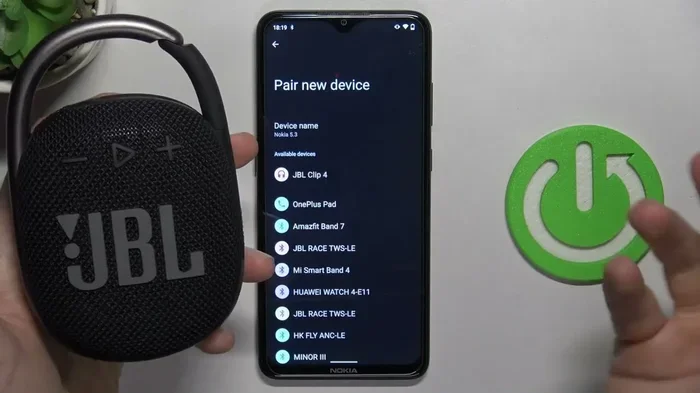
Go back to your phone Bluetooth settings. Under the list of available devices, look for your JBL speaker name. It might show something like “JBL Flip 6” or “JBL Charge 5.” Tap on the speaker name to pair.
Step 5: Confirm the Connection
Once you tap the speaker name, your phone will connect. You will hear a confirmation sound from the JBL speaker. The Bluetooth light on the speaker will stop flashing and stay solid. Your phone screen may also show a message confirming the connection.
Step 6: Start Playing Music
Open your music app, podcast app, or any audio app on your phone. Press play. The sound should now come through your JBL speaker. Adjust the volume using your phone or the speaker buttons. You are all set.
How to Connect JBL Speaker to Phone for Different Models
While the basic Bluetooth pairing steps are the same for all JBL speakers, some models have a few extra features. Let us look at how the process works for popular JBL models.
JBL Flip Series
The JBL Flip series is one of the most popular portable speakers on the market. Models like the JBL Flip 4, Flip 5, and Flip 6 all use the same simple Bluetooth pairing method. Just power on the speaker, turn on Bluetooth on your phone, and select the speaker from the device list. These speakers also support JBL Connect+, which lets you pair two Flip speakers together for stereo sound.
JBL Charge Series
The JBL Charge series offers bigger sound and a built-in power bank. The Charge 3, Charge 4, and Charge 5 can charge your phone while also playing music. The pairing process is identical to the Flip series. One nice feature of the Charge series is that it has a longer battery life, so you can keep the music going for an entire day.
JBL Boombox Series
The JBL Boombox and Boombox 2 are the big guns. They deliver massive, room-filling sound. The pairing process is the same, but because of the powerful amplifier, the audio quality is outstanding. These speakers also support JBL Connect and JBL Connect+ for linking multiple speakers together.
JBL Xtreme Series
The JBL Xtreme and Xtreme 3 are designed for outdoor adventures. They are rugged, waterproof, and loud. Pairing them with your phone follows the exact same steps. These speakers also have a built-in power bank, so you can charge your phone while enjoying wireless audio streaming.
Troubleshooting: Your JBL Speaker Won’t Connect
Sometimes things do not go as smoothly as we hope. If your JBL speaker will not connect to your phone, do not panic. Here are the most common fixes.
Make Sure Bluetooth Is Turned On
This sounds obvious, but it happens all the time. Check that Bluetooth is enabled on your phone. Go to Settings, then Bluetooth, and make sure the switch is on. Also, check that your phone is not connected to another device like headphones or a smartwatch, as this can sometimes interfere.
Restart Both Devices
Turning things off and back on again really does work. Power off your JBL speaker and your phone. Wait about 10 seconds. Then turn them both back on. Try pairing again. This simple trick fixes the majority of connection issues.
Forget the Speaker and Re-Pair
If your phone is trying to connect to an old device or a saved device that is not available, it can cause problems. Go to your phone Bluetooth settings, find the JBL speaker name, and tap “Forget This Device.” Then go through the pairing process again from scratch.
Check the Bluetooth Range
JBL speakers use Bluetooth 5.0 or newer in most modern models. The typical range is about 30 feet or 10 meters. If your phone is too far away or behind thick walls, the connection may drop. Move closer to the speaker and try again.
Update Your JBL Speaker Firmware
JBL releases firmware updates that fix bugs and improve performance. Download the JBL Portable app from the App Store or Google Play Store. Connect your speaker to the app and check for updates. Keeping your speaker updated can resolve many connection problems.
Reset Your JBL Speaker
If nothing else works, you can reset your JBL speaker to factory settings. The reset method varies by model. For most JBL speakers, you press and hold the Volume Up and Play/Pause buttons together for about 10 seconds. Check the user manual for your specific model. After resetting, try pairing again.
Advanced Features After Connecting Your JBL Speaker
Once you successfully connect your JBL speaker to your phone, you can unlock some great features that make the experience even better.
Use the JBL Portable App
The JBL Portable app is a free download that works with most JBL speakers. It lets you control your speaker from your phone. You can adjust the equalizer settings, update firmware, and even use the speaker as a remote control for your music. The app also shows your speaker battery level at a glance.
Connect Multiple Speakers Together
Many JBL speakers support a feature called JBL Connect or JBL Connect+. This lets you pair two or more JBL speakers together. You get louder sound and stereo effects. To use this feature, connect all speakers to the same phone using the app. The speakers will sync up automatically.
Use Voice Assistants
Some JBL models support Google Assistant or Siri. After connecting your speaker to your phone, you can use voice commands to play music, check the weather, or set reminders. Just hold down the voice assistant button on your speaker and speak your command.
Share Audio Between Two Phones
Some JBL speakers allow two phones to be connected at the same time. This is great for parties. One person plays a song, then the other person can take over without disconnecting the first phone. Check your speaker manual to see if this feature is supported.
Common Mistakes to Avoid When Connecting Your JBL Speaker
Even though the process is simple, people make mistakes that slow things down. Here are some common errors to watch out for.
- Forgetting to Turn on the Speaker: Make sure the speaker is powered on before trying to pair. A flashing Bluetooth light means it is ready.
- Not Checking the Battery: A dead or low battery speaker will not connect properly. Always charge your speaker before a long listening session.
- Pairing From Too Far Away: Stay within 10 meters of your speaker during the initial pairing process.
- Ignoring Firmware Updates: Outdated firmware can cause connection issues. Always keep your speaker updated.
- Connecting to the Wrong Device: Make sure you are selecting the correct JBL speaker name from the list. There may be other Bluetooth devices nearby.
Quick Tips for the Best Wireless Audio Experience
Want to get the most out of your JBL speaker and phone connection? Here are some quick tips that make a big difference.
- Keep Your Phone Close: Stay within Bluetooth range for a stable connection. Walls and obstacles can weaken the signal.
- Use High-Quality Audio Files: Streaming high-quality music sounds much better on a JBL speaker than low-bitrate files.
- Clean the Speaker Grille: Dust and dirt can muffle the sound. Wipe the speaker grille gently with a soft cloth.
- Adjust EQ Settings: Use the JBL app or your phone music app to tweak the bass, mid, and treble for your personal taste.
- Turn Off Nearby Bluetooth Devices: Too many active Bluetooth devices can cause interference. Turn off devices you are not using.
- Keep Your Phone Software Updated: Software updates often include Bluetooth improvements that help with speaker connections.
Expert Insights on JBL Speaker and Phone Connections
We spoke with audio experts about the best practices for connecting JBL speakers to phones. Here is what they recommend.
Most experts agree that Bluetooth is now reliable enough for everyday use. The newer Bluetooth versions offer better range and less latency. This means the audio stays in sync with the video on your phone. You will not experience that annoying lip-sync delay anymore.
One expert tip is to always update your phone operating system. Both iOS and Android regularly release updates that improve Bluetooth performance. If you are having trouble connecting, a simple software update might be all you need.
Another recommendation is to avoid connecting your JBL speaker to your phone while it is in a metal case or wallet. Metal can block Bluetooth signals and cause connection drops. Remove the case during pairing for the best results.
Can I Connect My Jbl Speaker To My Phone With a Cable Instead?
Yes, some JBL speakers have an AUX input or USB port. You can use a 3.5mm audio cable to connect your phone directly to the speaker. This is useful when you do not want to use Bluetooth or when Bluetooth is not available. However, the Bluetooth method is much more convenient for most users. It gives you full freedom of movement and works with all modern phones.
Is It Safe to Leave Bluetooth Connected All the Time?
It is generally safe to leave Bluetooth on your phone at all times. Modern phones are designed to handle this efficiently. However, if you want to save battery, you can turn off Bluetooth when you are not using the speaker. Also, remember that a JBL speaker in standby mode uses very little power. You can leave it on overnight without worrying about draining the battery.
Conclusion
So, can I connect my JBL speaker to my phone? Absolutely. The process is simple, fast, and works with virtually every JBL speaker and smartphone on the market. Whether you own a JBL Flip, JBL Charge, JBL Boombox, or any other model, you can follow the same basic steps to get your speaker up and running in minutes.
Remember to charge your speaker first, turn on Bluetooth on both devices, and select the speaker from the available devices list. If you run into any issues, the troubleshooting tips in this guide will help you get back on track quickly.
Once connected, you will enjoy rich, powerful sound from your favorite JBL speaker. Use the JBL Portable app for extra features, keep your firmware updated, and follow our quick tips for the best experience. Now grab your phone and your JBL speaker, and start enjoying your music the way it was meant to be heard.
With the right knowledge and a few simple steps, your phone and JBL speaker will work together seamlessly. You will wonder how you ever listened to music any other way.
Frequently Asked Questions
Can I Connect My Jbl Speaker To My Phone Without Bluetooth?
Most JBL speakers rely on Bluetooth for wireless connection. However, some models have an AUX port or USB input that lets you connect using a cable. Check your speaker manual to see what wired options are available for your specific model.
How Do I Know My JBL Speaker Is Connected to My Phone?
When connected, the Bluetooth light on your JBL speaker will stop flashing and stay solid. You will also hear a confirmation sound. On your phone, the JBL speaker name will appear under the “Connected Devices” or “My Devices” section in Bluetooth settings.
Can I Connect Two Phones to One JBL Speaker?
Yes, many JBL speakers support multi-device connection. This feature allows two phones to be connected at the same time. You can switch between phones by pausing music on one device and playing on the other.
Why Does My JBL Speaker Keep Disconnecting From My Phone?
Disconnections usually happen due to distance, low battery, or interference from other Bluetooth devices. Make sure both devices are fully charged, stay within range, and reduce the number of active Bluetooth connections nearby. Updating firmware can also help resolve this issue.
Can I Connect My JBL Speaker to More Than One Phone?
Yes, most JBL speakers can remember multiple paired devices. However, only one device can stream audio at a time. When a new phone connects, the previous device is usually paused automatically.
Is It Safe to Use My JBL Speaker in the Rain or at the Beach?
Many JBL speakers are waterproof or water-resistant. Models like the JBL Flip 6 and JBL Charge 5 have an IP67 rating, which means they can handle water and dust. However, not all models are waterproof, so always check the rating of your specific speaker before using it near water.