Can Bluetooth Work In Any Car Here Is How To Connect
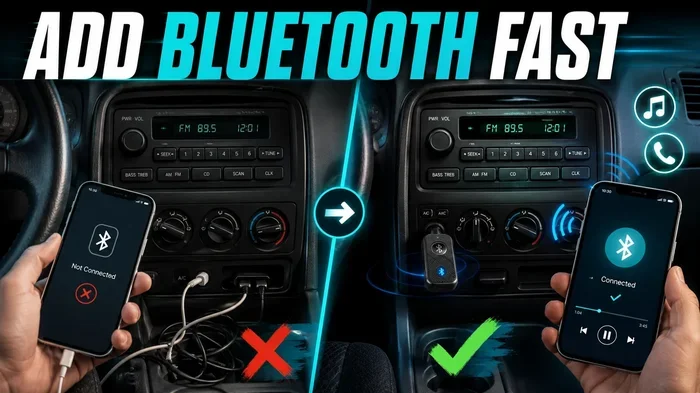
Yes, Bluetooth can work in almost any car, but the method depends on your vehicle’s age and features. Whether your car has built-in Bluetooth or needs an aftermarket adapter, you can enjoy wireless music streaming and hands-free calling. This guide shows you exactly how to connect Bluetooth in any car, from older models to the newest vehicles.
Can Bluetooth work in any car? The short answer is yes. Almost every vehicle on the road today can use Bluetooth in some way. Whether your car was built last year or decades ago, you have options for wireless connectivity.
Bluetooth technology has changed how we listen to music and make calls while driving. It lets you stream audio, take calls, and use voice commands without touching your phone. This means safer driving and more convenience on every trip.
But here is the thing. Not all cars connect to Bluetooth the same way. A newer SUV might have built-in wireless car stereo features. An older sedan might need a simple adapter. This guide covers every scenario so you can get Bluetooth working in your vehicle no matter what year or model it is.
You will learn how Bluetooth works in cars, what you need to check before buying anything, and the exact steps to pair your phone. We also cover common problems and how to fix them. By the end, you will know exactly how to connect Bluetooth in any car.
Let us dive in and get your car connected.
Key Takeaways
- Most cars can use Bluetooth: Even older vehicles can get Bluetooth with simple add-on devices.
- Built-in Bluetooth is the easiest: Newer cars come with wireless connectivity already installed.
- Aftermarket adapters work great: FM transmitters and Bluetooth receivers are affordable and effective.
- Pairing is simple: The process takes just a few minutes once you know the steps.
- Audio quality varies: Your connection method affects sound quality and call clarity.
- Troubleshooting is straightforward: Most Bluetooth issues have quick and easy fixes.
📑 Table of Contents
- What Is Bluetooth and How Does It Work in Cars?
- Does Every Car Have Bluetooth Built In?
- How to Connect Bluetooth in Cars With Built-In Support
- How to Add Bluetooth to Cars Without Built-In Support
- Common Bluetooth Problems and How to Fix Them
- Expert Tips for Getting the Most From Bluetooth in Your Car
- Is Bluetooth Safe for Driving?
- Frequently Asked Questions
- Final Thoughts
What Is Bluetooth and How Does It Work in Cars?
Bluetooth is a wireless technology that lets devices talk to each other over short distances. In cars, it connects your smartphone to your car audio system. This connection lets you play music and make calls without wires.
The technology uses radio waves to send data between your phone and your car stereo. The range is typically about 30 feet. This means your phone can sit in your pocket or on the seat and still work fine.
Bluetooth has been built into cars for over 15 years now. Early versions only supported basic calling. Modern versions handle high-quality audio streaming too. The latest Bluetooth versions also support voice assistants and multi-device pairing.
How Bluetooth Pairing Works
Pairing is the process of linking your phone to your car. Here is what happens behind the scenes:
- Your phone searches for nearby Bluetooth devices.
- Your car stereo appears as a discoverable device.
- You select the car from the list on your phone.
- A pairing code confirms the connection.
- Once paired, the devices remember each other automatically.
After the first connection, your phone and car usually reconnect on their own when you get in the vehicle. This makes the process seamless over time.
Does Every Car Have Bluetooth Built In?
No, not every car comes with Bluetooth already installed. But most cars made after 2012 have at least basic Bluetooth support. Older vehicles, especially those from before 2010, often lack this feature entirely.
Here is a quick look at how Bluetooth support breaks down by car era:
| Car Era | Bluetooth Support | Typical Features |
|---|---|---|
| Pre-2005 | Rare | None without aftermarket adapter |
| 2005-2010 | Growing | Basic hands-free calling in some models |
| 2010-2018 | Common | Calling and audio streaming in most trims |
| 2018+ | Standard | Full wireless connectivity, voice assistants |
Even if your car does not have Bluetooth, you are not stuck. There are many ways to add wireless connectivity to any vehicle. The key is knowing which option fits your car and your budget.
How to Check If Your Car Has Bluetooth
Checking for Bluetooth in your car is easy. Look for these signs:
- A Bluetooth icon on your infotainment screen.
- A “Phone” or “Connectivity” menu in your car settings.
- A button on your steering wheel labeled with a phone symbol.
- AUX or USB ports that mention Bluetooth compatibility.
You can also check your car manual. It will list all the audio and connectivity features your vehicle supports. If you still are not sure, search online for your car model and year plus “Bluetooth” to find out.
How to Connect Bluetooth in Cars With Built-In Support
If your car already has Bluetooth, the connection process is straightforward. Most vehicles follow a similar pattern. Here is how to do it step by step.
Step-by-Step Bluetooth Connection Guide
Follow these steps to pair your phone with a car that has built-in Bluetooth:
- Turn on your car stereo. Make sure the infotainment system is active.
- Go to Bluetooth settings. Look for a “Phone,” “Connectivity,” or “Bluetooth” menu.
- Enable discoverable mode. Your car needs to be visible to your phone.
- Turn on Bluetooth on your phone. Go to your phone settings and enable wireless connectivity.
- Search for devices on your phone. Your car should appear in the list of available devices.
- Select your car. Tap on the car name to initiate pairing.
- Confirm the pairing code. Both your phone and car will show a code. Make sure they match.
- Test the connection. Play music or make a call to confirm everything works.
That is it. The whole process takes about two minutes once you know where to look. After the first successful pairing, your phone should connect automatically every time you get in the car.
Tips for Better Bluetooth Audio Quality
Want to get the best sound from your Bluetooth connection? Try these tips:
- Keep your phone close to the car antenna. It is usually near the rear windshield.
- Make sure your phone software is up to date.
- Use the latest Bluetooth version supported by your car.
- Reduce interference by turning off other wireless devices nearby.
- Adjust the equalizer settings on your car stereo for better audio output.
These small adjustments make a big difference in wireless streaming quality. You will notice clearer vocals and richer bass.
How to Add Bluetooth to Cars Without Built-In Support
Older cars or base models without Bluetooth are not left behind. Several affordable options let you add wireless connectivity to any vehicle. Let us look at the best methods.
Option 1: Bluetooth FM Transmitter
An FM transmitter is one of the easiest ways to add Bluetooth to any car. It plugs into your cigarette lighter or USB port and broadcasts audio over an FM frequency.
Here is how it works:
- The transmitter connects to your phone via Bluetooth.
- It sends the audio signal to an FM frequency you choose.
- You tune your car radio to that same frequency.
- You hear your music and calls through your car speakers.
FM transmitters cost between 15 and 50 dollars. They work with any car that has a radio. The downside is that audio quality is not as good as a direct connection. You may also hear some static in areas with heavy radio traffic.
Option 2: Bluetooth AUX Adapter
If your car has an AUX input, a Bluetooth AUX adapter is a great choice. It plugs right into the AUX port and creates a wireless bridge between your phone and your car stereo.
Benefits of an AUX adapter include:
- Better audio quality than FM transmitters.
- Simple plug-and-play setup.
- No need to tune radio frequencies.
- Compact size that fits in most glove boxes.
AUX adapters typically cost between 10 and 30 dollars. They are one of the best values for adding wireless connectivity to older vehicles.
Option 3: Bluetooth Car Kit with Microphone
A dedicated Bluetooth car kit is a more permanent solution. It mounts to your dashboard and connects to your car stereo system. Many kits include a built-in microphone for hands-free calling.
These kits work well for cars that have a cassette player or CD changer. You can often use a cassette adapter or a CD-based transmitter to bridge the connection. Bluetooth car kits range from 30 to 100 dollars.
Option 4: Aftermarket Head Unit Replacement
If you want the best wireless streaming experience, consider replacing your factory head unit with an aftermarket Bluetooth receiver. Modern head units offer full Bluetooth support, touchscreen controls, and even Apple CarPlay and Android Auto.
This option costs more, usually between 100 and 300 dollars for the unit plus installation. But it transforms your entire car audio system. You get the best audio quality and the most modern features.
Comparison: Bluetooth Options for Cars Without Built-In Support
| Option | Price Range | Audio Quality | Ease of Setup | Best For |
|---|---|---|---|---|
| FM Transmitter | $15-$50 | Good | Very Easy | Cars with only a radio |
| AUX Adapter | $10-$30 | Very Good | Very Easy | Cars with AUX input |
| Bluetooth Car Kit | $30-$100 | Very Good | Moderate | Cassette/CD players |
| Aftermarket Head Unit | $100-$300 | Excellent | Professional Install | Full system upgrade |
Choose the option that matches your car and your budget. Even the cheapest FM transmitter gives you wireless connectivity. You do not need to spend a lot to enjoy Bluetooth in your car.
Common Bluetooth Problems and How to Fix Them
Bluetooth connections are not always perfect. Here are the most common issues and how to solve them quickly.
Bluetooth Will Not Connect
If your phone will not pair with your car, try these steps:
- Turn Bluetooth off and back on both devices.
- Delete the old pairing and start fresh.
- Make sure your car is in discoverable mode.
- Restart both your phone and your car stereo.
- Check that your phone is not connected to another device.
Most connection problems are solved by simply restarting both devices. This clears temporary glitches and resets the Bluetooth module.
Poor Audio Quality or Static
Static or choppy audio usually comes from interference or distance. Try these fixes:
- Move your phone closer to the car stereo.
- Switch to a different FM frequency if using a transmitter.
- Turn off other wireless devices in the car.
- Update your phone and car stereo firmware.
- Check that your Bluetooth version is compatible.
Phone Connects but No Sound
Sometimes the Bluetooth connection works but audio does not play. This is usually a media audio setting issue:
- Go to your phone Bluetooth settings.
- Find your car in the paired devices list.
- Make sure “Media Audio” is turned on.
- Also check that “Call Audio” is enabled if you want to make calls.
This simple toggle fixes the problem most of the time. Many people accidentally turn off media audio and wonder why their music stops working.
Bluetooth Keeps Disconnecting
If your connection drops frequently, try these solutions:
- Check that your phone battery is not in power-saving mode.
- Update your phone operating system and car firmware.
- Clear the Bluetooth cache on your phone.
- Remove other devices from the paired list.
- Reset your car stereo to factory settings.
Persistent disconnection issues often come from software bugs. A firmware update from your car manufacturer can fix these problems.
Expert Tips for Getting the Most From Bluetooth in Your Car
To get the best experience with wireless connectivity in your vehicle, keep these expert tips in mind:
- Update regularly. Keep your phone and car software current for the best compatibility.
- Limit paired devices. Too many paired phones can slow down your connection and cause confusion.
- Use voice commands. Most Bluetooth systems support voice dialing. This keeps your hands on the wheel.
- Charge your phone. A low battery can cause Bluetooth to disconnect unexpectedly.
- Know your Bluetooth version. Newer versions offer better range and audio quality. Check what your car supports.
These small habits go a long way. They keep your wireless streaming smooth and your hands-free calling clear every time you drive.
Is Bluetooth Safe for Driving?
Yes, Bluetooth is designed to make driving safer. Hands-free calling lets you keep your eyes on the road and your hands on the wheel. Wireless streaming means you never need to fumble with a phone cord while driving.
Many countries have laws against holding your phone while driving. Bluetooth helps you stay legal and focused. Voice commands take it a step further by letting you control your phone without touching it at all.
That said, even hands-free calls can distract you. The safest approach is to keep conversations short and pull over if you need to focus on a complex call. Bluetooth makes driving safer, but it does not eliminate all distractions.
Frequently Asked Questions
Can you add Bluetooth to any car?
Yes, you can add Bluetooth to virtually any car. Options like FM transmitters, AUX adapters, and Bluetooth car kits work with almost any vehicle. Even very old cars without any modern connectivity can get Bluetooth with the right adapter. The method you choose depends on what inputs your car has and your budget.
Why is my Bluetooth not connecting to my car?
Bluetooth connection issues are usually caused by outdated software, interference, or a full paired device list. Try turning Bluetooth off and back on both devices. Delete the old pairing and create a fresh connection. If the problem continues, restart both your phone and your car stereo system.
Does Bluetooth work in all types of vehicles?
Bluetooth works in cars, trucks, SUVs, and even motorcycles with the right equipment. Most modern vehicles have built-in Bluetooth support. For older vehicles, aftermarket adapters provide wireless connectivity easily. The technology is universal and works across all vehicle types.
Can you use Bluetooth for both music and calls?
Yes, Bluetooth handles both music streaming and hands-free calling. Most car systems support both features once paired. You can switch between playing music and taking calls seamlessly. The car stereo will pause music automatically when a call comes in.
How far can Bluetooth reach in a car?
Bluetooth has a typical range of about 30 feet. Inside a car, this is more than enough since your phone can sit anywhere in the cabin. The signal easily passes through seats, bags, and other items. You do not need to keep your phone near the stereo for a reliable connection.
Is Bluetooth audio quality good enough for music?
Bluetooth audio quality has improved significantly over the years. Modern versions support high-quality codecs that deliver clear, rich sound. For most drivers, Bluetooth audio is more than good enough for everyday listening. Audiophiles may prefer a wired connection, but the difference is subtle for casual music fans.
Final Thoughts
So, can Bluetooth work in any car? Absolutely. Whether your vehicle has built-in wireless connectivity or needs a simple add-on device, you can enjoy Bluetooth today. The technology is flexible, affordable, and works with nearly every car on the road.
Built-in Bluetooth gives you the smoothest experience. But even older cars can get Bluetooth with an FM transmitter, AUX adapter, or Bluetooth car kit. Each option is easy to set up and delivers real results.
Now that you know how to connect Bluetooth in any car, there is no reason to wait. Pick the method that fits your vehicle, follow the steps in this guide, and enjoy hands-free calling and wireless music streaming on every drive. Your car is closer to being fully connected than you think.