Can A Wifi Adapter Act As Bluetooth And How To Use It
Yes, a wifi adapter can sometimes act as Bluetooth, but it depends on the adapter type and hardware support. Many modern wireless adapters come with dual-band capabilities that handle both wifi and Bluetooth signals. This article explains how to check compatibility, set up your adapter, and get the most out of your wireless connection.
Have you ever looked at your computer and thought, “Wait, can I just use my wifi adapter for Bluetooth too?” It is a fair question. With so many wireless devices around us, the idea of cutting down on dongles and adapters is really appealing. You want a cleaner desk. You want fewer cables. You want things to just work.
The short answer is yes, a wifi adapter can act as Bluetooth in some cases. But the full answer is a bit more nuanced. It depends on what kind of adapter you have, what your computer supports, and what you are trying to connect. In this guide, we will walk through everything you need to know. We will cover how it works, when it does not work, and how to set it up the right way.
Whether you are trying to connect a wireless headset, a keyboard, or a mouse, understanding the relationship between wifi and Bluetooth can save you time and money. Let us dive in and break it all down.
Key Takeaways
- Dual-purpose adapters exist: Many wifi adapters today include built-in Bluetooth support for seamless wireless connectivity.
- Not all adapters work this way: Standard wifi-only adapters cannot replace a Bluetooth module without extra hardware.
- Driver support matters: You need the right drivers installed for your wifi adapter to handle Bluetooth functions.
- USB wifi adapters are the easiest option: Plug-and-play models make setup simple for beginners.
- Bluetooth pairing works the same way: Whether you use a dedicated Bluetooth dongle or a dual-function adapter, the pairing process is similar.
- Signal interference can be an issue: Both wifi and Bluetooth use the 2.4GHz frequency, which can cause conflicts.
- Check your device first: Always verify your adapter specifications before buying or assuming compatibility.
📑 Table of Contents
Understanding How Wifi And Bluetooth Work Together
Before we answer whether a wifi adapter can act as Bluetooth, it helps to understand what each technology does. Both wifi and Bluetooth are forms of wireless communication. They both send and receive data through the air. But they do it in very different ways.
What Is A Wifi Adapter?
A wifi adapter is a device that connects your computer to a wireless network. It sends and receives data using radio waves. Most laptops have wifi adapters built right into the motherboard. Desktop computers usually need an external or internal adapter to get online.
Wifi adapters operate on two main frequencies: 2.4GHz and 5GHz. The 2.4GHz band travels farther but is slower. The 5GHz band is faster but has a shorter range. Many modern adapters support both bands at the same time.
What Is Bluetooth?
Bluetooth is a short-range wireless technology. It connects devices like headphones, speakers, and controllers directly to your computer. Bluetooth uses the 2.4GHz frequency band, which is the same band many wifi adapters use for their 2.4GHz connection.
Bluetooth is designed for low-power, short-distance communication. It is perfect for peripherals like keyboards, mice, and earbuds. It does not need an internet connection to work. It just needs two devices that support Bluetooth to find each other and pair up.
Where Wifi And Bluetooth Overlap
Here is where things get interesting. Both wifi and Bluetooth use the same 2.4GHz frequency range. This means they can sometimes interfere with each other. When your wifi signal is strong, your Bluetooth connection might drop. When you are streaming a video over wifi, your wireless headset might stutter.
However, modern wireless protocols handle this overlap pretty well. Technologies like Bluetooth 5.0 and wifi 6 have built-in features to reduce interference. So even though they share the same airspace, they can coexist without too many problems.
Can A Wifi Adapter Actually Replace Bluetooth?
This is the big question, and the answer is not a simple yes or no. It depends entirely on the type of adapter you have and what your computer supports.
When A Wifi Adapter Can Act As Bluetooth
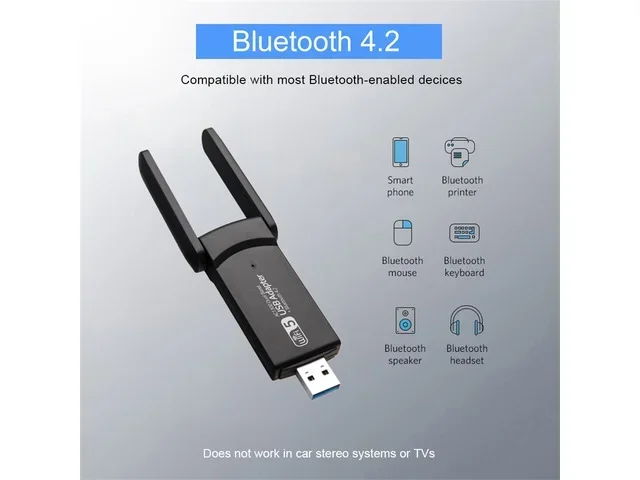
Many modern wireless adapters come with dual-band support. This means they handle both wifi and Bluetooth in one device. These are often called combo adapters or dual-function adapters. They have a single USB plug that gives you internet access and Bluetooth connectivity at the same time.
If your adapter has Bluetooth built in, you do not need a separate Bluetooth dongle. You just install the drivers, and your computer can connect to Bluetooth devices through the wifi adapter. This is super convenient and saves you a USB port.
Some examples of adapters that support both include:
- TP-Link Archer T3U Plus – handles wifi and Bluetooth 4.2
- ASUS USB-AC53 Nano – includes Bluetooth 4.0 support
- Netgear A6210 – supports wifi and Bluetooth 4.0
- Intel Wi-Fi 6 AX200 – built into many laptops with Bluetooth 5.0
When A Wifi Adapter Cannot Replace Bluetooth
Not every wifi adapter has Bluetooth built in. Standard wifi-only adapters cannot magically gain Bluetooth capability. If your adapter does not list Bluetooth in its specifications, it simply does not have the hardware to support it.
You also cannot add Bluetooth to a wifi-only adapter through software alone. Bluetooth requires a physical radio chip inside the adapter. If that chip is not there, no driver update will create it. This is a common misconception that trips up many users.
Here are some signs your wifi adapter does not support Bluetooth:
- The product listing does not mention Bluetooth at all.
- Your computer does not show any Bluetooth options in the device manager.
- You cannot find Bluetooth devices when you search for them in your settings.
- The adapter specifications only list wifi standards like 802.11ac or 802.11n.
How To Make A Wifi Adapter Work Like Bluetooth
If your wifi adapter does support Bluetooth, you need to set it up correctly. The process is straightforward, but it does require a few steps. Here is how to do it.
Step 1: Check Your Adapter Specifications
First, find out what your adapter can do. Look at the box, the manual, or the product page online. Search for the model number and check the specifications. Look for any mention of Bluetooth support.
If you are not sure, you can also check your device manager on Windows. Open the Device Manager and look for your network adapter. Right-click on it and select Properties. If Bluetooth is supported, you may see it listed under the adapter details.
Step 2: Install The Right Drivers
Drivers are the software that tells your computer how to use your hardware. For a dual-function adapter, you need drivers that support both wifi and Bluetooth.
Go to the manufacturer’s website and download the latest drivers. Do not rely on Windows Update alone. The drivers on the manufacturer’s site are usually more up to date and include Bluetooth support. Follow the installation prompts and restart your computer when asked.
Step 3: Enable Bluetooth In Your Settings
Once the drivers are installed, go to your Bluetooth settings. On Windows, go to Settings > Bluetooth & Devices. On macOS, go to System Preferences > Bluetooth. Make sure Bluetooth is turned on.
Your computer should now detect the Bluetooth radio through your wifi adapter. You can start searching for and pairing Bluetooth devices right away.
Step 4: Pair Your Bluetooth Devices
Put your Bluetooth device in pairing mode. This usually means holding down a button on the device until a light starts flashing. Then go to your computer’s Bluetooth settings and click “Add Device” or “Pair.”
Your computer should find the device within a few seconds. Select it and follow any on-screen prompts. Once paired, your device should connect automatically every time you turn it on.
Quick Tips For Smooth Setup
- Keep your adapter close to your Bluetooth device during pairing.
- Restart your computer after installing new drivers.
- Make sure your adapter is plugged into a USB 2.0 or 3.0 port for best performance.
- Avoid using USB hubs during initial setup. Plug directly into your computer.
Best Wifi Adapters That Also Support Bluetooth
If you are in the market for a new adapter and want one that handles both wifi and Bluetooth, here are some great options to consider.
| Adapter | Wifi Standard | Bluetooth Version | USB Type |
|---|---|---|---|
| TP-Link Archer T3U Plus | AC1300 | 4.2 | USB 3.0 |
| ASUS USB-AC53 Nano | AC1200 | 4.0 | USB 3.0 |
| Netgear A6210 | AC1200 | 4.0 | USB 3.0 |
| Intel Wi-Fi 6 AX210 | AX210 (Wi-Fi 6E) | 5.2 | M.2 / USB |
| Wavlink AC1200 | AC1200 | 4.0 | USB 3.0 |
When choosing an adapter, look at both the wifi speed and the Bluetooth version. Newer Bluetooth versions offer better range, faster data transfer, and lower power consumption. Bluetooth 5.0 and above are especially good for audio devices like headphones and speakers.
Common Problems And How To Fix Them
Even with the right adapter, you might run into issues. Here are the most common problems and how to solve them.
Bluetooth Devices Not Showing Up
If your computer does not detect Bluetooth devices, the first thing to check is your drivers. Outdated or missing drivers are the most common cause. Go to the manufacturer’s website and download the latest Bluetooth drivers for your adapter.
Also, make sure Bluetooth is turned on in your system settings. Sometimes it gets turned off accidentally. A simple restart can also fix detection issues in many cases.
Poor Bluetooth Audio Quality
If your Bluetooth headphones sound choppy or laggy, it could be a frequency interference issue. Both wifi and Bluetooth use the 2.4GHz band, and too many devices on the same band can cause problems.
Try switching your wifi adapter to the 5GHz band. This frees up space on the 2.4GHz band for your Bluetooth devices. If your adapter does not support 5GHz, try moving your router farther away from your Bluetooth devices.
Bluetooth Keeps Disconnecting
Intermittent Bluetooth connections are frustrating. This often happens when the Bluetooth driver is not working properly. Try uninstalling the driver and reinstalling it from the manufacturer’s website.
Also check your power settings. Some computers turn off Bluetooth to save power. Go to your Device Manager, find your Bluetooth adapter, and disable any power-saving settings. This keeps the connection stable.
Adapter Does Not Support Bluetooth At All
If your adapter truly does not support Bluetooth, you have two options. You can buy a separate Bluetooth dongle, which is inexpensive and easy to use. Or you can upgrade to a dual-function adapter that handles both wifi and Bluetooth.
A Bluetooth dongle costs as little as $10 and plugs right into a USB port. It is the simplest fix if you just need Bluetooth and do not want to replace your wifi adapter.
Expert Tips For Better Wireless Connectivity
Getting the most out of your wireless setup takes a little know-how. Here are some expert tips to improve your experience.
Use A USB Extension Cable
If your wifi adapter is stuck at the back of your desktop, the signal might be weak. Use a short USB extension cable to move it closer to the center of your desk. Better placement means stronger signals for both wifi and Bluetooth.
Keep Your Adapter Drivers Updated
Manufacturers release driver updates regularly. These updates fix bugs, improve performance, and add support for new devices. Check for updates once a month to keep everything running smoothly.
Minimize Interference From Other Devices
Microwaves, cordless phones, and baby monitors all operate on the 2.4GHz band. They can interfere with both your wifi and Bluetooth signals. Keep your wireless adapter away from these devices for better performance.
Consider A Wifi 6 Adapter
Wifi 6 adapters offer faster speeds and better handling of multiple devices. They also tend to have better Bluetooth support. If you are buying a new adapter, going with a Wifi 6 model is a smart choice for future-proofing your setup.
Use The Right Bluetooth Profile
Different Bluetooth devices use different profiles. A headset uses the A2DP profile for audio. A keyboard uses the HID profile. Make sure your adapter supports the profiles you need. Most modern adapters support all common profiles, but it is worth checking.
Final Thoughts
The answer to whether a wifi adapter can act as Bluetooth is yes, but only if your adapter has the right hardware. Dual-function adapters are becoming more common and more affordable. They offer a clean, simple solution for wireless connectivity without needing multiple dongles.
If your current adapter does not support Bluetooth, you have options. You can add a Bluetooth dongle or upgrade to a combo adapter. Both solutions are easy to set up and work great for everyday use.
Remember to always check your adapter specifications before buying. Install the right drivers, keep things updated, and manage interference for the best experience. With the right setup, your wifi adapter can handle both your internet connection and your Bluetooth devices with ease.
Take a few minutes today to check what your adapter supports. You might be surprised at what it can do. A little knowledge goes a long way when it comes to wireless connectivity.
Frequently Asked Questions
Can any wifi adapter be used for Bluetooth?
No, only wifi adapters that have built-in Bluetooth support can handle Bluetooth functions. Standard wifi-only adapters lack the hardware needed for Bluetooth. Always check the product specifications before assuming compatibility.
Do I need a separate Bluetooth dongle if my wifi adapter supports Bluetooth?
No, you do not need a separate dongle if your wifi adapter already supports Bluetooth. The adapter handles both functions through its built-in Bluetooth radio. Just install the right drivers and you are ready to go.
Can a wifi adapter improve Bluetooth audio quality?
A good wifi adapter with Bluetooth 5.0 or higher can improve audio quality and range. Newer Bluetooth versions offer better codecs and lower latency. However, the adapter itself does not directly affect audio quality beyond providing a stable Bluetooth connection.
Why does my Bluetooth keep disconnecting when I use wifi?
This happens because both wifi and Bluetooth share the 2.4GHz frequency band. When the wifi signal is busy, it can interfere with Bluetooth. Switching your wifi to the 5GHz band can help reduce this interference and keep your Bluetooth connection stable.
Is it better to use a combo wifi and Bluetooth adapter or separate devices?
A combo adapter saves USB ports and reduces cable clutter. It is a great choice for most users. Separate devices might offer slightly better performance if you need high-end wifi and Bluetooth simultaneously, but for everyday use, a combo adapter works perfectly well.
How do I know if my laptop already has Bluetooth built in?
Check your device manager on Windows or System Information on macOS. Look for a Bluetooth adapter listed under your hardware. You can also check your laptop specifications on the manufacturer’s website. Most modern laptops made after 2015 include Bluetooth support built in.