Can A Projector Work Without A Screen And Still Shine
Can a projector work without a screen? Yes, it absolutely can. You can project images onto walls, ceilings, and even fabric surfaces and still enjoy a great viewing experience. The key factors are surface color, ambient light, and projector brightness. This guide covers everything you need to know about using a projector without a screen and how to get the best image quality every time.
You just bought a projector. You are excited. You set it up in your living room. Then reality hits. You realize you do not have a screen. So you start wondering, can a projector work without a screen? The short answer is yes. But the full answer is much more interesting.
Projecting an image without a dedicated screen is something millions of people do every single day. Some do it out of necessity. Others do it on purpose because they like the simplicity. Either way, a projector without a screen can still deliver a fantastic viewing experience. You just need to know a few tricks.
In this guide, we will walk you through everything you need to know. We will cover how projectors work on different surfaces. We will talk about brightness, color, and ambient light. We will also share practical tips to help you get the best possible image. Whether you are setting up a backyard movie night or using your projector in a conference room, this article has you covered.
Key Takeaways
- A projector works without a screen: Any flat, light-colored surface can display a projected image effectively.
- White walls are the best alternative: They reflect light evenly and produce a clear picture.
- Brightness matters a lot: Higher-lumen projectors perform better on non-screen surfaces.
- Ambient light kills image quality: Dimming the room makes a huge difference when projecting without a screen.
- DIY and portable alternatives exist: Inflatable screens, blackout curtains, and projector paint are great options.
- Surface texture affects sharpness: Smooth walls give better results than textured or painted surfaces.
- Color choice is critical: Gray and light beige walls outperform dark or bright colored walls for projection.
📑 Table of Contents
- How Projectors Work and Why Screens Matter
- Can A Projector Work Without A Screen?
- Wall Projection: The Most Common Alternative
- Projector Brightness and Image Quality Without a Screen
- Screen Alternatives That Actually Work
- When You Absolutely Need a Screen
- Expert Tips for Getting the Best Image Without a Screen
- Common Mistakes People Make When Projecting Without a Screen
- Frequently Asked Questions
- Final Thoughts
How Projectors Work and Why Screens Matter
The Science Behind Projection
A projector works by shining light through an image chip or reflecting light off a panel. That light carries the image you want to display. The projector lens then focuses that light onto a surface. The surface you project onto determines how the image looks to your eyes.
Think of it like shining a flashlight on different surfaces. On a white wall, the light spreads evenly. On a dark wall, most of the light gets absorbed. On a textured wall, the image gets distorted. This simple concept is the foundation of everything we will talk about next.
What Screens Actually Do
A projection screen is designed to do one thing really well. It reflects light back to the viewer in the most efficient way possible. Screens have a special coating that controls how light bounces off. This is called the gain factor.
A high-gain screen reflects more light directly back to the audience. A low-gain screen spreads light wider. This is why movie theater screens look so bright and sharp. They are engineered specifically for projection. But here is the thing. You do not need one to enjoy your projector.
Can A Projector Work Without A Screen?
The answer is a resounding yes. A projector does not need a screen to function. It just needs a surface to throw light onto. That surface can be a wall, a ceiling, a bedsheet, or even a large piece of cardboard. The projector will still produce an image. The question is how good that image will be.
When you project without a screen, several factors come into play. The color of the surface matters a lot. The smoothness of the surface affects sharpness. The amount of ambient light in the room changes everything. And the brightness of your projector becomes the most important spec you own.
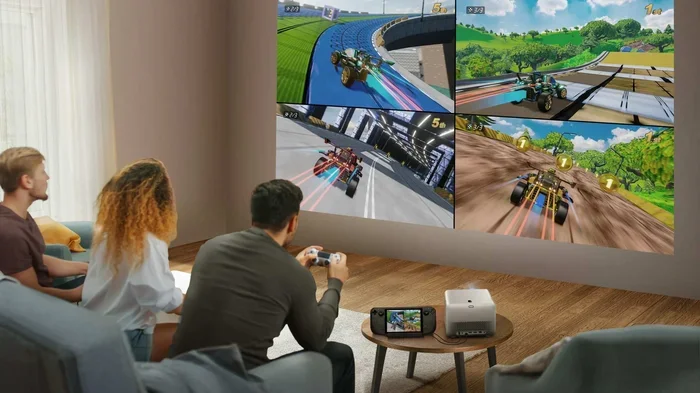
Most modern projectors are powerful enough to work on a plain white wall. You will notice the image is not as crisp as it would be on a proper screen. But for casual watching, gaming, or presenting, it works perfectly fine. Many people prefer the simplicity of just pointing their projector at a wall and calling it a day.
Projecting on Walls
Walls are the most common alternative to a projector screen. A flat, white wall works best. It reflects light evenly across the entire image. This gives you a balanced picture with good color accuracy.
But not all walls are created equal. A textured wall will create a rough image. A painted brick wall will absorb too much light. A dark-colored wall will make the image look dull and faded. If you want to project on a wall, choose the smoothest, whitest surface you can find.
Some people paint their walls with projector screen paint. This is a special reflective paint that improves image quality significantly. It is a great middle ground between a bare wall and a full screen. More on that later.
Other Surfaces That Work
Beyond walls, there are many other surfaces you can use. A white ceiling works well for upward-facing projectors. A white bedsheet stretched tight can serve as a decent projection surface. Even a large white poster board can work in a pinch.
The key rule is simple. The surface should be light-colored, smooth, and flat. The lighter the surface, the more light it reflects back. The smoother the surface, the sharper the image. The flatter the surface, the less distortion you will see.
Wall Projection: The Most Common Alternative
Wall projection is the go-to method for most people who skip buying a screen. It is free. It is convenient. And it works surprisingly well in the right conditions. But there are some things you should know before you start projecting onto your walls.
White Walls vs Colored Walls
White walls are the gold standard for projecting without a screen. They reflect the most light and produce the brightest image. Light gray walls are also a solid choice. They can actually improve contrast in rooms with some ambient light.
Colored walls are a different story entirely. A blue wall will tint your image blue. A red wall will make everything look warm and washed out. A dark green wall will make the image look muddy and dark. If you must project on a colored wall, try to find the lightest shade available in that color.
Quick tip. Stand in front of your wall and shine a flashlight on it. If the wall looks bright and even, it will work well for projection. If it looks dark or uneven, you will need to find a better spot.
Preparing Your Wall for Projection
You can improve your wall projection setup with a few simple steps. First, clean the wall thoroughly. Dust and dirt scatter light and reduce image clarity. Second, fill any cracks or holes. Even small bumps can distort the projected image. Third, consider using a projector screen paint to create a better surface.
Projector screen paint is affordable and easy to apply. You just paint a section of your wall with it. This creates a dedicated projection area that looks and performs much better than a regular wall. Many home theater enthusiasts swear by this approach.
Another option is to hang a white bedsheet or a large piece of white fabric. This gives you a smooth, light-colored surface without any paint or renovation. Just make sure the fabric is stretched tight and wrinkle-free for the best results.
Projector Brightness and Image Quality Without a Screen
When you remove the screen from the equation, projector brightness becomes your best friend. A screen is designed to reflect light efficiently. Without one, you rely entirely on your projector to produce a visible image. This means brighter is almost always better.
Lumens Matter More Than Ever
Projector brightness is measured in lumens. The higher the lumen count, the brighter the image. For projecting without a screen, you want at least 2,000 lumens. 3,000 lumens or more is even better, especially if you cannot fully darken the room.
Cheap projectors with low brightness will struggle on a wall. The image will look faint and washed out. You will be tempted to turn up the brightness settings, which can make colors look unnatural. Investing in a brighter projector pays off big time when you are projecting without a screen.
Here is a quick comparison of projector brightness levels and their wall projection performance.
- Under 1,500 lumens: Only works well in pitch-dark rooms. Image will look dim on a wall.
- 1,500 to 2,500 lumens: Works decently in dim rooms. Acceptable for casual viewing on a white wall.
- 2,500 to 4,000 lumens: Good performance in most rooms. Handles some ambient light well.
- Over 4,000 lumens: Excellent for wall projection. Can handle brighter rooms with ease.
Ambient Light Challenges
Ambient light is the enemy of projection. When you use a screen, the screen coating helps the image stand out against ambient light. Without a screen, ambient light washes out your projected image much faster.
This is why most people project at night or in dimly lit rooms. Closing the curtains and turning off the lights makes a massive difference. Even a small amount of light from a lamp can reduce the perceived quality of your projected image.
If you need to project in a bright room, consider using a high-lumen projector. You can also try projecting onto a lighter-colored wall that faces away from windows. The goal is to minimize the amount of competing light hitting the projection surface.
Screen Alternatives That Actually Work
If a bare wall is not cutting it, you have plenty of alternatives. These options give you better image quality than a plain wall without the cost of a dedicated screen.
Portable and Inflatable Screens
Portable screens are a fantastic option for people who want flexibility. You can set them up in any room. Take them outside for movie nights. And pack them away when you are done. Most portable screens are lightweight and easy to assemble.
Inflatable screens have become very popular in recent years. You just blow them up with a regular fan. They come in various sizes, from small tabletop versions to large 120-inch displays. They are perfect for backyard gatherings and outdoor events.
Quick tip. Look for portable screens with a matte white surface. This gives you the best image quality for the price. Avoid shiny or glossy screens, as they create hot spots and glare.
DIY Projection Surfaces
Getting creative with DIY projection surfaces is fun and rewarding. A white blackout curtain hung on a wall works surprisingly well. A large white foam board can serve as a makeshift screen for small projectors. Even a white shower curtain stretched tight can work in a pinch.
Some people build wooden frames and stretch white fabric over them. This creates a custom-sized projection surface that looks great and performs well. It is a weekend project that costs very little and delivers impressive results.
Another popular DIY option is projector screen paint. You can buy this in kits or as individual cans. You paint a section of any wall to create a professional-looking projection area. The paint contains microscopic glass beads that reflect light more efficiently than regular paint.
When You Absolutely Need a Screen
Not every situation works well without a screen. There are times when investing in a proper projection screen is the right call. Knowing when to use a screen can save you from frustration and disappointment.
Home Theater Setups
If you are building a dedicated home theater, a screen makes a huge difference. The image quality on a proper screen is dramatically better than on any wall. Colors are more vibrant. Contrast is deeper. The overall picture is sharper and more immersive.
Home theater screens come in fixed, retractable, and motorized options. Fixed screens give you the best image quality. Retractable screens are great for rooms that serve multiple purposes. Motorized screens add a touch of luxury and convenience.
If image quality is your top priority, a screen is worth every penny. The difference is especially noticeable on larger projection sizes. A 100-inch image on a wall will never look as good as a 100-inch image on a proper screen.
Business and Presentation Settings
In business settings, clarity and professionalism matter. A projection screen ensures your audience can see every detail clearly. It also looks more polished and put-together than projecting onto a bare wall.
Conference rooms, classrooms, and training facilities almost always use screens. The consistent surface quality helps maintain image accuracy across different projectors and content types. If you are presenting to clients or colleagues, a screen gives you credibility and confidence.
Portable foldable screens work well for business travelers. They are easy to carry and set up in any meeting room. They provide a reliable projection surface wherever you go.
Expert Tips for Getting the Best Image Without a Screen
Now that you know the basics, here are some expert tips to help you get the most out of projecting without a screen. These tips come from years of experience and testing different setups.
- Test your wall first. Before committing to a setup, shine your projector on the wall and check the image quality from your viewing position. Move around the room and see if the image looks good from different angles.
- Use a projector with keystone correction. This feature adjusts the image shape when the projector is not perfectly aligned with the wall. It saves you the hassle of mounting the projector at the exact right angle.
- Consider a short-throw projector. These projectors work well in smaller rooms and can produce large images even when placed close to the wall. They are ideal for apartments and small living spaces.
- Clean your projector lens regularly. Dust on the lens reduces image sharpness and clarity. A clean lens makes a noticeable difference in image quality.
- Adjust your projector settings. Most projectors have modes optimized for different surfaces. Look for a wall mode or a bright room mode and adjust the contrast and brightness settings to match your environment.
- Minimize reflections. If your wall has any glossy areas or mirrors nearby, they will create unwanted reflections. Cover or remove reflective surfaces near your projection area.
- Use a white sheet as a test surface. If you are unsure about your wall, hang a white bedsheet and test the projection on it first. This gives you a quick and easy way to compare image quality.
Following these tips will help you get the best possible image from your projector, even without a dedicated screen. The difference might surprise you.
Common Mistakes People Make When Projecting Without a Screen
Avoiding common mistakes can save you a lot of frustration. Here are the most frequent errors people make when projecting without a screen.
- Ignoring ambient light. Trying to project in a bright room without controlling the light will always result in a poor image.
- Choosing the wrong wall color. Dark or brightly colored walls will distort your image and reduce brightness significantly.
- Using a textured wall. Textured walls create uneven surfaces that distort the projected image and reduce sharpness.
- Overlooking projector placement. Placing the projector too close or too far from the wall affects image size and focus.
- Forgetting to keystone correct. A skewed image looks unprofessional and is uncomfortable to watch.
- Using a low-brightness projector. Budget projectors with low lumens simply cannot compete with a screen in most environments.
Steering clear of these mistakes will dramatically improve your experience. A little preparation goes a long way.
Frequently Asked Questions
Can I project on a colored wall?
Yes, you can, but the results will not be ideal. A colored wall will tint your projected image and reduce brightness. Light-colored walls work much better. If you only have a colored wall, choose the lightest shade available and consider using projector screen paint over a small section for better results.
Do I need a special projector to work without a screen?
No, any projector can work without a screen. However, brighter projectors produce significantly better images on walls and other surfaces. If you plan to project without a screen regularly, look for a model with at least 2,500 lumens for the best results.
Is a white bedsheet a good projection surface?
A white bedsheet can work in a pinch. It provides a light-colored, relatively smooth surface for projection. However, sheets often have wrinkles and texture that can distort the image. Stretching the sheet tight over a frame gives you much better results.
How does ambient light affect projection without a screen?
Ambient light is the biggest challenge when projecting without a screen. A dedicated screen is designed to resist ambient light and maintain contrast. Without a screen, any light in the room washes out your projected image. Dimming the lights or closing the curtains makes a dramatic improvement.
Can I use projector screen paint on any wall?
Yes, projector screen paint works on most wall types. It adheres well to drywall, plaster, and concrete. The paint creates a specialized reflective surface that improves image brightness and color accuracy. It is one of the best budget-friendly ways to upgrade your wall projection setup.
What is the best surface for projecting without a screen?
A flat, smooth, white wall is the best surface for projecting without a screen. It reflects light evenly and produces the most accurate colors. Light gray walls are also excellent, especially in rooms with some ambient light. Avoid textured, dark, or colored surfaces whenever possible.
Final Thoughts
So, can a projector work without a screen and still shine? Absolutely. A projector is a versatile device that does not need a dedicated screen to deliver a great experience. A white wall, a clean sheet, or a painted surface can all serve as effective projection areas.
The key is understanding what affects image quality. Surface color, smoothness, ambient light, and projector brightness all play a role. With the right setup and a few simple adjustments, you can enjoy a big-screen experience without spending money on a screen.
Whether you are a casual movie watcher, a gamer, or someone who presents at work, projecting without a screen is a perfectly viable option. Try it out. Experiment with different surfaces and settings. You might be surprised at how good the image can look.
Now you have all the knowledge you need to set up your projector without a screen. Go ahead, give it a try, and enjoy the show. A great image is just a wall away.