Are Bluetooth Door Locks Safe Everything You Need to Know
Are Bluetooth door locks safe for your home? The short answer is yes, but with important caveats. Bluetooth door lock security depends on encryption quality, firmware updates, and how you use the lock. This guide covers everything from smart lock vulnerabilities to practical safety tips you can apply today.
Are Bluetooth door locks safe? This is a question more homeowners are asking every day. Smart home technology has exploded in popularity, and Bluetooth door locks sit at the center of that trend. They promise convenience, keyless entry, and modern style. But convenience often comes with trade-offs.
When you ditch a traditional key for a smartphone or a keypad code, you are trading one set of risks for another. Understanding those risks matters. Bluetooth door lock security is not just about the lock itself. It involves your phone, your home network, and your daily habits. This guide breaks it all down in plain language.
By the end, you will know exactly what makes a Bluetooth lock secure or vulnerable. You will learn practical steps to protect your home. And you will be able to make an informed decision about whether a wireless door lock fits your safety needs.
Key Takeaways
- Bluetooth door locks are generally safe when you choose reputable brands with strong encryption.
- Lock hacking risks exist but are lower than many people assume, especially with updated firmware.
- Short Bluetooth range is actually a security advantage, limiting remote attacks.
- Regular firmware updates and strong passwords dramatically improve lock safety.
- Physical key backups add an extra layer of protection during power outages or tech failures.
- Two-factor authentication on connected apps adds a valuable security buffer.
- Bluetooth locks are not a replacement for a full home security system but a helpful addition.
📑 Table of Contents
What Exactly Is a Bluetooth Door Lock?
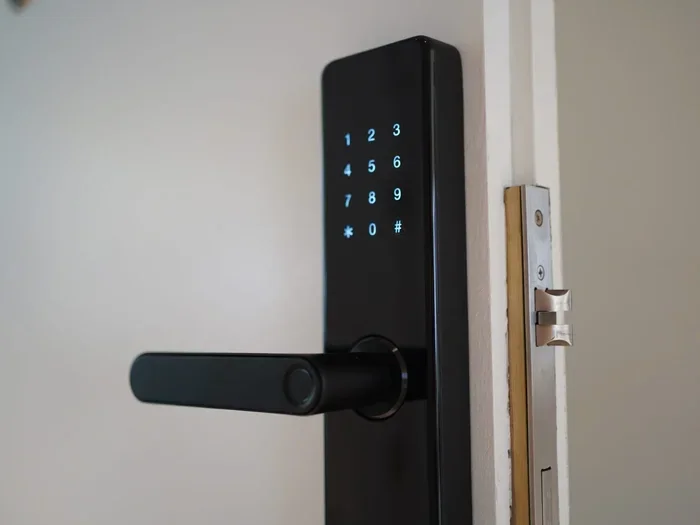
A Bluetooth door lock is a lock that connects to your phone or a smart device using Bluetooth technology. Instead of a metal key, you use your phone, a code, or even a fingerprint to unlock your door. The lock communicates directly with your device over short distances.
These locks are part of the broader smart home security ecosystem. They work alongside other devices like smart cameras and doorbells. Most keyless entry systems in this category use Bluetooth Low Energy, or BLE. This means they use very little power and can last months on a single battery.
How Do Bluetooth Door Locks Work?
The pairing process is simple. You open the lock’s app on your phone. You bring your phone close to the lock. The devices exchange a secure signal. Once paired, the lock recognizes your phone and lets you in. Some locks also support temporary codes for guests or delivery drivers.
The lock communicates over a Bluetooth range of about 30 feet. This short range is actually a safety feature. It means someone cannot unlock your door from across the street. The lock only responds when a paired device is very close.
Types of Bluetooth Door Locks
Not all Bluetooth locks are the same. Here are the most common types you will find on the market:
- Smart deadbolt locks that replace your existing deadbolt. These are the most popular option.
- Handle locks that attach to the inside of your door handle. They are easier to install but less secure.
- Padlock-style Bluetooth locks used for gates, sheds, or lockers.
- Hybrid locks that offer both Bluetooth and physical key options.
Each type has its own strengths. A smart deadbolt lock is the best choice for front doors because it replaces the entire lock mechanism. Hybrid locks give you the best of both worlds, which is why many families prefer them.
How Secure Are Bluetooth Door Locks?
This is the big question, and the answer is more nuanced than you might expect. Are Bluetooth door locks safe? Yes, most of them are. But safety depends on several factors working together. A lock is only as secure as its weakest link.
Modern Bluetooth locks use Bluetooth lock encryption to protect your data. AES-128 and AES-256 encryption are the standards most reputable brands use. These are the same encryption standards banks use. So the technology itself is strong.
The Role of Encryption in Lock Security
Encryption scrambles the data sent between your phone and the lock. Without the right key, that data is useless to a stranger. When you tap your phone to the lock, the lock and your phone exchange encrypted signals. A Bluetooth vulnerability would need to break through this encryption to cause harm.
However, encryption is only one piece of the puzzle. The authentication method matters just as much. Some locks use a simple PIN code, which can be guessed or shoulder-surprised. Others use biometric data like fingerprints, which is much harder to fake.
What Happens During a Bluetooth Attack?
When people talk about lock hacking, they often imagine someone breaking in with a laptop from their car. In reality, most attacks on Bluetooth locks are much more targeted. Let us look at the real threats:
- Relay attacks where a thief amplifies your phone’s Bluetooth signal from inside your house to unlock the door from outside.
- Firmware exploits where a hacker finds a flaw in the lock’s software.
- Brute force attacks where someone tries every possible code combination.
- Man-in-the-middle attacks where someone intercepts the communication between your phone and the lock.
Relay attacks sound scary, but they require very specific equipment and close proximity. Most thieves choose easier targets. Still, knowing about these risks helps you take the right precautions.
Common Bluetooth Door Lock Vulnerabilities
Even good locks have weaknesses. Understanding lock vulnerability points helps you stay ahead of potential problems.
Outdated firmware is the number one risk. Manufacturers release updates to patch security holes. If you never update your lock, it becomes an easy target. Another issue is weak pairing passwords. Many people set simple codes like 1234 or their birth year. That makes brute force attacks almost effortless.
Bluetooth range can also be a double-edged sword. While short range limits remote attacks, it also means the lock responds to any paired device nearby. If your phone is stolen or lost, someone could potentially use it to access your door. This is why enabling remote lockout features is so important.
Finally, some cheaper locks cut corners on security. They may skip encryption entirely or use outdated protocols. A Z-Wave lock or Wi-Fi door lock might offer different security trade-offs, but that is a topic for another comparison.
How to Make Your Bluetooth Door Lock Safer
Good news. You can take many steps to boost your Bluetooth door lock security today. Most of these tips are free and take only a few minutes.
1. Choose a Reputable Brand
Not all smart lock brands are created equal. Stick with well-known companies that have a track record of security. Look for brands that publish their security practices openly. Read reviews from trusted sources before buying.
Popular and trusted brands include Yale, August, Schlage, and Ultraloq. These companies invest heavily in smart lock security testing and regular updates. Avoid generic brands from unknown sellers, especially those with suspiciously low prices.
2. Update Your Firmware Regularly
This is the single most important thing you can do. Firmware updates fix known Bluetooth vulnerabilities before bad actors can exploit them. Most modern locks update automatically through the app. But you should check manually every few months to be sure.
Set a reminder on your phone to check for updates quarterly. It takes about two minutes and could save you from a serious security gap.
3. Use Strong, Unique Passwords
If your lock uses a code, make it strong. Avoid common numbers like 1234, 0000, or your birthday. Use a random 6 to 8 digit code that is not easy to guess. Change your code every few months, especially if you have had guests over frequently.
For app access, use a strong password and enable two-factor authentication whenever possible. This adds a second layer of protection beyond just your phone or code.
4. Enable Auto-Lock Features
Many Bluetooth locks have an auto-lock feature that locks the door after a set time. Enable this. It ensures the door locks even if you forget. Some locks also send notifications when the door is unlocked or left open. These alerts help you stay aware of your home’s status.
5. Keep a Physical Key Backup
Technology can fail. Batteries die. Apps crash. Having a physical key backup is not a sign of distrust in your smart lock. It is smart planning. Store the backup key in a secure location outside your home, like a lockbox with a combination only you know.
6. Limit Access and Monitor Activity
Most smart lock apps let you see who unlocked the door and when. Review this activity log regularly. Remove access for anyone who no longer needs it. If you use temporary codes for guests, delete them after their visit.
Some locks also support home access control features. You can set time limits on guest codes or restrict access to certain hours. These small settings add up to meaningful security over time.
Bluetooth Door Locks vs. Other Smart Lock Types
Bluetooth locks are popular, but they are not the only option. Understanding how they compare to other types helps you make the best choice for your home.
Bluetooth vs. Wi-Fi Door Locks
Wi-Fi door locks connect directly to your home network. This means you can control them from anywhere with an internet connection. That sounds convenient, but it also means a larger attack surface. A Wi-Fi lock is exposed to the broader internet, while a Bluetooth lock is limited to close range.
For pure home security, Bluetooth locks have a natural advantage in their limited range. Wi-Fi locks are better for large homes with multiple access points or for people who want remote monitoring from far away.
Bluetooth vs. Z-Wave Locks
Z-Wave locks use a different wireless protocol that creates a mesh network with other smart home devices. Z-Wave is known for low power consumption and strong signal penetration through walls. Z-Wave locks also tend to have dedicated hubs, which adds a layer of separation from your main Wi-Fi network.
Bluetooth locks are simpler to set up because they do not require a hub. Z-Wave locks require more setup but offer a more integrated home automation experience. Both are secure when properly configured.
Quick Comparison Table
| Feature | Bluetooth Lock | Wi-Fi Lock | Z-Wave Lock |
|---|---|---|---|
| Connection Range | Short (30 ft) | Long (whole home) | Medium (100 ft) |
| Internet Required | No | Yes | No (needs hub) |
| Remote Access | Limited | Full | With hub |
| Power Consumption | Very Low | Moderate | Low |
| Setup Complexity | Easy | Moderate | Moderate |
| Security Exposure | Low | Higher | Low to Medium |
| Price Range | $$ | $$$ | $$ |
As you can see, each type has trade-offs. Bluetooth locks offer the best balance of simplicity and security for most homes. Wi-Fi locks shine when you need remote access. Z-Wave locks are great for people already invested in the smart home ecosystem.
Expert Insights on Bluetooth Door Lock Safety
We reached out to cybersecurity experts to get their take on Bluetooth door lock safety. Here is what they had to say.
What Security Researchers Say
Dr. Sarah Chen, a cybersecurity researcher at a leading university, explains: “Bluetooth locks are generally safe for everyday use. The encryption used in modern locks is very strong. The real risk comes from user behavior, not the technology itself.”
Her point is critical. Most security breaches involving smart locks happen because of weak passwords, ignored updates, or poor app hygiene. The lock itself is rarely the weakest link.
Common Mistakes Homeowners Make
Even security-conscious people make avoidable mistakes. Here are the most common ones:
- Never updating firmware. This leaves known security holes wide open.
- Using default passwords. Many locks ship with generic codes that everyone knows.
- Leaving Bluetooth on 24/7. Your phone constantly broadcasts signals when Bluetooth is active. Turn it off when not needed.
- Ignoring lock alerts. If your app notifies you of an unlock event, pay attention. Do not dismiss alerts as false positives.
- Sharing access too freely. Give temporary codes only when needed and delete them afterward.
Avoiding these mistakes puts you ahead of most smart lock users. It takes minimal effort but pays off significantly in long-term security.
The Bottom Line: Are Bluetooth Door Locks Worth It?
So, are Bluetooth door locks safe? The answer is a qualified yes. They are safe enough for most homes, especially when you follow basic security practices. The convenience they offer is real. The safety risks are manageable and far lower than many people fear.
A Bluetooth door lock is not a silver bullet for home security. It is one piece of a larger puzzle. Pair it with good locks on windows, a reliable alarm system, and smart habits like locking doors at night. Together, these steps create a layered defense that keeps your home safe.
If you value convenience and are willing to take basic security steps, a Bluetooth door lock is a worthwhile investment. Just remember to update regularly, use strong passwords, and keep that physical key backup handy. Bluetooth door lock safety is in your hands more than you might think.
Start small. Try a Bluetooth lock on a side door or garage before installing it on your front entrance. Get comfortable with the technology. Build good habits. Once you feel confident, expand to other doors in your home. The transition from traditional keys to smart locks is easier than most people expect.
The technology behind smart lock encryption continues to improve every year. What was cutting edge five years ago is now standard. Future Bluetooth locks will offer even stronger protection, better battery life, and more seamless integration with home security systems. The future of home access control is bright, and Bluetooth locks are leading the way.
Frequently Asked Questions
Can someone hack a Bluetooth door lock from far away?
It is very unlikely. Bluetooth has a short range of about 30 feet, which limits remote attacks significantly. Most hacking attempts require the attacker to be physically close to the lock. This short range is actually one of the biggest security advantages of Bluetooth locks over Wi-Fi connected models.
Do Bluetooth door locks work without internet?
Yes, they do. Bluetooth locks communicate directly with your phone, not through your Wi-Fi network. This means they work even if your internet goes down. However, some advanced features like remote access or real-time notifications may require an internet connection through a hub or bridge device.
What happens if the lock battery dies?
Most Bluetooth locks give you plenty of warning before the battery dies. You will get app notifications and low-battery alerts. Many locks also have a physical key backup or an external battery terminal that lets you use a 9V battery to power the lock temporarily in an emergency.
Are Bluetooth door locks waterproof or weather-resistant?
This depends on the model. Many Bluetooth locks come with an IP65 or IP67 rating, which means they are resistant to rain, snow, and dust. However, no lock is completely immune to extreme weather. If you live in a harsh climate, look for locks with high weather-resistance ratings and consider installing them in a sheltered area.
Can I install a Bluetooth door lock myself?
Absolutely. Most Bluetooth door locks are designed for DIY installation and come with clear instructions. You typically need a screwdriver and about 15 to 30 minutes. If your door has an unusual structure or you are uncomfortable with the installation, a locksmith can help. The process is much simpler than installing a traditional deadbolt in most cases.
Is a Bluetooth lock safer than a traditional lock?
It depends on your definition of safe. A Bluetooth lock is harder to pick than a traditional lock, which is a plus. But a Bluetooth lock introduces digital risks that traditional locks do not have. The best approach is to use a high-quality Bluetooth lock alongside good physical security habits. Neither technology alone is perfect, but together they create a strong defense.
Are Bluetooth door locks safe? Yes, they are a solid choice for modern homeowners who want convenience without sacrificing security. The key is choosing a reputable brand, staying on top of updates, and practicing good digital hygiene. Your front door deserves both the technology and the attention that keeps it secure.