Does Hue Sync Work With Netflix for Movies and Shows
Yes, Hue Sync works with Netflix to create stunning ambient lighting that matches what you see on your TV screen. The Philips Hue Sync app captures the colors from your Netflix shows and movies and sends them to your smart lights in real time. You can use Hue Play light bars, light strips, or bulbs to turn any room into a home theater. Setting it up is simple and takes just a few minutes. Keep reading to learn exactly how it works, what you need, and how to get the best results.
Have you ever watched a movie on Netflix and wished your room could match the mood on screen? Imagine your walls glowing with the deep blues of a sci-fi thriller or pulsing with warm reds during an intense action scene. That is exactly what Hue Sync promises to deliver.
The question many people ask is simple: does Hue Sync work with Netflix? The short answer is yes. But like most tech setups, there are a few details you need to know to get it right. In this guide, we will walk through everything you need to set up entertainment lighting with your Netflix streams. Whether you are a casual viewer or a movie night enthusiast, this article covers what you need.
Philips Hue has built a strong reputation in the smart home space. Their ecosystem of bulbs, strips, and light bars offers one of the most polished experiences available. Adding color sync to your Netflix viewing takes the experience to a whole new level. Let us dive in and explore how it all works.
Key Takeaways
- Hue Sync works with Netflix: The Philips Hue Sync app captures on-screen colors and mirrors them to your smart lights while you stream.
- You need specific hardware: A Hue Bridge, compatible lights or light bars, and the Hue Sync app are essential for the setup.
- Two app versions exist: The free Hue Sync app offers basic sync, while the premium version adds more features and customization.
- Setup is straightforward: Connecting Hue Sync to Netflix involves a few simple steps through the Hue Sync desktop or mobile app.
- Common issues are fixable: Problems like lag, flickering, or disconnections can usually be solved with simple troubleshooting steps.
- Hue Sync enhances immersion: The ambient lighting effect makes watching Netflix movies and shows feel more cinematic and engaging.
📑 Table of Contents
What Is Philips Hue Sync and How Does It Work?
Hue Sync is an app developed by Philips Hue that synchronizes your smart lights with the content on your screen. It works by analyzing the colors, brightness, and movement on your display in real time. Then it sends matching colors to your Hue lights around the room.
The technology behind this is called content-adaptive lighting. The app uses your computer or device’s screen capture capabilities to read what is happening on screen. It then translates those colors into lighting commands sent through your Hue Bridge to your smart lights.
Here is how the process works step by step:
- The Hue Sync app captures a screenshot of your screen multiple times per second.
- It analyzes the dominant colors and brightness levels in the image.
- It sends matching color commands to your Philips Hue lights via the Hue Bridge.
- Your lights adjust in real time to mirror what is on your screen.
The result is a dynamic ambient lighting effect that makes your viewing experience feel much more immersive. You do not need to be a tech expert to use it either. The app handles all the complex processing in the background.
Hue Sync App Versions
Philips Hue offers two versions of the sync app. The free Hue Sync app provides basic screen mirroring functionality. It works well for casual users who want a simple setup. The Hue Sync Premium version costs a small subscription fee and unlocks more advanced features.
Premium features include more color modes, custom scenes, and better performance during fast-moving content. For Netflix streaming, the free version works well for most people. But if you watch a lot of high-action content, Premium might be worth considering.
Does Hue Sync Work With Netflix for Movies and Shows?
So let us get to the heart of the matter. Does Hue Sync work with Netflix? Absolutely. The app works with any content displayed on your screen, including Netflix. When you stream a movie or TV show on Netflix, Hue Sync captures the visuals and translates them into lighting effects.
This works whether you watch Netflix on your computer, tablet, or phone. The app captures the screen content and applies the colors to your smart lights in real time. The experience is especially impressive on larger screens where there is more visual detail to capture.
Here are some things to keep in mind when using Hue Sync with Netflix:
- Screen size matters: Larger screens provide more visual data for the app to analyze, resulting in better color matching.
- Resolution affects quality: Higher resolution content gives the app more detail to work with for accurate color sync.
- Full-screen mode helps: Watching Netflix in full-screen mode gives the app a cleaner image to capture.
- Dark scenes work best: Movies with lots of dark scenes create dramatic lighting effects that look incredible.
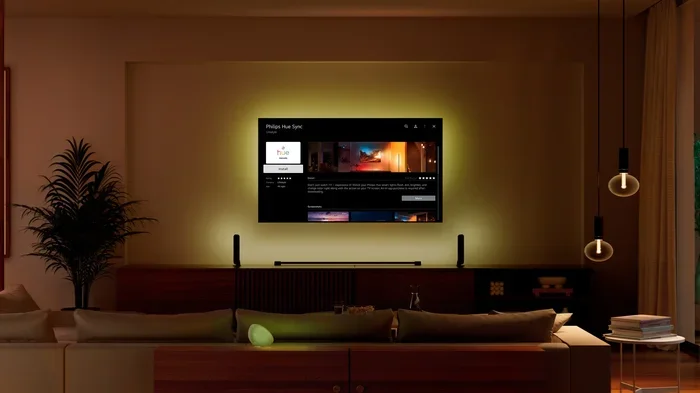
The Hue Play light bars are particularly well-suited for Netflix viewing. They sit behind your TV and cast a soft glow that reflects the on-screen action. Many users find this setup transforms their living room into a mini home theater.
What Types of Netflix Content Benefit Most?
Not all Netflix content reacts the same way to color sync. Some types of shows and movies create more impressive lighting effects than others. Here is a quick look at what works best:
- Sci-fi and fantasy films: These often feature vivid colors and dramatic lighting that translate beautifully to smart lights.
- Nature documentaries: The rich greens, blues, and earth tones create a calming and beautiful ambient effect.
- Action movies: Fast-moving scenes with bright flashes produce dynamic lighting that keeps the room feeling alive.
- Horror and thrillers: Dark scenes with pops of color create a tense and atmospheric mood.
- Animated films: Bright, saturated colors in cartoons often produce the most vibrant lighting effects.
Documentaries and dialogue-heavy dramas may produce subtler effects, but they still add a nice ambient glow to your room. The beauty of Hue Sync is that it adapts to whatever you are watching.
How to Set Up Hue Sync for Netflix Streaming
Setting up Hue Sync with Netflix is easier than most people expect. You do not need any special technical skills. Here is a complete walkthrough to get you started.
What You Will Need
Before you begin, make sure you have everything ready:
- A Philips Hue Bridge: This is the central hub that connects your lights to your home network. Without it, Hue Sync cannot communicate with your lights.
- Compatible Philips Hue lights: This includes Hue bulbs, Hue Play light bars, Hue Lightstrip Plus, or other Hue accessories that support color.
- The Hue Sync app: Available for Windows, macOS, iOS, and Android. Download it from the official Philips Hue website or your device app store.
- A Netflix subscription: You need an active Netflix account to stream content.
- A compatible device: A computer, tablet, or phone that can run the Hue Sync app and display Netflix content.
Step-by-Step Setup Process
Follow these steps to get Hue Sync working with Netflix:
Step 1: Set up your Hue Bridge and lights. Download the Philips Hue app, connect your Bridge to your router, and pair your lights. Make sure all lights are working and appear in the Hue app.
Step 2: Download and install the Hue Sync app. Go to the Philips Hue website or your device app store. Download the version that matches your operating system. Install it and open the app.
Step 3: Connect the Hue Sync app to your Bridge. The app will automatically detect your Hue Bridge on the same network. Follow the on-screen prompts to pair them.
Step 4: Select your lights for the sync group. Choose which Hue lights you want to include in the sync. You can select individual lights or groups. For Netflix viewing, placing light bars behind your TV works great.
Step 5: Open Netflix and start streaming. Launch Netflix in your browser or app. Start playing a movie or show. Then activate the Hue Sync app and select the screen or application you want to sync.
Step 6: Adjust the sync settings. Use the Hue Sync app controls to adjust the intensity, color saturation, and transition speed. Find the settings that feel right for your room and viewing preferences.
Quick Tips for the Best Setup
- Place your Hue Play light bars behind your TV for the most immersive effect.
- Use light strips along the back of your TV or around your room for a broader ambient glow.
- Keep your Hue Bridge close to your lights for a stable wireless connection.
- Close other apps while streaming to reduce bandwidth and processing demands.
- Use a wired internet connection for your streaming device to avoid buffering issues.
Hue Sync App Features That Enhance Netflix Viewing
The Hue Sync app comes packed with features designed to improve your Netflix experience. Understanding these features helps you get the most out of your setup.
Screen Mirror Mode
Screen Mirror mode is the default setting for Netflix viewing. It captures everything on your screen and translates it into lighting effects. When you are streaming a movie, the lights on your walls and around your TV change color to match the on-screen action.
This mode works seamlessly with Netflix. You do not need to change any settings. Just start streaming and the lights respond automatically. The app handles all the color analysis and light control in the background.
Ambient Mode
Ambient Mode takes a different approach. Instead of mirroring the entire screen, it focuses on the dominant colors in the scene. This creates a softer, more subtle lighting effect that works well for relaxing Netflix sessions.
Many users prefer Ambient Mode for drama series and documentaries. It adds a gentle glow without being distracting. You can switch between Screen Mirror and Ambient Mode at any time during playback.
Custom Scenes and Presets
The Hue Sync app allows you to save custom lighting scenes. You can create a preset specifically for your favorite Netflix shows or movie genres. For example, you might have a “Sci-Fi Night” preset with deep blues and purples or a “Comedy Night” preset with warm, cheerful colors.
Custom scenes let you switch between different lighting moods quickly. This is especially useful when you watch a variety of content on Netflix. You can tailor the lighting to match the genre of what you are watching.
Transition Speed and Intensity Controls
The app gives you fine control over how quickly the lights change and how intense the colors are. For fast-moving Netflix action scenes, you might want faster transitions and higher intensity. For slow, emotional scenes, slower transitions and lower intensity create a more subtle effect.
These controls are accessible from the main Hue Sync dashboard. You can adjust them on the fly while watching Netflix. Experiment with different settings to find what works best for your room and preferences.
Common Problems and How to Fix Them
While Hue Sync with Netflix works well for most people, you may encounter some issues. Here are the most common problems and their solutions.
Lights Lag Behind the Screen
A slight delay between the on-screen action and your lights is normal. This happens because the app needs a fraction of a second to analyze the screen and send commands to your lights. If the lag is noticeable, try these fixes:
- Make sure your Hue Bridge is connected to your router via an Ethernet cable.
- Reduce the number of lights in your sync group. Fewer lights mean faster response times.
- Close other applications running in the background that might be using network bandwidth.
- Check that your wireless network is not congested. A 5GHz Wi-Fi band can help reduce interference.
Colors Do Not Match the Screen
If the lighting colors look wrong or washed out, try adjusting the saturation and brightness settings in the Hue Sync app. Also make sure your TV or monitor color settings are calibrated correctly. A poorly calibrated display can confuse the color analysis.
Hue Sync Disconnects During Streaming
Occasional disconnections can happen, especially during long Netflix sessions. To prevent this:
- Keep your Hue Bridge and streaming device on the same Wi-Fi network.
- Restart the Hue Sync app if it stops responding during playback.
- Update the Hue Sync app regularly to benefit from bug fixes and improvements.
- Make sure your Hue Bridge firmware is up to date.
Netflix Controls Do Not Work While Hue Sync Is Active
Some users report that Netflix playback controls become unresponsive when Hue Sync is running. This is usually a compatibility issue with screen capture mode. Try switching to a different sync mode or restarting both the app and Netflix.
Is Hue Sync Worth It for Netflix Viewing?
After exploring how Hue Sync works with Netflix, the real question is whether it is worth the investment. The answer depends on what you value in your viewing experience.
If you enjoy creating an immersive atmosphere at home, Hue Sync is a fantastic addition. The ability to turn your living room into a dynamic viewing space adds a layer of enjoyment that standard lighting cannot match. Entertainment lighting like this elevates movie nights and binge-watching sessions.
The free version of Hue Sync offers enough functionality for most Netflix viewers. You get real-time color syncing, multiple light modes, and easy setup without spending a dime. The Premium version adds extra customization for those who want more control.
However, if you are a casual viewer who mostly watches Netflix in a well-lit room, the impact may be less noticeable. Ambient lighting effects shine brightest in dim or dark environments. The darker your room, the more dramatic and impressive the color sync becomes.
One thing to consider is the cost of the required hardware. You need a Hue Bridge and compatible lights to use Hue Sync. If you already own Philips Hue products, adding the sync feature is essentially free. But if you are starting from scratch, the investment can add up.
Overall, Hue Sync for Netflix delivers a genuinely enhanced viewing experience. It is one of the best ways to bring your smart lights to life beyond simple on-off control. For movie lovers and Netflix enthusiasts, it is a worthwhile addition to any smart home setup.
Final Thoughts
The answer to does Hue Sync work with Netflix is a clear yes. The Philips Hue ecosystem offers one of the most polished and reliable screen sync experiences available today. Whether you are watching the latest blockbuster movie or bingeing a new series, Hue Sync adds a layer of immersion that makes the experience more engaging.
Setting up entertainment lighting for Netflix is straightforward. With a Hue Bridge, compatible lights, and the Hue Sync app, you can transform your viewing environment in minutes. The app captures on-screen colors and mirrors them to your smart lights in real time, creating a dynamic and atmospheric effect.
Remember to experiment with different settings and light placements to find what works best for your space. The beauty of the Philips Hue system is its flexibility. You can adjust your setup anytime to match your preferences and room layout.
So go ahead, dim the lights, start your favorite Netflix show, and let Hue Sync do the rest. Your room will never feel the same again.
Frequently Asked Questions
Can I use Hue Sync with Netflix on a smart TV?
Yes, you can use Hue Sync with Netflix on a smart TV. The app captures whatever appears on your screen, so as long as you can view Netflix on a device that supports the Hue Sync app, it will work. You may need to cast Netflix from your phone or tablet to the TV while running the Hue Sync app on a computer for the best results.
Do I need the Hue Bridge to use Hue Sync with Netflix?
Yes, the Hue Bridge is required. It acts as the central hub that connects your Philips Hue lights to your home network. Without the Bridge, the Hue Sync app cannot communicate with your lights and the color sync feature will not work.
Is the Hue Sync app free to use with Netflix?
The basic Hue Sync app is free to download and use. It includes screen mirroring mode and basic color sync features. The Hue Sync Premium version offers additional features like custom scenes and advanced color modes for a small subscription fee. The free version works well for most Netflix viewing needs.
Why are my Hue lights flickering when syncing with Netflix?
Flickering usually happens when the lights are trying to change too quickly or when there is a connection issue. Try reducing the number of lights in your sync group and lowering the transition speed in the Hue Sync app settings. Also make sure your Hue Bridge firmware is updated to the latest version.
Can I sync Hue lights with Netflix audio as well as video?
The standard Hue Sync app focuses on visual color sync and does not analyze audio. However, the Hue Sync app does offer a music mode that reacts to audio from your device speakers. This mode is separate from screen sync and works best with music rather than Netflix audio.
What is the best Hue light setup for Netflix viewing?
The most popular setup is using Hue Play light bars placed behind your TV combined with a few Hue bulbs or light strips around the room. This creates a balanced ambient glow that enhances the viewing experience without being overwhelming. The light bars specifically target the area behind the screen for the most immersive effect.
=== CONCLUSION ===
Hue Sync works with Netflix to deliver a truly immersive home entertainment experience. From the moment you start streaming, your smart lights come alive, matching the colors and mood of every scene. The setup is simple, the app is intuitive, and the results are impressive.
Whether you are a casual Netflix viewer or a dedicated movie night enthusiast, Philips Hue Sync adds a dimension to your viewing that standard lighting simply cannot match. With the right hardware and a little patience during setup, you can transform any room into a personal cinema.
Start with the free version of the app, experiment with your light placement, and adjust the settings until you find the perfect balance. Once you experience Netflix with Hue Sync, you will wonder how you ever watched without it.