Can Airdrop Be Traced Everything You Need To Know Today
Can AirDrop be traced? The answer is more nuanced than most people think. AirDrop uses temporary Bluetooth and Wi-Fi signals that can leave digital footprints, but Apple has built in privacy layers that make tracing difficult. This guide breaks down exactly how AirDrop tracking works, what data is exposed, and the steps you can take to protect yourself.
Key Takeaways
- AirDrop can be traced to some degree: Apple logs temporary device identifiers and connection metadata during transfers.
- Your phone number and email are visible: These are shared with nearby AirDrop users unless you adjust your settings.
- AirDrop is not completely anonymous: Even with a nickname, metadata can reveal patterns and approximate location.
- You can reduce traceability: Adjusting your AirDrop receiving settings and disabling Wi-Fi and Bluetooth after use helps.
- Apple does not store AirDrop content: Files are not saved on Apple servers, but connection logs exist temporarily.
- Law enforcement can request records: In specific cases, Apple may provide limited AirDrop metadata to authorities.
- Staying safe is simple: Small changes to your settings and habits go a long way in protecting your privacy.
📑 Table of Contents
- Can AirDrop Be Traced? Here Is What You Need to Know
- What Is AirDrop and How Does It Work?
- Can AirDrop Be Traced: The Short Answer
- How AirDrop Tracking Works Behind the Scenes
- Privacy Settings That Protect You
- Common Myths About AirDrop Tracing
- Expert Tips to Stay Safe When Using AirDrop
- How Law Enforcement Handles AirDrop Tracing
- AirDrop Tracing vs. Other File Sharing Methods
- Key Takeaways
- Conclusion
Can AirDrop Be Traced? Here Is What You Need to Know
AirDrop is one of the coolest features Apple has ever built. You can send photos, videos, and files to someone nearby in seconds. It is fast, easy, and feels almost magical. But here is the question that keeps popping up: can AirDrop be traced?
The short answer is yes, but the full picture is more complicated than you might think. AirDrop is not completely anonymous. It is not totally traceable either. It sits somewhere in the middle. And that middle ground is exactly where the confusion lives. In this guide, we will walk through everything you need to know about AirDrop tracing, privacy, and security. By the end, you will know exactly what data is exposed and how to protect yourself.
Whether you use AirDrop every day or have only tried it once, this article is for you. We will cover how the technology works, what Apple tracks, and the steps you can take right now to boost your privacy. No fluff. No jargon. Just clear, honest answers.
What Is AirDrop and How Does It Work?
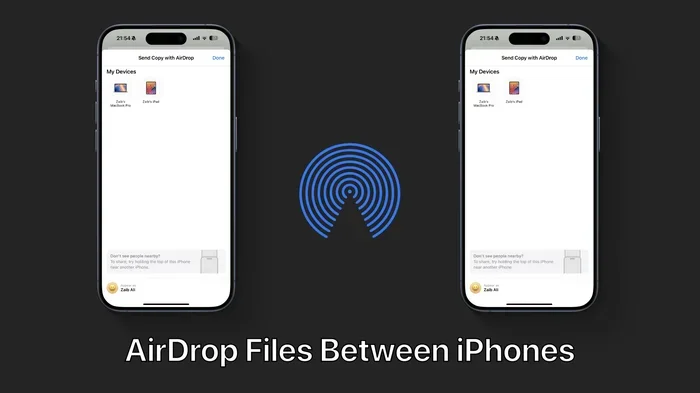
Before we dive into tracing, let us quickly cover the basics. AirDrop is a wireless sharing feature built into Apple devices. It lets you send files between iPhones, iPads, and Macs without using the internet. You do not need Wi-Fi or cellular data. It works through a combination of Bluetooth and Wi-Fi Direct.
Here is how a typical AirDrop transfer goes:
- You open AirDrop on your device.
- Your device broadcasts a Bluetooth signal to nearby Apple devices.
- The receiving device responds and sets up a direct Wi-Fi connection.
- The file transfers between the two devices.
- The connection closes once the transfer is complete.
That sounds simple enough. But behind the scenes, there is more going on than most people realize. Both devices exchange temporary identifiers during the process. These identifiers are not your name or your Apple ID. But they are not completely random either. They are tied to your device in specific ways that we will explore below.
AirDrop privacy depends largely on the settings you choose and the version of iOS or macOS you are running. Apple updates these settings with each new software release, so staying current matters.
How Devices Find Each Other
When you turn on AirDrop, your device starts looking for nearby Apple devices. It does this by broadcasting a signal over Bluetooth Low Energy. This signal includes a hashed version of your contact information. Hashing means your data is scrambled into a code. But the receiving device can unscramble it if it has your information in its contacts.
This is why you sometimes see a name pop up on your screen when someone AirDrops you something. It is not magic. It is a matching process based on your contact list. And this matching process is one of the key points where tracing becomes possible.
Can AirDrop Be Traced: The Short Answer
Let us get straight to the point. Can AirDrop be traced? Yes, to a certain extent. Apple does not make it easy for the average person to trace someone through AirDrop. But the data does exist. And under the right circumstances, it can be accessed.
Here is what that means in plain language. When you send or receive a file via AirDrop, Apple devices create temporary logs. These logs include things like:
- The device identifiers of both the sender and receiver
- The timestamp of the transfer
- The type of file transferred
- The Wi-Fi and Bluetooth signal strength during the transfer
- The approximate distance between the two devices
None of this information is stored on Apple servers. Apple does not keep a cloud database of your AirDrop activity. But the data does exist on your device and the recipient’s device. That is an important distinction.
Now, can a regular person look through those logs and figure out who sent them something? Probably not without some technical know-how. But can law enforcement or skilled professionals access that information? The answer is closer to yes.
What Apple Stores and What It Does Not
It helps to understand what Apple keeps and what it does not. Apple does not store AirDrop file content. Your photos, videos, and documents stay on your device and the recipient’s device. Apple does not see what you share.
However, Apple does collect limited metadata. This includes device identifiers and connection logs. These logs are stored locally on your device. They are not uploaded to iCloud or any Apple server. This is good news for privacy. But it also means that tracing an AirDrop transfer usually requires physical access to the devices involved.
How AirDrop Tracking Works Behind the Scenes
Let us get a little deeper into the technical side. Do not worry. We will keep it simple. Understanding how AirDrop tracking works helps you see why tracing is possible and where the limits are.
Bluetooth and Wi-Fi Handshake
Every AirDrop transfer starts with a handshake. Your phone says, “Hey, I am here.” The other phone says, “Hey, I see you.” This exchange happens over Bluetooth first. Then a peer-to-peer Wi-Fi connection is established for the actual file transfer.
During this handshake, both devices share temporary identifiers. These identifiers change frequently. Apple designed it this way on purpose. The goal was to make it harder for someone to track you over time. But temporary does not mean untraceable.
Here is a real-world example. Imagine you are at a coffee shop and you AirDrop a photo to a friend. Both of your phones logged that exchange. If someone later gained access to your phone, they could see that an AirDrop transfer happened at that time and location. They might not know exactly who your friend is. But they would know the transfer happened.
Device Identifiers and Hashing
Apple uses a process called hashing to protect your identity during AirDrop. Your phone number and email address are turned into a unique code. This code is what other devices see when you are nearby.
But here is the catch. If the other person has your contact information saved on their phone, they can match that code back to you. This means your identity is not fully hidden from people in your contacts list. For everyone else, you appear as a string of random characters.
This is a key point when asking, can AirDrop be traced. The answer depends on who is doing the tracing and what information they already have.
Metadata That Can Reveal Your Identity
Even if your name is hidden, metadata can still tell a story. Metadata includes things like the time of the transfer, the file type, and the device model. A skilled analyst could potentially use this metadata to narrow down who you are and where you were.
For example, if you AirDrop a screenshot of a text message at 9 PM from your iPhone 15, and you are the only person in your household with an iPhone 15, the mystery is basically solved. Metadata is like breadcrumbs. On its own, each crumb means little. But together, they can lead somewhere.
Privacy Settings That Protect You
The good news is that Apple gives you tools to control your AirDrop visibility. Knowing how to use these settings is one of the best ways to protect yourself. Let us walk through them.
AirDrop Receiving Options
When you open the Control Center and tap the AirDrop icon, you get three options:
- Receiving Off: No one can see your device or send you files.
- Contacts Only: Only people in your contact list can see you and send files.
- Everyone: Any nearby Apple device can see you and send files.
Choosing “Contacts Only” is the sweet spot for most people. It keeps you visible to people you know while hiding you from strangers. Choosing “Everyone” is convenient but makes you more traceable and exposed.
AirDrop privacy settings are not just about who can send you files. They also affect how traceable your device appears to others. The fewer people who can see your device, the smaller your traceable footprint.
Turning Off AirDrop When You Are Done
A quick habit that goes a long way: turn off AirDrop when you are not using it. Many people leave AirDrop on “Everyone” all the time without thinking about it. This means your device is constantly broadcasting its presence.
Set a reminder on your phone if you need to. After a few weeks, it becomes second nature. And your AirDrop security improves dramatically.
Disabling Wi-Fi and Bluetooth After Transfers
AirDrop uses both Wi-Fi and Bluetooth. Even after a transfer is complete, these radios may stay active for a short time. If you want to be extra careful, turn off Wi-Fi and Bluetooth from your Control Center after you finish sharing.
This stops your device from broadcasting any further signals. It also prevents anyone from attempting to connect to your device through AirDrop in the minutes after you share.
Using a Device Nickname Instead of Your Real Name
When someone sees your AirDrop name, what do they see? By default, it is your device name. This might be something like “John’s iPhone” or “Sarah’s MacBook.” That is not great for privacy.
You can change your device name to something generic. Try “My iPhone” or “Work iPad.” This small change makes it harder for someone to connect your AirDrop identity to your real name.
Common Myths About AirDrop Tracing
There is a lot of misinformation out there about AirDrop and tracing. Let us clear up some of the most common myths.
Myth 1: AirDrop Is Completely Anonymous
This is not true. While AirDrop does hide your identity from strangers, it is not fully anonymous. People in your contacts list can see who you are. And metadata can reveal patterns over time.
Myth 2: Apple Keeps a Record of All Your AirDrops
Apple does not store your AirDrop files or transfer history on its servers. The logs stay on your device. This is a significant privacy advantage. But it also means that tracing requires access to the physical devices involved.
Myth 3: You Cannot Be Traced Through AirDrop at All
On the flip side, this is also not true. As we covered above, device identifiers, metadata, and connection logs all exist. They can be used to trace an AirDrop transfer under the right circumstances. Saying AirDrop is untraceable gives a false sense of security.
Myth 4: AirDrop Works Like a VPN
Some people think AirDrop encrypts everything and hides your location. AirDrop does use encryption for the file transfer itself. But it does not hide your IP address or your physical location. The Bluetooth and Wi-Fi signals your device broadcasts can reveal your approximate location to nearby devices.
Expert Tips to Stay Safe When Using AirDrop
Privacy and security expert Sarah Chen says, “Most people do not think about AirDrop tracing because the feature feels seamless and invisible. But that invisibility is exactly what makes it risky.” Here are some practical tips to keep in mind.
Quick Tips for Better AirDrop Privacy
- Switch to Contacts Only: This limits who can see you and reduces your traceable exposure.
- Turn off AirDrop in public: Especially in crowded places like airports, malls, and transit stations.
- Use generic device names: Avoid names that include your real name or personal details.
- Review your AirDrop history: Go to Settings and check what devices have connected to yours.
- Keep your software updated: Apple regularly patches security vulnerabilities in AirDrop.
- Be cautious with “Everyone” mode: Use it only when absolutely necessary and for a short time.
- Educate your family and friends: Not everyone knows about AirDrop privacy risks. Sharing what you learn helps everyone stay safer.
What to Do If You Think You Have Been Traced
If you suspect someone has tracked your AirDrop activity, here is what you should do. First, change your device name to something generic. Second, switch your AirDrop setting to “Receiving Off” when you are not actively using it. Third, restart your device to clear temporary connection logs. Fourth, if you are concerned about a specific incident, consider resetting your network settings.
None of these steps guarantee complete anonymity. But they significantly reduce your traceable footprint and make it much harder for someone to connect the dots.
How Law Enforcement Handles AirDrop Tracing
You might be wondering what happens when law enforcement wants to trace an AirDrop transfer. The process is more involved than you might think.
Apple has a clear policy on this. The company will comply with valid legal requests, such as subpoenas and court orders. However, because AirDrop data is stored locally on devices and not on Apple servers, Apple often has limited information to provide.
In most cases, law enforcement would need to obtain the devices involved in the transfer. From there, forensic analysts can extract connection logs and metadata. The actual file content is only accessible if it is still stored on the sender’s or receiver’s device.
This is why AirDrop security matters not just for everyday privacy but also in legal contexts. The more steps you take to protect yourself, the harder it is for anyone to build a complete picture of your AirDrop activity.
AirDrop Tracing vs. Other File Sharing Methods
How does AirDrop tracing compare to other ways of sharing files? Let us look at a quick comparison.
- Email: Emails are stored on servers and can be traced through email headers. AirDrop is harder to trace because it does not use servers.
- Cloud storage links: Cloud services log access, location, and device information. AirDrop does not log access on external servers.
- Messaging apps: Apps like WhatsApp and Telegram store message metadata on their servers. AirDrop keeps everything local.
- SMS/MMS: Text messages are logged by carriers and can be traced easily. AirDrop does not involve carriers at all.
Overall, AirDrop is one of the more private ways to share files. But “more private” does not mean “untraceable.” It means there are fewer breadcrumbs for others to follow.
Key Takeaways
- AirDrop can be traced to some degree: Temporary device identifiers and connection metadata are created during every transfer.
- Apple does not store AirDrop content on its servers: Files stay on your device and the recipient’s device.
- Your visibility depends on your settings: “Contacts Only” is the best balance of convenience and privacy.
- Metadata can reveal patterns: Even without your name, transfer times, locations, and file types can tell a story.
- Law enforcement can access local device logs: But they typically need the physical devices involved.
- Small habits make a big difference: Turning off AirDrop when not in use and using generic device names are simple but effective steps.
Conclusion
So, can AirDrop be traced? The honest answer is yes, but it is not easy for the average person. Apple has built strong privacy protections into AirDrop. Your files are not stored on servers. Your connection logs stay on your device. And your identity is hidden from strangers through hashing and temporary identifiers.
But tracing is not impossible. Device identifiers, metadata, and connection logs all exist. Under the right circumstances, these pieces of information can be pieced together. The key is understanding what is at risk and taking simple steps to protect yourself.
The best thing you can do today is check your AirDrop settings. Switch to “Contacts Only” if you are not already there. Turn off AirDrop when you are done sharing. And use a generic device name instead of your real name. These small changes add up and make a real difference in your AirDrop privacy.
Stay informed. Stay cautious. And enjoy the convenience of AirDrop without unnecessary worry. You have the knowledge now. Use it.
Frequently Asked Questions
Can someone trace my AirDrop to my phone number?
Not directly. AirDrop uses hashed versions of your contact info, not your actual phone number. But if the other person has your number saved in their contacts, they can match the hash and identify you. This is why your contact list matters for AirDrop privacy.
Does Apple keep a history of my AirDrop transfers?
No. Apple does not store AirDrop transfer history on its servers. Any logs are kept locally on your device and the recipient’s device. This means Apple cannot look up your AirDrop activity remotely.
Can law enforcement trace an AirDrop transfer?
Yes, but it is difficult. Law enforcement would need physical access to the devices involved. They can then extract local connection logs and metadata. Apple itself has limited information to provide because AirDrop data is not stored in the cloud.
Is AirDrop safe to use in public places?
It can be, but you should take precautions. Set AirDrop to “Contacts Only” or turn it off entirely when you are in crowded public spaces. This reduces the chance of unwanted transfers and limits your traceable exposure to strangers.
Can I use AirDrop without anyone knowing it was me?
You can reduce your traceability by turning off AirDrop when not in use, using a generic device name, and avoiding “Everyone” mode. But no file-sharing method is 100% anonymous. AirDrop is relatively private compared to email or cloud sharing, but it is not invisible.
What happens to AirDrop data after a transfer is complete?
The file stays on both devices. Temporary connection logs may remain on your device for a short period. These logs include device identifiers and timestamps. Restarting your device can help clear some of these temporary logs. But the transferred file itself remains unless you delete it manually.
=== CONCLUSION ===
Can AirDrop be traced? Yes, but the full picture is more nuanced than a simple yes or no. AirDrop is one of Apple’s most convenient features, and it is also one of the most misunderstood when it comes to privacy and tracing. The truth is that AirDrop leaves digital footprints, but Apple has put strong protections in place to limit who can follow those trails.
Understanding how AirDrop tracing works empowers you to make better choices. You now know what data is shared, what Apple stores, and what steps you can take to protect yourself. The tools are in your hands. Use them.
Stay safe, stay informed, and share wisely. Your privacy is worth the extra few seconds it takes to check your settings.